

Subcategories

  • Condition based on player's income

    3
    1 Votes
    3 Posts
    712 Views
    VictoryFirstV
    @wc_sumpton Thanks for your answer. That's unfortunate to hear. I have a LOT of territories in my game so keeping track of how many territories have been lost will be very hard for the players to manage. An income level would be much easier because it is directly displayed in the "Players" tab.
  • Can't get changeOwnership to work.

    6
    1 Votes
    6 Posts
    1k Views
    wc_sumptonW
    @victoryfirst Yes. Triggers, like conditions, need to have unique names. Cheers...
  • How to make AA guns fire at units multiple times

    4
    1 Votes
    4 Posts
    974 Views
    VictoryFirstV
    @wc_sumpton Thank you WC for you answer
  • Remove SBR damage limit?

    7
    0 Votes
    7 Posts
    2k Views
    B
    @VictoryFirst That made me laugh lol In case you're not aware, v2 changes some other stuff too. Technology tokens i think. Maybe some other stuff. Can't remember
  • How to limit Factory/Facility Placement

    8
    1 Votes
    8 Posts
    2k Views
    VictoryFirstV
    @wc_sumpton I believe I finally found out the issue... I was searching online for the answer and I couldn't find it at first, until I finally came across a thread where someone had a similar problem, and the solution was to add the property Damage From Bombing Done To Units Instead Of Territories. That for some reason makes the canProduceXUnits to work.
  • Multiple combat phases

    4
    2 Votes
    4 Posts
    2k Views
    board 3659B
    @victoryfirst oh I remember some games having a second non-movement phase so should be possible
  • How do I auto-damage units at the end of a player's turn?

    16
    0 Votes
    16 Posts
    3k Views
    cameronC
    @wc_sumpton actually, that makes them heal less... when i tried: <property name="Units Repair Hits Start Turn" value="true" editable="false"> <boolean/> </property> <property name="Units Repair Hits End Turn" value="false" editable="false"> <boolean/> </property> then: units healed 0 HP at end of their Turn Complete phase units healed 0 HP at end of other players Turn Complete phase units healed 1 HP at start of their Combat Move phase when i tried: <property name="Units Repair Hits Start Turn" value="true" editable="false"> <boolean/> </property> <property name="Units Repair Hits End Turn" value="true" editable="false"> <boolean/> </property> then: units healed 1 HP at end of their Turn Complete phase units healed 0 HP at end of other players Turn Complete phase units healed 1 HP at start of their Combat Move phase when i tried: <property name="Units Repair Hits Start Turn" value="false" editable="false"> <boolean/> </property> <property name="Units Repair Hits End Turn" value="true" editable="false"> <boolean/> </property> then: units healed 1 HP at end of their Turn Complete phase units healed 1 HP at end of other players Turn Complete phase units healed ? HP at start of their Combat Move phase [always fully healed before this point but one assumes 0] EDIT: corrected lazy copy/paste errors
  • Why are the territory names so small

    2
    1 Votes
    2 Posts
    629 Views
    TheDogT
    View> Map Font & Colour Change the Font Size to 12 or more
  • Self-made map won't load

    2
    0 Votes
    2 Posts
    704 Views
    VictoryFirstV
    Never mind, I figured out the issue. The mapWidth and mapHeight in the map.properties file were both set to 256 for some reason...
  • Trying to get foreach to work

    19
    0 Votes
    19 Posts
    2k Views
    B
    @victoryfirst well thanks to wc the paratroopers auto deploy now. Guess I need to do another update lol
  • Change control of naval mine (AA unit)

    3
    1 Votes
    3 Posts
    735 Views
    VictoryFirstV
    @wc_sumpton Thank you, it works now! Awesome!
  • Russian Revolution

    48
    1 Votes
    48 Posts
    10k Views
    wc_sumptonW
    @victoryfirst "foreach" is a writing convention. Instead of writing 10 block of code, write 1 and the engine creates the 10 blocks. To see how this works, first load your map. In the menu in the upper left corner there is Export and under that is Export game.xml File (Bata). After saving open the file and you should see: <attachment name="conditionAttachmentRTOLivonia" attachTo="Russians" javaClass="games.strategy.triplea.attachments.RulesAttachment" type="player"> <option name="alliedOwnershipTerritories" value="1:Livonia"/> </attachment> <attachment name="conditionAttachmentRTOKarelia" attachTo="Russians" javaClass="games.strategy.triplea.attachments.RulesAttachment" type="player"> <option name="alliedOwnershipTerritories" value="1:Karelia"/> </attachment> <attachment name="conditionAttachmentRTOBelarus" attachTo="Russians" javaClass="games.strategy.triplea.attachments.RulesAttachment" type="player"> <option name="alliedOwnershipTerritories" value="1:Belarus"/> </attachment> <attachment name="conditionAttachmentRTOUkraine" attachTo="Russians" javaClass="games.strategy.triplea.attachments.RulesAttachment" type="player"> <option name="alliedOwnershipTerritories" value="1:Ukraine"/> </attachment> <attachment name="conditionAttachmentRTOTatarstan" attachTo="Russians" javaClass="games.strategy.triplea.attachments.RulesAttachment" type="player"> <option name="alliedOwnershipTerritories" value="1:Tatarstan"/> </attachment> <attachment name="conditionAttachmentRTOPoland" attachTo="Russians" javaClass="games.strategy.triplea.attachments.RulesAttachment" type="player"> <option name="alliedOwnershipTerritories" value="1:Poland"/> </attachment> <attachment name="conditionAttachmentRTOSevastopol" attachTo="Russians" javaClass="games.strategy.triplea.attachments.RulesAttachment" type="player"> <option name="alliedOwnershipTerritories" value="1:Sevastopol"/> </attachment> <attachment name="conditionAttachmentRTOKazakhstan" attachTo="Russians" javaClass="games.strategy.triplea.attachments.RulesAttachment" type="player"> <option name="alliedOwnershipTerritories" value="1:Kazakhstan"/> </attachment> <attachment name="conditionAttachmentRTOFinland" attachTo="Russians" javaClass="games.strategy.triplea.attachments.RulesAttachment" type="player"> <option name="alliedOwnershipTerritories" value="1:Finland"/> </attachment> <attachment name="conditionAttachmentRTOMoscow" attachTo="Russians" javaClass="games.strategy.triplea.attachments.RulesAttachment" type="player"> <option name="alliedOwnershipTerritories" value="1:Moscow"/> </attachment> So, the engine creates the difference condition. Cheers...
  • User Action messages

    2
    1 Votes
    2 Posts
    678 Views
    B
    @victoryfirst Idk if you can, but you can try adding a image the way you do for notifications. Add a image to doc/images must be a png and then add this to one of the lines in the actionstext and see what happens <img src="YourImageName.png"/> I've have had limited success with sounds. Was able to change them in notifications in 2.5 somewhat but haven't had any success in 2.6. I don't really understand how they work and just copied what Frostion did in Iron War. Added it to the Global 40 game, as I hate the air raid siren lol
  • enemyOwnershipTerritories doesn't exist

    3
    0 Votes
    3 Posts
    803 Views
    VictoryFirstV
    @wc_sumpton Thank you! I just checked and it worked correctly with the invert!
  • How to make captured units controlled by another power

    18
    0 Votes
    18 Posts
    3k Views
    wc_sumptonW
    @victoryfirst said in How to make captured units controlled by another power: I got it to work I added an original owner to each neutral and then did this: Nice! Cheers...
  • Modify movements restrictions out of contested territories

    11
    3 Votes
    11 Posts
    2k Views
    LaFayetteL
    A number of properties are listed here: https://github.com/triplea-game/triplea/blob/master/game-app/game-core/src/main/java/games/strategy/triplea/Constants.java (that location is subject to change & that list might not be complete)
  • air units: how to make them not crash

    12
    0 Votes
    12 Posts
    3k Views
    VictoryFirstV
    @cameron Omg thank you it worked!! I was spending so much time on this! I completely missed the absence of the forward slash! Lol pretty weird indeed, I just started XML coding yesterday and it has been giving me multiple headaches so far
  • Air units transportable by naval transport?

    14
    1 Votes
    14 Posts
    2k Views
    B
    @cameron yea I don't think triplea can do that unless there allied Ftrs being carried as cargo. The Ftrs aren't actually on the CV in triplea. They just fly a endless CAP i guess
  • Territory Effects

    5
    0 Votes
    5 Posts
    1k Views
    wc_sumptonW
    @beelee The "<!--" that was making the block red was the start of a comment section. You might want to remove the "-->" that marks the end of the comment section, "</territoryEffectList> -->", before it may cause further problems. Cheers...
  • land transport - how to make them work?

    17
    0 Votes
    17 Posts
    3k Views
    cameronC
    the Steampunk_Advanced.xml that i've been modding had them like that, as separate entries i mean. this is my first proper mod so it's all rather new to me.

Recent Posts

  • @black_elk

    you are the only one. Help us BlackElk

    😁

    read more

  • @Ramon No problem! I ran into the same problem when making changes to my North Africa map. Black_Elk made very cool reliefTiles for our map, but I didn't know how he made them. So when changing some territory borders, the reliefTiles didn't update along with them. I tried several things and what I described above ended up working the best. You can still see that the map is slightly darker at the places where the change happened, but I still tried my best to conceal it.
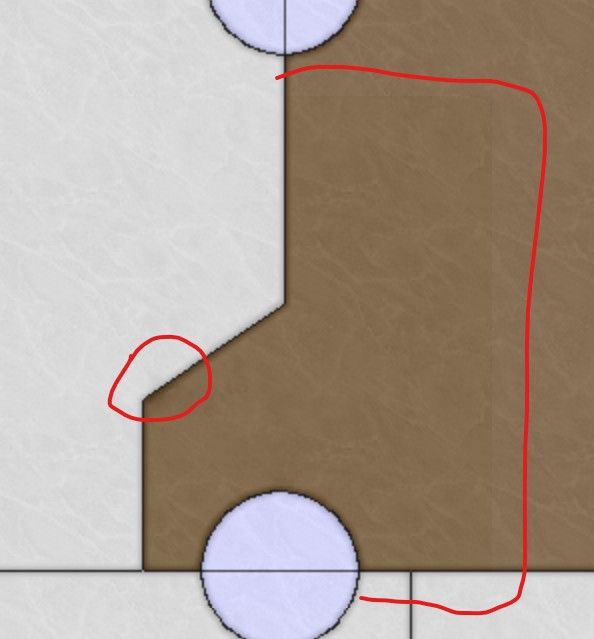
    image.jpeg

    The best thing actually to do is trying to contact the map maker! However, the map maker for NML is Black_Elk, and when I contacted him for North Africa, he didn't reply. But maybe you have more success!

    read more

  • @VictoryFirst

    Hi Victory thank you for your reply!

    Its very unfortunate that i dont have the original overlay that the map used.
    I will see what i can do!

    Cheers!

    read more

  • @ramon Changing the reliefTiles is difficult when you do not have the overlay that the game used. You can actually modify individual tiles, but it is not recommended if the change is across multiple tiles. Assuming that this is the case, you'd need to use the baseline image, change the borders there, and then break it using the tile image breaker. Then, you'd need to open the reliefmap by combining it using the tile image reconstructor. Also open the modified baseline map so that you can see what borders you removed and where the new borders are. To remove borders from the reliefmap, you can do the following. In the images you sent, you can see that the color of the territories isn't empty, it has a black-ish (or white/gray-ish in the other) color with a very low opacity. Try selecting this as color and remove the borders using this color. If you use GIMP, you can select the color using CTRL+click when having the pencil tool selected. Do not make it transparent as you did, that will make the territory shade go away completely. You should not be using the eraser at all, only the pencil tool. To draw new borders, you can select the white border color and use it to draw the new borders. If you lower the opacity of the baseline map and put it above the reliefmap, you can see the new borders and you can trace them. Then you can use the heal tool to make the borders and territory colors look more like the rest of the reliefmap, with different shades of colors. This doesn't necessarily make it look nice though. Even if you do your best, you will still probably have spots with a different shade than the rest of the map, but it's better than nothing.

    One small tip is to past the reliefmap not once several times in GIMP, so that you have like 10 identical layers. This will increase the opacity of the reliefmap. If you then combine all these layers, you essentially have increased the opacity. This allows you to actually see everything properly. You'd still need the heal tool to make the colors blend into each other better. Then you can lower the opacity of the layer so that it is around the same as the original reliefmap.

    Last option is to create your own relief tiles using your own overlay. This might be a lot of work but it would ensure that the map looks nice.

    read more