Reference the PU Value of a Territory in Triggers?
-
@wc_sumpton Hey, thanks as always for the thoughtful advice!
So your test code mostly works, in that it produces the railroad units, however those units are completely unable to move -- for some reason the game engine thinks that they have zero movement when they're created with your code. When I make the units manually, using Edit Mode, they move appropriately.
I tried writing a foreach loop, but it isn't working -- I keep getting error messages saying that "directPresenceTerritories" isn't a defined property. Any more insights?
<attachment foreach="$Players$:$Phases$^$TwoValueTerritories$" name="conditionAttachmentMakeRailroad@Players@In@TwoValueTerritories@" attachTo="@Players@" javaClass="games.strategy.triplea.attachments.TriggerAttachment" type="player"> <option name="when" value="after:@Phases@"/> <option name="players" value="@Players@"/> <option name="directPresenceTerritories" value="@TwoValueTerritories@" count="1"/> <option name="unitPresence" value="factory_minor:factory_major" count="1"/> </attachment> <attachment foreach="$Players$:$Phases$^$TwoValueTerritories$" name="triggerAttachmentMakeRailroad@Players@In@TwoValueTerritories@" attachTo="@Players@" javaClass="games.strategy.triplea.attachments.TriggerAttachment" type="player"> <option name="conditions" value="conditionAttachmentMakeRailroad@Players@In@TwoValueTerritories@"/> <option name="when" value="after:@Phases@"/> <option name="players" value="@Players@"/> <option name="placement" value="@TwoValueTerritories@:railroad" count="2"/> </attachment> -
So we are talking about two different problems, unable to move placed units, and the foreach xml code not working.
For the first problem, units placed with 'placement' are placed as moved units, and movement is not reset until the end of a phase that ends with 'NonCombatMovement'. One workaround is to place the units prior to the 'CombatMovement' phase, and the reset the unit stats at the beginning of the phase.
You tested the xml with 'directPresenceTerritories' and it worked, it wasn't until you added the foreach that 'directPresentTerritories' didn't work. Try changing the order inside the foreach to "$TwoValueTerritories$^$Players$:$Phases$".
Cheers...
-
@wc_sumpton Hmm, I still get the same error message when I try reversing the order that way:
games.strategy.engine.data.gameparser.GameParseException: Missing property definition for option 'directPresenceTerritories' in attachment 'conditionAttachmentMakeRailroadGermansInDenmark'I'm not sure I understand your other piece of advice here. Is there a way to manually reset the unit stats? I tried placing the units as early as before:Purchase, and they still had no movement by the time the noncombat phase rolled around.
-
When the phases, gremansCombatMove, germansBattle, germansNonCombatMove, etc... are defined within the xml a 'stepProperty' can be used to change what happens during that phase. Review pack_of_steel_2.xml to understand. Basically when are the unit stats reset, 'resetUnitStateAtEnd' and 'resetUnitStateAtStart' which can be set/changed during 'Move' type phases, CombatMove, NonCombatMove, etc... 'resetUnitStateAtEnd' default setting is true only with the NonCombatMove phase, otherwise both are always false. So to move units which are placed with 'placement' their UnitState will need to be reset. Using 'resetUnitStateAt...' will reset the stats of all units, so the placement of units should happen prior to any unit action, i.e. before CombatMove, then the 'stepProperty' 'resetUnitStateAtStart' can be set to true to allow these units to move.
As to the error message, I will look into it soon.
Cheers...
-
Try taking out the 'when' option in the condition statement, you may also consider removing 'players' since attachTo defines which player is affected by the condition.
Cheers...
-
@wc_sumpton The stepProperty trick worked, thanks!

-
@wc_sumpton Removing the players and when statements from the condition did not help. When I use:
    <attachment foreach="$TwoValueTerritories$^$Players$:$Phases$" name="conditionAttachmentMakeRailroad@Players@In@TwoValueTerritories@" attachTo="@Players@" javaClass="games.strategy.triplea.attachments.TriggerAttachment" type="player">
      <option name="directPresenceTerritories" value="@TwoValueTerritories@" count="1"/>
      <option name="unitPresence" value="factory_minor:factory_major" count="1"/>
    </attachment>

    <attachment foreach="$TwoValueTerritories$^$Players$:$Phases$" name="triggerAttachmentMakeRailroad@Players@In@TwoValueTerritories@" attachTo="@Players@"
    javaClass="games.strategy.triplea.attachments.TriggerAttachment" type="player">
      <option name="conditions" value="conditionAttachmentMakeRailroad@Players@In@TwoValueTerritories@"/>
      <option name="when" value="after:@Phases@"/>
      <option name="players" value="@Players@"/>
      <option name="placement" value="@TwoValueTerritories@:railroad" count="2"/>
    </attachment>
I get this error message:
Could not parse:file:///C:/Users/jason/triplea/downloadedMaps/bbr5/games/bbr5.xml, Missing property definition for option 'directPresenceTerritories' in attachment 'conditionAttachmentMakeRailroadGermansInNormandy Bordeaux' games.strategy.engine.data.gameparser.GameParseException: Missing property definition for option 'directPresenceTerritories' in attachment 'conditionAttachmentMakeRailroadGermansInNormandy Bordeaux'I have tested the code with a one-word territory name, and the space in the name does not seem to be the problem; I get the same error message for, e.g., Denmark.
-
@wc_sumpton Never mind, I see the problem -- I had my condition using "TriggerAttachment" instead of "RulesAttachment." No wonder it couldn't find "DirectPresenceTerritories."
-
@wc_sumpton I think this is going to work! Thanks for all the help.
-
Good find on the 'RulesAttachment' and 'TriggerAttachment'. Happy to hear everything is working.

Cheers...
-
@wc_sumpton All right, one last issue on this feature. I also want to remove all the railroads from the map at the end of each player's turn, but the code below does not seem to have any effect. It runs OK, but it does nothing. Any idea why?
<attachment name="triggerAttachmentGermansDestroyRailroad" attachTo="Germans" javaClass="games.strategy.triplea.attachments.TriggerAttachment" type="player"> <option name="when" value="after:germansNonCombatMove"/> <option name="removeUnits" value="all:railroad" count="20"/> </attachment> -
May need a condition to activate. TripleA engine can sometimes be tricky about such things.
 <attachment name="conditionAttachment_AlwaysTrue" attachTo="Germans" javaClass="games.strategy.triplea.attachments.RulesAttachment" type="player">
   <option name="switch" value="true"/>
</attachment>
Nice thing about a switch is it can be referenced by all players.
Cheers...
-
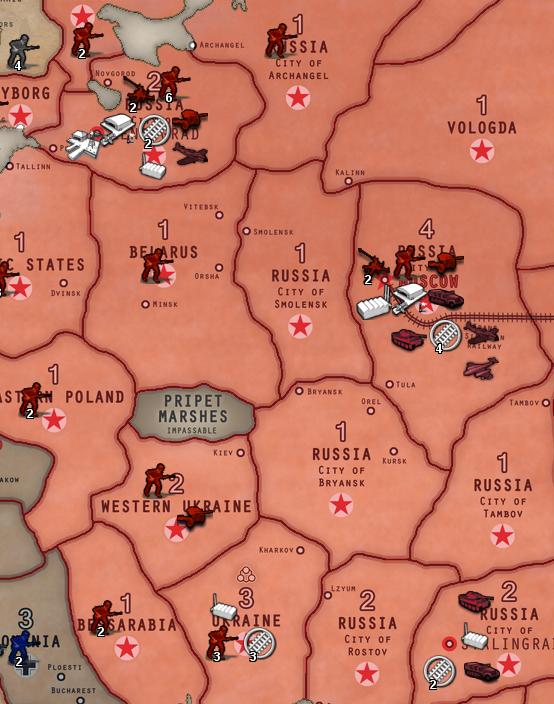
@wc_sumpton Amazing. That does it! Railroads are now appearing and disappearing on schedule. You've made the trains run on time...thank you.
-
Cheers...
-
@jason-green-lowe that's a cool lookin map. Is that the blood bath one ?
-
@beelee Yup!
-
@jason-green-lowe sweet never seen it on triplea before. Nice job. Look forward to checkin it out


Hello! It looks like you're interested in this conversation, but you don't have an account yet.
Getting fed up of having to scroll through the same posts each visit? When you register for an account, you'll always come back to exactly where you were before, and choose to be notified of new replies (either via email, or push notification). You'll also be able to save bookmarks and upvote posts to show your appreciation to other community members.
With your input, this post could be even better 💗
Register Login