Achievable improvements to the Triplea User Interface
-
@butterw said in Achievable improvements to the Triplea User Interface:
Populating the Battle Calculator
@thedog said in Achievable improvements to the Triplea User Interface:
I used to be able to hover over a territory before a battle, press ctrl+b and it would populate the Battle Calculator with the units from the territory, this does not happen now. As mentioned it does not even detect the factions involved.
It works again when I re-add the corresponding button to the territory Panel. It comes down to the territory panel knowing the currentTerritory, and this info is required to be able to populate the panel.
EDIT: Apart from using up space, the issue with the Battle Calculator buttons in the territory panel is that they are also confusing. Using the buttons directly is difficult (you are really meant to use the hotkeys ?). The CTRL-A/D hotkeys only work when the Battle Calculator is open and doesn't have focus, it also not so easy to hover over a territory when the battle calculator fills the screen.
- In the territory panel, it would make more sense to only have 3 short buttons (CTRL+ B, A, D) on a single line with title tooltips.
- CTRL+A/D should be featured in the Battle Calculator rather than the territory panel and should be bound to the tripleaFrame. They should work even if the Battle Calculator has the focus.
The Battle Calculator is a fairly complex tool, am I missing something ?
Yes the Battle Calculator is a complex and has these uses;
- A new player finds it invaluable to get an idea of if they have a chance of winning or losing a battle.
- A veteran player will still use it occasionally
- A map maker will always use it to help balance their units, they are also the ones that will add and subtract units.
- The Territory add and subtract units is for map makers to help balance their scenario.
The Battle Calculator works well if the variables are simple, ie. just attack and defence values with D6. But is less accurate when you have larger dice, territory effects, supportAttachment like Command, artillery support etc.
To sum up hover over a territory and ctrl+b is its main use, the rest is for the map maker.
Other readers please chime in if have other uses.
-
@butterw said in Achievable improvements to the Triplea User Interface:
For reference, this is what the sidepanel ui looks like in v2.5 with 125% dpi:
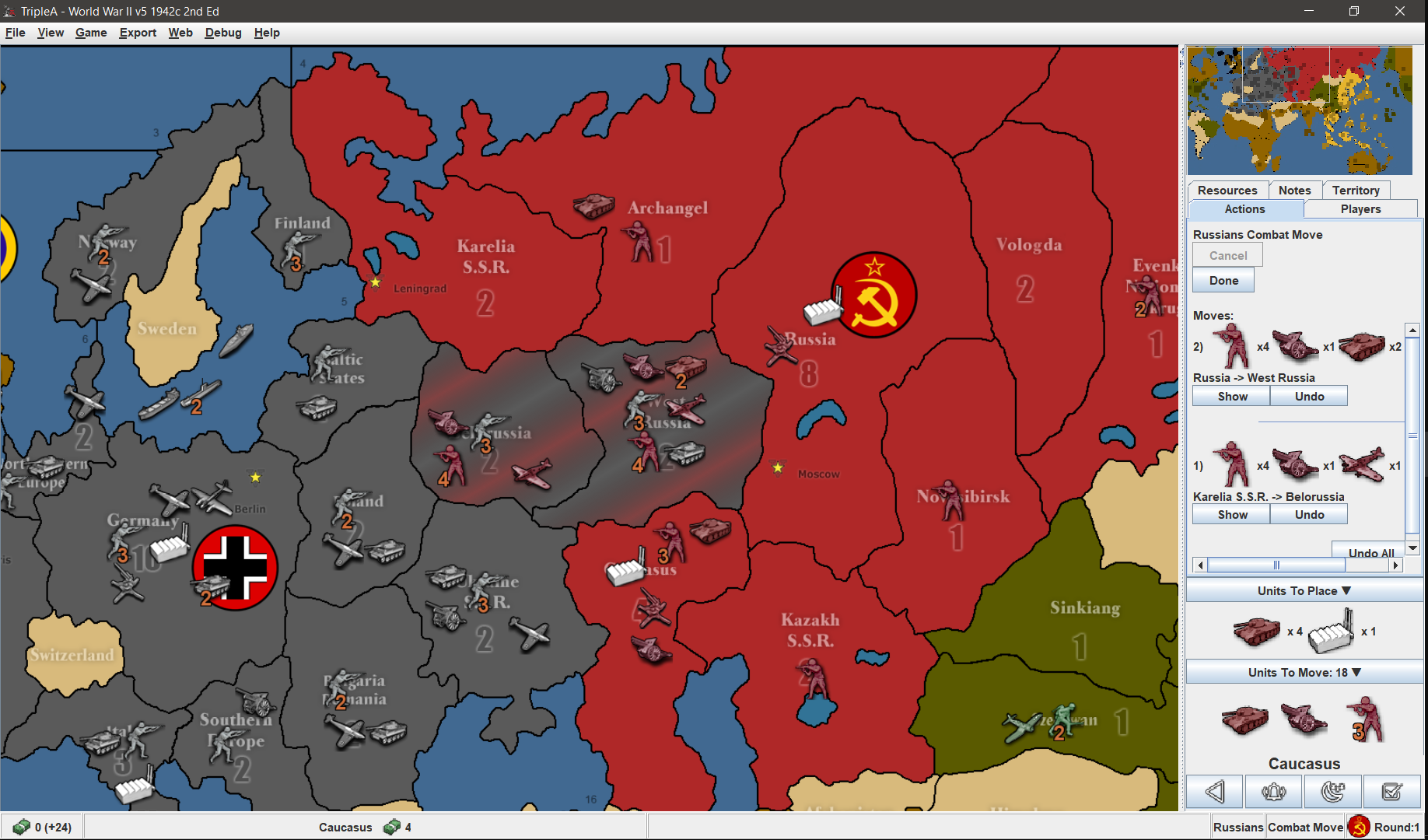
If more than 3 different unit types are involved in a move, it doesn't fit in the sidepanel horizontally.
Could the side bar units be say halved in size, that way you might get 6 in a row?
-
@general_zod
Thanks for the link, there are some solid ideas in there for sure. I would need to take a good look at the suggestions and see what can be done relatively easily.
Using bold text, different font size, icons instead of text (toolbars), scaling down the unit icons in the side panel (@87.5% would certainly work) would be very achievable.
I'll put out a v3.5.1 patch for my build with the current minor fixes this week.
-
@butterw
Right hand panel space optimization
In your map example, the right hand panel there are;
Infantry x4, Artillery x1, Armour x2Those numbers (x4) could use the same method as on the main map, ie. overlaid over the top of Infantry, Artillery, Armour icons.
So even more unit icons can be displayed on a row.
Menu Bar
Still on the trail of removing the Menu Bar.
The game starts out with no Menu Bar.
By pressing the Alt key it appears as a pop up overlaying the main map and the top of the right hand panel.
The Alt+F V G E T H will be displayed and still work as now.For the above we need to tell the players before the game starts and perhaps at the start of each turn.
-
Here's the v2.5.31-bu.jar fix, which reverts Battle Calc change, improves the production panel display. For evaluation purpose, the sidepanel tab titles are cut down to 1 character (but it's not fully implemented, ex: history, edit tab keep full names, etc.) the goal is to simplify the interface and keep the tabs to 1 line.
Menu Bar
Still on the trail of removing the Menu Bar.
The game starts out with no Menu Bar.
By pressing the Alt key it appears as a pop up overlaying the main map and the top of the right hand panel.
The Alt+F V G E T H will be displayed and still work as now.For the above we need to tell the players before the game starts and perhaps at the start of each turn.
I am away for a while, but will look at implementing the hidden menubar feature when I get back. Keep the feedback coming.
- All hotkeys featured in the menu should remain active when the toolbar is hidden.
- Hidden toolbar would be a user interface preference configured in (Engine) Settings.
- Hotkeys would be listed in a dialog similar to MoveHelpMenu.
-
@butterw
NEW Status Bar move to the top of the screen, stops the eyes moving to the very bottom of the screen.
NEW Pressing ALT, popup of the menu bar, appears under the Status Bar . The File View Game Export Tools Help, overlays the main map and the right hand panel.Right Hand Panel Tabs
Action/Command Tab - In progress space saving
Players Tab - NEW remove Technology section as can have 16+ players with say 4+ Alliances, see Technology Panel below
Notes Tab - Removed in 2.6
Territory Tab -
History Tab - NEW was on the Left Hand Panel, now put in Right Hand Panel as a Tab.Pause Tab - NEW its not really a Tab, but a pause/restart button for the game, so you can look around the map, really useful for map-makers. This could be on the History Tab, but would prefer it as its own Tab, ie. with just 1 click.
Hot Territory Tab - NEW up to 4 territories can be defined on this Tab and pressing the [tab] key will cycle round these four, on the main map..
.
Technology Panel NEW
Game> Show Technology Panel (listed near the Show Politics Panel)
Was in Players Tab but can be a grid of 15 techs x 16+ nations, so needs its own menu panel, similar to the Politics panel.
The axis needs to be swapped, so say 16+ Player/Nations is on the Y axis, ie up & down, with technology on the x axis like;
superSub, jetPower, shipyards, aARadar, longRangeAir, heavyBomber, improvedArtillerySupport, rocket, paratroopers, increasedFactoryProduction, warBonds, mechanizedInfantry, destroyersCanBombard, reinforcedHulls, wolfPackTactics, could be 15 techs on the x axis.The order of the Player/Nations should as those listed on the Setup Panel (currently alphabetical).
.
.
map.properties Player/Nation colours as text or background colours, should be used in the following;- Players Tab, the text of the Player/Nation
- Territory Tab, the text of the Current, Original owner and Capital of...
- Technology Panel, Player/Nation text
- Politics Panel, Player/Nation text
- Game> Game Statistic, the Player/Nation graph colours
-
Territory Tab - replace with the following;
When you hover over a Territory you could get a pop-up giving;- The current Territory Tab info, as now, Current, Original, A Capital, A Victory Location, Production details etc
o but the pop-up might be really big with the unit types listed for both allied/enemy, display as say 75% and over say 4 rows
o the current method is poor if there is more than say 6 unit types as it difficult to scroll the Right Hand Panel
It could also include;
- List the territoryEffects
o combatOffenseEffect
o combatDefenseEffect
o noBlitz
o unitsNotAllowed - Trigger info
- The current Territory Tab info, as now, Current, Original, A Capital, A Victory Location, Production details etc
-
Battle list panel
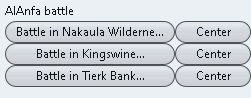
Above note the button [Center] is to the right
.
.
Placement panel
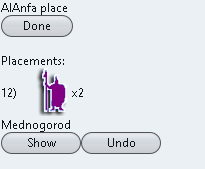
Above note the [Show] button is on the left.
For consistency the Center/Show button should be;
Both on the right or left, I prefer on the right
Both say the same Center/ShowBattle Screen suggested changes
the words [Battle in could be removed from every button, too reduce screen clutter and the word in put above the battles eg.
Faction battle in;The Button [Center] should be [Show] as on the edge of the map the battle will not center, but show the battle.
As mentioned before the x1 , x2, x3 etc units to place, could be displayed like on the main map with the number overlaid over the unit icon (where 1s are not shown but implied) and shown at say 75% size, too get more placements on a row.
-
@thedog
The unit count overlay is painted on top. This is more involved than just text in a label. In any case there will likely need to be some spacing between image icons, or the result will look squashed.
I will look into ways of making the unit display in the sidepanel a bit more compact. -
@thedog
The reason Battle is specified in the Battle List is because Air Battles are possible, These must be resolved before the regular battle.
A current issue is that the battles are in random order. I think Air battles should always be listed before the corresponding Battle. The word Battle could be removed from the button, as it doesn't provide any information. -
@butterw
I have been using 2.5.31-bu.jar, it is working very well.What are thoughts on
https://forums.triplea-game.org/topic/2798/achievable-improvements-to-the-triplea-user-interface/81?page=5and the next post.
Specifically the
- Technology panel
- Territory hover pop-up
as they are probably a lot of work?
-
@thedog
Even if the result is only a couple of lines of new code, most changes do require a fair bit of work.
An overhaul of the sidepanel/status bar is probably needed, but at this stage it is not very clear what it should be.
To make progress, I intend to build a (simplified) ui mockup of the tripleaFrame, which will make it easier to try out changes than with the full game app. -
Two nice to haves to save the player time;
- Right Click on a unit icon, invokes the unit hover pop-up.
- Right Click on a Territory, invokes the Territory hover pop-up.
-
- It's called a (right-click, pop-up) contextual menu.
What would be the content of menu ?
What would it enable that can't be achieved with the current ui ?- The territory quick navigation list would be a good addition, you should open a dedicated feature request post to discuss this. It would need to be saved per map per player, and the user would need to be able to manage the list (add or remove territories). It could contain the players capitals by default.
-
@butterw
I did not mean a menu pop-up, but when you hover over a unit and then get the current unit details, this same unit pop-up could be invoked with a right mouse click on the unit.This saves having to wait, say 2 seconds, for the pop-up to appear.
-
The Factory Scroller has been suggested before, but did have much support, but it was only for placement. Also the Development folder tends to get ignored, as its usually too deep for most readers.
https://forums.triplea-game.org/topic/2473/factory-scroller-for-placement-phase
I was hoping a hot key would just cycle round all factories, in any phase, so typically combat move, move and placement phases.
Then it would be dynamic and not require an input panel and a file per map, per player.
-
@thedog
I think adding a go to next factory action to the "Units to place" UnitScroller tab is what makes most sense in that case.
It would require figuring out what player unit types are factories. -
@butterw
There are basically two types of factory- Factory using xml <option name="isFactory" value="true"/>
- Producer <option name="canProduceUnits" value="true"/> <!-- allows a unit to be a factory, without all the other things that come with being a factory -->
The isFactory is common in all maps, but the Producer type is not common, I have used the Producer type in my Settlers: Fallen Empire.
You have used both of the above correctly when displaying maximum units that can be produced/bought on the Purchase panel.
-
@thedog One issue with the unitScroller is that it isn't displayed during the purchase phase and I think it is also useful to be able to view factories when planning production.
- I've added a mouse action on the round label/flag icon, which I have a bound to the hide the sidePanel (Ctrl-X) command. Hiding the sidePanel currently resets it to its starting size.
-The default map text font size has been increased from 12 to 24 (this setting is used when reset to default is used). I am also thinking about splitting in one font size for unit counts (default: 24) and another font size for territory/PUs/Convoy (default: 18) used in Maps like POS2.
- Having the tabs on a single line is a improvement IMO. It also makes finding the command/action tab much easier.
@thedog Status Bar: move to the top of the screen.
Moving the whole status bar to the top of the screen would not be practical, but the status label could be moved to the menubar. Maps with territory effects and multiple ressources are quite badly constrained currently, so it should be looked at.
It would of course be possible to remove the bottom bar if the contents were moved elsewhere. -
@butterw said in Achievable improvements to the Triplea User Interface:
@thedog One issue with the unitScroller is that it isn't displayed during the purchase phase and I think it is also useful to be able to view factories when planning production.
I agree, are you thinking of using the unitScroller as a factoryScroller in the purchase phase?
- I've added a mouse action on the round label/flag icon, which I have a bound to the hide the sidePanel (Ctrl-X) command. Hiding the sidePanel currently resets it to its starting size.
Is this the Flag bottom right of the screen?
-The default map text font size has been increased from 12 to 24 (this setting is used when reset to default is used). I am also thinking about splitting in one font size for unit counts (default: 24) and another font size for territory/PUs/Convoy (default: 18) used in Maps like POS2.
Is this so they occupy less space?
- Having the tabs on a single line is a improvement IMO. It also makes finding the command/action tab much easier.
Agreed
@thedog Status Bar: move to the top of the screen.
Moving the whole status bar to the top of the screen would not be practical, but the status label could be moved to the menubar. Maps with territory effects and multiple ressources are quite badly constrained currently, so it should be looked at.The right click Territory popup would solve the above?
It would of course be possible to remove the bottom bar if the contents were moved elsewhere.
Oooh yes it could, some of it could go into the right click on a Territory popup?
I think the far right of the status bar should stay where is, but put it inside the right hand panel

Hello! It looks like you're interested in this conversation, but you don't have an account yet.
Getting fed up of having to scroll through the same posts each visit? When you register for an account, you'll always come back to exactly where you were before, and choose to be notified of new replies (either via email, or push notification). You'll also be able to save bookmarks and upvote posts to show your appreciation to other community members.
With your input, this post could be even better 💗
Register Login