How to modify borders on an existing map
-
Alright! I'll do what i can to retrace it in such a way that it doesn't stick out while also playing with brightness and contrast. I'll try to find a way to get rid of the leftovers like this after retracing :
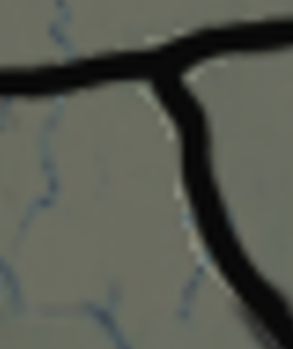
Sure, give it a go whenever you feel like it! Do you want me to send you an untraced map tomorrow with my edited brightness?
-
Sure thing, sounds good!
You made a lot a progress inside a week, well done. Way to go dude!
Catch ya next round
-
So i've attempted to retrace the new lines, with mixed results. I had trouble finding out what brush size was used for the original map, i found 3 to be too thin and 4 to be too wide, so i somehow decided on 3.1. Other than that, i finally settled on a good brightness level, sure it's not like the original but it doesn't exactly have to be.
This is how relief map ended up looking (Europe)
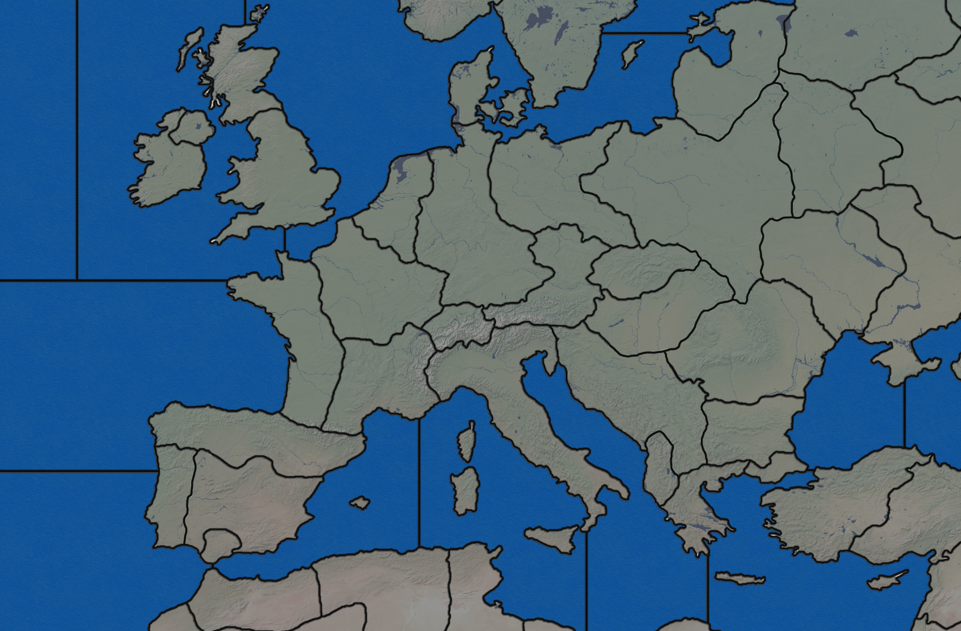
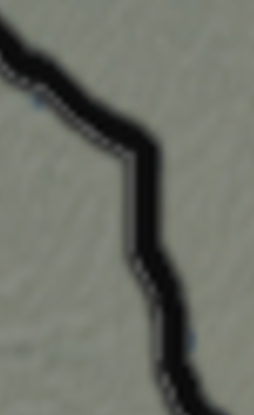
At first glance it doesn't look bad, but once you take the time to notice new outlines of the territories you can see it doesn't seem to fit in with the rest. Once you zoom in then you can see this better :
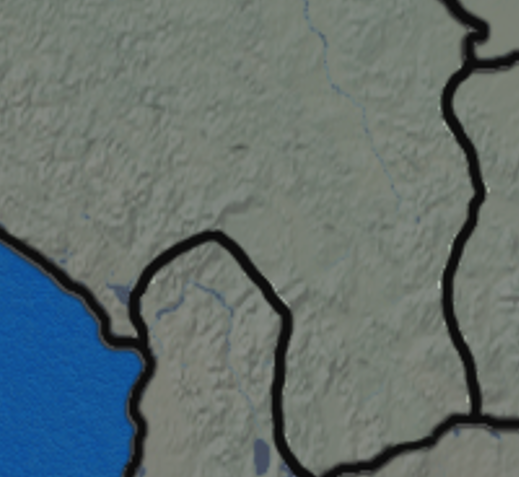
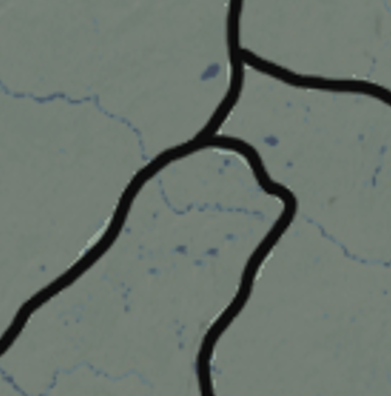
First of all, the most noticeable things are the obvious left-overs from tracing lines which i couldn't remove successfully. Any attempt at erasing them results in erasing the relief as well.
Second of all, original Iron War relief outlines seem to be blurry, you can see it's not exactly crystal clear once zoomed in, compared to my retraced lines. I haven't thought of a solution yet, maybe make the new lines blurry as well? I turned anti-aliasing on as well.
Third and the last noticeable thing, is that the original relief map has another line next to the black one, a thin grayish outline running alongside the main black outline, while mine don't. I guess i should follow the original and do it for my lines as well.
@Black_Elk here you can find the untraced map and my current traced map, just in case you want to see a difference between the two. Hopefully you will be able to fix this mess in case i don't succeed lol
https://drive.google.com/drive/folders/1d4lOQ2CbHLe_YhN-n6Gy3XuAaWHuE6lX?usp=share_linkWhen it comes to actual map, i think i am pretty much satisfied with the European territories, i wouldn't change anything else border-wise. I'm looking at ww2 world maps and i don't see any major differences that i would need to change from the original. If anyone has any suggestions lemme know.
Thats it for now!
-
Right on, I'll take a look. I'm sure given enough time and elbow grease I could rework a baseline for Iron War, which would make it somewhat simpler to rework the border line independent of the relief. Basically so you can get a consistent line when redrawing the borders. I suspect that similar to way I was working on the G40/Domination Map, Frostion probably had the relief and the borders as separate layers, then added them together at the end, with a fair bit of noise reduction or gaussian blur for the borders to soften them. Especially since Iron War uses black lines, so they're feathered up a fair bit. The paintbrush tool in PS/GIMP sometimes struggles to hit that same amount of blur, so the line may appear relatively thicker/thinner or harder/sharper when redrawn, whereas if expanding from 1 px to achieve the same you could probably get something a bit more consistent.
Or if you wanted to take a crack at it yourself the method is basically this...
First open your baseline in GIMP/PS, add a new layer. Then return to the Baseline layer but reduce the opacity to like 50%. This will allow you to see the difference between your new lines and the old ones.
Then return to your new layer, and basically you retrace the borders but with a 1 pixel line using the Pencil tool rather than a Paintbrush to ensure the line is 100% black. Using no Anti-Aliasing for that. Once the borders are redrawn at 1px, you can delete the layer showing the baseline image so all that's left is your black line at 1px.
Once you have that black line, you can then isolate it with the color picker tool, and do handy things like expand the selection or stroke the line. An easy method would be to expand to 1 pixel beyond the width of the lines that Frostion had, that way your new borders will totally cover up the old ones when you add in some blur. Then just repaste those new lines on top of the relief image so it all looks consistent.
Just some random thoughts on the Iron War production values since that was brought up earlier w/ Italy.
In Iron war the infantry cost is at base 10 PUs and just about everything else in the unit roster costs between 11-30 pus. That makes the replacement cost of a hitpoint and relative value of infantry pretty high, and everything else relatively cheap, so it's really money more than production that is the limiting factor for hitpoint spams in this game. A TT worth 10 PUs, is sorta the equivalent of TT worth 1 PU in A&A. A TT worth 30 is more like 3 PUs in A&A. So even though the values seem wildly disproportionate in some spots, it's not nearly as high an economy game as one might think. The highest value TT on the board is still 50 which is still only 5 in A&A terms for hitpoint replacement, all relatively low. A TT worth 5 PUs in Iron War is only half the replacement cost of a hitpoint, but the big jump is that it allows for the factory buy at that value.
I think you could easily raise the value of Allied capital TTs to 25 or 30 PUs and that's not going to bust the playscale here, and it would make the balance/parity by sides feel a bit more believable. Or take a TT like Italy, you could easily split that into a TT in the North worth 30 and one in the South worth 20 and I wouldn't bat an eye.
I'd ballpark it to something like this...
TTs 1-4 PUs: basically this is like 0-1 Ipc in A&A terms. Meaning you'd have to take over a bunch before they get you enough value to even produce a single hitpoint. 10 TTs worth 1 PU before you could buy an Infantry unit with the money for example.
TTs 5-9 PUs: This is sort like TTs worth 1 in A&A. Technically you could build a facility on a 1 PU TT, but it's not really worth it there. In Iron War because of the way factories work (build cap at 5 units) a low value anything above 5 is still pretty viable, so it plays a bit different on that count. These TTs are the real floor though, since they are the one's that allow the player to push their production fronts.
TTs 10 and up: Everything worth 10 PUs or more to me is sort of the real entry level, since these TTs are worth enough to replace a hitpoint they become the real drivers of the playbalance. I think anything between 10-50 one could play with those values to try and get a rough parity going with less concentration at the high end. So if West Germany or Italy or Japan is worth 50. Going to 15 or 20 or 25 for some surrounding territories doesn't seem all that wild at all to me. I'd highball rather than lowball it on this map, since the floor is actually already pretty low.
I think Iron War is best as a single player game vs the AI. The things that would make it drag in PvP don't matter as much in that style of gameplay, and generally I think the game is better where it leans into the reality that most people will probably play it that way, solo vs the machine. I think if designing a new opener, you'd want a balance where the AI does basically everything you'd expect a human to do especially in the opening turn. Like on G1, it's a massive nerf if the HardAI fails to take the Danish straits for team Axis. It really hoses their opener and the whole game. So basically trying to avoid stuff like that in a redux I think would be good hehe
This thread is older like 2017, but usually my requests to Frostion were stuff like including more 5 PU tiles, or increasing the amount of production in contested Tiles relative to the uncontested Tiles. Or just more fuel lol.
https://forums.triplea-game.org/topic/73/iron-war-official-thread?page=1
-
I'll take it into consideration. Definetly could split Italy and disperse the PU, same for Poland, i don't think Yugoslavia needs splitting though.
I've taken a look at that link and in those pics, 'Iron War Europe' is merged with 'Iron War', which is not the case with the original.
Would it be a good idea to merge them and add unique players from Iron War Europe (Croatia, Hungary, Romania,etc.) to the mod in the future? I kind of like the idea of making one large mod which combines both Iron War and Iron War Europe, hmm.
At this point in time i don't even know how to add additional zones, how to change ownerships and make new nations, but as i go on i hope to get more experience to make such a thing a reality, would be awesome, i think.
Well if you find the time and will to rework the baseline, that would certainly help a ton, especially for quickly making any other border changes if there is any need. I added my traced relief map to TripleA, to be honest the mistakes are barely visible in-game, but yeah the original relief outlines definetly have some gaussian blur or some sort of blur i can't match consistently.
-
Yeah it's interesting, the game definitely went through several iterations in that first year. I think he ended up making the Iron War Europe game mainly to preserve the artwork he'd done for the units initially, since he had all that stuff for Romania or Bulgaria and whatnot hehe. The lead post image there still shows his first draft of Europe before he made all those separate TTs into a single faction called Balkans.
I think I'd basically do what you were thinking. Split Italy into Northern Italy and Southern Italy on the Gustav line. Then split Poland into Western and Eastern Poland. Keep Yugoslavia as a single TT for simplicity and the 39 vibe. I think that'd probably be sufficient.
If getting more ambitious, I'd maybe add Malta for an after dinner mint, just cause I think that TT would be fun to see with a fighter parked on it heheh. But otherwise, I think the map is pretty solid. He made a lot of nice adjustments along the way like adding Truk and making Hawaii more viable etc.
To add new Territories, basically you will be making adjustments in the map.properties and the game's XML file. It's probably not as daunting as the stuff you've already learned how to do with the map, but a bit of a different beast. I almost always pass the buck, so I'm not super well versed in the ins and outs, but it can definitely be done.
I'd say over all Iron War 1940 is a lot more entertaining to play as team Axis and I think part of that is because the Allies don't really have enough places to go. Like they're pretty limited in the ways they can expand their production fronts. They're also hampered a bit by faction bloat, with so many minor player nations. We streamlined the British into a turn single block towards the end, but I still feel like French Colonies and British Colonies and South Africa are kind of unnecessary. Like they just make the French and British factions feel less interesting to me. I made a unit set for Canada as well at one point, but honestly I think the gameplay would be better served if some of those British factions were just folded back into Britain with some PU adjustments to offset lol.
-
ps. More thoughts regarding the units. In addition to v3 rules for carriers the other main thing I'd recommend is changing the transport capacity rules so that they can carry +2 inf +1 tank type. The way it's set up in the current build, transports can carry 3 inf types or 1 inf+1 tank type. But the practical effect there is to make tanks a way less attractive purchase for any nation that has to use transports to get them into the fight.
I think having carriers and transports at a capacity of 3 is a little debatable to begin with, since it changes the mental math coming from A&A quite a bit, like maybe even moreso than the base 10 infantry and D10 attack stuff. On the other hand having a higher capacity is sort of an Iron War hallmark there, so that might be changing too much. If keeping the park 3 on deck dynamic, I'd consider not allowing bombers or air-transports to land on carriers at all, as the AI has a really tough time with this. It's similar to the naval transport situation too, where the carrier can carry 3 fighters or else 1 fighter + 1 bomber type. This has the practical effect of the AI always landing the wrong type of aircraft on their carriers and sort of neutering them that way.
The Air Transport is another odd duck. The Air Transport only has to deal with 1 unit type, unlike the 3 capacity situation, but the AI doesn't use them at all. Also the way they are spawned at Air-Bases constantly every round makes them a serious drag on the AI's fuel consumption. It's crippling for the HardAI after a few rounds, once they have half a dozen Air-Transports and are trying to move them each turn.
Sub-Pens for the Axis are similar, but not quite as bad cause their range is more limited, the Air-Trans just guzzle fuel though, and have team Allies constantly running dry almost immediately just from that. Honestly I'd probably remove those units that spawn other units continuously, as that's just a pretty unfamiliar dynamic out of A&A and has a lot of unintended consequences. You could accomplish a similar gameplay flavor by just giving each nation a few more Air Transports as starting units. But anyway, that's another biggie. Having the overall playbalance hinge on unit spawns, and for a unit that the AI can't use, just seems bad for business.
Aircraft I'd say are overpowered on this map relative to all the other units, their only downside is the fuel consumption, but because the AI doesn't know what do with fuel or to purchase Synth to pad their reserves, they just sort of fail at that aspect of the gameplay. While I think limited fuel is cool as an abstract concept, I still don't think it's a great mechanic for basic gameplay enjoyment. What you get out of it, compared to the amount of tracking and the nerf to the AI makes me think it should be tamped down considerably. Like if the player has to think about fuel once or twice per game, that's probably enough for the "Ah ha!" flare, but having to crunch those numbers each round and parse what the enemy can do based on their fuel, it's all just rather complicated for my taste. Like the game has so many other things going on, and a lot that I really love, but that part sorta drags it down I feel.
More money, more production capable tiles, with a few more divisions for the 1939 thing. V3 carriers and simplified transports/subs would be pretty ideal. And then just more fuel heheh
-
pps.
@davor-pavlić said in How to modify borders on an existing map:
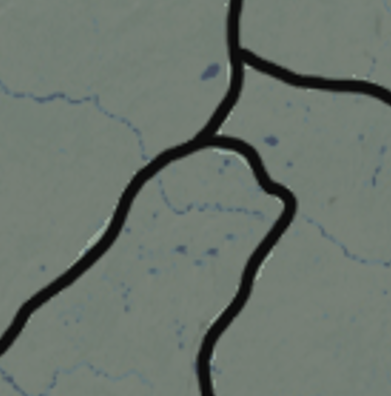
Oh also I almost forgot, so for that, to soften those borders and clean up the areas around, you might just try using the Blur tool. That one will blend the pixels which allows you to soften the lines. It might not hit exact, but you can use that one to sort of manually feather your lines and control the size of the brush to help keep it focused just on the spots you want to clean up, while blending the opacity at the same time to close out those little gaps.
Here I just quickly stomped the lines on the map you posted earlier. Let me know if that displays any better for you now...
https://www.dropbox.com/s/ub4iq1ngqme6ejn/reliefMapModded stomped lines.png?dl=0
I also see what you mean about that gray halo line that is on the base. Not sure of a great way to replicate it. It'd be easier to get rid of it I think. You might be able to use the paintbrush tool at a low opacity with gray to just kinda kiss the edges of the border lines but maybe it's not too noticeable anyway to just ditch that gray? I tend to play zoomed out a little, which makes it harder to notice hehe
It's interesting now that I'm looking at it more closely, the relief I sent you with the healed borders, it's showing some small gaps in transparency all across the map. Like they're showing around lines in TTs we didn't adjust, in random places. That gray line is in the original, but some of those other openings must have happened when I was trying to modify it or something? I'll have to make you a better one this week when I get the time.
My solution for the above was to just expand the border lines for everything by 2 px and then add in a little gaussian blur to try and close in those gaps I mentioned. Like there might be a few places where the line still needs to be widened for the new border lines you created, but I think it closed most of those random holes in the transparency. Basically removed the gray border line effect entirely, replacing that with a more standard blend on the blur, which would hopefully be easier for you to replicate with the regular paintbrush tool in PS if adding new borders.
Not sure if that's sufficient for ya? If not we can try again when I have more time. It'd be easier if we had an image of the relief that just didn't show any borders at all, and then a baseline that wasn't anti-aliased already so we could pull the borders from there heheh, but given what we got to work with, seemed like an alright compromise. The borders do read a bit thicker than I'd prefer for some spots, and that was more an expedient, blunt instrument style, but at least it keeps the ball rolling for now lol.
-
Im away from the pc right now, i'll check it out later and let you know.
-
@black_elk Alright this will be a lengthy one.
Okay so i've taken a look, i also booted up TripleA with this relief map, and this is what im noticing :
The blur fixed the 'left-overs' completely, maybe there are small spots somewhere that i'm not seeing, but it seems to be completely fixed. However the blur didn't only affect the outlines, but also made everything pretty blurry, including the actual relief terrain.
It went from this
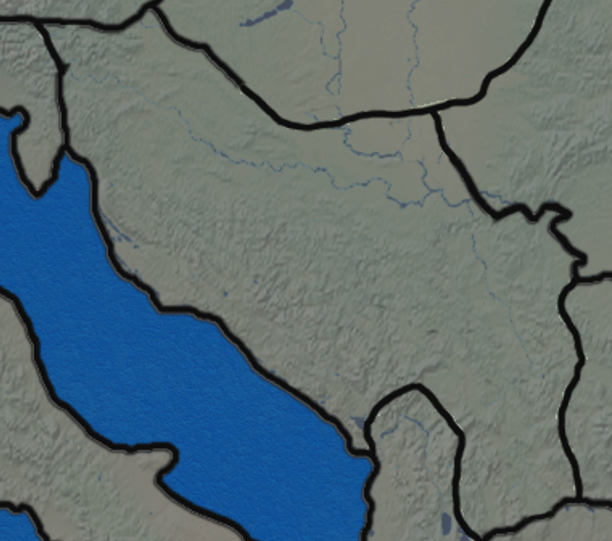
to this
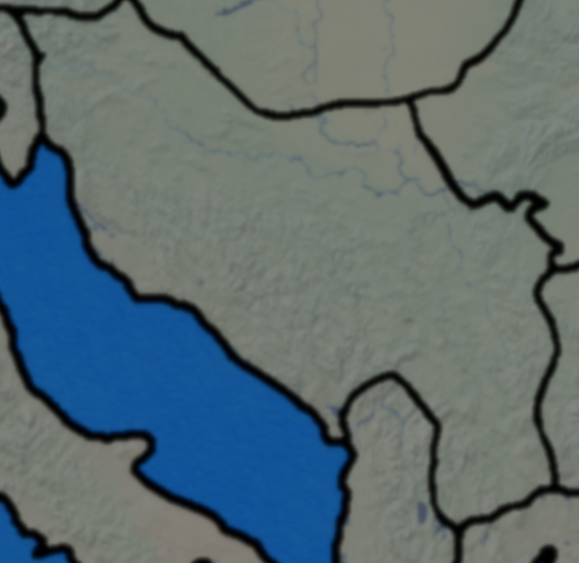
Blurry lines aren't a huge problem, it would actually be perfect if it was just a little bit less blurry and that would be it, but yeah i don't think i want to ruin the quality of the terrain as well.
I'm not sure if you got rid of the gray halo, but i don't see it anymore, the blur did the job most likely, which is amazing.
Yep yep, i did notice small patches of gaps randomly across the map as well before, now it seems to be gone, well atleast i think, i don't see any.
Finally, here is how blur effect affects the map in-game :
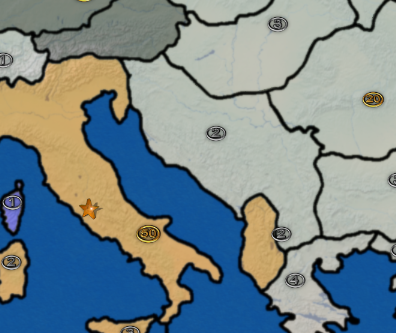
So my conclusion is that the blur is definetly a good solution, it fixed a lot of things and made the new outlines kind of blend in with the rest, the differences are basically minimal which can easily be fixed if i put more effort into nicer outlines. The only downside i see with this is that it ruined the quality of the actual relief/terrain.
What i think with my limited experience is that maybe it would be great if the blur could be applied to only the borders while preserving the quality of the rest of the map. What do you think, is it doable?
So all you did was just use blur? I'm asking so i can know how to try it myself later.
ps. im sorry for spamming screenshots, but i find it so much easier for explaining things lol
-
Interesting, yeah I can see the blur effect into the terrain there. I think what we should do next time is try to isolate only the areas immediately around the borders, so that the blur doesn't spill over into everything else.
The Anti-Aliasing on the baseline makes it a bit harder to isolate selections using the color picker from baseline for use in a separate layer, but I think the move would be to isolate the black with the color picker at wherever it lands, then expand the selection out from there to just a few pixels in radius before doing the blur, so it only effects that isolated portion of the map. Like you'd still probably see a little blur bleeding over across a few pixels that way, but not across the entire relief.
-
Ok lets see if this one holds up any better...
https://www.dropbox.com/s/snh6vn2shv8zjpa/reliefMapModded gaussian isolated.png?dl=0
I used the image you posted, again selected the black with the color picker, but this time I only expanded the selection by 1px to paint the new black lines. Then I grew the selection another 3px, filter/blur/gaussian at 1.
So basically you have 3 pixels outside the border line that will show some blur to close those opacity gaps, but beyond that it should return to the normal level of sharpness again.
Let me know if that works for ya. I think it healed most of those little gaps, and gave the existing lines a consistent level of blur, without messing with the under terrain too hard. Except for those pixels right on the border areas the rest of the relief should look like the image you posted initially. You might be able to fine tune it from here just with the blur tool if you catch any tiny opacity holes, but I think it nailed most of them.
-
Just checked the image and checked it in-game as well, it looks great. Thanks a lot!
Okay so i have the basemap, i have a reliefmap,...next thing i could do is add new zones? Split Italy, Poland and island of Sakhalin (i found that it was actually split during the war by USSR and Japan).
Okay, how would i go about this? Obviously i need to draw a border first, but then what? :confused_face:
Is there a guide for XML? Haven't touched that aspect yet. -
@davor-pavlić
There are examples in the Pact of Steel (PoS) xml file.You will need to change the xml & the following files;
centers.txt    -the TT center-ish point, seen when moving 2 or more TTs
place.txt      -how the units are placed in a TT
polygons.txt   -outline of the TT
But just ask, when you are ready to do this stage.
-
I see, alright ill get into it once i have all the outlines
-
Sweet! Glad to hear it worked
Haha yeah so for a general how to guide, I know at various points people had planned to put some stuff together, but I don't know if it materialized? Maybe there's an older thread Lafayette or Cernel or somebody might recall. I'm not sure that the process is all that well documented though, or least not from the perspective of like first step, or step by step. Or like from the perspective of being kinda green with the whole thing.
I've helped to make a few maps, but that part is always a bit like a magic trick or something, whenever I see it go from an image to the actual game lol.
Maybe we could write a guide as we figure it out I guess. I really only know how to do a few things, and I almost got those down pat but other stuff has me kinda out of my depth. I was hella impressed with Frostion and Hepps just banging out maps, so all their threads are probably worth checking out, but they're at a pretty high level. The Shogun map is another cool one that has a lot of fun stuff in it. I've been meaning to start up another campaign there just to take the edge off haha. Iron War is a fun map though, like I can definitely get into this one again. Frostion put a lot into it, but then I think got a little burnt on WW2 and turned his attention more to Dragon War and building out the fantasy materials and sci fi materials. I still think this one is pretty top shelf though. Like it's probably my favorite tripleA map overall for solo entertainment value, so you know I'll show out lol
Oh bam there ya go! the Dog beat me to it haha. Yeah the Pact of Steel game has a ton of info, it's sorta like the main resource I think for learning how to tango with xml type stuff in tripleA.
-
Oh man this XML thing seems tough to crack.
I've copied my baseTile map so i can go back to it if i mess something up, and on the new copied map i've drawn borders for splitting the TTs, like so :
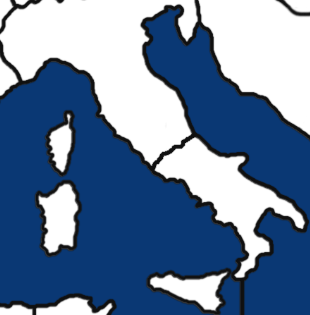
I haven't touched anything else for fear of not messing it up lol. So i didn't do centers and polygons for this updated map yet, and i think i cant do it anyway because i need to edit the XML first and add the territories.
I took a look at the documentation (https://github.com/triplea-game/triplea/blob/master/docs/map-making/tutorial/creating-custom-map-xml.md), from my understanding, in order to split Italy i could rename 'Italy' into 'North Italy', and add another TT and call it 'South Italy', like so :
<territory id="South Italy"/>
Is that right?
Then it seems i need to make connections to other TTs that it is bordering, which i could do like this i guess :
<connection t1="North Italy" t2="South Italy"/>
I'm still scared to attempt this to not make a huge mess hahah
-
@davor-pavlić
These files are a set, they must all match the changes you make.
centers.txt
place.txt
polygons.txt
MapName.xmlThese files can be edited manually, if you work out the new entries.
centers.txt
place.txt
MapName.xml (Yes to Northern & Southern Italy)However polygons.txt is too complicated and should be generated by the map tools.
Notepad++ will aid you as its a good text editor.
https://notepad-plus-plus.org/downloads/ -
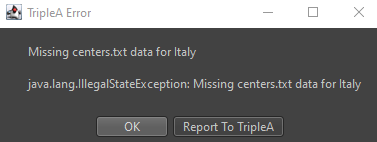
I keep getting this whenever i attempt to run Automatic Placement Finder. I've removed italy from XML and added 'Northern Italy' and 'Southern Italy', included them in XML, connected them to neighboring territories, and i still get this.
Note : I started getting this as soon as 'Italy' was removed from centers, so im confident i didn't mess anything up in XML editing. It keeps looking for Italy and showing up as error.
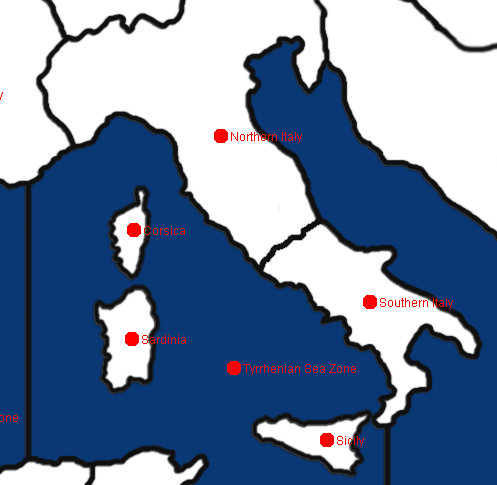
Possible solutions?
-
@davor-pavlić
Do you copies of the files you need?Then open these 4 files in Notepad++
centers.txt
place.txt
polygons.txt
MapName.xmlSearch them for just Italy and remove the line with it on, as Italy does not exist anymore.
Try running Automatic Placement Finder, assuming you have run Polygon grabber.



Hello! It looks like you're interested in this conversation, but you don't have an account yet.
Getting fed up of having to scroll through the same posts each visit? When you register for an account, you'll always come back to exactly where you were before, and choose to be notified of new replies (either via email, or push notification). You'll also be able to save bookmarks and upvote posts to show your appreciation to other community members.
With your input, this post could be even better 💗
Register Login