TripleA Logo TripleA Forum
    • TripleA Website
    • Categories
    • Recent
    • Popular
    • Users
    • Groups
    • Tags
    • Register
    • Login

    Arheic Wars / Pangea Proxima A&A

    Scheduled Pinned Locked Moved Maps & Mods
    53 Posts 4 Posters 16.4k Views 4 Watching
    Loading More Posts
    • Oldest to Newest
    • Newest to Oldest
    • Most Votes
    Reply
    • Reply as topic
    Log in to reply
    This topic has been deleted. Only users with topic management privileges can see it.
    • jkprinceJ Offline
      jkprince @jkprince
      last edited by jkprince

      Land unit types. This whole mod takes Axis and Allies Global 1940 as a starting point.
      Format is NAME, Attack#, Defense#, MovePoint#, IPCCost#, DESCRIPTION. Units with their name in italics are special and can only be produced in specific territories.

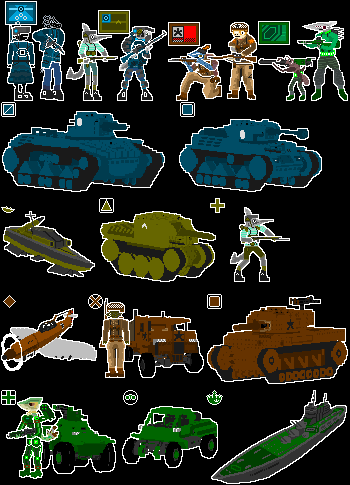
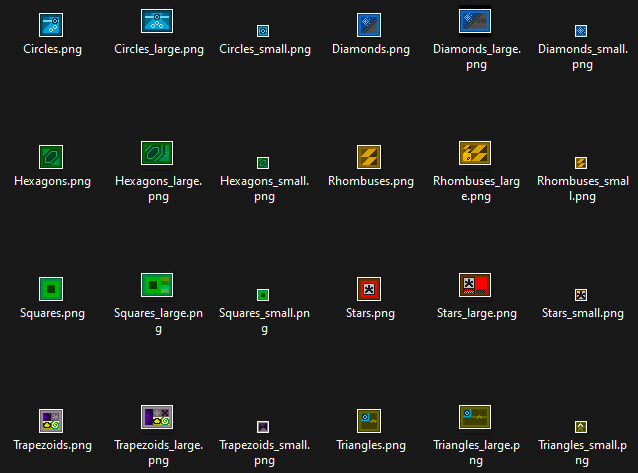
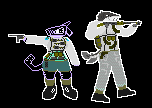
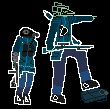
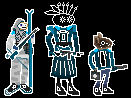
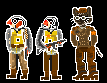
      Infantry, A1/D2/M1/C3. Sprite is a standing soldier in uniform with their weapon shouldered, and an "X" top left corner icon.
      Same as usual, attack increases to 2 when paired with artillery, etc. By the way, Recon and Elite are the same “weight” as Infantry, so they can be put in the second slot of a Transport ship. Generally, use Elites to get the best bang for your buck.

      Recon, A0/D1/M2/C3. Sprite is a diagonally downward facing jeep / light truck, with a top right icon of stylized binoculars placed inside a circle.
      Sidegrade to Infantry with an extra movement point and free blitz capability. No combined arms or artillery support bonus. However, it can tow Arty / Anti-Tank, indirectly buffing both Arty / AT move and Mech attack. (See Carrier about the 0 attack stat).

      Motorized Infantry, A1/D2/M2/C3.5. Sprite is the same as Infantry but with a truck placed behind. The "X" icon gets placed inside a circle.
      A slightly worse yet cheaper version of Mechanized. Can never blitz, can't tow either, can't provide combined arms bonus. Bought in sets of 2 for 7 IPC (or by upgrading 2 existing infantry for 1 IPC)

      Mechanized Infantry, A1/D2/M2/C4. Sprite is of a different infantryman, in a semi-active stance with weapon ready, and APC in the background. The "X" icon is placed inside a square box.
      Same as AAG40, can blitz when paired with a tank. Though it cannot tow Artillery itself like Recon can, it receives the support bonus. Assemble mobile armies! (recon as fodder/tractor for arty, mech as fodder #2, armor as centerpiece)

      Artillery, A2/D2/M1/C4. Sprite is of a heavy gun with its barrel raised up, and its corner icon is a right triangle with the 90 degree corner facing left.
      Same as usual, pairing up with Infantry or Mechanized Infantry to increase their attack power. Can also be towed by a paired Recon if needed, in order to keep up with the latter mobile troops. Connect lesser units together to build something greater!

      Motorized Artillery, A2/D2/M2/C4.5. Sprite a heavy gun with raised barrel, with a truck in the background, corner icon is same right triangle surrounded by a circle.
      Just plain Arty with 2 move points. Can never blitz, can't tow either, can't provide combined arms bonus. Bought in sets of 2 for 9 IPC (or by upgrading 2 existing Artillery for 1 IPC)

      Mechanized Artillery, A2/D2/M2/C5. Sprite is of a self-propelled gun with its barrel raised up, and corner icon is a right triangle with the 90 degree corner facing left placed inside a square. Not very useful for its price, but it can freely blitz, provide blitz capability like Armour can, and receives a +1 defense bonus when paired with any other Mechanized unit.

      Anti-Tank, A2/D2/M1/C4. Sprite is of a heavy gun with its barrel levelled, and its corner icon is of a equilateral triangle pointing up.
      A sidegrade to Artillery which forgoes its infantry support capability to instead prioritize enemy Armour. Rolls a first strike specifically at one enemy tank pre-combat, then engages normally. Can be towed by a paired Recon, like Artillery can.

      Motorized Anti-Tank, A2/D2/M2/C4.5. You know what I mean, the same process as Motorized Artillery.

      Mechanized Anti-Tank, A2/D2/M2/C5. Same thing here.

      Armour, A3/D3/M2/C5. Sprite is of a medium tank with an enclosed turret, and corner icon is of a square with bevelled/rounded corners.
      Same as usual, gives combined arms bonus to Tac Bombers. Generally better than Elites for their price, held back by being build-limited to heavier Industry territories, by being directly threatened by Anti-Tank units, and by their convoy weight. Situationally, Elites can achieve higher stats on the attack than Armour can.

      Elite: A2/D2/M1/C5. Sprite is of a well-equipped infantryman in an active stance (like kneeling with weapon aimed), and corner icon is of a "+" cross.
      Can be paradropped from an allied territory with an airbase up to 3 tiles away. Always has first strike unless there is an enemy Elite or Mechanized Elite present (they cancel each other's tactics out). Represents marines and paratroopers as one unit. +1 Attack during airborne or amphibious attacks, stacks alongside Artillery support bonus.

      Mechanized Elite: A2/D2/M2/C5. Sprite is of a different infantryman, also in an active stance and featuring an IFV in the background. Icon is a "+" cross placed inside a square box.
      Recieves stacking bonuses to attack from both paired Artillery and Armour, which can bring its attack stat all the way up to 4. Gets a first strike when paired with Anti-Tank, unless there is an enemy Elite or Mechanized Elite present (they counter each other's tactics). Can't paradrop and remains at only a 2 defense stat.

      Anti-Air: A0/D1/M2/C5. Sprite is of a AA gun on a pedestal mount pointing upwards, and icon is a semicircle/dome placed inside a circle.
      Like AAG40, it rolls first strikes at up to 3 enemy planes pre-combat (stacks with multiple allied AA, and enemy selects their own air losses). However, the doubled base movement allows you to quickly reposition during non-combat, no tow needed.

      Heavy Armour A3/D3/M2/C7. Sprite is of a larger heavy tank, and corner icon is a square with rounded corners with a diagonal line running across.
      Identical to normal Armour for all purposes except for taking two hits to destroy. A semi-special unit, generally able to be produced by most nations.

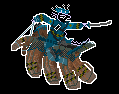
      Super-Heavy Armour / Armoured Train A4/D4/M2/C12. Sprite is of a multi-turreted super-heavy tank / militarized passenger train, and corner icon is a bevelled square with two parallel diagonal lines inside.
      Mobile fortress, which also takes two hits to destroy (or maybe even three!). Does not recieve Railyard movement bonus. Boosts the attack stat of a paired Armour / Heavy Armour by 1.

      Air unit types

      Fighter: A2/D3/M4/C10. Sprite is a light plane facing downwards (as if making a gun run) and corner icon is a diamond.
      Like AAG40, the generic air attack unit. Its base defense has been lowered to 3. Air units are powerful enough, so I have lowered their general strength.

      Interceptor: A0/D3/M4/C10. Sprite is a light plane facing upwards (as if rapidly climbing to intercept) and corner icon is a pinched/thin diamond.
      A fighter sidegrade which abandons offensive and carrier landing capability in favor of improved scrambles. It can now scramble to a neighboring zone regardless of airbase, with one, 2 moves, and with airbase + major industry, 3 spaces away!
      (Note: If scrambling lower than max distance, Interceptor SBR defense roll goes up from 1 to 2 and normal Defense goes up from 3 to 4)

      Tactical / Light Bomber: A2/D2/M4/C11. Sprite is of a light plane pointed sharply downwards (as if dive-bombing) Icon is a diamond overlaid with a lightning bolt.
      Like AAG40, it receives an attack bonus of 1 when paired with fighters or tanks, but also now when grouped up with two mechanized infantry or one recon and one mechanized infantry if the previous pairings aren't already applicable.

      Strategic / Heavy Bomber: A3/D1/M6/C12. Sprite is of a multi-engine heavy plane facing roughly level. Icon is a diamond overlaid with two parallel lightning bolts.
      Like AAG40, but bombing raids are simpler in effect- they reduce the IPC income of the attacked territory and by association its unit production cap (with damage above territory IPC value instead taking away IPCs). Strategic Bombers can't inflict blockade damage.

      Aircarrier / Air Refueler: A1/D2/M6/C15. Icon is of a flying wing in level fight. Icon is of two diamonds side-by-side.
      Boosts the range of paired Fighter or Tactical Bomber by two (making their move stat match Strat Bomber). Takes two hits to destroy (very powerful for an Air unit)

      Naval unit types

      Torpedo Boat: A1/D1/M2/C6. Sprite is of a motor/attack boat viewed from above, icon is a nearly flattened rectangle which is slightly raised toward one side (looking hydrodynamic/speedy).
      A defensive fodder naval unit which lacks special abilities. Represents small "brown water" navies and marine patrol units. Whenever paired with an allied Cruiser or with a neighboring allied Harbour its defense stat is raised to 2. Can’t block fleets or roll blockade damage.

      Submarine: A2/D1/M2/C6. Sprite is a sub viewed from above, icon is of a wavy pattern with a tall rectangle sticking out (i.e a raised periscope)
      Same rules as AAG40. In blockade terms, subs stay in the 2 dice rolling club, with Strat Bomber leaving and Battleship joining.

      Transport: A0/D1/C8. Same rules as AAG40, except for being able to defend itself. Sprite is a convoy ship viewed from above, icon is a flattened rectangle with other small rectangles (containers) stacked on top of it.
      Now has 1 point on defense, so the "Defenceless transports die" rules are removed, and it can be taken as a combat casualty. Can carry 1 of any unit and 1 Infantry, Recon or Elite. Elites are the best but keep the cheaper two in mind.

      Destroyer: A2/D2/M2/C8. Sprite is- ok you know what I mean. Icon is a slightly taller flattened rectangle with a small box (turret) in front and a raised surface (torpedo launchers) in back. (I.e just a simple stylized destroyer)
      Same rules as AAG40, disabling all special submarine abilities.

      Escort Carrier: A0/D1/M2/C10. Corner icon is a half square with a triangle on top (landed aircraft).
      Can carry a single Fighter or Tactical Bomber, basically half of a carrier (half the HP, half capacity, half defense, etc) with the same aircraft rules. Not as good as a normal Carrier in terms of bang-for-your-buck but 2 escort carriers are more flexible.

      Cruiser: A3/D3/M2/C12. Corner icon is a half-square with three boxes (turrets) sticking out the top, and one dome atop as well (anti-air guns).
      Supportive naval unit. In addition to its naval bombardment capability, it now buffs Torpedo Boats, and has a built-in Anti-Air which fires one shot at up to 3 enemy planes pre-combat (stacks with multiple cruisers, enemy selects air losses)

      Carrier: A0/D2/C16. Icon is a half-square with triangles (landed aircraft) on top, plus an anchor symbol inside (to represent it withstanding 2 hits).
      Same stats and rules as AAG40, with 2-hit to kill, 2-slots for fighters and /or tac bombers. With its A0 stat it can’t attack alone but can be taken as a combat casualty. Carriers cannot carry Interceptors or Heavy / Strategic Bombers.

      Battleship: A4/D4/C18. Icon is a half square with five boxes (turrets) sticking out the top, plus an anchor symbol inside (rep. it takes two hits).
      Same stats and rules as AAG40, but its cost has been reduced to make it a semi-sensible purchase. Still, naval combat is becoming the realm of aircraft carriers, and the battleship shall remain a suboptimal purchase as such.

      Hypercarrier: A4/D4/C(N/A). Sprite is is of a multi-hulled battle-carrier viewed from above, icon is of a very long flattened rectangle with domes, triangles and box turrets sticking out the top, and an anchor inside.
      A floating fortress that is basically a combination of an Airbase with a Battleship and two Transports. Also has built in Anti-Air. Still only takes 2 hits to sink though. Only built by Hexagonan special events.

      These changes are obviously going to be very important for balance. Comments wanted and welcome

      TheDogT jkprinceJ 6 Replies Last reply Reply Quote 0
      • TheDogT Online
        TheDog @jkprince
        last edited by TheDog

        @JOSEPH-PRINCE
        Very ambitious I will be following your journey.

        Consider x4 your map dimensions, currently they are 3778x1827px.

        1941 Global Command Decision dimensions are 16816x8085
        Shogun Advanced 11264x6290

        Newer computer screens are 4K having 3840x2160px, so our new maps should be bigger than usual.

        .
        You can have bigger than 48x48px units, see
        https://forums.triplea-game.org/topic/3326/1941-global-command-decision-official-thread/2?page=1

        Carrier.png
        96x54px

        .
        It uses a lot of Frostions WW2 units with the shadow and flag removed for a very clean look.

        .
        Consider adding more islands, otherwise see battles will just be coastal and most of the sea zones will not be traveled or fought over.

        .
        GIMP might be able to stretch your map. (I am no graphic artist)
        Consider using Inkscape or similar to draw the baseTiles, as its very easy to stretch the map using vector software.
        https://forums.triplea-game.org/topic/3318/easier-map-making-with-inkscape-reusable-art-assets

        https://forums.triplea-game.org/tags/thedog
        https://forums.triplea-game.org/topic/3741/curated-best-top-maps-triplea-guides

        jkprinceJ 3 Replies Last reply Reply Quote 1
        • jkprinceJ Offline
          jkprince @TheDog
          last edited by

          @thedog Oh okay then... I sort of have to switch to Inkscape because making the image that large in GIMP fills a sizable (6 GB) portion of my RAM (15 GB) resulting in glacial pace editing
          Thanks for info

          1 Reply Last reply Reply Quote 1
          • jkprinceJ Offline
            jkprince @TheDog
            last edited by jkprince

            @thedog I have been finangling with inkscape for two hours, there are so many things that are annoying me

            • the trace bitmap tool leaves so many gaps all over the place, how do I make its scale more refined
            • same with the fill tool, I can't get it to hug the other lines, it leaves empty gaps
            • where is the fractal function for making the borders look border-y?
            • how do I export it back as a bitmap image with 1 px borders? the lines are way too thick i hope its just what they look like and it will export properly
            • do I have to remove the borders I have already drawn to get it to work
            TheDogT 1 Reply Last reply Reply Quote 0
            • jkprinceJ Offline
              jkprince @TheDog
              last edited by

              @thedog Yeah, I will return to using GIMP and keep my small map dimensions as-is for now, complete it at the current scale, and then run it through Inkscape once I have drawn all the borders to upscale it

              The biggest problem seems to be that Inkscape doesn't like tracing single pixel lines

              1 Reply Last reply Reply Quote 0
              • TheDogT Online
                TheDog @jkprince
                last edited by

                @joseph-prince
                The quick ones

                Trace a bitmap. Try reducing the the bitmap in size, say 1/2 it. Then run the trace tool, then resize it.

                Fill tool, are you using it to fill sea zones?

                1px Border
                Select the whole map
                Fill and Stroke (on the right)> Stroke Style> Width=1> mm=px

                https://forums.triplea-game.org/tags/thedog
                https://forums.triplea-game.org/topic/3741/curated-best-top-maps-triplea-guides

                jkprinceJ 1 Reply Last reply Reply Quote 2
                • jkprinceJ Offline
                  jkprince @TheDog
                  last edited by jkprince

                  @thedog there are a few gaps but small enough they will probably disappear when exporting to bitmap.
                  still at a loss for how to draw the actual borders in Inkspace, should I just export it now that I've made the no borders outline 4x larger? Then draw the borders in GIMP

                  I'm interested in the fractal system thing but tbh if its hard to use then I can't be bothered ill just draw borderish looking borders myself.

                  or, I could go back to the 3778x1827px file, draw rough sketch of the borders, export again, trace again, then use the fractal tool to make the borders look better and also upscaled

                  TheDogT 1 Reply Last reply Reply Quote 0
                  • TheDogT Online
                    TheDog @jkprince
                    last edited by

                    Fractalize
                    Highlight the path/lines you want to Fractalize.
                    Extensions> Modify Path> Fractalize
                    Have a play

                    https://forums.triplea-game.org/tags/thedog
                    https://forums.triplea-game.org/topic/3741/curated-best-top-maps-triplea-guides

                    jkprinceJ TheDogT 2 Replies Last reply Reply Quote 2
                    • jkprinceJ Offline
                      jkprince @TheDog
                      last edited by

                      @thedog 6b0575ac-e7fa-411a-8183-f9297ad733a1-image.png
                      yeah it doesn't look very good

                      1 Reply Last reply Reply Quote 0
                      • TheDogT Online
                        TheDog @TheDog
                        last edited by

                        Borders
                        Do you have a 1px rectangle that surrounds the whole map? If so you need to remove it.

                        https://forums.triplea-game.org/tags/thedog
                        https://forums.triplea-game.org/topic/3741/curated-best-top-maps-triplea-guides

                        jkprinceJ 1 Reply Last reply Reply Quote 0
                        • jkprinceJ Offline
                          jkprince @TheDog
                          last edited by

                          @thedog That's the original image underneath the path

                          TheDogT 1 Reply Last reply Reply Quote 0
                          • TheDogT Online
                            TheDog @jkprince
                            last edited by TheDog

                            Maybe you can download a pangea svg version close to your version
                            https://www.google.com/search?sca_esv=601184441&rlz=1C1CHBF_en-GBGB812GB812&sxsrf=ACQVn0__VSM9fWfF3EFB3lt8Kwe690y2jA:1706129569178&q=pangaea+map+svg+free+download&tbm=isch&source=lnms&sa=X&ved=2ahUKEwjGiqX38_aDAxXP_7sIHeiGCwcQ0pQJegQIDBAB&biw=1777&bih=832&dpr=0.9

                            or try

                            • 1/2 the original bitmap or maybe 1/4
                            • In Inkscape trace the 1/2 bitmap
                            • Select all nodes/lines and reduce the lines to 1px
                            • Now you might have to remove nodes to smooth/flatten the lines to stop the lines from crossing each other (You might have to delete a lot of nodes)
                            • Select all nodes/lines again and reduce the lines to 1px

                            Fractalize session should be the last thing before exporting to png.

                            https://forums.triplea-game.org/tags/thedog
                            https://forums.triplea-game.org/topic/3741/curated-best-top-maps-triplea-guides

                            jkprinceJ 1 Reply Last reply Reply Quote 0
                            • jkprinceJ Offline
                              jkprince @TheDog
                              last edited by

                              @thedog yeah no, I'm going to keep the map the same scale as the 1940 global map, dealing with this inkscape thing has been a 5 hr waste of time. I can always come back to it with my finished base tiles image later if i want to

                              when I make units they will be larger 96x96 files though, with their ingame scale set lower
                              also don't worry about the oceans on both sides of pangea proxima, i will place important things for game mechanics there

                              jkprinceJ 1 Reply Last reply Reply Quote 2
                              • jkprinceJ Offline
                                jkprince @jkprince
                                last edited by

                                @joseph-prince c48b35e7-9c92-407c-ae4c-6afe32d0efe6-image.png
                                f286af0b-6e2e-45f0-b8f0-c28f5f330a4f-image.png

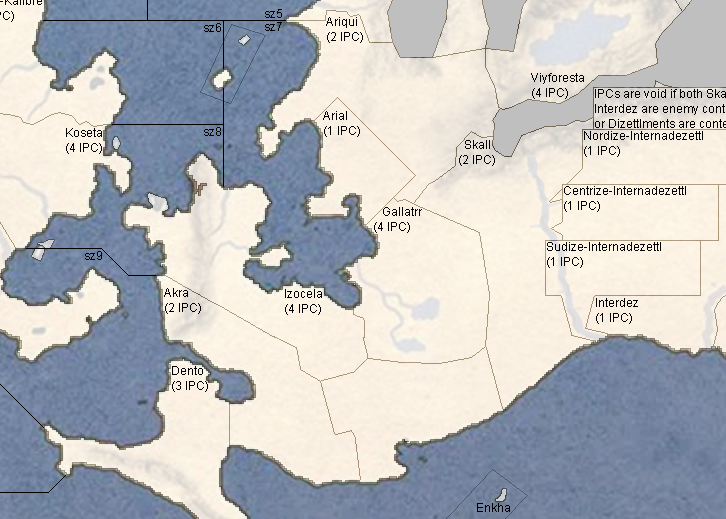
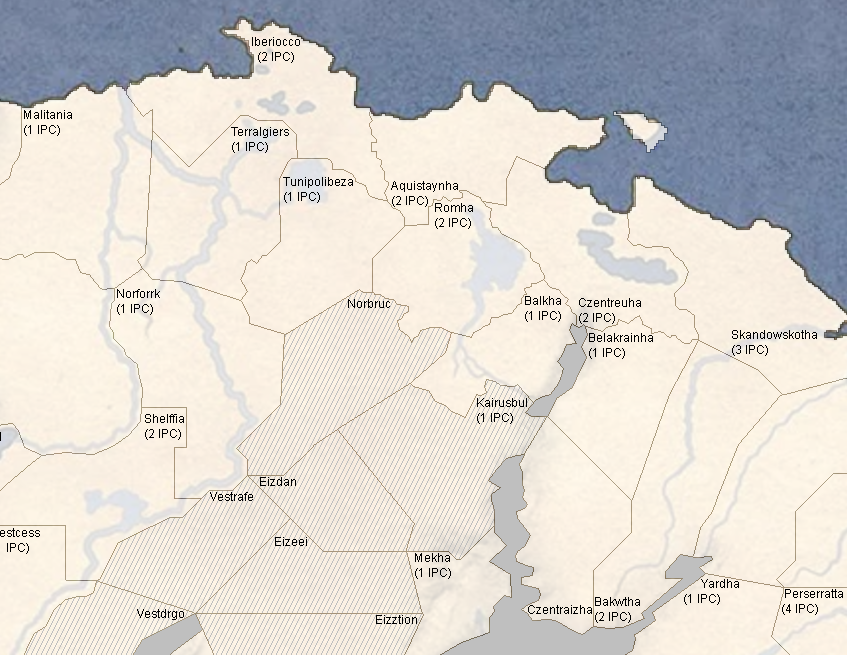
                                making all the territories is tricky, deciding connections, names, etc all that. (the grey areas are impassable, the slightly grey striped ones are semi-impassable/hostile)
                                so i think im gonna stop and im gonna think of finishing it later, I havent even started on sea zones

                                RogerCooperR 1 Reply Last reply Reply Quote 1
                                • RogerCooperR Offline
                                  RogerCooper @jkprince
                                  last edited by

                                  @joseph-prince Making maps is hard. Try to keep the number of territories small, The anniversary edition map is 162 areas (only 95 land areas). Small games are easier to mod than big games.

                                  Take a look at the Grand War mod (https://github.com/triplea-maps/the_grand_war). The designer created a complete alternate history scenario, with interesting nations with some background provided and a new map (of 190 areas). And it is fun to play.

                                  If you are feeling frustrated, try using an existing map as a basis for a mod, which is much less work.

                                  Note that there is an auto-connection tool which saves some work.

                                  jkprinceJ 1 Reply Last reply Reply Quote 1
                                  • jkprinceJ Offline
                                    jkprince @RogerCooper
                                    last edited by

                                    @rogercooper yeah, I think I'm going to aim for a territory+sea zone number around that of A&A v3 1942, maybe higher but not like Global 1940 level high
                                    The Grand War mod is great map, I want to make my new one with its own individual good looking visual style to set it apart from the other maps, just like the Grand War did
                                    I've used existing maps before, https://forums.triplea-game.org/topic/2190/churchill-s-1939 and https://forums.triplea-game.org/topic/2773/churchill-s-1939-thread-2
                                    but i want to go bigger this time and make a new map (not from scratch, I am using an existing image) 4755062e-0ad7-4f74-86ee-1be87e409faa-image.png

                                    1 Reply Last reply Reply Quote 2
                                    • jkprinceJ Offline
                                      jkprince @jkprince
                                      last edited by

                                      @joseph-prince
                                      Edit 27 January 2024
                                      Removed Naval Seaplane A3/D0/M3/C12. A weird hybrid air/sea unit. Cannot partake in land combat and can’t defend itself. Negates all special sub abilities. Can use up its full movement and land on water, stranded until any friendly warship stops for it to fuel up and return home. This is obviously impossible in TripleA. I may replace it with a more simple land-based Naval Bomber unit, but I really want it to be clear that the unit is land-based only and can't be used by carriers, but people are liable to be confused if its called Naval Bomber and isn't a seaplane yet it can't be put on carriers.

                                      Changes I am considering:

                                      • Is Recon's stats suitable for AI? Will AI understand how its towing system works? Or should I instead take away towing, up Recon base attack to 1 and make it go up more when paired with Mech Inf, Armour or Tac Bomber. (And add alternative 2-movement Self Propelled Gun / Tank Destroyer versions of the Arty and Anti-Tank units respectively).

                                      • Is Armour too cheap now, should I bring it back up to 6 IPC cost?

                                      • Is Recon underpowered as-is even for its low price?

                                      • Is Elite underpowered for its 5 IPC price (should I lower it to 4?) Or should I keep the price the same but give Elite something extra, like the ability to be transported 1 Elite per Cruiser or Battleship?

                                      • Is the Anti-Aircraft Cruiser buff enough to make it useful? Or should I make the AA more powerful (identical to a land based AA unit i.e one shot at up to 3 enemy planes rather than just 1)

                                      • I'm thinking of removing the Cruiser Submarine unit, isn't it redundant?

                                      • I'm thinking of adding a new unit, Motorized Infantry / Reserves. It has same base stats as Mechanized Infantry (A1/D2/M2/C4), it cannot blitz, tow or anything, but it does recieve arty support on attack and it also pairs defensively with a new infastructure called "Train Station" I will elaborate on infastructure shortly.

                                      1 Reply Last reply Reply Quote 0
                                      • jkprinceJ Offline
                                        jkprince @jkprince
                                        last edited by jkprince

                                        @joseph-prince Infrastructure
                                        Note: As with AAG40 all infrastructure has built in AA
                                        Airbase: Allows Air Scramble. Modifies all Aircraft movement by +1. Needed to repair certain special units (Aircarrier / Flying Wing). Interceptors specialize in scrambling and with an airbase they can scramble 2 territories away, and with airbase + major industry, 3 territories away

                                        Harbor: Allows Naval Scramble / Sortie. Mod Naval movement by +1. Needed to repair certain special units (Battleship, Aircraft Carrier). Harbour AND Major Industry needed to repair super special units (Floating Fortress). Torpedo Boats specialize in defending harbors and receive a +1 to defense if in a neighboring SZ to a harbour, if they have not already received that +1 defense by pairing up with a Cruiser.

                                        Railyard: Allows Land Scramble / Rapid Reserves. Mod Land move by +1. Needed to repair certain special units (Heavy Tank, Armored Train). Railyard AND Major Industry needed to repair super special units (Fortress Tank). When not placed on a Major Industry, allows units to scramble to defensive battles or to assist attacks made by allies as far as their unmodded Land move can (so a 1 move stat Infantry can scramble to the defense of a neighboring territory, 2 move stat Armour can defend the neighbor of a neighbor). If the Railyard is paired with Major Industry it allows the units to scramble WITH their +1 bonus move added.

                                        Industry
                                        In this version, there are no Industrial Complex pieces. Industry is instead represented on the board and can only be changed by national objectives. In territories originally controlled by the enemy of the current owner, industry operates at one level lower than its marker (i.e Fronterozt, a Circulean minor industrial region, operates as only a micro for its Starian occupiers.). The size level does not affect the number of units that can be produced by the territory, which is controlled by the territory’s IPC per turn value.

                                        Industrial Complex size levels
                                        None: No icon. This territory cannot produce anything, unless it has a + symbol, in which case it can only produce that unit type.

                                        Micro: Single smokestack icon. This territory can normally only build Infantry, Artillery, Recon, Mechanized, Elites, Anti-Air, (+ Cruisers and Torpedo Boats if coastal) A occupied Micro industry is downgraded to None until liberated.

                                        Minor: Double smokestack icon. Infantry, Artillery, Recon, Mechanized, Elites, Armour, Anti-Air, Fighters and Light (Tactical) Bombers. (+ Transports, Destroyers, Submarines, Cruisers and Torpedo Boats if coastal)

                                        Major: Triple smokestack icon. This territory can build any type of unit that is not in the Special section (which can only ever be produced by + bonuses). Apart from + bonuses, only Major industry can produce Heavy (Strat) Bombers (+ Carriers, Battleships if coastal)

                                        Bonus Production or + symbol: Indicated by the icon overlaid over the plus, it opens production for that unit if the territory would normally be unable to build it. (I.e, the Triangulic Aeiran Blur, despite having only Micro industry, can produce Fighters thanks to the + bonus, representing the Starian Parliamentary Dominion exile govt’s focus on air defense.). A couple territories get multiple plus sign bonuses. The bonus doesn’t apply for anyone but the original owner of the territory.

                                        TheDogT 1 Reply Last reply Reply Quote 0
                                        • TheDogT Online
                                          TheDog @jkprince
                                          last edited by TheDog

                                          At this stage I would not be too worried about PU cost of units, having approximates at this stage is good enough. :thumbs_up:
                                          Its more important to get the units abilities as you want them, only then can you point them, as their purchasing worth is dependant on the group they are in, see below.

                                          The AI purchasing is quite complex.
                                          It groups units into;

                                          • Land Attack (high attack compare to other units in group)
                                          • Land Defence (high defence compare to other units in group)
                                          • Land Fodder (low PU cost compared to other units in group)
                                            and also for Sea & also for Air units, there are more groups like amphibious. Units can be in more than one group.

                                          The AI then ranks them with a probability to purchase within each group.

                                          You might be able to have your seaplane, but I think the AI might struggle with its restrictions, for now keep it in. Likewise with the Motorized Infantry / Reserves, in for now.
                                          Testing will dictate if the units are redundant/worthless/duplicated etc.

                                          https://forums.triplea-game.org/tags/thedog
                                          https://forums.triplea-game.org/topic/3741/curated-best-top-maps-triplea-guides

                                          1 Reply Last reply Reply Quote 2
                                          • jkprinceJ Offline
                                            jkprince @jkprince
                                            last edited by jkprince

                                            @joseph-prince
                                            Removed Cruiser Submarine: A2/D1/M2/C7. A slight upgrade to the normal Submarine, being able to choose whether it blocks enemy fleets, and also being able to shoot at aircraft. However, it only rolls for 1 on blockade damage. Hey, it can bombard on a 2…like that’ll ever be useful.

                                            Edited Hypercarrier, removing its former 24 IPC price in favour of making it a special unit provided for free by events.

                                            Added Motorized Infantry but not as a special mobile reserve unit, just a fast version of Infantry with no extra abilities but costing 0.5 IPC less than Mechanized. Instead, I will make it so that all land units can scramble out of Railyards as far as they can move normally without the Railyard's +1 bonus (so ones with 1 move can guard neighboring territories, and ones with 2 move can guard neighbors of neighbors.) If the Railyard is placed on a Major Industry territory its units guard as far as they can move WITH the +1 bonus (so ones with normally 1 move can guard neighbors of neighbors, and ones with 2 move can guard 3 territories away, sufficient to cover pretty much an entire country... so yeah that's why I'm not adding fortification units, because having a mobile reserve in your capital on guard is enough defense). Just keep in mind not to scramble your entire reserve because they'll have to slowly return to the railyard in order to do it again

                                            Some more units I am considering:
                                            If the AI doesn't understand towing functionality, I will make mobile versions of the Anti-Tank and Artillery units, with similar method to how I balanced Mot. Infantry (i.e no other changes but adding 0.5 to cost and 1 to movement). I might even make it so there are basically 3 tiers of mobility:

                                            1. 1-move non motorized units (basic Infantry, Arty, Anti-Tank)
                                            2. 2-move motorized units with no other special bonuses but which can be easily converted from non-motor units (Motorized Infantry, Mot. Arty, Mot. Anti-Tank)
                                            3. 3-move mechanized units which gain blitz when paired with tanks and sometimes other bonuses (Mech. Inf, Self-Propelled Gun, Tank Destroyer).

                                            Making certain extra powerful special units be only buildable by certain nations
                                            Circles get Super-Heavy Armour, Heavy Armour and Mechanized Elites. By a couple turns into the game they build up neurotoxin gas missiles which will inflict heavy damage on enemy homelands.
                                            Stars get Heavy Armour, Mechanized Elites and Armoured Trains. They also start with the best network of support infastructure (airbases, harbours, railyards) which will allow them to defend their gains.
                                            Triangles get cheaper Elites (costing only 4.5 instead of 5 when bought in pairs), cheaper Interceptors (only 9 rather than 10 IPC) and cheaper Battleships (only 16 rather than 18 IPC). They also get Heavy Armour but no other special units.
                                            Hexagons get Aircarriers/Air Refuelers, Hypercarriers/Floating Fortresses and Armoured Trains. However, they don't get Heavy Armour. They also start in the worst position because of their Interior Desert settlement megaproject has left a sizable population inside Triangulic borders.
                                            The various Rhombic factions provide their sponsors with cheap levies and support units (Conscripts? Tankettes? Biplanes?) in order to contest the region at minimal cost possible.
                                            Later into the game, the AI controlled Squarish and Diamondic factions might join in. The Squarish get cheap wheeled Armour (only 4.5 rather than 5 cost) and pulse jet aircraft (6 movement by default). The Diamondics get rapid deploying mountaineers (spawned by triggers) and high speed ships (3 movement by default no harbour required)

                                            wc_sumptonW 1 Reply Last reply Reply Quote 0

                                            Hello! It looks like you're interested in this conversation, but you don't have an account yet.

                                            Getting fed up of having to scroll through the same posts each visit? When you register for an account, you'll always come back to exactly where you were before, and choose to be notified of new replies (either via email, or push notification). You'll also be able to save bookmarks and upvote posts to show your appreciation to other community members.

                                            With your input, this post could be even better 💗

                                            Register Login
                                            • 1
                                            • 2
                                            • 3
                                            • 3 / 3
                                            • First post
                                              Last post
                                            Copyright © 2016-2018 TripleA-Devs | Powered by NodeBB Forums