Polling Question - Which play style do you prefer?
-
@cernel
I do zoom out on most maps (I don't play any map on 100%, so I am always zoomed out) and sometimes I adjust zoom as I play because certain areas (usually ocean) often need a wider area to really get the context.I think the question is meant to about the usefullness of the territory tab, and its really not great. Half of the information about territories is displayed at the bottom of the screen, and in my opinion it should all be moved there. It could also use some display settings. For example in TWW territories like Norway have such a long list of "If captured by Australia-->Exiled Allies" even though that little tid bit is completely useless information. I'd rather have a tab show just units, and showing a decent amount of units without having to scroll.
-
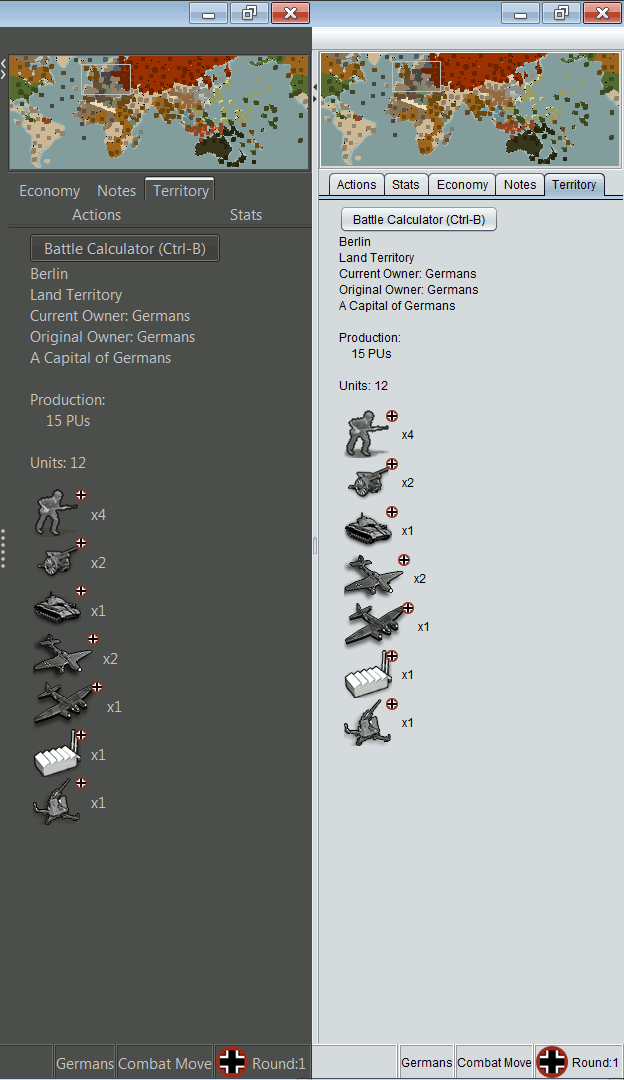
@crazyg I'm all with you, especially if you think about maps with 64x64 units, but I'd rather suggest splitting into two tabs. The "Territory" tab as now without the units and the "Units" tab with only the units and the BC button. Really, you never look at what it is written in the Territory tab, but those things should stay there for double-checking purposes and because there should be an official code-based reference (so you are safe from the mapmaker telling something wrong, or not telling).
Meantime, have you tried "Nimbus"? It leaves some more space for units display, packing the letters more:
-
Also, shouldn't it be "Ctrl+B"?
-
I think your over analyzing the poll question. It's a simple general question. I think there are a lot of people who value wider map view over unit image detail (however it's a trade off). The territory tab is a just a tool used to help navigate and scan the map in this context. And once eyes adjust to the units on the map, the territory tab may be used a bit less.
Yeah the nimbus looks helpful, nice.
The territory tab in itself is a pain in the ass once the list of units causes a scroll (plus it's so slow via mouse wheel). That is a an area of the UI, that can definitely benefit from a redesign. Also some of the other information is really just clutter as listed (territory exchanges), and would not mind if it was on a separate tab somewhere. It might be use full to the mapmaker to confirm things are as they should be.
Ideally a map maker should have the ability to enable/disable via xml, what information is shown in the tabs.
-
@crazyg @General_Zod I took the question as primarily asking whether players use the territory tab frequently vs looking at the actual map to see what units you have. Not so much about zoomed in vs zoomed out since that is very arbitrary and would be better to quantify it for certain maps and specific percentage ranges.
TripleA Developer with a Passion for AI: https://forums.triplea-game.org/topic/105/ai-development-discussion-and-feedback
-
The map zoom is relative to each map. So the actual number it's set to, is really irrelevant.
The point is that there is a substantial group of players who find their comfort zone (map zoom/unit zoom) somewhere between seeing a wide swath of territories and being able to reasonably recognize the units. I'm not saying the comfort zone is at the extreme end, but it's almost never above 75% map zoom on a map that use 4 movement units.
Where unit recognition is more difficult (crowed territories, small territories, etc..) the territory tab is a crucial part of the UI when playing with this method.
The actual settings (map zoom/unit zoom) of the comfort zone will vary from map to map and with range of the units on that map. But if unit ranges are similar, then the zoom proportions will also be similar imo.
Also I might use more zoom when I have too. Like seeing sbr damages usually requires a higher zoom level since they don't get listed in the territory tab. I just go 100% and then return to my comfort zone for that map.
I hope this clears it up a bit.
I should also add, that it does become habit to use the territory tab. So I am using it where I don't even need it as well.
-
@general_zod I think the problem is most voters are answering it in terms of zoomed out vs zoomed in (which really doesn't mean anything without better stating what each of those would mean). Technically, you can only zoom in since you can't go above 100% anyways. Given @CrazyG post, he doesn't really use the territory tab but still voted for that option.
At least what I thought we were looking to get from the poll is based on territory tab usage, would it be better to focus on improving unit placements/ordering/etc on the map vs focus on improving the territory tab information/usability. Essentially, where do users get information around what units are in each territory.
TripleA Developer with a Passion for AI: https://forums.triplea-game.org/topic/105/ai-development-discussion-and-feedback
-
@redrum The territory tab is an integral part of playing with zoom set to see wider map. Without use of the territory tab, it would be ineffective method of playing imo.
Unless you have 20/20 vision of course.
But is there a margin of error in polling? Most likely yes. We can reword it and try again if you need more conclusive results.
-
@general_zod Agree but I think when most players think zoomed out they are thinking 60-80% not 40-50%. It varies a lot from map to map, but at say 40-50% you pretty much have to use the territory tab on most maps when you have more than a few units. I'm interested in knowing what portion of people play at that level of zoomed out and rely heavily on the territory tab since if that is a majority of players then prioritizing territory tab improvements would make a lot of sense. All comes down to where to focus improvements of main map vs territory tab vs battle calc usability.
Best thing is if most people that voted can briefly comment on their vote so we understand their user experience as I'm concerned our poll might not be capturing what we had intended.
-
Yes, that makes sense. We should make another poll then.
My preliminary thoughts are, there will be a substantial number or peeps in each group.
Improving aspects of, territory tab UI ergonomics and territory placements/ordering/enhancements. Should satisfy peeps in both camps. I don't think these are mutually exclusive directions to aim for. But I do understand, we have limited manpower to tackle all of it.
-
@general_zod Yep, today its mostly whatever I personally think or whoever happens to yell the loudest in terms of priorities

Honestly, I kind of assumed most players didn't use the territory tab much but I have no data to verify that. Having a feeling on whether its like 50/50 vs 90/10 does help me to consider where to put the bulk of our efforts. There are definitely things that can potentially benefit both as well. For example, the sorting that was improved for territory placements could be the same sorting we have in the territory tab if folks think that would be beneficial (also would help with consistency).
-
I wonder if it would make sense to take the poll a step further. And gather more data on player preferences, while were at it.
But on the current poll question at hand. Do you want a specific re-wording?
Sample Poll
The question: I tend to use the territory tab for the following?
(choose all that apply)
a. to scan territories for unit specifics throughout game
b to scan territories for territory specifics throughout game
c. use when zoomed further out (further out than 75%)
d. use when zoomed further in (further in than 75%)
e. use when at any zoom level (10% to 100%)
f. use to get unit specifics for battle calculator input
g. use to get to the "battle calculator" button
h use to left click+hold+drag a territories units into the "battle calculator"
i. other uses not listedIt would be nice to also sort the results by 3 levels of experience. rawmeat, regulars, elite
-
@general_zod Might be interesting. The other angle you could consider is looking at either pain points or improvements poll that lists the things folks don't like about it now or the things they would look to improve/change. That might be a little more straightforward in how we could then use the results to influence development priorities.
TripleA Developer with a Passion for AI: https://forums.triplea-game.org/topic/105/ai-development-discussion-and-feedback
-
Ideally, that would require actual comments as feedback, so it would no longer be a poll. We can try it that way.
But I also think, something that would get us to similar place is...
A traditional poll with a list of maybe 10 common improvement requests and they can choose a maximum 3 of them. And also do a similar setup on the common pain in the ass side.
Hmm... Thinking on it more. The "pain in the ass" poll might not get us anywhere new (useful). But the "improvement request" poll sounds productive.
-
@general_zod Yeah, that was more what I was thinking. Have a list of 5-10 improvements that could be voted on. I think the only question is scope. Whether it makes sense to try to focus on just territory tab, unit display, entire in-game UI, or any feature request. As we obviously have a rather long list of feature requests on a lot of different areas and various levels of effort.
My thought is try to focus on the small wins where if "X" adjustment/change was made it would be a significant impact to many users. As that is probably more actionable than a poll on really large changes like add an in-game challenge system vs revamping entire game setup UI vs adding per map AI configuration, etc as those take a long time to make a reality.
-
@redrum said in Polling Question - Which play style do you prefer?:
@general_zod I think the problem is most voters are answering it in terms of zoomed out vs zoomed in (which really doesn't mean anything without better stating what each of those would mean). Technically, you can only zoom in since you can't go above 100% anyways.
That's my guess as well. And, yes, technically, the zoom in option should have 0% votes, as you can never zoom in, but I didn't want to nitpick.
-
My experience is that there are people that zoom out NWO and people that play Feudal Japan without zooming out; so I think the variability is extreeme.
-
@cernel There are people that really zoom out on NWO... That's insane. Can't imagine NWO is even playable at 50% zoom.
TripleA Developer with a Passion for AI: https://forums.triplea-game.org/topic/105/ai-development-discussion-and-feedback
-
@redrum
You need to zoom out on WaW and TRS just because of the oceans. I used to zoom out to move Germany's subs, then zoom in for the East, but after while I just left it zoomed out. The unit stacks are so large that you always end up battle calcing anyways.For specific feedback about the territory tab
1- is there a hotkey to open it? There is for the battlecalc, which makes it more appealing IMO
2- the scroll is way to slow
3- the tabs section in general isn't that space efficient. Its width is set by the mini-map and if the mini-map is small you end up with a tiny area to actually view things -
@cernel Is there a chance they don't understand the question? Sure. I think the poll still gives a general picture of player preferences, zoomed in for max detail or zoomed out for a wider view, no matter what map it is. They most likely have proportions they favor and set the zooms accordingly.




Hello! It looks like you're interested in this conversation, but you don't have an account yet.
Getting fed up of having to scroll through the same posts each visit? When you register for an account, you'll always come back to exactly where you were before, and choose to be notified of new replies (either via email, or push notification). You'll also be able to save bookmarks and upvote posts to show your appreciation to other community members.
With your input, this post could be even better 💗
Register Login