Unit Icons Added By Conditions
-
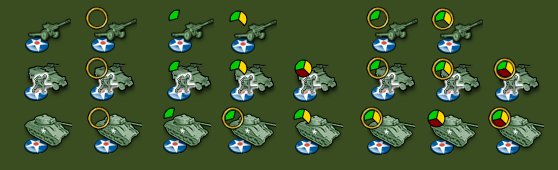
@redrum What you got against lime green anyway? That's like the third time you've dissed the lime green!

I was trying to avoid covering distinguishing parts of certain unit images. Very preliminary work done within 1/2 an hour of seeing this new feature come to fruition. Just take a pill... or a Bourbon... or both. Revisions will come when I sit down with my partner to finalize the designs.
-
@hepps Lol. It hurts my eyes! Definitely could use a pill and a Bourbon right now but have a few more hours of work to survive first. TGIF!
-
So you are going for adding a folder for these images. This makes me think it'd rule out the switch alternative to support, as it would be weird to have the new image outside the "units" folder, and it would not make sense to be defined as an icon for the starting image, anyway.
I'm unconvinced about this, especially on the account that of the few hard-coded techs, changing unit images, we have, few of them work in the way of adding any icons (I think the only case are heavy bombers, AA radar and rockets), but in the way of changing the image itself, either totally (improved factories etc.) or by adding a couple white stripes or such (super submarines etc.).
Of course, one could hack an image changing by just having the basic image totally transparent, and adding the icons on top of it as the actual images, making sure you start with an icon and the condition of the first one becomes false when the new one is true.I don't have any particular examples in mind, as, as I said, I'm not huge on tech (both as a maker and as a user) and I'm not sure how can you get examples, in the moment, so far, anything like this has been limited only to a part of the few hard-coded techs available. I don't even know if and how I would be using this feature. But, in general, having the possibility of changing the image completely should feel of superior quality. All your fighters becoming jets, when you get the tech, is obviously silly, but you can have more sensible examples, like warriors turning into werewolves, Gandalf turning from grey to white, cavemen turning into spearmen, a battleship getting a radiotelemetre, or a factory looking more modern, rather than having an icon beside that tells you now it is more modern (kinda cheap). Beside, if this is not supported, I can see mapmakers hacking it by just assuring that the new image completely covers the old one (or by even more devious means...). The long range fighters, on the other hand, receiving a couple of white stripes is not making a lot more sense: just paint some stripes on the wings, they'll fly better. Not like that having the image not changing completely helps making more sense, I tend to think.
Anyway, probably the strongest argument is that icons telling what is what are likely suboptimal with respect to an integrated approach, as you, then, need to watch several images to know about one unit. From my point of view, even only adding two stripes to a fighter is more user friendly than adding an icon beside to tell that is an advanced version of the former. Like, I would not advice to substitute all Adv.Fighter in WAW with regular fighters images with an "A" symbol or something beside, no matter how much the current stripes solution is cheap, anyway.
It is basically the same reason why (as long as you have 12 or less players) it is better having units ownership depending on colours, than adding a flag or any symbol beside, to tell the ownership.On the name, it depends on what this is going to be.
If it is going to be just an overlay thing, like decoration would imply, i don't think "Icon" is good, either, as it makes me rather think of something stand-alone (like it would be fitting if you want to add a small side-image highlighting some stuff regarding the unit, but here we could also use this thing to add white stripes for long range or whatever, and that would definitely be not an icon). In such a case, I'd call it "Unit Indicators", if that would sound fine to the average English speaker (or signage or such).
However, icon would be good enough as a title of this thread if you go for an integrated approach using the current basic "units" folder, without adding another folder specifically for this feature (and, in this case, the only name we need to add is only how to call the properties file, that would be the only addition).So, my suggestion is not adding any "unitIcons", or whatever, new folder, but doing everything inside the current "units" folder. For the iconic part of it, the icons of general use would stay directly inside the "units" folder (where currently nothing is referenced, anyways), while player specific icons would go inside the players subfolders, with the unit images they are for.
So, instead of making some overlay thing on top of the current units stuff, I would rather go for expanding what is supported via the "units" folder itself only, by allowing defining multiple layers for images, that would also cover all what at this feature request (and more).
First of all, before getting to the conditions part, expanding the functionality of the current "units" folder system, by allowing having images directly in it, instead of in the players subfolders.
When a unit image is called, the engine will search for it in the player subfolders (just like now) and, if not finding it in it, it will, then, search for it directly in the general "units" folder (and, then, go searching in the program assets, of course, the same way).All images for this feature would stay in the current "units" folder, as well (so not adding another folder for these things), and the property sheet being called "unit_display.properties".
Inside such file, you would have entries like:info_name.unit_name.player_name.conditionAttachment=image_nameThe "info_name" being the info name for the game, that defines what xml we are using (that is what game we are referring to).
The "unit_name" being the name of the unit inside that xml.
The "player_name" being the name of a player inside that xml.
The "conditionAttachment" being a condition defined inside that xml.
The "image_name" being the name of the image file.Assuming everything else is self explanatory, the way "conditionAttachment" works is that it is a check that is true if the condition is true.
The first two entries are mandatory.
The third and fourth entries are optional, and both (the "player_name" and the "conditionAttachment") are always true, if absent.So, you can also have:
game_name.unit_name.player_name=image_nameAnd this would always apply, to that player only.
And you can also have:
game_name.unit_name.conditionAttachment=image_nameAnd this would apply to all players, if the condition is true.
Or you can just have:
game_name.unit_name=image_nameThis always applying to all players.
I guess all the above would be feasible by the engine checking how many entries and, in case of three, if the third one starts exactly as "conditionAttachment" or not.
For using this feature as a simple overlay (merely as an alternative to having it directly in the image itself, as per the only current practice), in a map like Napoleonic Empires, in which the ships are the same for everyone, but with different flags, you can have the ships images directly in the "units" folder, plus a single "flag" image per each player subfolder.
Then, in the "unit_display.properties" you would have:Napoleonic_Empires.Cutter=Cutter.png
Napoleonic_Empires.Cutter=flag.pngSo, everyone will get the same "Cutter" image, while the players will get different "flag" image, but this is not to be specified in the properties, as it just depend on the positions in the units folder, as said.
Of course, switched over, if, instead, you want the Cutter to be superimposed to the flag.If and only if the unit_display.properties is absent or no entries are present or no entries are valid (for that player or at all), then the default image is used.
If any entries in unit_display.properties are valid, then the default is not used at all (so, nothing is superimposed to the default: to superimpose you need to specify what would be the default in the properties, as an always true entry).
If you want entries in properties to not superimpose, you just need to assure that the condition of the first entry becomes always false when the condition of the second entry is true, in the xml (you need to code the condition accordingly). I believe this would mean that TWW would superimpose after the first, if I'm assuming correctly that when you get a new level of the same kind of tech, the preceding one remains true.
For example, inside the property sheet, you can have only an entry like this, if you want the unit to be completely changed:
Total_World_War_December_1941.germanFighter.conditionAttachmentgermanImprovedFighters=fighter_improved.pngIn this case, normally, the unit displayed is the default one (like not having an entry, when the entry is not valid). When the condition is true, instead, the "fighter_improved" is displayed, in substitution.
On the other hand, if you want to just have a overlay, you would have an entry like this:
Total_World_War_December_1941.germanFighter=fighter.png
Total_World_War_December_1941.germanFighter.conditionAttachmentgermanImprovedFighters=gold_star.pngIn this case, the "gold_star" image would be just superimpose to the always true "fighter" image.
In both the above cases the "player_name" is absent, thus this will apply to any "germanFighter" units in the map, regardless of ownership.
On the other hand, I tend to think that one should not code the xml thinking about skin elements, so it would be rather better having:
info_name.unit_name.player_name.conditionAttachment1:conditionAttachment2:...:conditionAttachmentN.conditionType=image_nameWhen conditionType can be AND, OR, etc. (what's supported for triggers).
So, to be clear, what I'm saying is that you don't really need to make a way to define if stuff superimpose or replace, but you can have that it just always superimposes, and assure the lower levers to disappear (not being drawn anymore), when wanted, by conditions.
Moreover, it would be good also the "player_name" allowing for multiple (but you can just repeat the entry as many times as you need to; so I'm not sure about this).
p.s.: A remaining matter to define, then, would be if this feature should be switchable by the user and which way. This really needs to be sorted out, as well, since, for example, you should never be able to switch off the flags of the ships of Napoleonic Empires, as that is the only way to differentiate them by ownership. So, if I would make something like that, and this feature would be optional, I would still have the flags in the image themselves, to avoid them being ever not displayed. Probably, to keep it simple, just having a single entry in properties that define if everything or nothing can be turned off, by the user (when turned off, it would be like the map having no unit_display.properties).
-
@cernel TLDR? I've already implemented the initial proposal so if you have any slight variations then I can consider them but needs to be more concise.
-
@cernel Yes that's tldr. But from skimming through the first paragraphs I suppose you want complete unit image replacement.
But what if I want to have 10 different bonuses, each applicable to every unit - will you, then, create 1024 unit images for each unit, instead of 1 image per unit and 10 unit icons? (Exaggerated, but still.)
If the unit image is worth completely replacing, then it's also worth creating a new unit for that purpose.
I have multiple ideas that I could do with unit icons, and they are generally much easier to implement with unit icons than image replacement.
-
An alternative name choice for (map/unit_icons.properties).
(map/image_manipulation.properties)
-
A couple vague ideas so far as related to this feature, would be as follows. Specific details and examples are really undetermined at this point. I will just post here as they come to me.
Also @cernel has some interesting related ideas on flexibility of this feature, although he should point those out more concisely.
-
technology related (similar to hard coded techs)
-
experience related (would utilize unique units)
-
display unit (or non unit) image related (fog of war)
-
alternate name display for images related (alternate unit names displayed for images)
-
non unit image related (also manipulates non unit images such as resources, terrain, decorations, flags, etc..)
-
diplomatic/political image related
-
national objectives image related
-
risk style cards image related (any cards really, ideally as long as visible to only current players, however can be setup to be visible all time for non secretive version)
-
damaged unit related (sbr or combat damage)
-
unit stacks related
-
unit status as related movement, phases, presence and abilities related
-
-
I decided to make an example of how this can be used pretty easily to change a unit based on conditions...
This is just a quick rendering of just how easily this can be used.
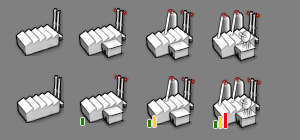
Seems to me that this feature can be used in a myriad of ways currently.
-
@redrum Do these suit your delicate sensitivities better?
-
PR merged. This can now be tested in the latest pre-release: https://github.com/triplea-game/triplea/releases/tag/1.9.0.0.10351
-
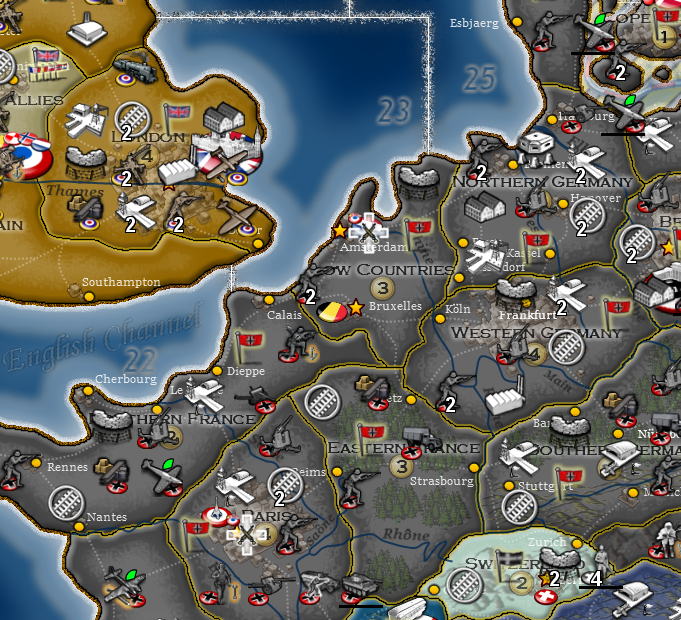
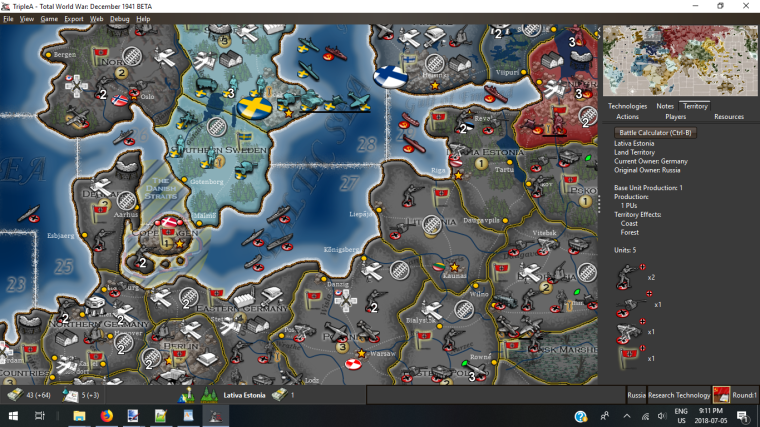
Example:
-
-
-
is there not a conflict between the the engine placement of unit player flags and these unit abilities/attributes? Are they not both placed in the upper right corner? And are there map.properties settings that can affect the placements? If not, maybe there should be.
Like a full set of options controlling the placement settings for stacked number text, damaged HP text, flag picture, these new unit abilities pictures etc. (I am aware of the all ready existing option to set stack number placement relative to unit picture)
-
@frostion Unit flags are bottom right aligned. Unit icons are top right aligned. But everything is also layered so unit flags are always on the top most layer. Essentially layers go "unit" -> "unit icons" -> "unit flag" -> "count/damage".
-
@redrum I think it would have a good value having an option to switch unit icons (I'd call them unit indicators or unit signage, as I said) off, in the "View" menu. In this case (the user being able to switch them off), it may also be good to allow mapmakers to disable this feature for the specific map (in map.properties), in case the icons/indicators/signals are essential to it (like different units distinguished only by a red dot).
-
@cernel For example, somebody could update WAW to have the red dots as icons/indicators (instead of part of the units images) and, if there would be an option, the user could decide if he wants to see red dots or not (since 2.0 red dots are not necessary, as the units are distinguishable without).
Even if the name remains icons, I'd call them "indicators" in such an option for the user (like a red dot or a green triangle I think it is more specifically an indicator).
-
Its really funny what a little information can do. Am playing around with @CrazyG HoH map and @CrazyG got Crazy and added Techs. I been trying to help debug a few of those Tech and then I had @Hepps Red (attack bonus), Green (movement bonus) and Yellow (defense bonus) pie overlays, and WOW! Must say really changes everything when you can look at you opponents cannon and tell its attack got improved!
This is a really great idea!!
Thanks to all that contributed to it.
Cheers...
-
@wc_sumpton Yup... going to really take the mystery out of games with greater complexity.
In my soon to be released TWW with this included it is going to make a world of difference and make the game far more playable.
-
@wc_sumpton What no screen shot? Talk about being a tease!







Hello! It looks like you're interested in this conversation, but you don't have an account yet.
Getting fed up of having to scroll through the same posts each visit? When you register for an account, you'll always come back to exactly where you were before, and choose to be notified of new replies (either via email, or push notification). You'll also be able to save bookmarks and upvote posts to show your appreciation to other community members.
With your input, this post could be even better 💗
Register Login