Version 1.9 wont start but 1.8.0.9 does
-
@Christian-Stiebing Sorry, I forgot to mention that when running TripleA.exe, you need to run it with the
-consoleoption in order for any potential logs to be written to the console. That is,TripleA.exe -console.Given that this may require you to reboot your box, I'll let you decide if and when you want to proceed.

-
@ssoloff I am able to start the game via the java file in the bin folder without problems. Ill try that, one moment.
-
@ssoloff So no lag, no freeze, no start of the game, no pop-up, no log in cmd.
-
@Christian-Stiebing So, just to confirm, when you run
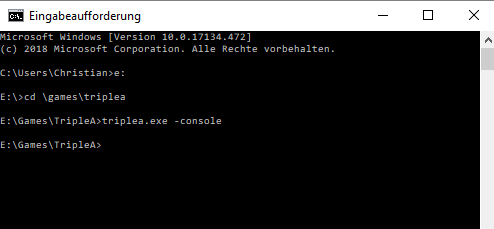
TripleA.exe -consolefrom a command prompt, nothing happens? There is absolutely no output in the command window before it displays a fresh>prompt? -
Also, that next line is printed immidiately. No reaction from the tripleA.exe whatsoever.
-
@Christian-Stiebing Thanks for confirming. There's only one more thing I can think of. Please run:
TripleA.exe /create-i4j-logThat should open a message box that will display the path to the log file the launcher will create (and if you answer Yes to the prompt, it should open a File Explorer window to that location). Please attach that log file to this thread.
-
there is no prompt. I wasnt asked to confirm or deny a log file creation.
Also the next line was displayed without delay. No further reactions.
Well for me, I can start the game vie the java file in the bin folder. So theres something not right with the triplea.exe or something like that.
-
@Christian-Stiebing Yeah, there's definitely something wrong with that executable. I can think of two possibilities:
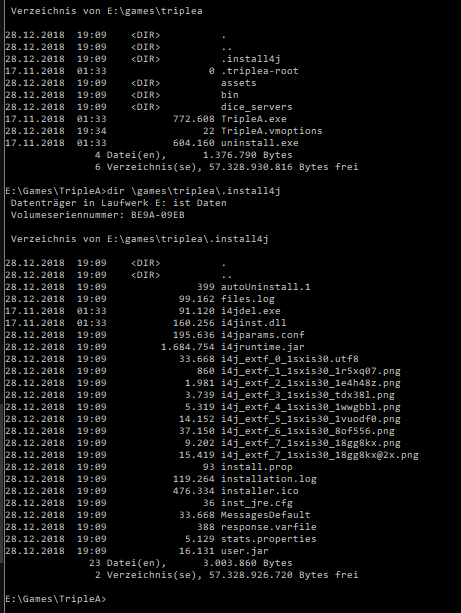
- The installation folder is corrupted. If you can paste the contents of the installation folder and the
.install4jsubfolder (just using a simpledir), we can rule that out quickly. - It's possible your A/V may be silently blocking the executable or something. You could try temporarily disabling your A/V and re-running the command to see if it does anything. (EDIT: For example, in my A/V, there's a Trusted Application Mode that only permits a whitelist of previously-approved applications to run.)
As you said, you can use the portable build to play the game, so if that's good enough for you, great. Otherwise, if you discover any new information about the installer problem, feel free to post it here, and we'll try to help.
- The installation folder is corrupted. If you can paste the contents of the installation folder and the
-
@ssoloff Well at least thats a workaround so I can play the game, which was my goal. So yeah, that helps

Here you go:
-
@Christian-Stiebing Your installation looks fine. So, other than possible A/V interaction, I'm stumped. :frowning_face:
-
@ssoloff I have no idea. Well the Windows Av didnt showed a warning...
-
But thank you everyone for your help!
Hello! It looks like you're interested in this conversation, but you don't have an account yet.
Getting fed up of having to scroll through the same posts each visit? When you register for an account, you'll always come back to exactly where you were before, and choose to be notified of new replies (either via email, or push notification). You'll also be able to save bookmarks and upvote posts to show your appreciation to other community members.
With your input, this post could be even better 💗
Register Login