Unit image creation
-
Hi everyone, I'm fairly new at map making and am struggling to come up with some good unit images. I don't have any experience at starting from scratch so I have been using images from google or the brown set from "Joe T" and trying to re-colour them with varying results in photoshop / gimp. If anyone can give me some pointers on re-colouring or starting from scratch that would be great. Thanks.
-
@arcticfox Best way to recolour units uniformly that I have found is to select and open an entire set of the desired images at the same time...
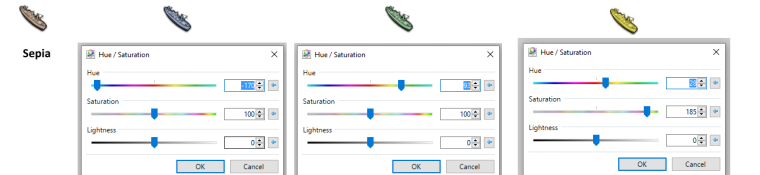
Then set them all to a "Sepia" setting. (This will make them all the same brownish-tan colour)
Compare them next to each other and lighten or darken all the units you need to until they all have the same brightness. (This really only needs to be done if the set you are creating contains units of different colours to begin with) { ie. you want a set that has a Italian Inf. and say an American Bomber and say a British Artillery}
Then select one unit and colour it to whatever hue you want. Copy the values for the RBG settings for that unit once it is exactly the way you want it... and then recolour all the other units to the exact same values. (I often do this by taking a print screen shot and opening a new image and then past the image of the pallet window. Then I save and label that image and place it in the same folder with the units. That way if I ever have to make a new unit I can recreate the colour with ease).
Keep in mind my terminology is based on getpaint.net/index.html so it may not directly translate into what the terms are in Photoshop or GIMP.
Designing from scratch is a bit more involved.
Hope that's helpful.
-
@Hepps
Thanks for the advice.. setting to sepia sounds like a great way to get a uniform starting point!When you recolour do you use a paintbucket with the opacity down part way / an overlay mode or use the image colour settings? Or is there some other function you find easier? If it's a getpaint only feature I may just try that out.
-
@arcticfox Well I don't know about the two programs you are using...
But in paint.net there is an "Adjustments" tab and in that list there is an option called "Hue/Saturation".
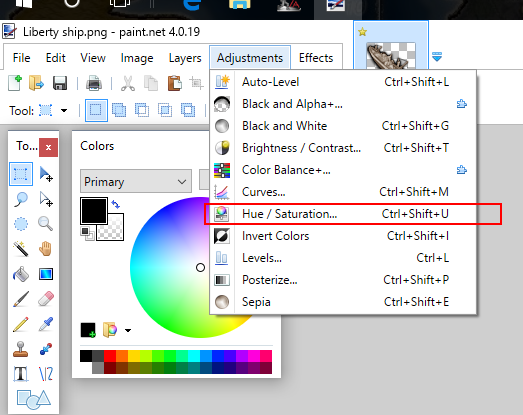
This function will re-colourize all non black or white pixels to a uniform hue.... so you will retain the right outline, detail and shadowing.... but anything else will change to the colour in the image.
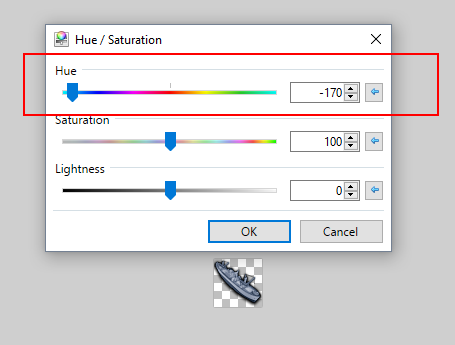
These are the colour codes you want to keep documented.... (since as long as you start from a Sepia base image it will always yeild the exact same finished colour) This is also why I say you should have all the units open at the same time.... because once you set the hue.... you can go to all the other sepia images and just "repeat" that setting. (In paint.net once you have set a hue... you can just go to the next image... select the "Hue/Saturation" option and it will retain the selection you made already in the other image) So then you just go to each unit... hit that option and tada! All your units are the exact same colour. Then you go back through each of them and save them as what you need.
Side note is that if you are trying to do this for multiple nations... you may want to have already set up empty file folders named for each nation you intend to build. Makes it much easier while you are trying to do this quickly. Staying very organized in your file management is CRITICAL to make this process as painless as possible since it can be very time consuming to begin with.
-
@hepps test
Is this one better
 but to be honest I dont know what the issue is your having. Sorry
If we open a quarrel between past and present, we shall find that we have lost the future! Sir Winston Churchill
-
@ArcticFox Since you are new I would like to explain the joke. @Hepps is one of the best graphics guys we have. So if he cant upload images we really have a problem .... I am quite certain all will try and help solve the issue. I was just having some fun with H because he loves winding my "tail" also.

-
Yeah sounds, like a cruel torture, for hepps. Cant display his nice pics anymore. I'm waiting for one of his pics my thread too... The suspense is building. What can it be? hehe
-
@ArcticFox if you are going to be recoloring a lot of units think about making a outline of the unit with a transparent center so the layer underneath it will show through this way you can just change the layer color as many time as you like. I personally like to start with a larger image for outlining and color change then I resize it for the game and the the big one for the nice color.
-
@vikingmaker It's actually far easier to do it the other way. To take an image... shrink it down to the finished size then create an outline and shadowing. Yeilds far more consistent results.
-
@general_zod Thanks confirmed what I suspected based on the impeccable advice of one Mr. Prastle.... say what you will about country bumpkins.... but the man really does know a thing or two.
"A joyous heart sours with the burden of expectation"
Hepster -
@ArcticFox Posts updated with images.
-
@hepps searches for hammer to smash his useless hard drive ... sigh guess I am going shopping...
-
So here is a quick look at how I set up a master layout for a map. This is what I keep as a reference when designing all the different nations for a game.
-
Thanks for all the help. Should be able to recolour much faster and more consistent now!
-
@arcticfox NP! Look forward to seeing the results.
I will try to put together a step by step for new unit creation as soon as I have the time.
-
@prastle said in Unit image creation:
@hepps test
Is this one better
but to be honest I dont know what the issue is your having. SorryBTW Prastle.... can you please change your avitar to this image?
Something about seeing an ass laughing hysterically just seems.... right.
-
@hepps hehe digs for a laughing MamMoth




Hello! It looks like you're interested in this conversation, but you don't have an account yet.
Getting fed up of having to scroll through the same posts each visit? When you register for an account, you'll always come back to exactly where you were before, and choose to be notified of new replies (either via email, or push notification). You'll also be able to save bookmarks and upvote posts to show your appreciation to other community members.
With your input, this post could be even better 💗
Register Login