connection problems
-
I will do that, already made a map folder,
but what is a description folder good for? what files should it contain? -
Hi,
let's go back to
https://forums.triplea-game.org/topic/2435/post-turn-summary/13?_=1607414920560
that's where we started the 2.5/1.9 issue.
This thread was for connection error discussions

-
@Numetalfan description is an image of the map that shows up when you hit select maps. Is needed to upload to triplea but not for local play/testing.
Yea, you shouldn't have any zip files in your "map" map
 Also the 2 xmls at the bottom. That is why 2 maps were showing in select map. Your shipyard image should go in each players units folder. Probably a few other things.
Might wanna just look at the original v3 41 and make it look like that.
L
-
Hi belee,
I cleaned up:
https://storage.driveonweb.de/dowdoc/c84fc4098f53f8a891526fe7c7ba3a61288eec3f04cf9286
password: TripleAAA
the things mentioned should no longer appear
-
Hi all,
happy new year
In my game there were
a) a 73 Sea zone
b) a French indo-China Thailandboth countries are removed, I find none remnants in either the xml, the centers, the place or the polygons.
all of these files are attached.
polygons.txt
place.txt
centers.txt
world_war_ii_v4.xmlHowever, when I start the game, somewhere like a ghost these territories still exit - but where, in which file?
the error message is:
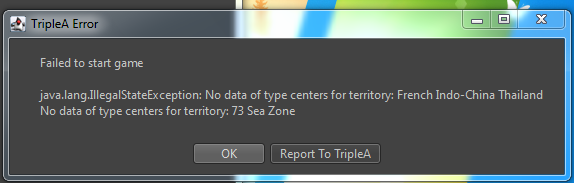
please help
-
This reminds me of an issue I had where I made changes to a placement file, but then when running the game I was still getting my original placement locations.
If I remember correctly it was a problem of having multiple copies of my map folder (for previous versions) and the game was continuing to call the information from a previous folder even though the XML was the newest version.
Long story short, I’m wondering if it might be a similar problem of calling info from a folder you’re not expecting. Perhaps you think you’re running the game on the latest XML but TripleA is actually running an older version that still has references to your deleted territories.
I’m far from experienced, so just a guess.
-
@Contango yea stick everything in a separate folder then delete all triplea stuff and try it. If you have to, email the folder to yourself and 86 that too.
-
Hi,
ist the tripleA folder the problem or the downloaded games folder?
-
@Numetalfan yea idk I've had that problem and with java too. Damn stuff hides out
-
Incredible this worked!
Hello! It looks like you're interested in this conversation, but you don't have an account yet.
Getting fed up of having to scroll through the same posts each visit? When you register for an account, you'll always come back to exactly where you were before, and choose to be notified of new replies (either via email, or push notification). You'll also be able to save bookmarks and upvote posts to show your appreciation to other community members.
With your input, this post could be even better 💗
Register Login