Allow user to specifically choose amphibious offloaded units in battle chooser
-
Here it is with the smaller size and the order flipped:
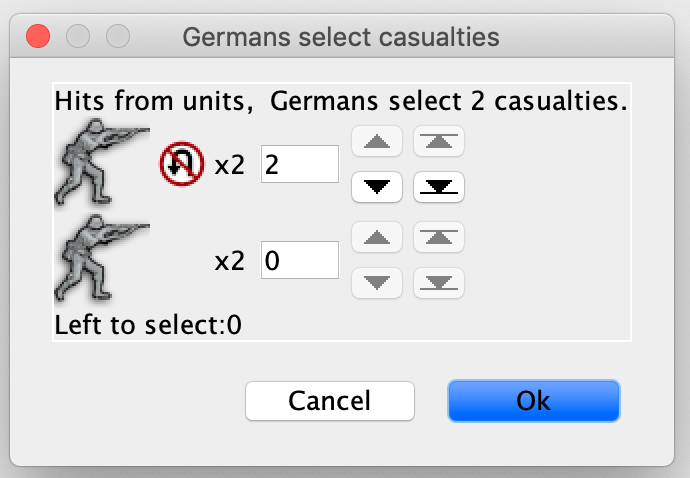
@lafayette said in Allow user to specifically choose amphibious offloaded units in battle chooser:
My initial impression is the image is too large, smaller and as a subscript or as a super-script is my initial preference.
I don't know how to make it a subscript or super-script. I don't have much experience in image manipulation with Java.
-
@trevan Both the 32 and the 24 look good to me. The 24 might be too small for 4k.
Not sure if you are already doing it, but, at least under any v3 rules, I would always display that image for information, not just for same-named units having both offloaded and non-offloaded ones. For example, if you land move 1 infantry and offload 1 armour, I think it would be good to display the non-withdrawable symbol for the armour. Also, you can easily eventually get to a situation where you don't have same-named offloaded and non-offloaded units because of units which were already removed. In this case, I think it would be confusing to remove the symbol during the course of the battle (it would look like only non-offloaded ones remained). I wouldn't mind also all land units having that image when all land units starting the battle were offloaded (it might inform inexperienced people that they can retreat only air and there might be games having not so obvious looking air units images).
-
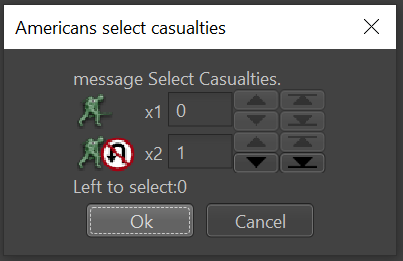
I'll see if I can plant this seed, seeing the unit image, then the 'no-retreat' logo, it looks almost like the no-retreat is its own unit image and there are "x2" of those. Looking at it, the 'x2' is more associated with the logo than it is the unit (hence, kinda odd). I think if we move the logo to the bottom left of the image, it would resolve that (or even just move it to the let of the image).
-
The comment to always display the no-retreat for any unit that cannot retreat, IMO is a good one. I wonder if we should show that on the unit attack board as well. This way the unit image that is displayed in casualties will stay the same. Thinking about it like this, the no-retreat symbol really does become part of the unit image during combats.
Side-note, nice work @Cernel with changing the concept to no-retreat. That concept has a universal symbol to it, very much solved some of the early problems that made this a challenging thing to do.
-
@lafayette My suggestion, left to right:
- Number of units of the type you are selecting.
- Number of units of the type, but written as "/2" instead of "x2" (as it is also wrong using the letter "x" as something else if that is what it is being done).
- Unit image.
- Any other images (meaning the non-withdrawable symbol).
- Arrows.
Basically the current 1, 2, 3, 4, 5 would be reordered as 4, 3, 1, 2, 5.
-
I can create a PR with this code but it will have the option disabled. Someone else will need to work on the UI parts as I don't have a lot of experience there.
-
@trevan I likely could help, post a draft PR when ready and I can try to jump in with some commits.
-
I want to add that, as far as I know, the only current case (beside multiple hitpoints) in which you are prompted to select different same-named units is when the two or more same-named transports (surely sea and maybe air too) have different units assigned. In this case, the transports will display the units on board beside the transport's image (or nothing if none). So this should be done in a way similar to that and also taking into account that in the future more additional images might be added for other cases in which it is not irrelevant chosing any one amongst two or more same-named units.
-
@lafayette said in Allow user to specifically choose amphibious offloaded units in battle chooser:
@trevan I likely could help, post a draft PR when ready and I can try to jump in with some commits.
Here's a draft PR - https://github.com/triplea-game/triplea/pull/8947
-
@cernel said in Allow user to specifically choose amphibious offloaded units in battle chooser:
I want to add that, as far as I know, the only current case (beside multiple hitpoints) in which you are prompted to select different same-named units is when the two or more same-named transports (surely sea and maybe air too) have different units assigned. In this case, the transports will display the units on board beside the transport's image (or nothing if none). So this should be done in a way similar to that and also taking into account that in the future more additional images might be added for other cases in which it is not irrelevant chosing any one amongst two or more same-named units.
There are other cases as well. When putting a unit on a transport, if transports have different amount of movement left, it will separate them. When putting a unit on an air transport, if the units have different transport cost, it will separate them.
-
@trevan, @Cernel I am preparing my first screenshot to get your feedback.
But it turns out the units are displayed so small that the non-withdrawal add on icon is eiter too big or - when I scale it down - becomes very pixeled, and the whole thing is hard to read.DEFAULT_UNIT_ICON_SIZE is 48, which would probably result in a nice display.
But PROPERTY_UNITS_SCALE is 0.5625, which results in unit icon size 27.Why is that? Would anybody mind if we display units with 48 pixels in the casualty selection dialog in 2.6?
If you agree: Shall I only do that in the casualty selection dialog?
(I would probably add a flag unscaled to UnitImageFactory.getImage.)If you don't agree: Suggestions please, how to display the fact, that units can't retreat.
I can't imagine a pretty graphical solution. But then - I am no designer... -
@rainova said in Allow user to specifically choose amphibious offloaded units in battle chooser:
@trevan, @Cernel I am preparing my first screenshot to get your feedback.
But it turns out the units are displayed so small that the non-withdrawal add on icon is eiter too big or - when I scale it down - becomes very pixeled, and the whole thing is hard to read.DEFAULT_UNIT_ICON_SIZE is 48, which would probably result in a nice display.
But PROPERTY_UNITS_SCALE is 0.5625, which results in unit icon size 27.Why is that? Would anybody mind if we display units with 48 pixels in the casualty selection dialog in 2.6?
If you agree: Shall I only do that in the casualty selection dialog?
(I would probably add a flag unscaled to UnitImageFactory.getImage.)If you don't agree: Suggestions please, how to display the fact, that units can't retreat.
I can't imagine a pretty graphical solution. But then - I am no designer...Version with withdrawal sign in front of unit image
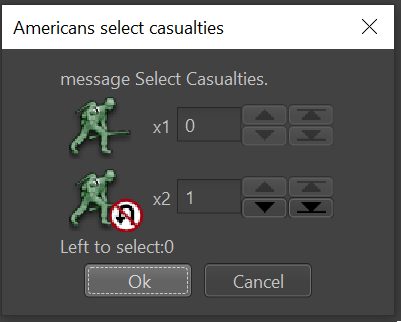
Version with withdrawal sign behind unit image
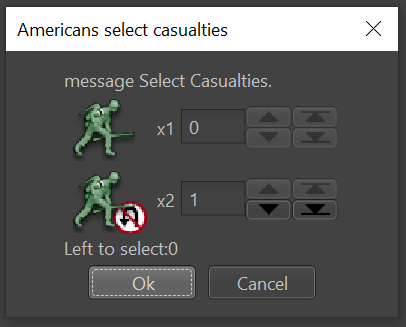
Real screenshots

-
@rainova I have to assume you are either looking at a skin (that is, at a map, if you are using the original skin for the same) whose "units.scale", as defined in "map.praperties", is equal to 0.5625 or you have set such a "Unit Size" via the "View" menu.
Whatever the reason, TripleA supports any kind of unit dimensions (look at "Conquest of the World" if you want to see a map with units sized 256 per 192), so you can have a map whose icon size is 24 or even less before applying any scaling.
My suggestion is just to have a default image which you feel good for most maps (I suggest you taylor it for "Pact of Steel 2".) and allow map-makers to customize the icon (by optionally adding in the skin (maybe inside the "misc" folder of the map) an image which will be used for the matter at hand).
This said, I would agree with always setting the units scale at 1 when displaying unit images while selecting casualties. I don't think that the current program behaviour of applying the scaling there is preferable anyway.
If you want to have an arguably perfectly sized image for the matter at hand, you would need having a vectorial image and assuring it displaying at a given ratio with respect to the size at which the units are being displayed, but I'm not helping you there (as I'm not able to create vectorial images).
-
@cernel Long story short, just use the "24 pixels on both axis" image I provided, without ever scaling it, and don't care if it is sometimes too big or too small, depending on the map.
-
@rainova Thanks for picking this up. I like the version with the no-retreat symbol behind the unit. i don't think I've any objection to changing the casualty picker unit size, before/after screenshots may help.
-
@LaFayette i don't think I've any objection to changing the casualty picker unit size, before/after screenshots may help.
Map is Big_World_1942_v3rules.xml
Screenshot with scaled unit and non-withdrawal icons
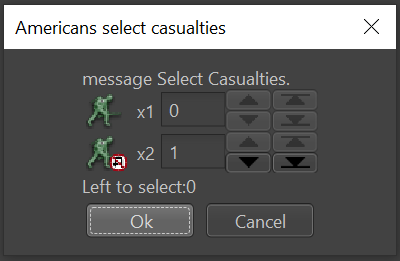
Screenshot with scaled unit icons and 24x24 non-withdrawal icon
@Cernel I suggest you taylor it for "Pact of Steel 2"
The pact of steel variations I can download have no marine units. Neither does pact_of_steel_2_test.xml.I'm happy to try with other maps - please provide

-
Let's define the precise logic:
How about:
In games with units with marine bonus or malus the casualty selection dialog groups units by whether they are attacking from sea and adds a non-withdrawal icon to units attacking from sea.This means:
- The casualty selection dialog groups units by attacking from sea even if they have no marine bonus/malus
(for the sake of traceability by the user) - ... even if the respective player has no units with marine bonus/malus at all,
- but only in games wher some player has units with marine bonus/malus.
- The casualty selection dialog groups units by attacking from sea even if they have no marine bonus/malus
-
@rainova said in Allow user to specifically choose amphibious offloaded units in battle chooser:
Let's define the precise logic:
How about:
In games with units with marine bonus or malus the casualty selection dialog groups units by whether they are attacking from sea and adds a non-withdrawal icon to units attacking from sea.This means:
- The casualty selection dialog groups units by attacking from sea even if they have no marine bonus/malus
(for the sake of traceability by the user) - ... even if the respective player has no units with marine bonus/malus at all,
- but only in games wher some player has units with marine bonus/malus.
This shouldn't have anything to do with the "marine bonus". It only affects units that can't retreat. And right now, the only units that can not retreat are land units that are attacking from the sea (amphibious units).
- The casualty selection dialog groups units by attacking from sea even if they have no marine bonus/malus
-
@rainova said in Allow user to specifically choose amphibious offloaded units in battle chooser:
I'm happy to try with other maps - please provide
Maybe take a look at my "270BC Wars" game. That one has 64x64 unscaled unit images.
-
@trevan said in Allow user to specifically choose amphibious offloaded units in battle chooser:
@rainova said in Allow user to specifically choose amphibious offloaded units in battle chooser:
Let's define the precise logic:
How about:
In games with units with marine bonus or malus the casualty selection dialog groups units by whether they are attacking from sea and adds a non-withdrawal icon to units attacking from sea.This means:
- The casualty selection dialog groups units by attacking from sea even if they have no marine bonus/malus
(for the sake of traceability by the user) - ... even if the respective player has no units with marine bonus/malus at all,
- but only in games wher some player has units with marine bonus/malus.
This shouldn't have anything to do with the "marine bonus". It only affects units that can't retreat. And right now, the only units that can not retreat are land units that are attacking from the sea (amphibious units).
Correct, and I believe the consensus was to apply this matter only to v3+ rules games, since previous to that either all units in the battle or all land units in the battle would be unable to retreat if one or more land units were offloaded into the embattled zone, so there is no actual need to display it. I understood that nothing would visually change for v1 and v2 rules games (not that I'm against if something does).
- The casualty selection dialog groups units by attacking from sea even if they have no marine bonus/malus

Hello! It looks like you're interested in this conversation, but you don't have an account yet.
Getting fed up of having to scroll through the same posts each visit? When you register for an account, you'll always come back to exactly where you were before, and choose to be notified of new replies (either via email, or push notification). You'll also be able to save bookmarks and upvote posts to show your appreciation to other community members.
With your input, this post could be even better 💗
Register Login