TripleA Logo TripleA Forum
    • TripleA Website
    • Categories
    • Recent
    • Popular
    • Users
    • Groups
    • Tags
    • Register
    • Login

    How to modify borders on an existing map

    Scheduled Pinned Locked Moved Map Making
    108 Posts 6 Posters 47.8k Views 5 Watching
    Loading More Posts
    • Oldest to Newest
    • Newest to Oldest
    • Most Votes
    Reply
    • Reply as topic
    Log in to reply
    This topic has been deleted. Only users with topic management privileges can see it.
    • TheDogT Online
      TheDog @Davor Pavlić
      last edited by

      @davor-pavlić
      Send me a link to the file set later this evening, I look at it tomorrow morning.

      https://forums.triplea-game.org/tags/thedog
      https://forums.triplea-game.org/topic/3741/curated-best-top-maps-triplea-guides

      Davor PavlićD 1 Reply Last reply Reply Quote 0
      • Davor PavlićD Offline
        Davor Pavlić @TheDog
        last edited by

        @thedog

        here you go
        https://drive.google.com/drive/folders/1d4lOQ2CbHLe_YhN-n6Gy3XuAaWHuE6lX?usp=share_link

        B 1 Reply Last reply Reply Quote 1
        • B Offline
          beelee @Davor Pavlić
          last edited by

          @davor-pavlić open your TripleA folder and you'll see "error.log"

          Screenshot from 2022-12-01 16-28-29.png

          That should give you some more info. Once you can get the game to actually run, go to the "Debug" top left and hit "Show Console"

          That will also provide more ingame info.

          I think there's a thing called a "stacktrace" that has the error info but I don't remember how to do it

          TheDogT 1 Reply Last reply Reply Quote 2
          • TheDogT Online
            TheDog @beelee
            last edited by TheDog

            @Davor-Pavlić
            in the xml
            line 5420
            need to add block of code for Eastern Poland

            line 5426-ish
            need to add block of code for Southern Italy

            Then for me it ran without error.

            https://forums.triplea-game.org/tags/thedog
            https://forums.triplea-game.org/topic/3741/curated-best-top-maps-triplea-guides

            1 Reply Last reply Reply Quote 2
            • Davor PavlićD Offline
              Davor Pavlić
              last edited by Davor Pavlić

              @thedog

              YAAAH i finally got it to work!!

              So it seemed like changing the things you mentioned wasn't enough, i had an original iron_war downloaded as well, and those two folders were probably messing eachother up because those folders were named the same lol, i never even paid attention to it, but yeah, it is very likely that the problem was the naming of the folders.

              What i did was i deleted the original iron war, and i unzipped my mod and removed 'master' from the name, and that did the trick, after that i managed to run it.
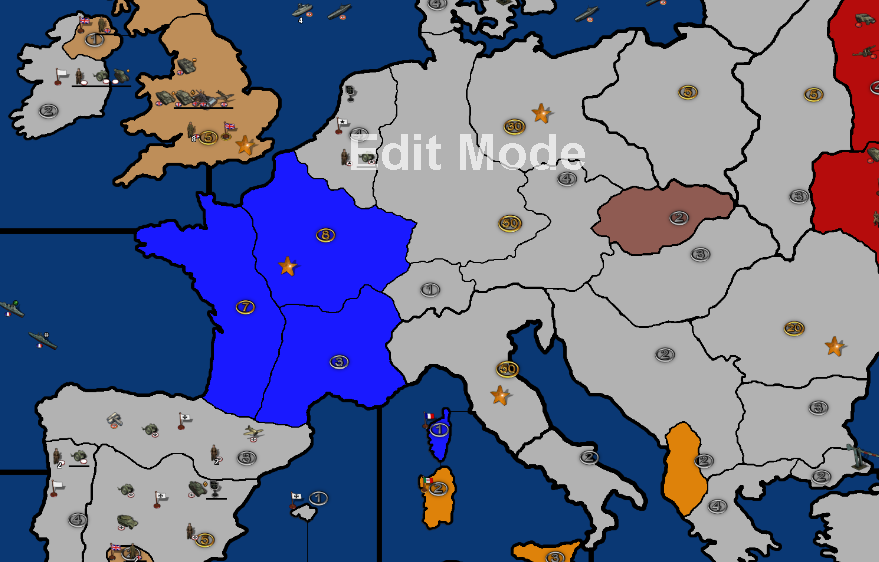
              5e3ba2c2-c49b-4637-894b-d981c9b99b59-image.png

              The baseTile works, buuuut the lines are all weird, the line widths, why is that? The outlines in my map are thicker but when i run it in TripleA some are thinner and some wider.
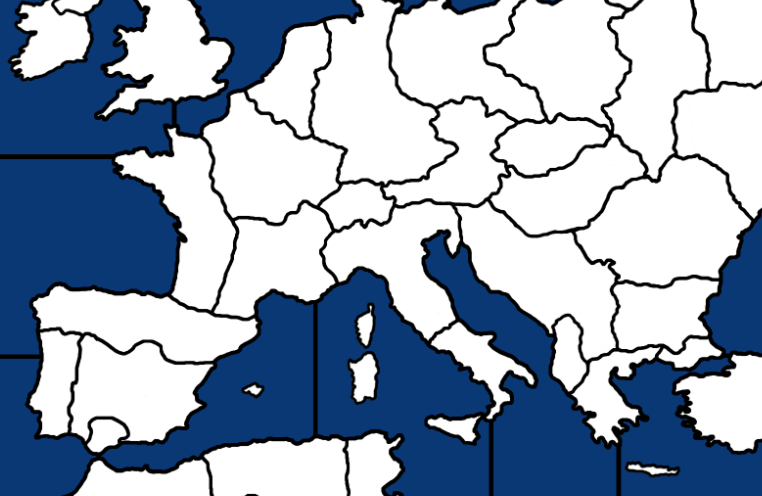
              cdf9e562-db8e-4487-bc4a-821a54541ff7-image.png

              TheDogT 1 Reply Last reply Reply Quote 3
              • TheDogT Online
                TheDog @Davor Pavlić
                last edited by TheDog

                @davor-pavlić
                GONGRATS !!!

                Well done, you got there.

                As you have realised its very important not to have a conflit of similar naming maps. I find it better to cut and paste maps that are very similar to another folder for "storage" and reference.

                I really like Notepad++ as you can have reference files on the left and current project on the right.
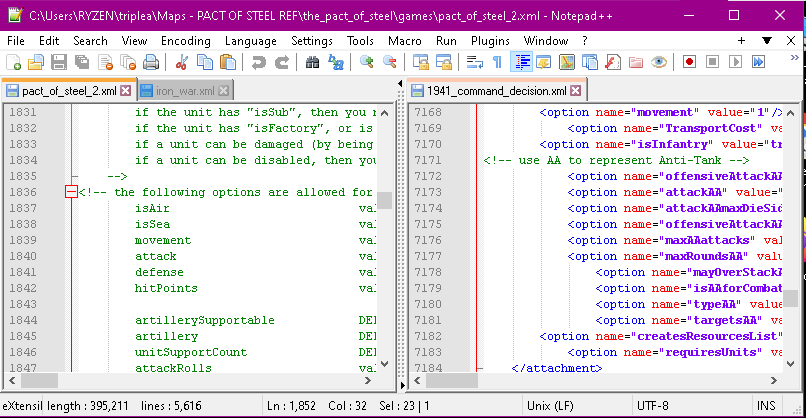
                845ed4e6-5bb9-48e7-9570-645ecc276493-image.png

                Back to your game/map.

                You probably know this
                View> Show Map Details Turns reliefTiles off/on On can completely over-write baseTiles
                View> Show Map Blends Shows an alternative "shade" of the reliefTiles map, the parameters are held in map.properties file

                Hopefully this helps explain the difference in your views/TT border thicknesses.

                https://forums.triplea-game.org/tags/thedog
                https://forums.triplea-game.org/topic/3741/curated-best-top-maps-triplea-guides

                Davor PavlićD 1 Reply Last reply Reply Quote 2
                • Davor PavlićD Offline
                  Davor Pavlić @TheDog
                  last edited by

                  @thedog

                  Oh right, i forgot about that.

                  One more question and im done for today.

                  How do i move the PU icons on the map?

                  For example take a look at Albania in my screenshot above. I would like to center a PU icon in the territory. I tried going in the centers picker in TripleA so i can find the right coordinates, and i typed those coordinates in pu_place for Albania, but it didnt move the icon in the slightest.

                  TheDogT 1 Reply Last reply Reply Quote 1
                  • TheDogT Online
                    TheDog @Davor Pavlić
                    last edited by TheDog

                    @davor-pavlić
                    Never say,

                    One more question and im done for today.

                    As there will be more 😁

                    How do i move the PU icons on the map?

                    Yes pu_place.txt is the file to edit, did you restart TripleA as some files are dynamic, like xml save and load the map they work, other changes require TripleA to be restarted.

                    Some maps have the PU embedded on the reliefTiles like the 2 Shogun maps.

                    https://forums.triplea-game.org/tags/thedog
                    https://forums.triplea-game.org/topic/3741/curated-best-top-maps-triplea-guides

                    Davor PavlićD 1 Reply Last reply Reply Quote 3
                    • Davor PavlićD Offline
                      Davor Pavlić @TheDog
                      last edited by Davor Pavlić

                      @thedog

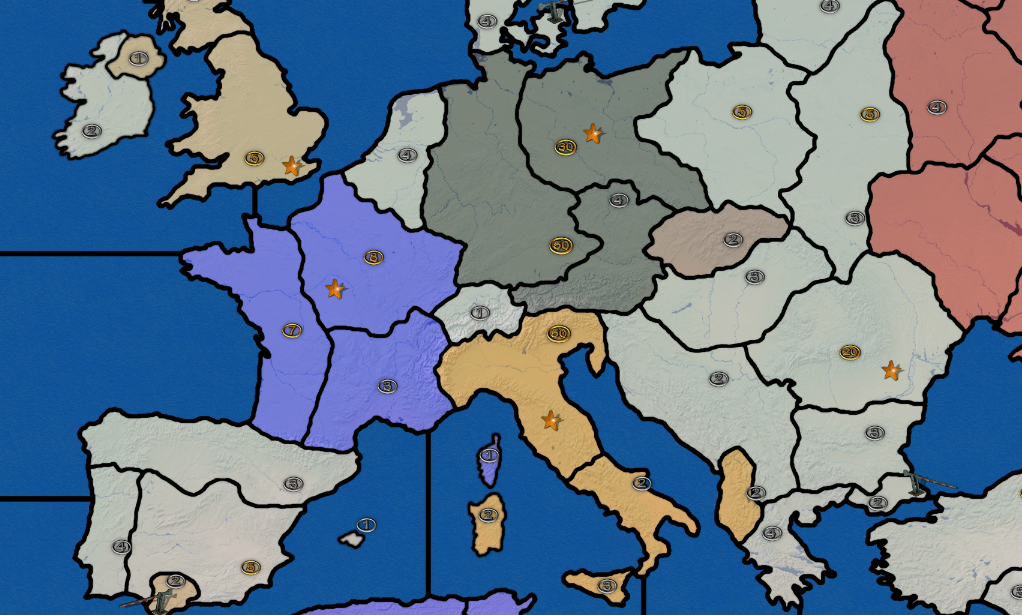
                      This is it boys and gals, after about a week, i have a modified map with reliefTiles. Few weeks ago this kind of thing seemed absolutely impossible for me to ever do, and now i've learned so much in just a week thanks to this amazingly helpful community!

                      This is the current state of the map in-game, with reliefTiles
                      70f129c8-187e-43c4-8618-a5ea0597418b-image.png

                      Is it perfect? Absolutely not, actually it's probably far from done. As of now, i will have to change the pu icons on the map and unit placing, some smaller territories like Albania and Southern Italy get crowded after 4 units placed. Well there is no avoiding it, TTs are just that small, but ill fine-tune it as much as possible. And ill have to move that capital icon for Italy further down, tbh i don't even know why i changed it's coordinates, most likely by accident.

                      I didn't experiment a lot of with relief outline width resulting in borders being this thick, but ill change it.

                      Will i change anything else to the map? Maybe. Maybe add Malta, maybe add Falklands, maybe fine-tune some territories like Kuwait and British Somaliland make them bit smaller because they weren't that huge.

                      I could easily just call it a day and use this map for myself, but i will look forward that this mod reaches a certain playable standard so that everyone can enjoy it. Technically this map isn't done, so i don't think i would like to close this thread and open a new one in Maps & Mods, atleast not until i make a fully playable version for testing and balacing.

                      Thanks to everyone who is contributing to my project, even though it's not a big deal to some, it means a lot to me.

                      For any further questions and issues i guess i will just keep asking here lol

                      TheDogT 1 Reply Last reply Reply Quote 3
                      • TheDogT Online
                        TheDog @Davor Pavlić
                        last edited by TheDog

                        @davor-pavlić
                        It works. 😁

                        Backup your folder
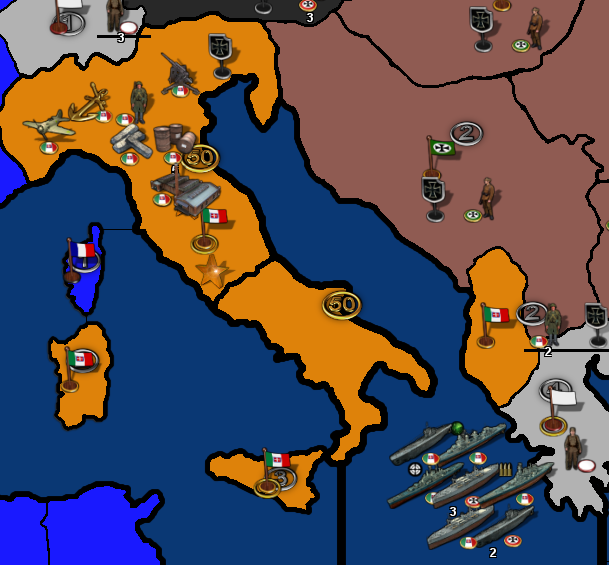
                        To make your units smaller, in the map.properties is this;
                        units.scale=1
                        units.width=60
                        units.height=54

                        Change the unit scale to .75 (Save it)

                        Then run Map creator Tools
                        Step 2: Map Utilities
                        Run the Automatic Placement Finder
                        OK (Info panel)
                        iron_war (folder name)
                        File Suggestion answer No
                        0.75 (Scaling)
                        61 (60px width +1px padding or more)
                        55 (54px height +1px padding or more)
                        This take minutes to complete, go and have a coffee.
                        Save the place.txt
                        bc7f0ed7-f28a-4f2d-9125-d276dbeb554b-image.png

                        https://forums.triplea-game.org/tags/thedog
                        https://forums.triplea-game.org/topic/3741/curated-best-top-maps-triplea-guides

                        Davor PavlićD 1 Reply Last reply Reply Quote 3
                        • Davor PavlićD Offline
                          Davor Pavlić @TheDog
                          last edited by

                          @thedog

                          It worked!

                          1 Reply Last reply Reply Quote 3

                          Hello! It looks like you're interested in this conversation, but you don't have an account yet.

                          Getting fed up of having to scroll through the same posts each visit? When you register for an account, you'll always come back to exactly where you were before, and choose to be notified of new replies (either via email, or push notification). You'll also be able to save bookmarks and upvote posts to show your appreciation to other community members.

                          With your input, this post could be even better 💗

                          Register Login
                          • 1
                          • 2
                          • 3
                          • 4
                          • 5
                          • 6
                          • 6 / 6
                          • First post
                            Last post
                          Copyright © 2016-2018 TripleA-Devs | Powered by NodeBB Forums
