Game notes max width
-
@Cernel Also I've tested that it gives me 30% more wideness also if I set it for a division ("div").
-
@Cernel So here's an example of what I think is the best way to have an image (as well as a consistent background color regardless of window size:
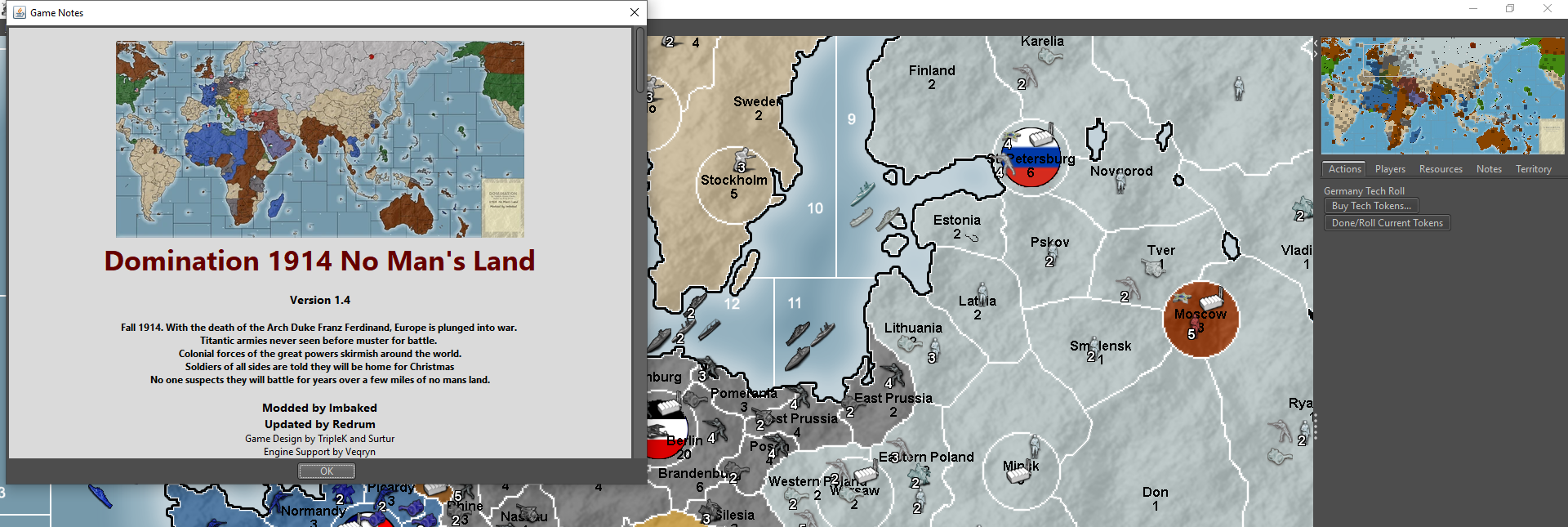
Here is the first part of the HTML:
<body bgcolor="DADADA" align="center">
<div style="text-align: center;">
<br>
<img src="mapScreenshot.png"/>
</div>
</body>
So essentially it sets a background color for the whole notes window to gray (DADADA) then has a div that is centered within the window that holds the image and text. That way if I increased the window size it stays centered:
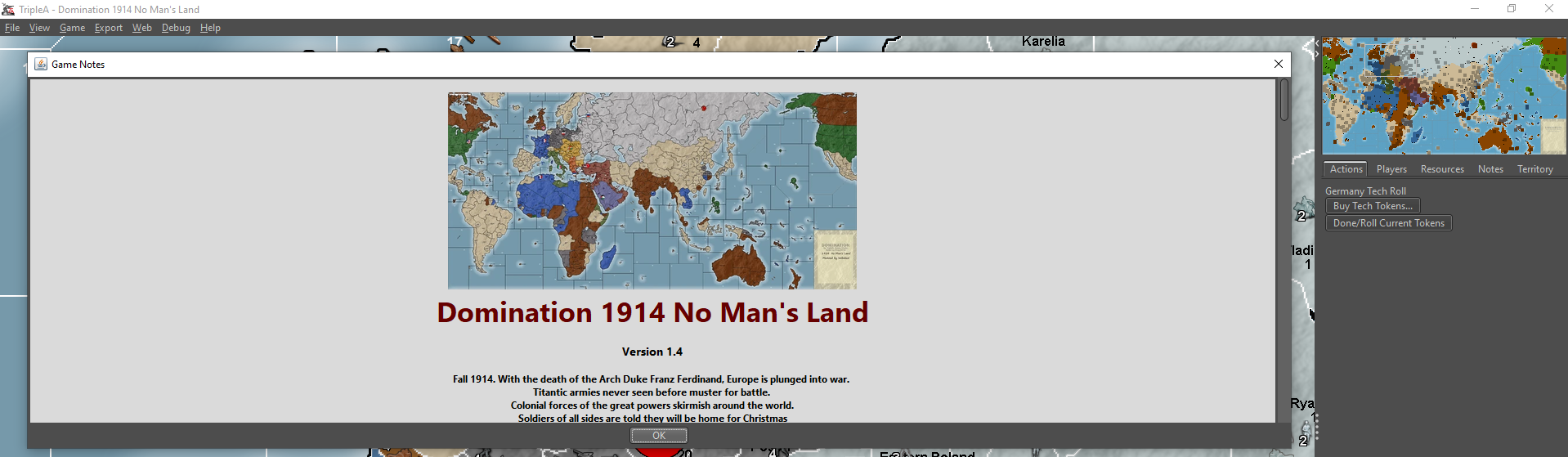
Is that not what you are trying to achieve? Or are you trying to do something else?
-
@redrum That is basically a hack in which you fix infinite wideness, then have all centred, then manually manage line breaks as to assure that no line is going to extend more than it should.
I just want to have a fixed wideness, like in whatever rulebook pdf, like the notes of TWW, but without going images only, to get that. Width works, both for min and for max, apparently, were it non that it is set at 30% more than I ask for, that I see now it is the only issue I have.
That means I want the background too extending for the wanted wideness, no more, also, I don't want to have to take care manually to put every single linebreak, not to exceed the wanted wideness, and, as I said, I tested that the "div" wideness is 30% more too, so, in your example, that would not work, as well, if I have a single line of text that is more than that, unless all text is centred, which I don't want to (I also want not centred text, while all image are centred, as well as some text), and I take care never to have too long lines, by manually managing linebreaks (which I don't want to, either).
So questions are you getting this 30% pixels more than set too and, if so, why is that, and can the program be fixed as taking the actual pixels you are setting?
-
@Cernel I know I could solve the problem of having centred and not centred text by turning all notes into a single table, but I've also actual table, so that would get really messy, and it would be a hack anyways.
Really the only problem is this issue that every time you set a pixels wideness it gives you 130% of what you get. Why???
-
@Cernel Ok, so you want a fixed width in the center portion so you don't have to put lines breaks. Didn't we achieve that in WaW? Something like this shows not having a fixed width in the first line and having a fixed with in the bullet points so they wrap without line breaks?
      <br>(if "Add Elite Marine ArmoredCar Mot.Inf Mech.Inf Adv.Fighter Stuka B.Transport" is deselected at start game, Stuka are substituted with Fighter, in the setup)
      <br>
      <br>
      <br>
      <b>Capitals (shown by flags <img src="flags_small.gif"/>)</b>
      <br>
      <div>
         <ul style="text-align: left; display: inline-block; width: 400px">
            <li><b>Unconditional Surrender</b>: Victory is achieved at any moment the enemy alliance owns only 5 capitals or less (original plus conquered) (the Victory Notification is after Combat).</li>
            <li>Most allied nations (excluding Anzac and China) have multiple capitals.</li>
            <li>If and when any of these capitals are captured, the attacker gains all of the PUs of the owner nation.</li>
            <li>Nevertheless, the defender can collect income again and produce, as long as it holds at least one of its capitals.</li>
            <li>Exception: Russians may still collect income and even produce after all of its capitals are captured.</li>
         </ul>
      </div>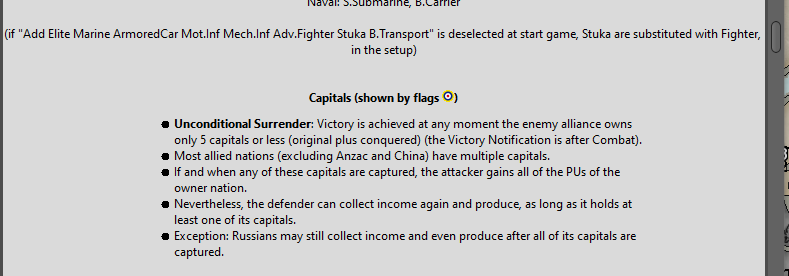
-
@redrum That would not solve the issue of the background extending more than the wanted wideness but is it possible to have those block without them being all "bullet points"?
Basically, when you have this text:
- For each territory owned at the start of the turn, a maximum of 1 new Bunker can be purchased/placed per turn (no stack limits) (bunker placement is additional to normal placement, if a Factory is present).
How can you assure it being as wide as those inline blocks, without putting a line break manually, and avoiding starting all the way to the left without being centred?
-
@redrum Also, those are wrong too, by the way. Just noticing now, but the setting there is 400 pixels wide, while they appear to be 520 pixels wide actually, or anyway surely more than 400 pixels. Why TripleA cannot set the pixels correctly as defined in the file?
(EDIT: I wrote 560 pixels wide, but I meant 520 pixels wide; that was a typo)
-
@Cernel I believe if you put that text in a div and set a similar style to the ul it should work.
Not sure if that is exactly 400 pixels or not. Guess I just assumed that it was. Not sure the easiest way to figure out how many pixels it is displaying as.
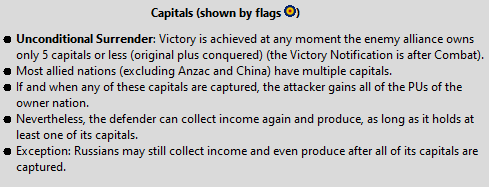
Well my screen is 1920 wide and this fits across it 4 times and a little left over:
-
@redrum said in Game notes max width:
@Cernel I believe if you put that text in a div and set a similar style to the ul it should work.
I guess I'll have to try that (basically a hack, as I see it), if this absurd thing of having +30% pixels than set is not going to be fixed. Or turn all into an image, using a better external program to display the html as coded, then adding it as an image in the game notes, but not a fan of that. I'd prefer if the TripleA notes themselves work as they should.
Not sure if that is exactly 400 pixels or not. Guess I just assumed that it was. Not sure the easiest way to figure out how many pixels it is displaying as.
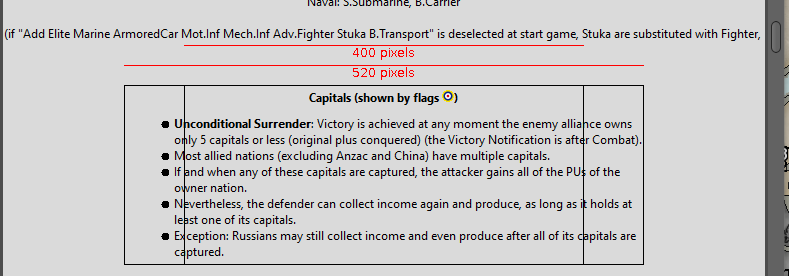
Here you go, that is certainly not 400 pixels wide (just taking the image you posted):
-
@redrum said in Game notes max width:
Well my screen is 1920 wide and this fits across it 4 times and a little left over:
This image is 489 pixels wide. Also you may notice that those things are more to the right than the actual centre, I guess because some space is left before the big dots. If you take that into account, it becomes exactly 520 pixels wide.
-
@Cernel I've obtained the 520 because it extends of up to 260 pixels rightwards from the centre, thus I've extended of the same amount leftwards. It extends less than so to the left, instead. Anyways, those quadrangles are centred and, for sure, it doesn't fit in the 400 pixels wide one, anyways.
520 pixels would be exactly 30% more pixels than 400, that is what I'm getting in all cases.
So, it seems clear to me that TripleA has this major problem of setting any pixel dimensions to 30% more than you set. I guess, so far, mapmakers just set it and, then, look if it is good enough, instead of assuring it being of the wanted dimensions. It would be good if you can actually give a wanted layout to your rulebook, without having to go the TWW way and have it as all images. I can assure that if you call an image, instead, the image is not increased by 30% (of course, overwise the notes of TWW would be all blurred, for example, as well as whatever image).
Practically, if you have a centred image that is 400 pixels wide and, under it, a division that is centred and supposed to be 400 pixels wide too, the image will be 400 pixels wide, while the division will be 520 pixels wide, screwing up the relative layout, other than the absolute one.
-
@Cernel Hmm. Honestly I have no idea. I don't think TripleA does anything beyond using the standard Java HTML rendering so if its displaying 30% wider I don't have a clue to why that would be.
@RoiEX @LaFayette Any thoughts here?
-
@redrum The only way I can explain this is that there must be something somewhere in the program that increases all "px" values given in notes by 30%. It would be good to get rid of it. Hardly any idea why any developers decided to have this, if I'm right.
-
A bit of topic, but .... can notes have background picture instead of background color? If so, what would the code look like?
BTW, and if it is of any use, I use text max width in some map notifications instead of a <br> at every line to keep a long sentence to not make the notification window very wide. Notification code looks like this like this:
HumansIntro=<body><p style="width: 260px"><img src="IntroLogo.png"/><br><b>Humans:</b><br>Bla bla bla.<br><img src="GreatBattleArthur.png"/><br><br></p></body>
But strangely the text field is much wider than 260px, more like 300px. But I just adjust the number to fit the purpose. -
@Frostion said in Game notes max width:
But strangely the text field is much wider than 260px, more like 300px. But I just adjust the number to fit the purpose.
Yes, and I would say that is bad. Then, if someone would (finally) fix this problem (if it is a problem), your layout would be messed up. Probably other mapmakers do the same, and maybe don't even realize it.
My guess is that some developer in the past felt that some notes were too small and added to the program a +30% on any dimensional values, but, of course, I'm merely surmising. If so, better getting rid of this as soon as possible.
As far as background pictures go, I think that would be another topic.
-
@Cernel said in Game notes max width:
My guess is that some developer in the past felt that some notes were too small and added to the program a +30% on any dimensional values, but, of course, I'm merely surmising. If so, better getting rid of this as soon as possible.
Quite positive no. AFAIK the HTML of game notes is plopped into the Swing UI for rendering. I'd conclude it's more a problem with the dimensions calculations the HTML rendering is using. Inline styles of some elements can be overridden to stretch/fill space. You may need to include a 'filler' element that can occupy the extra space that is being used so that the 'filler' is expanded rather than the HTML engine stretching your component. For example, consider this:
<p style="width:500px">
   <p style="width:250px">
  </p>
</p>
you might think that nested element is going to be 250px wide, but the engine sees that the component needs to be made 500px, so you the child styling might lose or might win, it totally depends on the HTML rendering engine.
Some things you can try:
- try a table, the width of tables is usually respected
- avoid nesting elements with width specifications
- see if you can get the HTML to render well in a web browser, if you can't get it to render well there, then there is not much hope in a swing HTML renderer.
-
@LaFayette I've tried in several other cases, also on otherwise completely blank or next to blank notes, as per screenshots at this thread, and it still gives 30% more pixels. Look at this:
https://forums.triplea-game.org/topic/1784/game-notes-max-width/6?page=1 -
@Cernel Give it a try as a web-page. The swing rendering should not be too different, if you can't get it to work there, it's pretty guaranteed swing won't do any better.
-
-
Save the HTML content as a ".html" file and open it in a web browser.



Hello! It looks like you're interested in this conversation, but you don't have an account yet.
Getting fed up of having to scroll through the same posts each visit? When you register for an account, you'll always come back to exactly where you were before, and choose to be notified of new replies (either via email, or push notification). You'll also be able to save bookmarks and upvote posts to show your appreciation to other community members.
With your input, this post could be even better 💗
Register Login