Map editing software
-
@VonnVary Still loving this idea!
Heppell's Highlanders would be a Toronto based unit.

-
@Hepps HEY THERE! Dont leave out the golden horseshoe country hicks!

-
So I was busy last week as I was out of town so I haven't gotten too far on the map making. I do have a question/idea I'd like to run past everyone as it will affect the layout of the map. Should I make only the cities worth PU's and the rest of the country side worth nothing? This would create a more objective based style of play. Or do you think that would detract from the way the game was intended to be played?
Also, how big should each territory roughly be? Any thoughts on this?
-
@Cernel said in Map editing software:
I always also suggest to draw your map so to be fairly good for them (territories big enough for having 100% 48x48 pixels units at least, preferably 100% 64x64 pixels).
I think territories should be as big as the ones of Total World War or (preferably) bigger. You should really keep 4k in mind, in my opinion, and that means TWW would be really bare minimum.
It depends on your map, but I would say go for territories, especially all the important ones, being able to have 8+ units at 100%, fairly well spaced (packed units are kind of annoying and overflow lines are definitely not aiding).
In my opinion, here you can take TWW as a good example and NWO etc. as bad examples; in particular, absolutely try not to do something like WAW, in which you have wildly small and relatively large territories and super packed mini-circles where tons of units use to stay.
My suggestion is to have the map meant to be usually kept at 50% zoom, tho sadly the TripleA zoom is not very good.
If you are making the units anew, I suggest 64x64 pixels. -
In my mind, ideally all maps should have the "average" view (you want to keep most of the time) at 50% zoom, and this is the proper way to have a map that you can actually zoom in (by going over 50%). I think 100% should be like the level at which noone can possibly want to zoom in more, not the normal setting for the map.
Tho, I can't strongly suggest that, as TripleA really needs a better zoom and, then, also a setting for having a default different from 100% per map and a mouse scroll that works well and smoot in changing the zoom setting (the current one is so bad it is basically unusable).
However, you can keep an eye in doing the relief, so to have them zoom friendly (Feudal Japan is an example the map looks very good zoomed at 50%). -
So guess there isn't a 'One size fits all' answer when it comes to the overall size of the map. Just as long as each territory has breathing room for all the units? I also like how you mentioned that the territories should be relatively consistent in size. I will keep this in mind as I build my map. There are 3 sections of the map (Southern Ontario, St. Lawrence River and Eastern Canada) where I will have to blow up the map, kind of like what 'Great War' does with the Eastern Front and Africa). If I do that I can make the territories more uniform and avoid the mess of having too big/small territories.
-
@VonnVary Here is how I have approached map design....
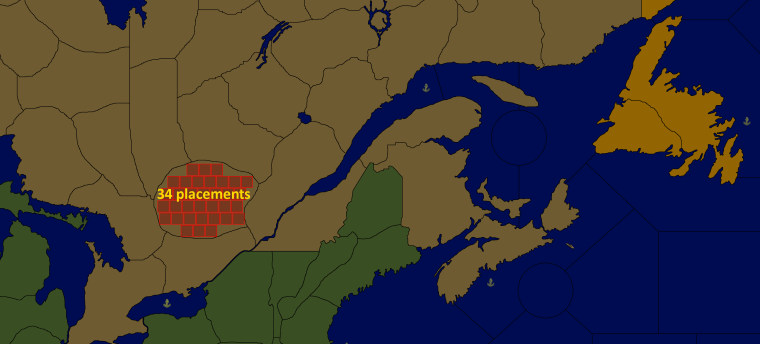
The very first thing I look at is...
-
The number of units I have in my roster.
-
The average number of those units that are going to be in every terr. (there will probably be only a few instances where a territory will have everything).
-
Multiply the average number of units you expect in a territory times the size of the unit... eg. 10 units x (48 pixel x 48 pixel) = the general absolute minimum area you'd want within a territory. Plus add in a couple of pixels high and wide... so if you use 48x 48... put in 50 x 50 for you calculation.
-
Figure out the high end of that scale... eg. you have a total of 14 units per nation.... so you'd want to know how big to make a terr. that is either a Capital or going to see heavy action throughout the game. Remember to factor in Allied nations.... if 2 nations are going to share a territory to hold a front.... think about that because you would then end up with 2 of each of the basic unit types.
-
Draw one of each territory with the appropriate area. Eg. Draw the capital of a nation and the frontline territory for the conflict.
-
Now you can transplant that territory into you map.... If it takes up half the map... its time to rescale the map. If you haven't drawn the map... then you have a great starting point to know how big the map will need to be.
-
-
This is how a section of placements look in my not yet playable Iron War Europe map:
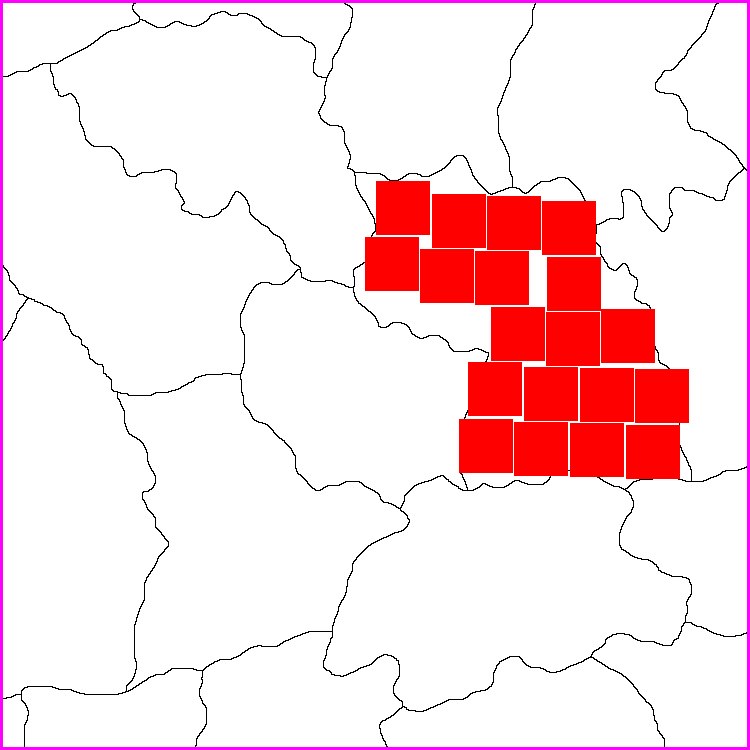
I made the map to be displayed at 100%, also the units at 100%. My units aim to be max 54 pixels high (also 54x54 in map.properties). My experience is that this is the maximum height that still allows units to be displayed in all the windows without being cut in any way.
My map has a lot of unit types, but I don’t make my territories as large as Hepps. On the other hand I don’t want to make them so small that there is no room and unit types would overflow and make that ugly line to the right.
I would advise you to define all the placements manually and not automatically. The result is so much better even if it can take a loooong time to do
 Remember, when making the placements, to save an area of the territory you are working on for last, so that the last placement can be placed in the right side of the territory, so that you have control over where that overflow line is made and that it does not overflowing and cover other units in the same territory.
 -
Totally agree with all of that. I was going with just map design without dealing with the next steps... but since Pandora's box is open I will add one more thing about planning your manual placements out.
When you are laying out manual placements.... aiming to leave one of the last placements on the right side of the territory..... also plan to have that last placement as one that will not run straight through the center of the next territory.
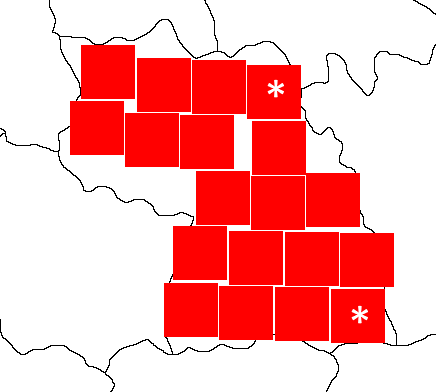
Building on Frostion' example... the two territories marked with the asterix (*) would be ideal choices for a last placement. That way any potential overflow would run through the border of the neighboring territory and allow you to still move units from that neighboring territory without having the overflow blocking a good portion of them.
-
Great tips @Hepps & @Frostion! Since the maximum amount of units I could ever have in each territory is limited to 8 (Infantry, Hepp's Highlander, Artillery, Tank, Factory, AA, Fighter, Bomber) that would mean I should consider each territory to have room for 8 x 54 pixels each. I think that's workable. Like I said the other day I am still working redrawing and scaling the map properly. But perhaps I should be drawing the 3 conflict zones first (Ontario, Quebec & the Maritimes). Again, thanks for the help. I will get back to you guys when I've made some progress.



Hello! It looks like you're interested in this conversation, but you don't have an account yet.
Getting fed up of having to scroll through the same posts each visit? When you register for an account, you'll always come back to exactly where you were before, and choose to be notified of new replies (either via email, or push notification). You'll also be able to save bookmarks and upvote posts to show your appreciation to other community members.
With your input, this post could be even better 💗
Register Login