TripleA Logo TripleA Forum
    • TripleA Website
    • Categories
    • Recent
    • Popular
    • Users
    • Groups
    • Tags
    • Register
    • Login

    Help: National Objectives are removed when editing name of map file

    Scheduled Pinned Locked Moved Map Making
    51 Posts 7 Posters 14.4k Views 6 Watching
    Loading More Posts
    • Oldest to Newest
    • Newest to Oldest
    • Most Votes
    Reply
    • Reply as topic
    Log in to reply
    This topic has been deleted. Only users with topic management privileges can see it.
    • Jason Green-LoweJ Offline
      Jason Green-Lowe
      last edited by

      What string are you using in the objectives.properties file? My understanding is that objectives.properties has to match the info name from line 4.

      PantherP 1 Reply Last reply Reply Quote 0
      • PantherP Offline
        Panther Admin Moderators @Jason Green-Lowe
        last edited by

        @Jason-Green-Lowe I did not touch it at all.

        What I did was:

        • I moved to your Github repo and downloaded the map-zip manually from there.
        • I edited line 2195 of the xml as noted above
        • I moved the complete zip-file into my downloadedMaps folder

        That's all. Works perfectly fine.

        Don't always trust TripleA when it comes to rules questions. Know the rules before you start … and better check what TripleA has done.

        1 Reply Last reply Reply Quote 0
        • Jason Green-LoweJ Offline
          Jason Green-Lowe
          last edited by

          OK, that's great! I'm glad it's working. What I need to find out is whether your objectives.properties file is using "1941balancedmod" or "World_War_II_v3_1941_Balanced_Mod" as the prefix. I made that change in github just a few minutes ago, and I don't know which version you downloaded.

          PantherP 1 Reply Last reply Reply Quote 0
          • PantherP Offline
            Panther Admin Moderators @Jason Green-Lowe
            last edited by

            @Jason-Green-Lowe I downloaded the version before the changes you applied.
            I assume you shouldn't have touched the objectives.properties file.

            Don't always trust TripleA when it comes to rules questions. Know the rules before you start … and better check what TripleA has done.

            1 Reply Last reply Reply Quote 0
            • Jason Green-LoweJ Offline
              Jason Green-Lowe
              last edited by

              OK, thanks. I'll revert the objectives.properties changes, and try it with:

              Line 4 - World War II v3 1941 Balanced Mod
              Line 2195 - 1941balancedmod
              objectives.properties - World_War_II_v3_1941_Balanced_Mod

              PantherP 1 Reply Last reply Reply Quote 0
              • PantherP Offline
                Panther Admin Moderators @Jason Green-Lowe
                last edited by Panther

                @Jason-Green-Lowe Yes. I think Line 2195 was the only change needed, nothing else.

                Don't always trust TripleA when it comes to rules questions. Know the rules before you start … and better check what TripleA has done.

                1 Reply Last reply Reply Quote 0
                • Jason Green-LoweJ Offline
                  Jason Green-Lowe
                  last edited by

                  @Jason-Green-Lowe said in Help: National Objectives are removed when editing name of map file:

                  World_War_II_v3_1941_Balanced_Mod

                  Well, I have made exactly the changes you suggested on github, but I am still getting the "MapNotFoundException" error. For some reason, your local copy of TripleA is able to search for and find a map called "1941balancedmod" and mine is not. I do not understand what is going wrong, and I am feeling frustrated.

                  PantherP 1 Reply Last reply Reply Quote 0
                  • PantherP Offline
                    Panther Admin Moderators @Jason Green-Lowe
                    last edited by Panther

                    @Jason-Green-Lowe
                    I have already downloaded the new map-zip from your Github repo - and it works fine.

                    Please try that.

                    Before delete the map zip and the map-properties file from your downloadedMaps folder.

                    Don't always trust TripleA when it comes to rules questions. Know the rules before you start … and better check what TripleA has done.

                    1 Reply Last reply Reply Quote 0
                    • Jason Green-LoweJ Offline
                      Jason Green-Lowe
                      last edited by

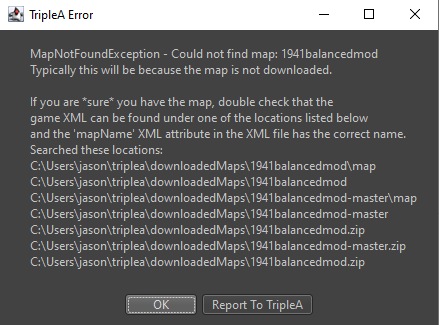
                      I did just that -- I deleted the map zip and the map-properties folder, uninstalled and reinstalled tripleA, downloaded the new map-zip, and got this error:
                      c0a69410-3f2c-4384-aab7-37d0ebaf9cb1-image.png

                      PantherP 2 Replies Last reply Reply Quote 0
                      • PantherP Offline
                        Panther Admin Moderators @Jason Green-Lowe
                        last edited by Panther

                        @Jason-Green-Lowe

                        What I asked you was to manually download the zip file from your repo and place it manually into your downloadedMaps folder - to see that it works.

                        Did you use the ingame-downloader?

                        Don't always trust TripleA when it comes to rules questions. Know the rules before you start … and better check what TripleA has done.

                        1 Reply Last reply Reply Quote 0
                        • PantherP Offline
                          Panther Admin Moderators @Jason Green-Lowe
                          last edited by Panther

                          @Jason-Green-Lowe

                          I see the culprit now:

                          You seem to have renamed the map folder at any time from
                          1941balancedmod

                          to

                          worldwar_II_v3_balanced....

                          or vice versa

                          The mapfolder name must match the mapname in line 2195.

                          When I use the ingame downloader I download a file called
                          "world_war_ii_v3_1941_balanced_mod-master.zip".

                          From your repo I get
                          "1941balancedmod-master.zip"

                          It is this "1941balancedmod-master.zip" that works fine.

                          Don't always trust TripleA when it comes to rules questions. Know the rules before you start … and better check what TripleA has done.

                          1 Reply Last reply Reply Quote 0
                          • Jason Green-LoweJ Offline
                            Jason Green-Lowe
                            last edited by

                            OK, let's say that that's the culprit. How do I name the map folder? I do not know how to control what the name of the folder is.

                            PantherP 1 Reply Last reply Reply Quote 0
                            • C Offline
                              Cernel Moderators @Jason Green-Lowe
                              last edited by

                              @Jason-Green-Lowe said in Help: National Objectives are removed when editing name of map file:

                              Excellent! I'm glad it's working for you, at least.

                              I took your advice and edited github so that the string is "1941balancedmod" everywhere. So now that's the string I'm using for the info name, the mapName, and the repo folder name.

                              Unfortunately, it's still not working on my downloaded version. What was the exact change you made locally?

                              You only needed to change the mapName value to that. This is what I said:

                              If you want "World War II v3 1941 Balanced Mod" to be a game of the "1941balancedmod" map, you need to have this name as its "mapName" property value.

                              In the moment you did that and it didn't work, that normally means you don't have a map folder called "1941balancedmod" in your "downloadedMaps" folder. Regardless, the problem should not be within the game (XML) file (meaning that changing the "info name" won't matter).


                              I think "1941balancedmod" is not a very good name, by the way, at least because it may refer either to v3 or v6 (and actually v6 is the only one that is strictly 1941).

                              1 Reply Last reply Reply Quote 0
                              • PantherP Offline
                                Panther Admin Moderators @Jason Green-Lowe
                                last edited by Panther

                                @Jason-Green-Lowe

                                Now you have

                                "1941_balanced_mod" instead of "1941balancedmod".

                                Don't always trust TripleA when it comes to rules questions. Know the rules before you start … and better check what TripleA has done.

                                1 Reply Last reply Reply Quote 0
                                • Jason Green-LoweJ Offline
                                  Jason Green-Lowe
                                  last edited by

                                  Panther, Cernel, I appreciate your help, but your statements are not clear enough for me to take action based on those statements.

                                  I am willing to make whatever changes are needed, but I need you to tell me very specifically what line to change in what document.

                                  For example, how do I change the name of the folder that is created when someone downloads the map from tripleA?

                                  C 1 Reply Last reply Reply Quote 0
                                  • PantherP Offline
                                    Panther Admin Moderators
                                    last edited by Panther

                                    @Jason-Green-Lowe

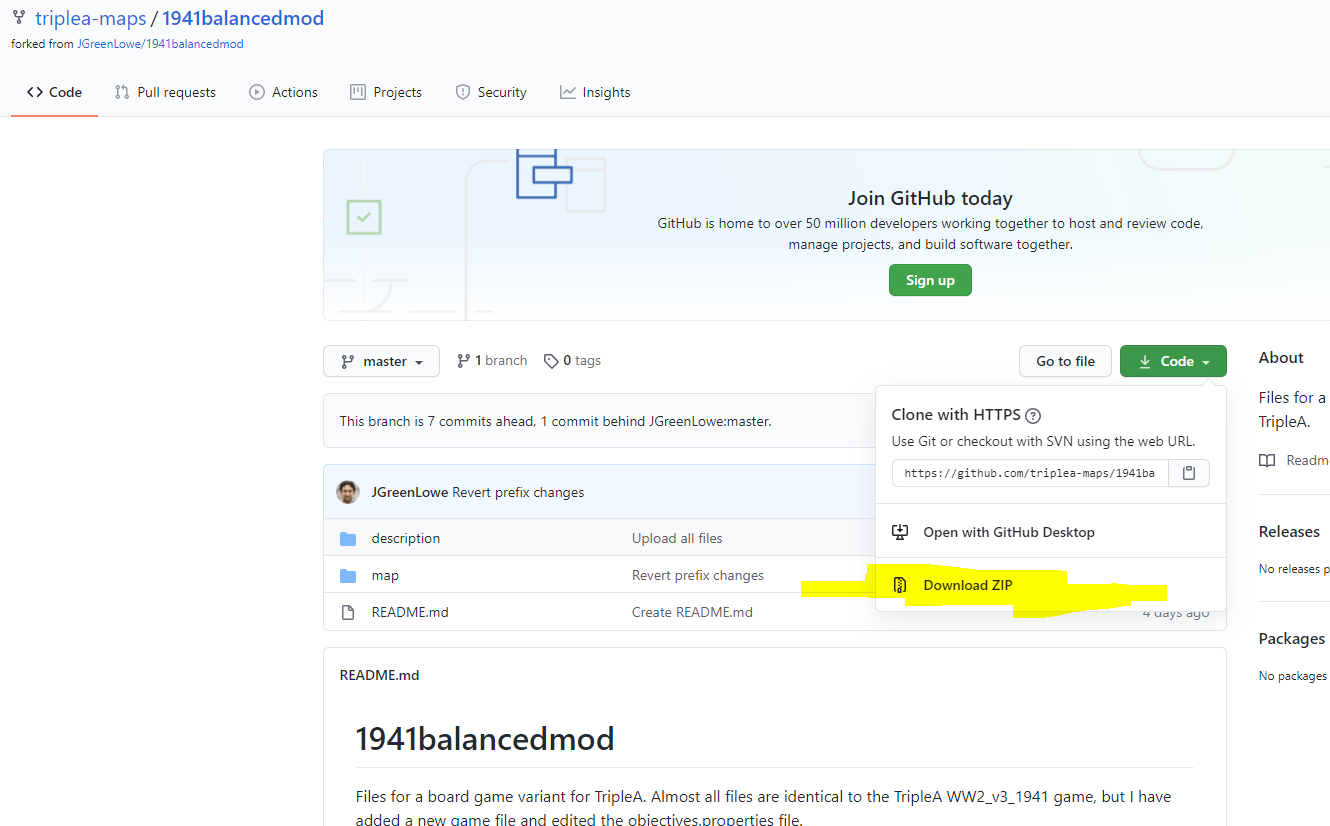
                                    Again: The current map-zip file that you can download directly from your repo :
                                    repo.PNG

                                    is working fine, when placed into your downloadedMaps folder.

                                    Please try that out to reproduce that!

                                    The new problem is somewhere else.

                                    Don't always trust TripleA when it comes to rules questions. Know the rules before you start … and better check what TripleA has done.

                                    PantherP 1 Reply Last reply Reply Quote 0
                                    • C Offline
                                      Cernel Moderators @Jason Green-Lowe
                                      last edited by

                                      @Jason-Green-Lowe A way it shoul work is all of this:

                                      • The name of the GitHub repository is "https://github.com/triplea-maps/1941balancedmod".
                                      • The info name within the WW2v3-1941balmod.xml game file is equal to World War II v3 1941 Balanced Mod.
                                      • The mapName property value within the WW2v3-1941balmod.xml game file is equal to 1941balancedmod.
                                      • Every line within the https://github.com/triplea-maps/1941balancedmod/blob/master/map/objectives.properties starts as World_War_II_v3_1941_Balanced_Mod.

                                      As long as everything is as above (as it looks like it is), you should not be in need to make any changes, for the matter at hand, within your https://github.com/triplea-maps/1941balancedmod repository, and everyone downloading the map thorugh TripleA from that repository should be fine. If you are not, chances is that you have some other game file somewhere that you are currently selecting, so just clean (delete everything inside) your "downloadedMap" folder, then download your map through TripleA (like anyone else).

                                      1 Reply Last reply Reply Quote 1
                                      • PantherP Offline
                                        Panther Admin Moderators @Panther
                                        last edited by Panther

                                        @Jason-Green-Lowe

                                        Now the current problem is that when using the ingame downloader the folder

                                        "1941balancedmod-master"

                                        is zipped under

                                        "\world_war_ii_v3_1941_balanced_mod-master.zip"

                                        So there is an incorrect structure:

                                        \downloadedMaps\world_war_ii_v3_1941_balanced_mod-master.zip\1941balancedmod-master\

                                        I have currently no idea where this subordinate "world_war-ii_v3_1941_balanced_mod" derives from.

                                        This is causing the problem. Your repo and XML seem to be fine now.

                                        Don't always trust TripleA when it comes to rules questions. Know the rules before you start … and better check what TripleA has done.

                                        1 Reply Last reply Reply Quote 0
                                        • Jason Green-LoweJ Offline
                                          Jason Green-Lowe
                                          last edited by

                                          I have currently no ides where this subordinate "world_war-ii_v3_1941_balanced_mod" dervives from.
                                          This is causing the problem.

                                          OK, well, I agree. Who would know the answer to that question?

                                          1 Reply Last reply Reply Quote 0
                                          • Jason Green-LoweJ Offline
                                            Jason Green-Lowe
                                            last edited by

                                            @Cernel

                                            Thank you; that information is in the format I am looking for, but it was not successful. I uninstalled tripleA, deleted my entire downloadedMaps folder as well the folder above that with the options.cache, and reinstalled and downloaded everything from scratch and got the same error.

                                            I believe the problem is as Panther said: the folder name is wrong in the zip, but I don't know what sets the folder name for the zip or how to change it.


                                            PantherP 1 Reply Last reply Reply Quote 0

                                            Hello! It looks like you're interested in this conversation, but you don't have an account yet.

                                            Getting fed up of having to scroll through the same posts each visit? When you register for an account, you'll always come back to exactly where you were before, and choose to be notified of new replies (either via email, or push notification). You'll also be able to save bookmarks and upvote posts to show your appreciation to other community members.

                                            With your input, this post could be even better 💗

                                            Register Login
                                            • 1
                                            • 2
                                            • 3
                                            • 3 / 3
                                            • First post
                                              Last post
                                            Copyright © 2016-2018 TripleA-Devs | Powered by NodeBB Forums