TripleA Logo TripleA Forum
    • TripleA Website
    • Categories
    • Recent
    • Popular
    • Users
    • Groups
    • Tags
    • Register
    • Login

    Achievable improvements to the Triplea User Interface

    Scheduled Pinned Locked Moved Development
    130 Posts 9 Posters 74.0k Views 8 Watching
    Loading More Posts
    • Oldest to Newest
    • Newest to Oldest
    • Most Votes
    Reply
    • Reply as topic
    Log in to reply
    This topic has been deleted. Only users with topic management privileges can see it.
    • TheDogT Online
      TheDog @butterw
      last edited by

      @butterw
      Here is what I did

      Copied all of TripleA version 2.5.22294 folder to TripleA folder (as I donrt have one)

      Copied your .jar file to C:\Program Files\TripleA\bin

      Renamed triplea-game-headed-2.5.22294.jar to triplea-game-headed-2.5.22294.jar-org (to be able to return to the original if I need to)

      Renamed your triplea-game-headed-2.5-bu.jar to triplea-game-headed-2.5.22294.jar

      Ran TripleA.exe from C:\Program Files\TripleA

      Loaded a map/scenario

      I get [Play2] [ MainPanel Quit 2] buttons so I know its your changes.

      Will it work with 2.6.246 ?

      https://forums.triplea-game.org/tags/thedog
      https://forums.triplea-game.org/topic/3741/curated-best-top-maps-triplea-guides

      B TheDogT B 3 Replies Last reply Reply Quote 2
      • B Offline
        butterw @TheDog
        last edited by butterw

        @thedog said in Achievable improvements to the Triplea User Interface:

        @butterw
        Here is what I did

        Copied all of TripleA version 2.5.22294 folder to TripleA folder (as I donrt have one)

        Copied your .jar file to C:\Program Files\TripleA\bin

        Renamed triplea-game-headed-2.5.22294.jar to triplea-game-headed-2.5.22294.jar-org (to be able to return to the original if I need to)

        Renamed your triplea-game-headed-2.5-bu.jar to triplea-game-headed-2.5.22294.jar

        Ran TripleA.exe from C:\Program Files\TripleA

        Loaded a map/scenario

        I get [Play2] [ MainPanel Quit 2] buttons so I know its your changes.

        Good point. You need to have an existing 2.5 or 2.6 installation/triplea folder to be able to use a .jar file (as it requires java11 and an assets folder).

        On Windows, if you have used the exe installer it creates an exe launcher, in which case you can rename the jar file to match the installed version. Otherwise you can modify the provided shortcut to use your javaw.exe path (ex: "C:\Program Files\Triplea\jre\bin\javaw.exe").

        There is a single html file to be added to assets to demo the "Help > browse Game Notes" command, as embedded Game Notes from v2.5 cannot be viewed in browser.

        Will it work with 2.6.246 ?

        Yes your method should also works with a 2.6 installation.

        1 Reply Last reply Reply Quote 0
        • TheDogT Online
          TheDog @TheDog
          last edited by

          10. Production
          The < should really be ≤
          Oooh and its a counter, it counts down if you bought that unit in previous turns.
          Liking the Factory production capacity.

          The Construction tab, could be renamed as Place Anywhere ?

          5. Right Sidebar
          The ideal size of the mini map/smallMap.jpg is 240 x 240 pixels or less.
          See here.
          https://forums.triplea-game.org/topic/2637/standard-image-sizes

          So to that end the Command/Action, Players, Resources, Territory menu bar should also be 240 pixels or less so that it stays in just one level and does not double up, as it does now. (I know we will lose the Notes and the ** of the command).

          6. Map Zoom another ++Good function.

          New
          Can the File, View, Game, Export, Tools, Help menu fit in to the right hand panel of 240-ish pixels and its space be freed up so the main map can replace the space freed up by the File ... menu bar?

          https://forums.triplea-game.org/tags/thedog
          https://forums.triplea-game.org/topic/3741/curated-best-top-maps-triplea-guides

          TheDogT B 2 Replies Last reply Reply Quote 0
          • TheDogT Online
            TheDog @TheDog
            last edited by

            @butterw
            A quick test on 2.6.246, your file does load/work and the Zoom works, I shall test further.

            https://forums.triplea-game.org/tags/thedog
            https://forums.triplea-game.org/topic/3741/curated-best-top-maps-triplea-guides

            1 Reply Last reply Reply Quote 0
            • B Offline
              butterw @TheDog
              last edited by butterw

              I will try ≤ for the Production panel and will use it, if it works. Thanks For the suggestion. I used < because it is a standard character (always available and typically more readable).

              @thedog said in Achievable improvements to the Triplea User Interface:

              New
              Can the File, View, Game, Export, Tools, Help menu fit in to the right hand panel of 240-ish pixels and its space be freed up so the main map can replace the space freed up by the File ... menu bar?

              Seems doubtful. Different look&feels/fonts/font sizes can be used, so what you see on your screen may not be the same as what others see (ex: with HiDPi Font scaling or on a different OS).
              Beyond that, putting the main toolbar in a side panel instead of the main frame is non standard, and would require extensive code modifications. So it's not just a question of whether it fits or looks OK.

              EDIT: Adding an option to shorten some text displays in the interface is something I will consider.
              I will try out displaying abbreviated names ex: player "BRI" instead of "British". But, maybe this simplification should be done at the map xml level instead.

              TheDogT 1 Reply Last reply Reply Quote 1
              • TheDogT Online
                TheDog @butterw
                last edited by

                @butterw
                As an aside I thought your UI was running faster than my usual 2.6.246.

                So I did my standard test, see here;
                https://github.com/triplea-game/triplea/issues/9001
                and I got 41 seconds

                I thought fluke 39s
                and 39s

                Sadly not many people will appreciate what you have done as its about the same speed as v2.5 so they will not see the massive speed difference.

                https://forums.triplea-game.org/tags/thedog
                https://forums.triplea-game.org/topic/3741/curated-best-top-maps-triplea-guides

                B 1 Reply Last reply Reply Quote 0
                • B Offline
                  butterw @TheDog
                  last edited by

                  @thedog My code isn't optimized.
                  If your results are correct it would suggest there is a performance issue with v2.6.

                  TheDogT 1 Reply Last reply Reply Quote 0
                  • TheDogT Online
                    TheDog @butterw
                    last edited by

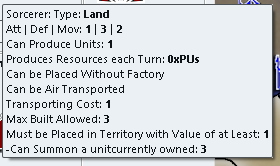
                    A minor formatting problem.

                    883f21a1-b9cb-4d82-9ae0-93d7f8bf6add-image.png

                    Above the "-Can Summon a unit" is a tooltip comes from the file tooltips.properties.
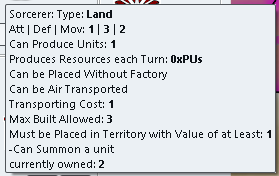
                    e9093254-22af-4c09-93ba-21afbd7473b5-image.png

                    Above the unit without a tool tip.

                    So "currently owned:" needs a capital C ?
                    And catering for tool tips.

                    https://forums.triplea-game.org/tags/thedog
                    https://forums.triplea-game.org/topic/3741/curated-best-top-maps-triplea-guides

                    TheDogT 1 Reply Last reply Reply Quote 0
                    • TheDogT Online
                      TheDog @TheDog
                      last edited by

                      d85cbb10-8152-4cd3-a154-04b16e49d6c6-image.png

                      For me its CTRL (not ALT) while Scrolling the Mouse Wheel.

                      https://forums.triplea-game.org/tags/thedog
                      https://forums.triplea-game.org/topic/3741/curated-best-top-maps-triplea-guides

                      TheDogT 1 Reply Last reply Reply Quote 0
                      • TheDogT Online
                        TheDog @TheDog
                        last edited by TheDog

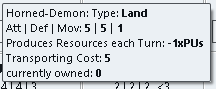
                        044acefe-d9c0-40ca-b632-156b6344a971-image.png

                        17 this is fantastic and correct, 7 Factories that can produce 2 units each and 3 Sorcerers that can produce 1 unit each, total 17.

                        .
                        A feature request.
                        The ability to cycle round "Production" capable Units with a CTRL+P or similar, in any phase of the game.
                        This would be "isFactory" units but might also include "canProduceUnits"?

                        https://forums.triplea-game.org/tags/thedog
                        https://forums.triplea-game.org/topic/3741/curated-best-top-maps-triplea-guides

                        B 1 Reply Last reply Reply Quote 0
                        • B Offline
                          butterw @TheDog
                          last edited by

                          Improved Production Panel

                          @thedog

                          • Does adding <br> to the last entry of your tooltips.properties solve the issue (also check, if you get an empty line with regular triplea) ?

                          • "currently owned" isn't capitalized because it's helpful for dev to know it was added to the tooltip.

                          • The MoveHelpMenu ui was added to v2.6-pre. I need to backport my latest version to this build.

                          • ≤ looks OK.

                          • There is currently no check on placement restriction (if applicable), so that aspect could still be improved.

                          • Tabs of the Right-Hand side Panel could fit in a single line if the title is shortened (with the full text in the tooltip).
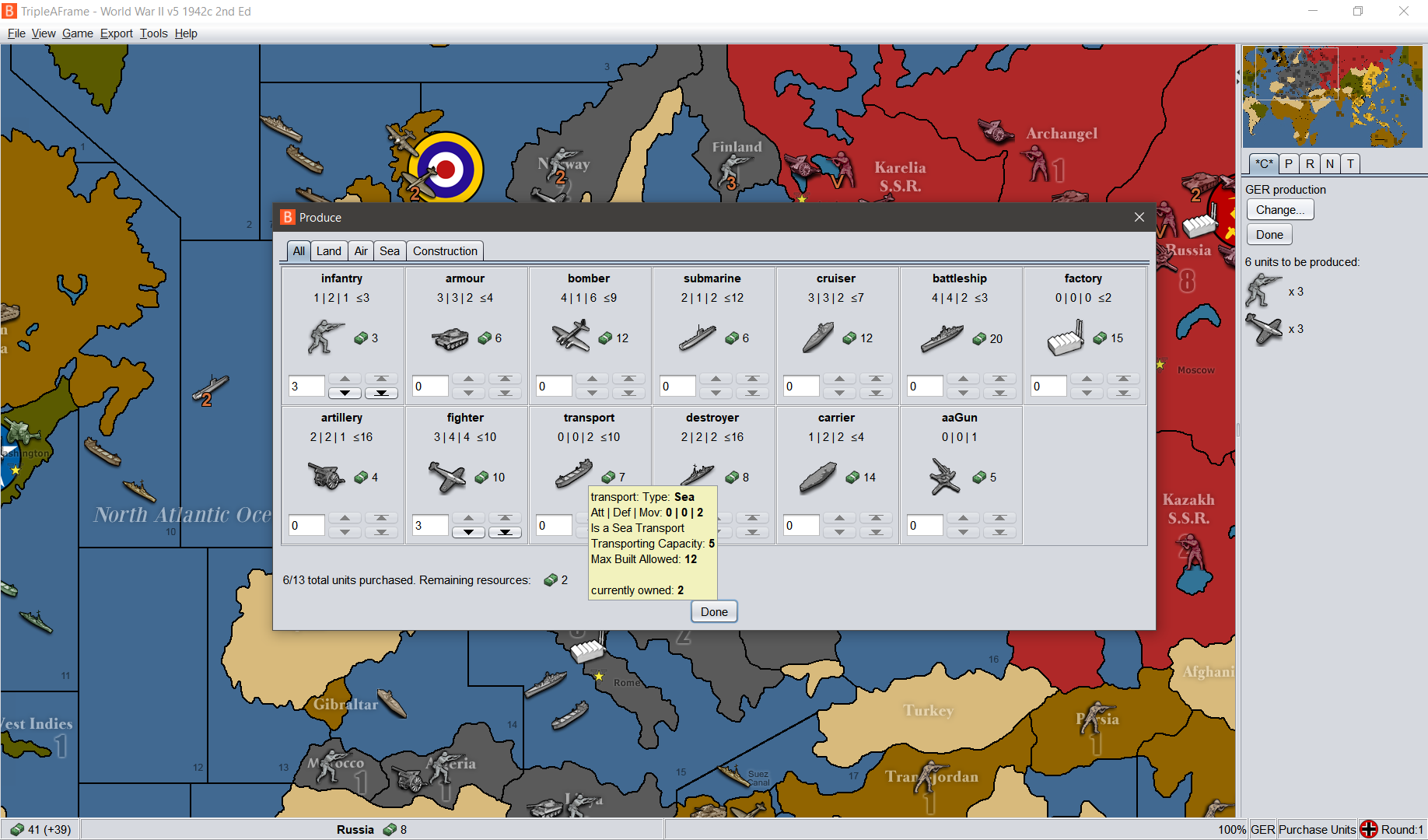
                            alt text

                          v2.5.31-bu patch with Win10 @100%dpi (custom scaling with font scaling%: 125)
                          L&F: Nimbus (Font: sansserif-15).
                          I've shortened the player name from Germans to GER in the map and I'm using a 24x24 pixel player flag

                          TheDogT 1 Reply Last reply Reply Quote 0
                          • TheDogT Online
                            TheDog @butterw
                            last edited by

                            78344fa7-5266-4d9c-ae5a-39c6cb9ed644-image.png

                            Putting <br> at the end of the tooltip works, but its not common practice, so all maps with tooltips will need this adding.

                            Can the currently owned be placed before the tooltips?

                            https://forums.triplea-game.org/tags/thedog
                            https://forums.triplea-game.org/topic/3741/curated-best-top-maps-triplea-guides

                            TheDogT B 2 Replies Last reply Reply Quote 0
                            • TheDogT Online
                              TheDog @TheDog
                              last edited by

                              @butterw "There is currently no check on placement restriction"

                              Im not sure what the above means.

                              For example, in two of my maps I have placement restriction, an aircraft carrier cannot be placed or move into a river, whereas a Destroyer can.

                              https://forums.triplea-game.org/tags/thedog
                              https://forums.triplea-game.org/topic/3741/curated-best-top-maps-triplea-guides

                              TheDogT B 2 Replies Last reply Reply Quote 0
                              • TheDogT Online
                                TheDog @TheDog
                                last edited by TheDog

                                @butterw
                                I dont appear to be able to use the Battle Calculator as I used to, how do I activate it?

                                Also it does not detect the nations in the fight and default always to the same two.

                                https://forums.triplea-game.org/tags/thedog
                                https://forums.triplea-game.org/topic/3741/curated-best-top-maps-triplea-guides

                                B 1 Reply Last reply Reply Quote 0
                                • B Offline
                                  butterw @TheDog
                                  last edited by

                                  Battle Calculator

                                  @thedog
                                  Battle Calculator is launched via CTRL+B or Game Menu.

                                  I didn't intentionnally change how it works. But it's unclear what the current ways to use it are (Probably needs to be documented ?)

                                  TheDogT 1 Reply Last reply Reply Quote 0
                                  • B Offline
                                    butterw @TheDog
                                    last edited by

                                    @thedog said in Achievable improvements to the Triplea User Interface:

                                    @butterw "There is currently no check on placement restriction"

                                    Im not sure what the above means.

                                    For example, in two of my maps I have placement restriction, an aircraft carrier cannot be placed or move into a river, whereas a Destroyer can.

                                    Ideally, you would get a warning when you attempt to purchase more units than you are currently able to place because of placement restrictions.

                                    TheDogT 1 Reply Last reply Reply Quote 0
                                    • B Offline
                                      butterw @TheDog
                                      last edited by butterw

                                      @thedog said in Achievable improvements to the Triplea User Interface:

                                      78344fa7-5266-4d9c-ae5a-39c6cb9ed644-image.png

                                      Putting <br> at the end of the tooltip works, but its not common practice, so all maps with tooltips will need this adding.

                                      Can the currently owned be placed before the tooltips?

                                      • putting it after the main tooltip, but before the appended properties tooltip would not be easy.
                                        TooltipProperties.java joins the .properties tooltip and the main tooltip defined in UnitAttachment.java by toStringShortAndOnlyImportantDifferences().
                                      • It could be put before the main tooltip, which may be a better solution:
                                      **2** Sorcerer: Type Land
                                      
                                      TheDogT 1 Reply Last reply Reply Quote 0
                                      • TheDogT Online
                                        TheDog @butterw
                                        last edited by

                                        @butterw
                                        I used to be able to hover over a territory before a battle, press ctrl+b and it would populate the Battle Calculator with the units from the territory, this does not happen now. As mentioned it does not even detect the factions involved.

                                        https://forums.triplea-game.org/tags/thedog
                                        https://forums.triplea-game.org/topic/3741/curated-best-top-maps-triplea-guides

                                        B 1 Reply Last reply Reply Quote 0
                                        • TheDogT Online
                                          TheDog @butterw
                                          last edited by

                                          @butterw

                                          **2** Sorcerer: Type Land
                                          

                                          Yes that would work, as the next best alternative.

                                          https://forums.triplea-game.org/tags/thedog
                                          https://forums.triplea-game.org/topic/3741/curated-best-top-maps-triplea-guides

                                          1 Reply Last reply Reply Quote 0
                                          • TheDogT Online
                                            TheDog @butterw
                                            last edited by

                                            @butterw said in Achievable improvements to the Triplea User Interface:

                                            @thedog said in Achievable improvements to the Triplea User Interface:

                                            @butterw "There is currently no check on placement restriction"

                                            Im not sure what the above means.

                                            For example, in two of my maps I have placement restriction, an aircraft carrier cannot be placed or move into a river, whereas a Destroyer can.

                                            Ideally, you would get a warning when you attempt to purchase more units than you are currently able to place because of placement restrictions.

                                            For me, I think thats a very nice to have, not a must have function.

                                            As your time is precious, I would prefer to have the ability to cycle round "Production" capable Units with a hotkey.

                                            https://forums.triplea-game.org/tags/thedog
                                            https://forums.triplea-game.org/topic/3741/curated-best-top-maps-triplea-guides

                                            B 1 Reply Last reply Reply Quote 0

                                            Hello! It looks like you're interested in this conversation, but you don't have an account yet.

                                            Getting fed up of having to scroll through the same posts each visit? When you register for an account, you'll always come back to exactly where you were before, and choose to be notified of new replies (either via email, or push notification). You'll also be able to save bookmarks and upvote posts to show your appreciation to other community members.

                                            With your input, this post could be even better 💗

                                            Register Login
                                            • 1
                                            • 2
                                            • 3
                                            • 4
                                            • 5
                                            • 6
                                            • 7
                                            • 5 / 7
                                            • First post
                                              Last post
                                            Copyright © 2016-2018 TripleA-Devs | Powered by NodeBB Forums