What to do with the game notes?
-
@thedog thank you for these clarifications.
Yes, I saw how you handle this question in Global command (and how it works on other maps). I personnaly feel more comfortable writing an html file (easier for me to ammend, as the rules are quite unstable for now). In any cases, I can also simply copy and paste it in the xml for compatibility, not a big deal.
Because I guess most players will still be on 2.5 for quite long, won't they?
-
Because I guess most players will still be on 2.5 for quite long, won't they?
Maybe not, the silent majority, play against the AI and they want a faster turn sequence and if they are playing say 1941 GCD then they have to be on 2.6.
I am astounded :exploding_head: at the number of views for GCD, my 1st WW2 map compared to my other maps.
The PvP players will probably be on 2.5 for some time as 2.6 does not appear to work properly in the lobby, yet.
-
@thedog don't think that, I am looking at your other maps as well

But silently, as a map maker (because I am not playing any maps on TripleA for now).
-
@thedog said in What to do with the game notes?:
Game Note images are a bit useless, they are too big, in the right hand pane and was one of the reasons why it was removed.
I disagree. Notes were just fine where they were.
Unless I'm misunderstanding something, here is an example of my Game note images and they work just fine

-
@cernel said in What to do with the game notes?:
@azimuth I also do believe that map-makers should be well informed about this. I don't even know if this is documented at all!
Personally, I would drop support for the Game Notes (the property for it) within the game file (XML) completely so to avoid duplication and confusion.This is why communication is important. I spent days trying to figure this out.
If something is being Changed
let people know about it
-
@beelee TIL there are game notes
-
@ubernaut
What does TIL mean ? -
@beelee today i learned
-
Only issue I can see with using an image over HTML (text) for the game notes is that the former will upscale with pretty janky interpolation if the display resolution for tripleA is increased beyond 1080p.
Font will upscale normally within tripleA using the point system, so12px font will become 24px font, if your resolution defaults to 150% (Windows at 1440p will suggest this). But if you create a png of an image with the 12pt and upscale that instead, you will see some pretty heavy pixelation and jpeggery there. Even starting with a larger pt font, you'd have the same issue when it's upscaled, since it's raster.
Same deal for small graphics like flags and roundels or units when they're shown within the UI as opposed to the main map (which can be scaled manually). The stuff within the UI like for game Notes, that just goes off whatever the display resolution you have set for Font scale in the Windows display settings.
-
so i've started making the game notes .html file for my mod and while it displayed fine in firefox & chrome it just causes errors in tripleA. (to the point where i'm gonna have to hide the file when i want to change maps b/c it makes the choose map thingie fail to load.)
i'm guessing the problem is the images so my question is how do people get images to display in tripleA?An unexpected error occurred! InvalidPathException: Illegal char :> at index 4: data:image/png;base64,iVBORw0KGgoAAAANSUhEUgAAABUAAAAVCAYAAACpF6WWAAAD+0lEQVQ4T7WUa0ibVxjHH5MYlMQSm8ZUg9dMQ0HCVJhG/aJMrYWJ9YawuSnCWL1MlFlR9sEhbFMR7CRxMJERZeIHMYgKUjt0xl3sNFA/WDrj/VI0iUabxMRXs+eckneJs2MMdr69z3vO7/zP/7n4wf+w/N7ElEgkwvcY5u1bPF754+Dgdw0vXoQrlUpLRkbGb/v7+1qj0fjj4uKiGc+7rzKuharE4vt9XG6f3GQS8TkczgcpKfCDXg95eXkwODgIfD4fLBaLraqqqk+n0z1EqMsbfBXKeySRfPuh1Vohcrk4dCOXC++rVD7QoKAg+svlcsHY2NjvZWVlRWdnZ5sesA/0a6m0r95sruQzzF8X/wPUs2lkZORZUVFRGn6/IjEWKheJ7s85HCOhTicbcwgEYJPJ4MukJJg3GiEhIQGqq6tBJBJBeHg4ezGDIkpLSycRnofBCw9AOHH79ua9ly9venvDcDjwMDUVNE+fsuHk5GQYGBiAiIgIn/wcHh4yBQUFCr1ev0ah927cSB62238WMgz10Y4K3f7+IDg+hp2YGEhzu2FrfR14PB6gGpowm80Ge3t7EBsbS+FEbW5u7nfT09MfU2iKUKgeu7io4uJhCg0JgQdhYfCZ3Q4pa2vwFar74skTSEXVWq2Wwjo6OqC+vp6FknPt7e12tVp9k0JlMtkf76hUb3neI0Slk+PjcHJyAmlKJUSgf1qdjip048Wzs7OA2YaamhpYxxd41sHBAczPz8d4PL3AH69LCFcYqnQ6nWA2k9q+fpFazc7OhnG8/MpKoNDIyMjnmZmZCj+/13cEBATA8PAwrcOcnBzA7oLe3l6SYQgMDISpqSkwmUzQ2NgI2F0sc2trC9DTaEpBrx7NzMx86o/JIesYE1ReXg51dXUQHx8PbW1t0NPTAyTzQ0NDYLVaoauri3qamJjIQpuaml6h12IKxc1JExMTC2KxmFpADpHnh2DClpaWID8/H7a3t7G5uBRaXFxM/+/u7kIMVgdZ5+fngK/VYElVezwVdHd3b6Iysbc/DocDKisrfXzDoUL7PyoqysfKnZ2dc0xkrMFg2GS7B327Ozc3N6lQKNjY0dER2LGsWlpaaMbT09OhtbUVSO9LpVIWSioBk6bD84UYvPTp/YqKCk1nZ+cDtMFHBXYKjI6OslPKM1DIpsvLS9BoNIba2lrS+w4SuzqluPjcb5qbmz+Ry+Vsib0JSrzv7+//taGhgSjc8yi5dp6GhobexYwPFhYWBguFQk5JSQmrlPQ9tqt7ZWXFhi9TLy8vf44wr7H2d6XezxZkZWXdwQ76aHV1NWdjY0MeHR1tjouL+wn7/PuFhYVfTk9PLXjg301+H0P/w8efsDWro+/SEugAAAAASUVORK5CYII= -
@cameron Use valid HTML. A lot of programs will interpret the "image/png;base64" prefix as the start of an image, and will read it as such. That is not a default specification for parsing HTML. The engine is seeing those characters as simply more HTML. There is then eventually an illegal sequence with a
>, as it thinks that is part of a tag.So, use an
<img src=...>HTML tag. An easy way to host an image, is open up a new github issue, paste in an image, and it will convert to a permanent link. You can then use that link. No need to actually create the issue, the link will stay good. -
you can also look at The Dogs Command Decision and see how he does it but as Dan says, <img scr= is the key
-
I recall as well - you can add the game note images to the map itself.
Regarding my previous suggestion to use a remote URL... I realize now I don't know if a remote URL is cached... so that might be bad for performance.
@Myrd Do you know if images fetched via URL in the game notes, by the tripleA engines, if those images are cached? Or are images found in the games notes HTML fetched every time the game notes are rendered?
To bundle Images
To bundle images with the map, you put them in 'docs/images':
For example:
-
https://github.com/triplea-maps/world_at_war/blob/master/map/games/WAW40.xml#L8481
-
https://github.com/triplea-maps/world_at_war/blob/master/map/doc/images/French.png
Be careful of file name casing. For example, that it is "French.png" and not "french.png" in the XML (this breaks on Linux & Mac if the file casing is wrong, but works if on windows).
-
-
Game notes 2.5 vs 2.6 - how to handle?
@Cernel you raised a few questions on this topic.
If the 'min-version' on a map is 2.5, then the game notes need to be in both the XML file and an external HTMl file. If the 'min-version' is 2.6, then the XML location is not read.
I agree a hard cut-off of the XML would be a good thing. The support for either is primarily intended to be "transition-aid", to help remove problems as we transition to 2.6; Once things are solid, and we have considered a backward compatibility approach, then the cut-over would be well timed.
-
so... just oldschool html and no css. and it doesn't like file paths either.
sorted it by using <img src="Flag.png"> and making a "doc" folder with an "images" subfolder containing the images and not <img src="../flags/Flag.png"> as i'd foolishly assumed...

i like keeping it local so that it works when offline.
thanks for putting me in the right direction.

-
Sorry, I'm confused. I am noticing that this feature doesn't appear to work any more. What is needed to get it to work?
-
Do you mean the game notes in the right hand pane?
If so, in version 2.6+ they were removed. Game Notes is only available from
Help> Game Notes.To get it to work use 2.5
-
@thedog Oh wow. That is an obscure location for them. ok. Don't think this was a good change. I don't expect to see game related stuff under "Help".
-
I agree. To me it would make more sense under the "Game" tab than "Help"
"Game Notes" I'd think would maybe come right before Game Options > in that dropdown.
"Unit Help" seems like it should read "Unit Details" or something along those lines and also be in the game tab.
Although several pop-up screens in the Game tab have a click confirmation "OK" that locks up the UI and gives the ding sound until the window is closed. The politics panel for example in G40. I had issues in 2.7148 with the Battle Calc not launching from the tab, but only if clicking control B on a tile. After the first attempt the font would change to black, and kick off a null exception.
For the actual Game Notes I would suggest using actual text for the text portions, and smaller images in line with that text, rather than both text and images as a single image. The reason is because within the UI screen tripleA will scale text properly, but images not so much. Upscaling the display font in Windows to 125% or 150% for displays at 1440p or larger will show heaving interpolation, for actual images it's not so bad, but text becomes nearly illegible. In my view it is more important the text read cleanly. If images show pixelation from upscaling it's whatever, but when that happens to text it looks super jank like someone took an eraser to the individual characters, or the kerning will look off where some letters may confuse for others etc. It also means that players can't copy the text portions to a clip board, like if they want to cite or quickly copy over a table or whatever.
A single image with everything is convenient in that map the maker has more control over how things are arranged, or for illuminated details, but the downside is that it only works when the display size for Font is consistent, say 100% at 1080p. I mean in Windows, not the Font size/color within the tripleA settings. At 1600p Font size 150% most game notes that are a single image will look quite fuzzy for the text blocks.
Here are some Screens to compare... note the text in the Tutorial game compared to the text in the example images below them. Then a screen GCD (text as image) compared to Iron War (images in line with text). You can see how the interpolation has it going fuzzy at 1600p as an image, whereas text will scale cleanly.
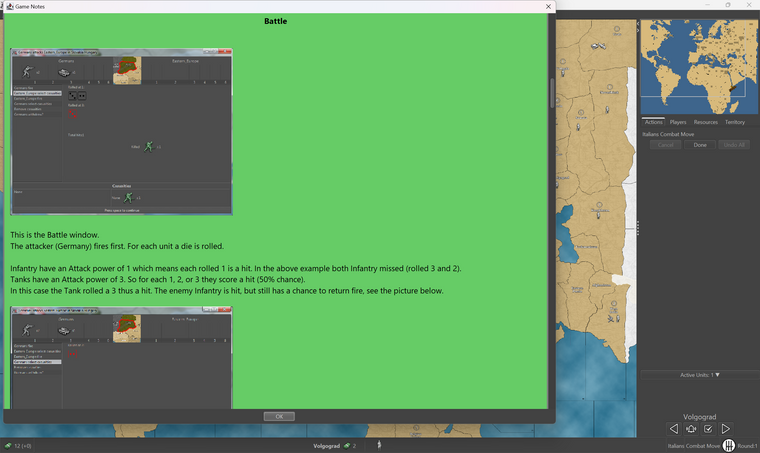
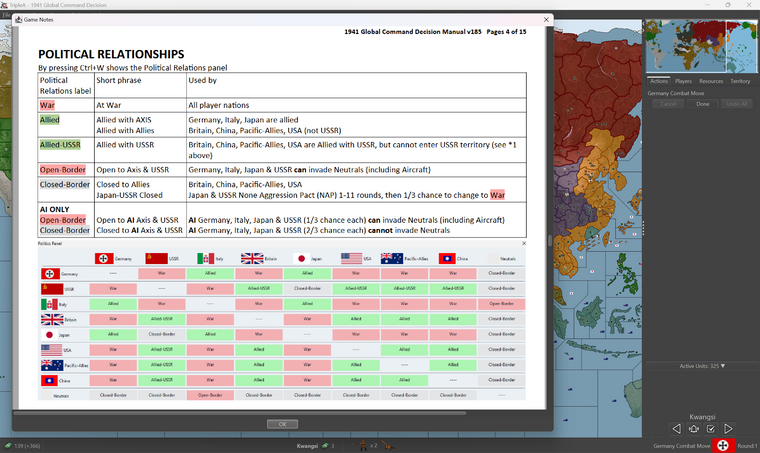
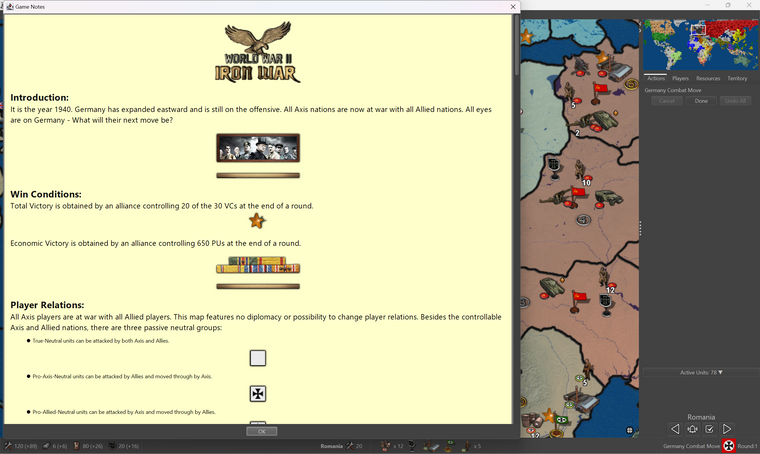
In the last, even though the images are upscaling poorly, the overall effect is less pronounced there, because the text is still displaying smoothly.
-

Hello! It looks like you're interested in this conversation, but you don't have an account yet.
Getting fed up of having to scroll through the same posts each visit? When you register for an account, you'll always come back to exactly where you were before, and choose to be notified of new replies (either via email, or push notification). You'll also be able to save bookmarks and upvote posts to show your appreciation to other community members.
With your input, this post could be even better 💗
Register Login