TripleA Logo TripleA Forum
    • TripleA Website
    • Categories
    • Recent
    • Popular
    • Users
    • Groups
    • Tags
    • Register
    • Login

    Mega New Elk WIP

    Scheduled Pinned Locked Moved Maps & Mods
    409 Posts 8 Posters 285.6k Views 6 Watching
    Loading More Posts
    • Oldest to Newest
    • Newest to Oldest
    • Most Votes
    Reply
    • Reply as topic
    Log in to reply
    This topic has been deleted. Only users with topic management privileges can see it.
    • Black_ElkB Offline
      Black_Elk @Black_Elk
      last edited by Black_Elk

      Here this may help a lot, unzip this and drop the content into your map folder

      https://drive.google.com/file/d/1vMYjz-tsM_SVWORuIBBQrzxXBj2bavzr/view?usp=sharing

      What I did: so lets say you want the Text that displays on the map not to move, or to move not so much when font size is changed. Easy way to ballpark that is to take the txt file you have called "centers" then copy that file, rename it "name_place" txt.

      Now when you rescale the Font in "View> Map font and Colors > Font size" instead of recentering the label at each Font size, that label will be stuck in the same spot, using the same coordinates as the center.

      Now take that same file, copy again, rename to "PU_place"

      Now all your Territory names and PUs will have a fixed center, same coordinates for each.

      Now if you put that PU folder with images, back into the mapfolder (rename it from PU_backup to PU again or whatever) it'll show you where the UHD bung style graphics land. They'll be slightly offset, probably too close to the label to look good. But you'll have a fixed set off coordinates there relative to where the Name is going.

      Now it's easier to say, move every Label or PU some set number of pixels in whatever direction from the center, by adding 50 pts along the Y axis coordinates, or 50 pts right on the X axis etc, whatever is required to get them back to looking smooth, all in one go.

      What I did here, quick method, was to just raise the PU graphic on the 54px field, so it'd land slightly above the Name label, when using the same center. Probably not the most awesome solution but ballpark. Hopefully makes it easier to see what's going down 🙂

      If you want the territory Names to write from the center out, instead of from left to right (using the center as the leftmost coordinate) I believe that is something can switch in the map.props. I can't remember exactly what it's called, but basically then the Name Labels will all shift slightly to the left from their current position.

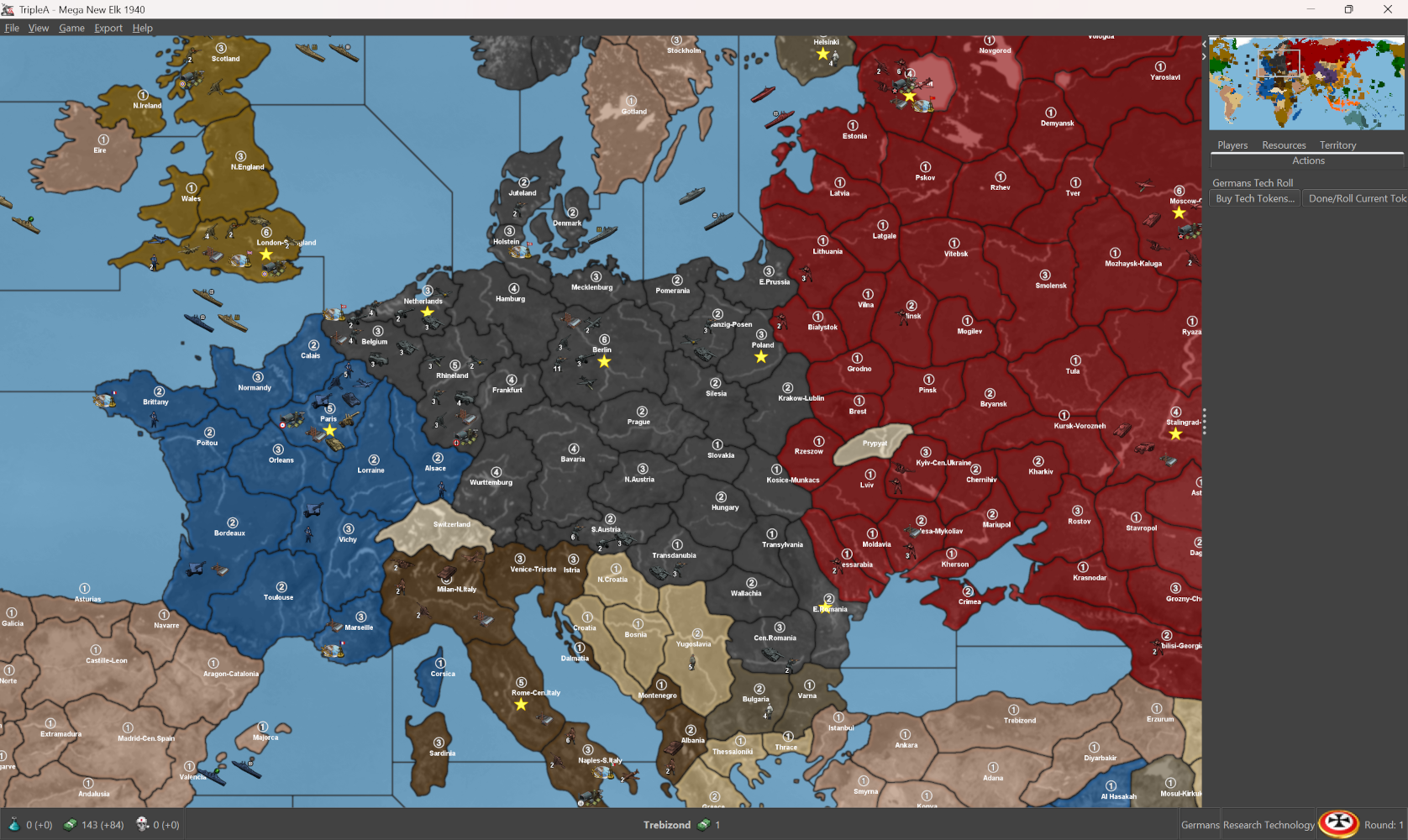
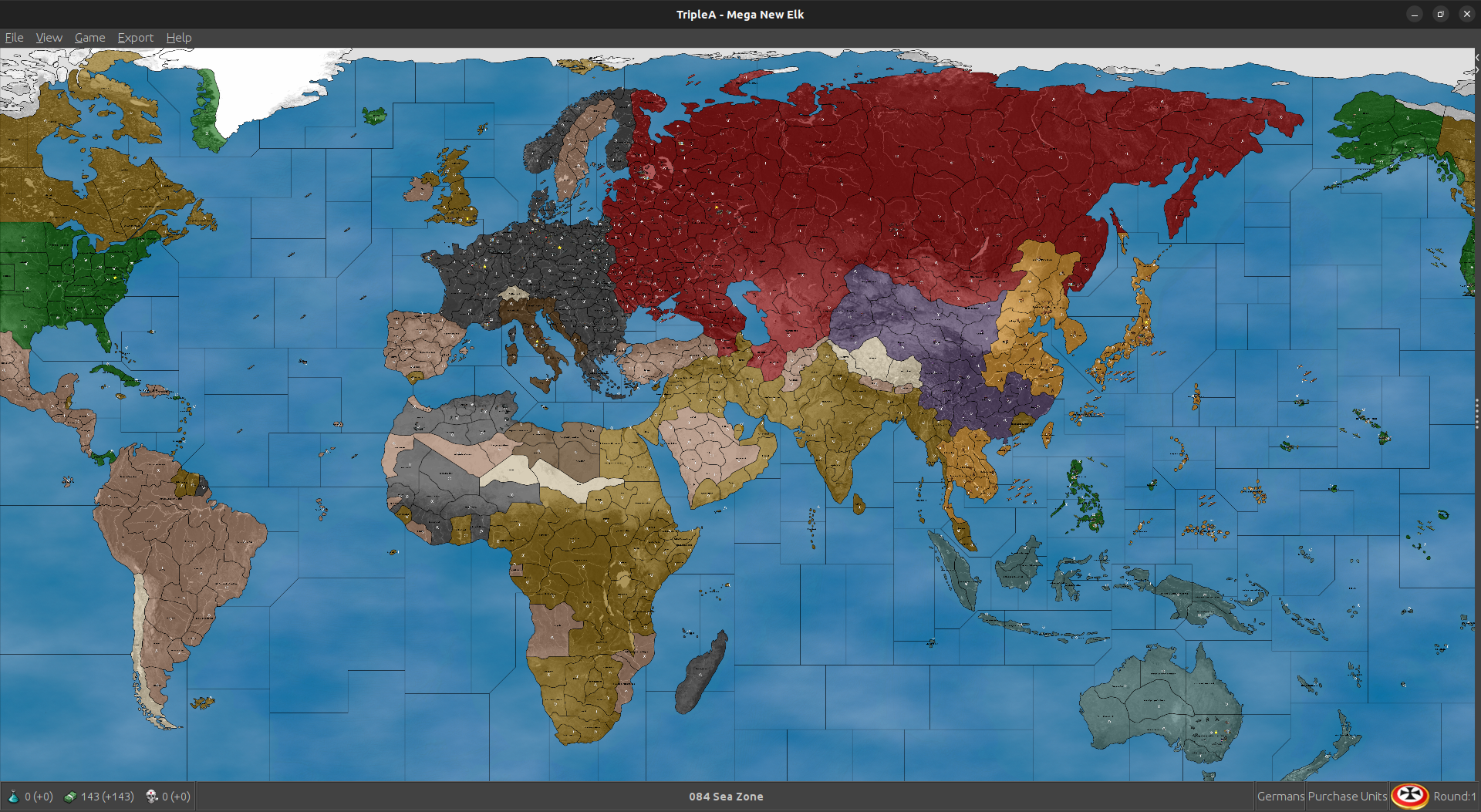
      Right now looks like so (with unit view off)... You can see that a couple centers, with long labels sorts strike too far to the right. It's because the Name_place is writing as if the center was the leftmost point. PU graphic shows closer to where the center is but it's a graphic. I raised the circle within the field to be like 20 pixels above where the center is so it'd display slightly above the label. But the label center itself my be better in a different location.

      Screenshot 2025-02-26 172453.png

      Now you can change the Font size from say 22 to 18 or whatever, and the label will not reorient within the polygon.

      It'll use that fixed center point and scale from it instead. The centers for the name place can be moved using the map tool, sorta same way as changing where a unit might go, but then all your PU's will be in the same position relative to the label, just wherever that center is located. This is the same thing with Font size 18.

      You can see that the center for a spot like Westphalia hangs way over, because it's such a long label and writing from the left, so it's bumping into a neighbor. That sort of thing I'd just maybe move the center point for those spots, then have the PU and Name_place key off whatever that new center would be.

      Screenshot 2025-02-26 173428.png

      Once those are all set in place, or with the VCs as well, idea would be to dance the unit place around the PU label, so it remains empty of Unit place. Reason is so that the player has a ready spot for their cursor to click the All-units, instead of accidentally clicking an individual unit. If each spot as a ready click zone to bring up all units, that is helpful I think. Then idea would be to ensure that unit overflow line in the place, isn't directly on top of that area, or running across a label. Idea being that if player wants to bring up all units within the Territory at a one click, they click the PU number and bang, now they got the all units within territory view instead.

      🙂

      B 1 Reply Last reply Reply Quote 2
      • B Offline
        beelee @Black_Elk
        last edited by

        @black_elk so I can move the names in name_place and that won't jack the font thingy ? Or do i have to move the center and then change the name_place to the same ?

        B 1 Reply Last reply Reply Quote 2
        • B Offline
          beelee @beelee
          last edited by

          @Black_Elk

          I must be missing something. This is what I get

          Screenshot from 2025-02-26 19-55-02.png

          Black_ElkB 1 Reply Last reply Reply Quote 2
          • Black_ElkB Offline
            Black_Elk @beelee
            last edited by

            @beelee Ah yeah, that's right. So I think this might be because when I was eyeballing it, I had my screen at 1600p with font in windows at 150%, but we need to get it dialed for 1080p with font at like 100%, or ideally for both. I can fire it up this weekend and noodle around. Basically should be more straightforward with the Name place having some set coordinates to riff from, before it was just sorta jumping around cause we didn't have one. Original display didn't have the labels so didn't matter there, but here it would make a difference for sure. I'll knock something out and hit you up when I get done running some errands

            🙂

            1 Reply Last reply Reply Quote 2
            • B Offline
              beelee
              last edited by

              @black_elk

              Name and Place were capitalized so now I get this

              Screenshot from 2025-02-26 20-44-59.png

              should be a little easier to work with. Looks as if the names will have to slide left as you were saying

              Black_ElkB wc_sumptonW 2 Replies Last reply Reply Quote 2
              • Black_ElkB Offline
                Black_Elk @beelee
                last edited by

                @beelee Oh yeah I forgot the caps thing, that'd do it. I was using windows haha. Go figure!

                For the screen rez thing, long as it looks good on your end should end up fine on mine. There can be sorta subtle changes in how a set graphic displays, like going higher rez the image may be slightly smaller, so I thought it was that, but prob just the capitalization thing 🙂

                1 Reply Last reply Reply Quote 1
                • wc_sumptonW Offline
                  wc_sumpton @beelee
                  last edited by

                  @beelee, @Black_Elk

                  Wow, looking good. But I still think you guys are going at it the long way. But OK.

                  Cheers...

                  Black_ElkB 1 Reply Last reply Reply Quote 2
                  • Black_ElkB Offline
                    Black_Elk @wc_sumpton
                    last edited by

                    @wc_sumpton I agree it's more an issue of trying to use the little circular graphic and strongarming it for the other map which just used like decoration style place for all the bung labels. For this the advantage of having the PU place all keyed up to be at a fixed center, and the Name place, would be that then you can ditch or substitute the graphics for the simple text and it won't show up striking right into the drawn on label. Cause right now just has the same coordinates and I only quickly edited the graphic to lift that above. But if PU folder removed, and show resources PU is on to supply the regular txt, it'll show up inside the Name. The built-in text is nice because it scales like font vector, instead of the graphic which scales raster with the main map screen. At 50% view not an issue, but if going lower text prob scales cleaner for most, or can be enlarged for smaller view (map zoom.) Anyhow, just and idea. If the PU centers are all in a sweet spot, the graphic can be centered instead of offset as it is now. I was just doing it quickie so you could see how might look, and cause there was no name place in there.

                    🙂

                    B 1 Reply Last reply Reply Quote 2
                    • B Offline
                      beelee @Black_Elk
                      last edited by

                      @black_elk

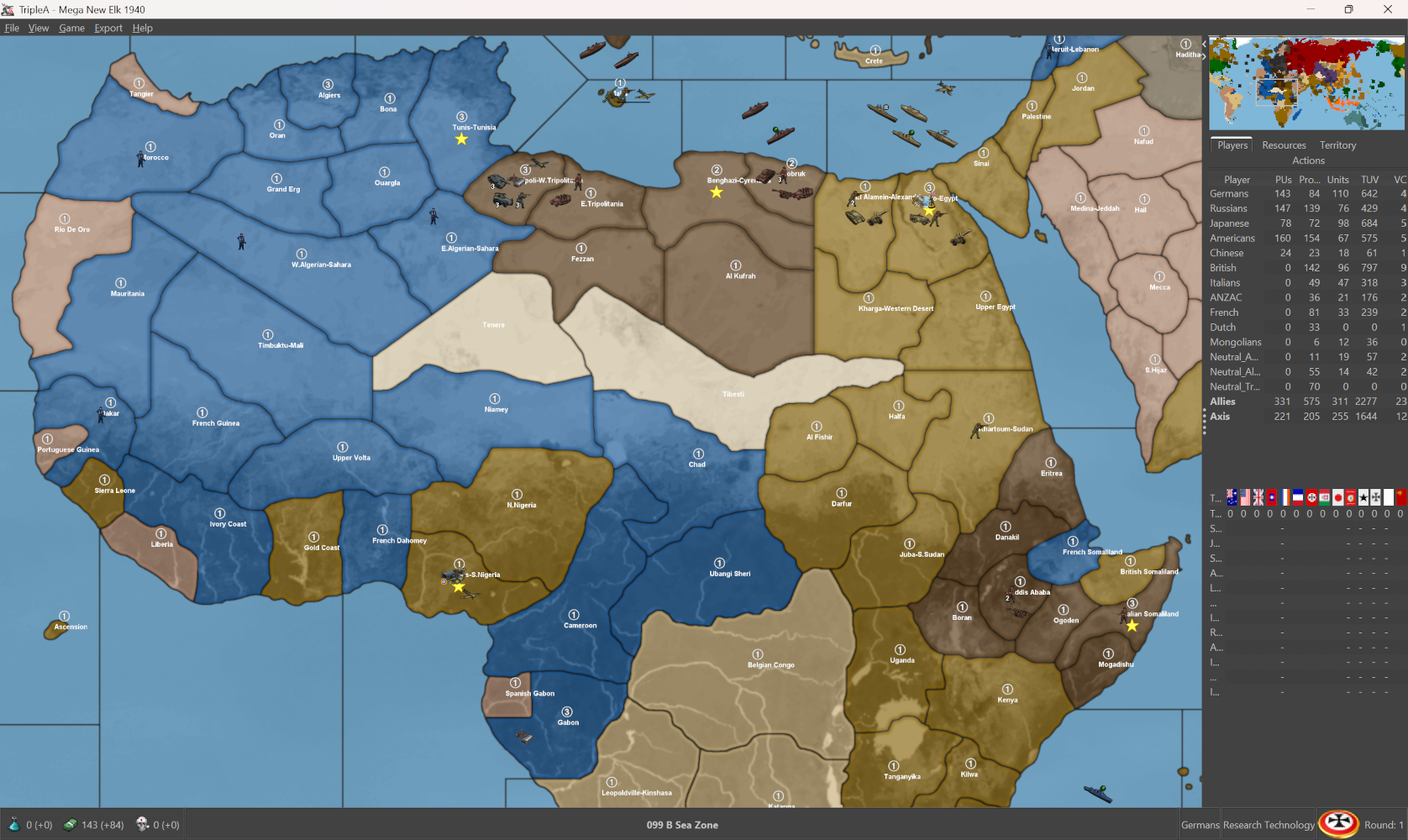
                      Updated to git. You should have a clean folder to work with now. Added Chicago as a VC to test. Search "VictoryCities" in the xml and you'll see you just add the TTy where Chicago.

                      The vc.txt works for new coordinates. I tried an existing one and you can move them there too.

                      Screenshot from 2025-02-27 11-56-09.png

                      https://github.com/beelee1/mega_new_elk

                      wc_sumptonW Black_ElkB 2 Replies Last reply Reply Quote 3
                      • wc_sumptonW Offline
                        wc_sumpton @beelee
                        last edited by wc_sumpton

                        @beelee

                        So, I see that you have "isInfantry", and the armor as "isLandTransport". I'm going to say the same thing I said to @TheDog, you going to pile 8 to 12 soldiers, including a machine-gunner on top of a tank and roll into combat with bullets flying at you. 8 - 12 maybe also towing an artillery piece. Them brave M-F'ers. Then what is the use of the mech_infantry? I can purchase 1 infantry and 1 armor which can travel 2 spaces and blitz or buy 2 mech_infantry les 1 pu that cannot blitz, cannot transport troops, cannot tow artillery.

                        Ahh... the point is moot as the is no mechanizedInfantry tech, so, those brave soldiers are still walking. I think it's safer that way.

                        Cheers...

                        B 1 Reply Last reply Reply Quote 2
                        • Black_ElkB Offline
                          Black_Elk @beelee
                          last edited by Black_Elk

                          @beelee Cool digs, I was just rummaging around in the map folder to see what all was in there.

                          Here I combined the VC list from G40 along with some entries from GCD or removing any duplicates there, then making a couple substitutions.

                          I think one could add Chicago, but that is also very interior and not easily a contested location which Axis are likely to reach till the game is sorta over. Instead I'd maybe consider a spot that's more coastal? Or probably was just to test. Obviously they can be moved around to suit the desired play pattern for VC wins.
                          🙂

                          Here's a quick list of 42 that seem pretty good to me for Victory Centers, just to give a distribution across a distance sorta m2/m3 in clusters. I condensed a couple Dutch VCs to get Amsterdam and Batavia Java (Jakarta) in the there, in case of wanting to do Dutch mods maybe for earlier timelines. Anyhow, just something to ballpark it VCs. I'd think goal of turn 1 would be to get some changing hands quickly into Axis control for the balance.

                          Baghdad
                          Baku-Azerbaijan
                          Bangkok-Siam
                          Batavia-W.Java
                          Benghazi-Cyrenaica
                          Berlin-Cen.Germany
                          Cairo-Egypt
                          Calcutta
                          Cape Town
                          Chungking
                          Greece
                          Guadalcanal-Solomon Is.
                          Helsinki
                          Hong Kong-Kwangtung
                          Honolulu-Pearl Harbor
                          Iwo Jima-Bonin Is
                          Italian-Somaliland
                          Legos-Nigeria
                          Leningrad
                          London-S.England
                          Manila-Luzon
                          Moscow-Cen.Russia
                          Netherlands
                          New Delhi
                          Ottawa-Montreal
                          Panama
                          Paris-Cen.France
                          Ploiesti-E.Romania
                          Rio De Janeiro -Sao Paulo
                          Rome-Cen.Italy
                          San Francisco-Cen.California
                          Shanghai-Kiangsu
                          Singapore-Malacca
                          Stalingrad-Volga
                          Sydney Canberra-New South Wales
                          Tokyo
                          Truk-Coraline Is.
                          Tunis-Tunisia
                          Warsaw-Cen.Poland
                          Washington D.C.

                          I was not sure what you'd planned to do in terms of relabeling, so I just used the templet from before for that. If looking to cut the hyphen out of the current labels, I would probably use either the designation that's more familiar from G40 (say 'Bordeaux' rather than Gascony, for Bordeaux-Gascony, since G40 has a TT named Normandy-Bordeaux, it's likely more familiar to use Bordeaux). Or otherwise to use the more specific designation of whatever City or smaller region included in the name. Some TTs had more a combo two regions in one TT name. So say New York-New Jersey, might just be New York or whatever. I think generally would be more compelling to use a familiar Metro sometimes, as opposed to something more Generic like N. or S. or E. W. Cen. whatever which I sometimes used. Mainly to avoid the issue where a player unfamiliar with the geography sees smaller tile and associates it with the larger region. So for example thinking Poland is too small, when that tile is actually just Metro Warsaw, and Poland is the half dozen or so TTs surrounding it. In each case there are some issues with choosing just one name sometimes.

                          For example TT called Prague, might also be called Czechia, or it might be called Bohemia, I mean probably now that everyone is playing Kingdom Come Deliverance 2, there's a bit of a Bohemian pre-renaissance going on right now hehe. But you know what I'm saying I think, sometimes compromises would probably be made if trying to display a label that fits nicely, favoring whatever name is familiar and also has fewer characters in the name total. I had avoided giving this too much thought for the other one, since it was decided fairly early to just sorta nix the name display in favor of PUs. That could work here as well with the line in the map props, though if trying to get it all dialed might make sense to just work with the displays up while trying to sort the place for it.

                          I dropped one VC in Rio, just to have one in South America. I think it should work alright for a spread. Could substitute or add, maybe Vancouver if you want to pull Japan into an Alaska campaign. I'd highball it
                          🙂

                          1 Reply Last reply Reply Quote 2
                          • B Offline
                            beelee @wc_sumpton
                            last edited by

                            @wc_sumpton

                            oh Idk I'm just focused on place. Try and get it up and running. The xml changes were mostly made a year ago. I don't even remember what all I did 🙂

                            Think I mostly just got rid of politics, everyone at war.
                            Changed to the later start date so France doesn't have any dudes.
                            Got rid of Objectives.

                            Think i used G 40 as the base and removed the rules Elk didn't want and then added all of The Dog's stuff over for territories basically.

                            Hell Idk lol 🙂

                            Early stages 🙂 Take a while to get it dialed.

                            I've got it in Notes now though 🙂

                            wc_sumptonW 1 Reply Last reply Reply Quote 2
                            • wc_sumptonW Offline
                              wc_sumpton @beelee
                              last edited by

                              @beelee said in Mega New Elk WIP:

                              and then added all of The Dog's stuff over for territories basically.

                              Yea... little paw prints all over the place. 🤣

                              Cheers...

                              B Black_ElkB 2 Replies Last reply Reply Quote 2
                              • B Offline
                                beelee @wc_sumpton
                                last edited by

                                @wc_sumpton said in Mega New Elk WIP:

                                Yea... little paw prints all over the place.

                                That's how most people use triplea. Copy other peoples shit

                                1 Reply Last reply Reply Quote 3
                                • Black_ElkB Offline
                                  Black_Elk @wc_sumpton
                                  last edited by

                                  Yeah totally hehe. My thinking was the barest of bones first, then could add stuff back in as it goes along. Sorta the hackjob Frankenstein approach, to get the roster and the g40-ish thing going on, but then was also trying to the aesthetic there, cause labels on gives a pretty different vibe. I can't really think of a way to match out the labels with the double tone thing, short of like typing them out. It could be done fairly quickly but I'm not sure we ever actually determined the font choice he used. Couldn't find it in my GIMP plugins, alas. But then there are some other options too down the line, like we go try transparencies as well. Or making the little circles and whatnot slightly smaller, could options there. For just seeing what the Fast/HardAI does with it, can add in a large purse to start and see how it's building out under the g40 with the cash involved. I suspect it will buy quite a few bombers and such, but then also each Ai nation has it's own purchasing that it tends to do. Anyhow, should be easy enough to riff and sorta tease out different ideas to add on top. At some point down the line.
                                  🙂

                                  TheDogT 1 Reply Last reply Reply Quote 2
                                  • TheDogT Offline
                                    TheDog @Black_Elk
                                    last edited by TheDog

                                    @beelee
                                    @wc_sumpton has a point about mech infantry, you need to find a balance for including/buying them.

                                    Mech infantry/Inf-Motorized in GCD

                                    • For Japan and Pacific-Allies, I removed Inf-Motorized, as the Player & AI did not buy them, also Japan used most of its trucks for supply.

                                    • For Germany, Italy, Britain, USA Inf-Motorized can

                                      • Blitz if stacked with Armor
                                      • Get Combined Arms support of +1 Atk from being stacked with Armor or Bomber-Tac
                                      • Produced from Base-Camp, good for moving around Africa

                                    So are they worth the extra 1pu over infantry?
                                    For me, for Germany & Italy attacking east, yes, the rest is situational.

                                    https://forums.triplea-game.org/tags/thedog
                                    https://forums.triplea-game.org/topic/3741/curated-best-top-maps-triplea-guides

                                    TheDogT wc_sumptonW 2 Replies Last reply Reply Quote 3
                                    • TheDogT Offline
                                      TheDog @TheDog
                                      last edited by TheDog

                                      @beelee
                                      The minimalist in me see no reason to display the TT or SZ name/label on the map, usually its hidden under a mass of units, also it is on the status bar.

                                      Unless, you are going to print the map as a map board then I would go to all the trouble that it entails of shoe horning the name within the TT/SZ.

                                      Just my 2p. 🙂

                                      https://forums.triplea-game.org/tags/thedog
                                      https://forums.triplea-game.org/topic/3741/curated-best-top-maps-triplea-guides

                                      Black_ElkB 1 Reply Last reply Reply Quote 2
                                      • Black_ElkB Offline
                                        Black_Elk @TheDog
                                        last edited by

                                        I'm ambivalent, I think it would probably be fine if I could do a line break instead of hyphen, but for the built-in text sorta just has to run in one long line. I think the text itself could probably be danced around, though for me the PU is the more important at a glance. Text sorta more for flavor and to make it G40-esque though prob recommends some noodling.

                                        Thought for units would just be the barest bones, like grafting G40 or some form of it onto the existing thing. So mech would just do whatever they do in world war II global, basic roster there. I think since standard roster has the ABs and NBs, that land base of some sort makes sense, and for that some form of simplified rail would be nice for m3. Just granting say the +1 bonus for ground units beginning their turn on a territory with an operational factory, but otherwise probably keeping all the ground the same. I think unit set up was more just to get some stuff down see how it filled out. I think other stuff probably just like a holdover from trying to port the one on top the other.

                                        🙂

                                        1 Reply Last reply Reply Quote 2
                                        • wc_sumptonW Offline
                                          wc_sumpton @TheDog
                                          last edited by

                                          @thedog said in Mega New Elk WIP:

                                          @wc_sumpton has a point about mech infantry, you need to find a balance for including/buying them.

                                          Thank you, this reminds me of our conversation about the AA, which has gone the way of the Dodoo bird in GCD with the mech_infantry and submarines on the endangered species list.

                                          TripleA, IMHO, is designed around the concept of each piece having a job. Though there is the bomber which can SBR, combat, and transport. But if it transport it cannot SBR or combat, so it can only do 1 job per turn. When jobs are shared between multiple pieces, then some pieces become useless. Tanks are land transports, so you do not need mech_infantry because now infantry can move 2 and blitz. Every unit can AA so you do not need AAA. Transports have isDestroyer, so submarines are used as fodder.

                                          Why buy an AAA, you don't.
                                          Why buy a mech_infantry, it cannot blitz, so maybe give it a buff with armor? But now infantry can blitz and move 2 les 1pu!
                                          Why buy submarines, they can no longer sneak attack on transports?

                                          I know, I need to get off my soap box, but one last comment. Each infantry unit represents between 1000 - 1200 soldiers, while each armor will equal maybe 100 tanks. So, you going to put a platoon of equipped infantry on a tank! Someone walking. If half the infantry are walking, then the tank should only be able to move 1 space, to allow the walking soldiers a chance to keep pace.

                                          To me the logic just does not work. I know that soldier road abord tanks, but that's two or three, not ten to thirty.

                                          Sorry, this is just one of the things I can't wrap my head around.

                                          Cheers...

                                          Black_ElkB 1 Reply Last reply Reply Quote 1
                                          • Black_ElkB Offline
                                            Black_Elk @wc_sumpton
                                            last edited by Black_Elk

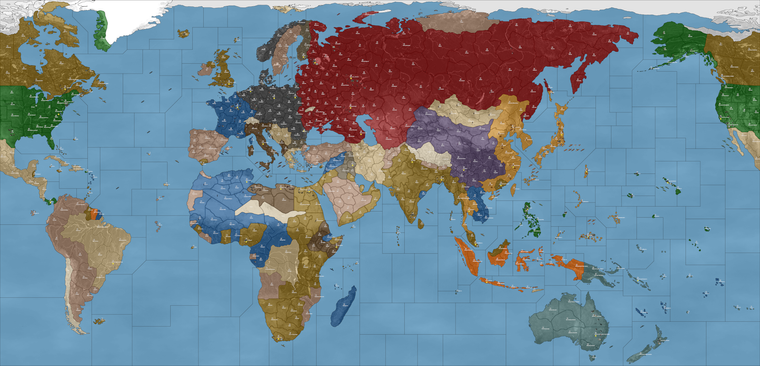
                                            I think the vanilla roster in G40 would work fine for this one. I mean it has the advantage of being extremely familiar, so then if that is the starting point it's a bit easier to riff on something more advanced there, maybe via tech or novel mechanics, or some form of different combined arms I guess. For this thing though, just sorta seeing if we could get the G40 features onto the jumbo board for some bones. Requires a different sort of production spread to make it more in-scale with a G40 I'd think. Hence sorta blanking the production back down, and then putting the high end a bit lower on this one 6 pu instead of 9 pu at ceiling, for the most productive tiles. Then reworking the rest of the spots back down from there.

                                            🙂

                                            Goal would be to get something that might service that idea maybe of tech token oriented game ala v3 NML style, but set more WW2 and using the more vanilla roster from one of those scenarios, or basically just world war II global, but reduxed for the larger map. I think m3 factory concept is pretty solid, not too hard to implement in a simplified way if the bonus is sorta universally applied +1. So tanks at M2, or Mech when paired with tanks might be able to move M3 into combat if starting their turn on factory, M1 units like inf or art would be able to operate at M2, but again only when positioned on that tile at the start of their turn, and if the factory is operational (under the G40 scheme for factory/base repair). It will would be fewer factories on the board overall and only two types Major/Minor, and with some limitations there to follow the vanilla scheme on how factories and such work in A&A, but I think once it's put together a bit more it should be pretty simple to see in operation there.

                                            Basically just an analogy to the NBs and ABs, but handled via the factory so we wouldn't need an additional graphic to make it work. I would keep all the units essentially identical in terms of pricing and abilities to world war II global, so that when opening this one or UHD global, all the stuff looks more or less the same. Vanilla G40 roster as the basis, then other stuff possibly optioned on via techs or the like, but first to just get the reg stuff down.

                                            Black_ElkB 1 Reply Last reply Reply Quote 2

                                            Hello! It looks like you're interested in this conversation, but you don't have an account yet.

                                            Getting fed up of having to scroll through the same posts each visit? When you register for an account, you'll always come back to exactly where you were before, and choose to be notified of new replies (either via email, or push notification). You'll also be able to save bookmarks and upvote posts to show your appreciation to other community members.

                                            With your input, this post could be even better 💗

                                            Register Login
                                            • 1
                                            • 2
                                            • 7
                                            • 8
                                            • 9
                                            • 10
                                            • 11
                                            • 20
                                            • 21
                                            • 9 / 21
                                            • First post
                                              Last post
                                            Copyright © 2016-2018 TripleA-Devs | Powered by NodeBB Forums