Mega New Elk WIP
-
heh heh it's all wip. We'll get it sorted

-
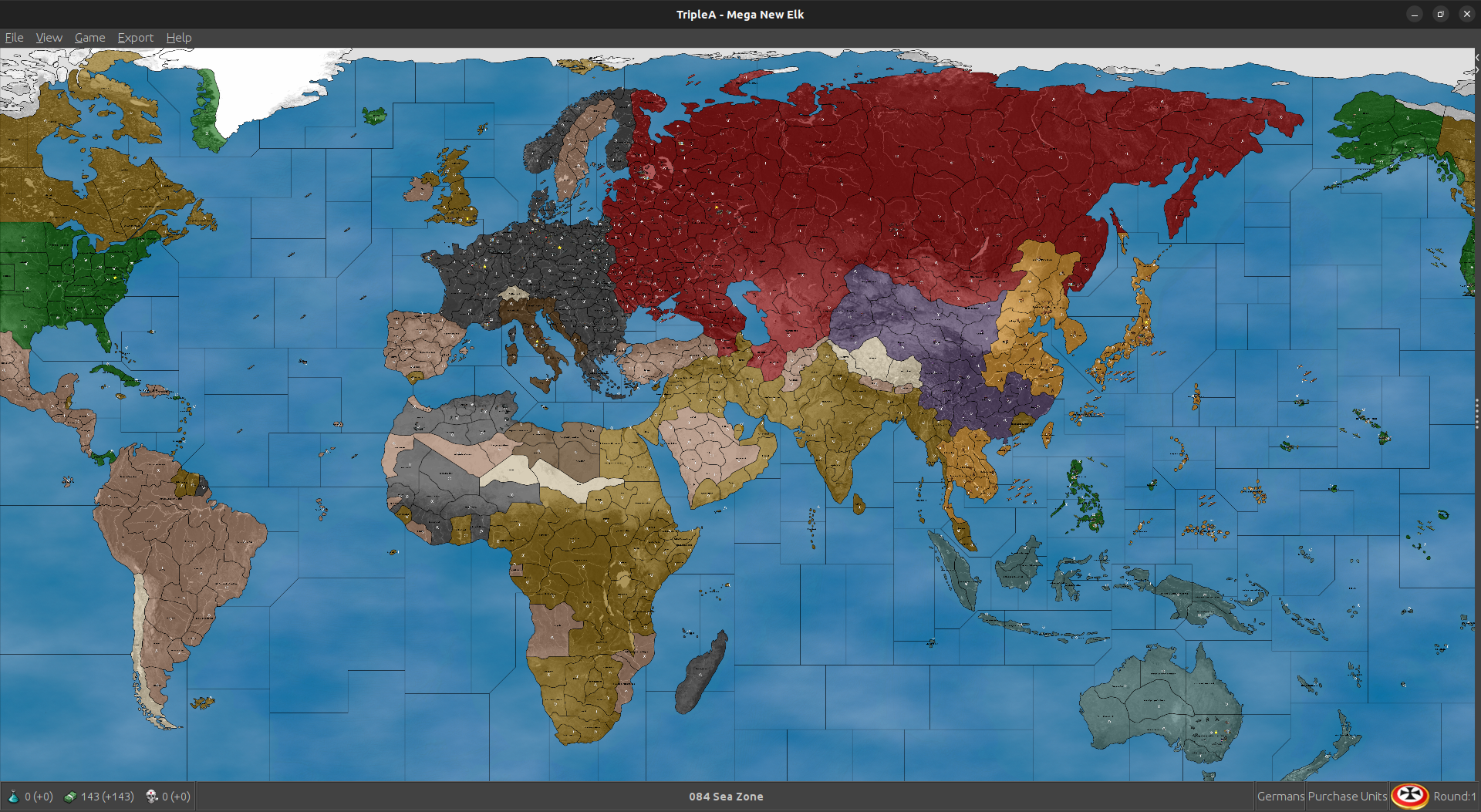
I ran a few different tests to see which starting unit positions would have computer Japan reliably attacking the US fleet at Pearl on J1, while also taking Wake Is (as opposed to Midway or Hawaii etc.) By moving the current Japanese fleet off Marshall Islands from sz 32 B to sz 32 A. Then adding 2 submarines to sea zone 024, and a bomber on Marshall Is. With those starting units it becomes fairly scripted where computer Japan will just always make that attack, so sorta baked in there. Again because everything else Japan is doing on J1 vibes more 1941 the play pattern gives a sweep where Japan attacks into Philippines, Guam, Wake etc all on the same turn. This of course is a bit of an anachronism for a G1 that reflects 1940, but I think overall it gives a better push out of the first round. To me it's more important that the computer is positioning well, and hitting the right beats in subsequent rounds. G2 is effectively Barbarossa, which is a slight jump back in time, but again imagined like the first rounds of the game are playing catch up, "last week on...' with that sort of logic to it. Depending on the theater in focus
So essentially thinking about all this as if the Europe side of the gameboard is slightly earlier in time, the Pacific side of the board slightly later in time. The two theaters sorta sync up in round 2 and we're off to the races. A more 1941 era total war sweep from there, but which still featured the fall of France and some familiar stuff that would recall the G40. I think it works reasonably well, I mean for a scenario that doesn't require the whole DoW thing, since the computer will never really grasp that. This sort of approach just seemed an expedient way to get at a play pattern and play pace that still felt satisfying, while using simple rules.
Anyhow this was the edit save that had Japan making that sort of play while still doing what it was already doing.
2025-3-8-Mega-New-Elk-1940.tsvg
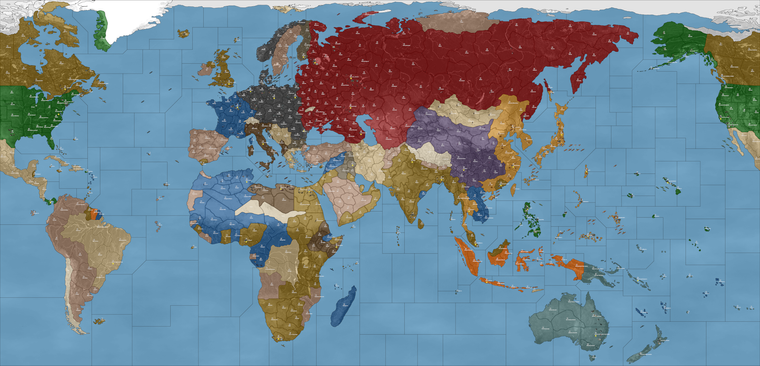
Quick image of the tweak
https://drive.google.com/file/d/1eYMZAFgIgxyD_rAIZGoaMopR-YRXNWPJ/view?usp=sharing
-
@beelee I missed that one.
Kosice-Munkacs -> Ruthenia or Bukovina -
Thank you.
@beelee said in Mega New Elk WIP:
yea, so when names change, as you know, you have to update the xml, name_place, polygons, centers, pu_place and place or the game won't fire.
Yes, I understand this. This is an easy process, as I can open all 5 txt files, plus both working copies of the xml. Do a quick search and replace in all files. Wrap up all 7 files into a zip, since all are text files the size is manageable. All 7 files were in my last zip update. Again, these are just text files, I do not see the reason for requiring a complete GitHub update/download when it seems easier to me just to grab the zip and update. Again, the choice is yours. These updates can be posted to GitHub, and pushed.
@Black_Elk
I noticed that your last position update did not have @RogerCooper latest changes, so to use this xml you will have to replace all 5 txt file which are included in the zip.MNE WIP '40 version 1.35.8.zip
MNE WIP '40 version 1.35.8
- @RogerCooper name changes (again Thank You)
- @Black_Elk Last unit start positions
- Updated: mega_new_elk.xml
mega_new_elk_1940.xml
centers.txt
name_place.txt
place.txt
polygons.txt
pu_place.txt
As Always... Have Fun!
Cheers...
P.S Good Morning!
-
Faster than Daredevil! So cool hehe
Love it
Great work gang
-
Using that here's a quick simulation I ran while cooking breakfast, everyone hardAI. Seemed like a climactic moment so I tapped in as France for the save here in round 9 hehe
So far the computer push seems to be going pretty well. The emergent playpattern and pacing had that thing I was hoping for, with the Tunisia pocket keeping North Africa interesting and to counterbalance France a bit. I think to get a bit more pressure on Italy before France, just need to get the Greece situation figured. If Axis advance and that front opens might get the Allies into a better position to face off vs Sicily and Naples.
A minor in Sicily might work as a kind of bait, since that seemed to work with Normandy. Basically putting the focus more there than on Bordeaux, just for the D-Day vibes. Soviets and Japan skirmish a bit but it's mostly contained on the coast and along the Manchurian border early on, which I kind read like sphere of influence. Here though computer Japan started to advance in earnest, which looked a bit more classic style. Felt apt hehe. I figure that if it works well enough this way, then there's always the possibility of NAPs and such to option on, but I kinda like how it plays out more simplistically here. The Russian tanks and dudes that end up in China I suppose would be analogous to Red forces there, while the Purple is more like being backed up by the Western Allies. USA probably just needs that little bit of extra income from Brazil and such and they might also hop on Africa a bit sooner, but it runs at a pretty steady clip. I had fun watching it do it's thing while sipping the coffee
Pretty good there for something like a morning run hehe
2025-3-8-Mega-New-Elk-1940_France_9.tsvg
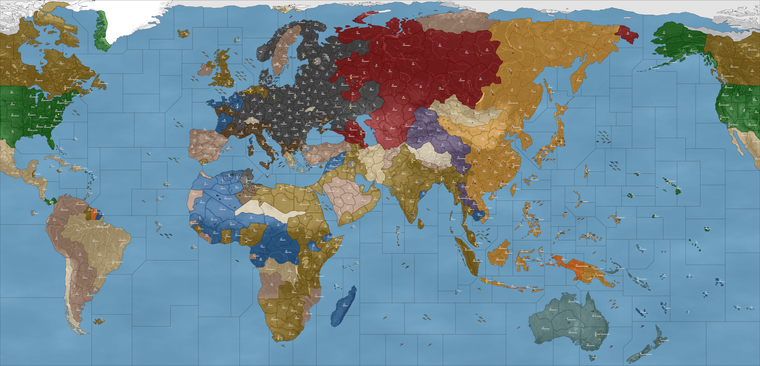
Quickie screen of the action... Paris was just liberated for computer France by their computer buds. Rejoice! It did the restore to French control when their capital was liberated (standard style), so the map lit up all blue again heheh. Will have to see if they can hold onto the cash
Round 8
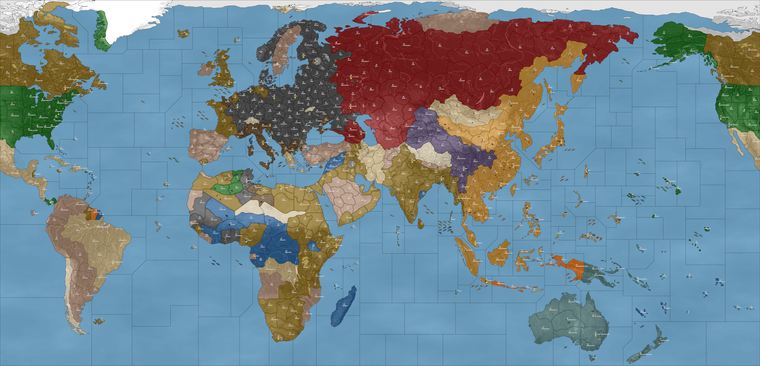
Round 9
https://drive.google.com/file/d/1hbm02AkW3u2skrk3W_K6lDjQbsnYEfL8/view?usp=sharing
I think for now prob makes to do a no_tech as the default option, since computer will definitely roll for it. Saw that a few times in the other game I ran, which confirmed the graphics seemed to be working. Since dropping those factories _disabled images into my units folder hadn't had any issues there. Names looking nicer which should be help for when the unit place is dialed. Great work!
Thanks again for all the help getting this up off the ground!
ps. Oh also for a name, I think we could probably call it by the UHD prefix, to suggest the connection there, and to locate the maps nearby when downloaded. Something like "UHD Domination 1940-45"? Works for me if that seems agreeable, since it's basically an upscale of my older Dom maps, and then the title would sorta suggest a similar scale or sweep there, or in case anyone wants to do mods on the skeleton.
-
For the Soviet Union...
I think Siberia at 2 PU with a minor factory and a pocket force, then Siberia serves as the fallback capital. Gives good coverage to both sides of the board so USSR can manage their backfield but still far enough from Japan's front line so it doesn't swing too hard. I shifted the Soviet Far East forces back one tile, so they wouldn't crash the party into Manchuria and Korea immediately. Vladivostok front is a bit tricky since anything there will just advance on USSR's first turn, if nothing is positioned opposite it on Japan's side. I thought we needed a little more of pressure cooker exchange there, perhaps with just a couple front line infantry in each zones to hold the other side in check. The idea being that they might skirmish, but then the lines sorta reset into a bit of a buffer along the coast with a large stack prob in Magadan to face what Japan is bringing to the party. Tried to lowball it for now, but felt about right for what Japan has facing them down already. Russia doesn't really buy much infantry for the far east so the stack has to be pretty large I would think, between 18 and 21 dudes or thereabouts just so Japan doesn't get a free pass up there before USA can put some heat on. Enough to hold the line and keep Japan honest for the early game at least.
2025-3-10-Mega-New-Elk-1940.tsvg
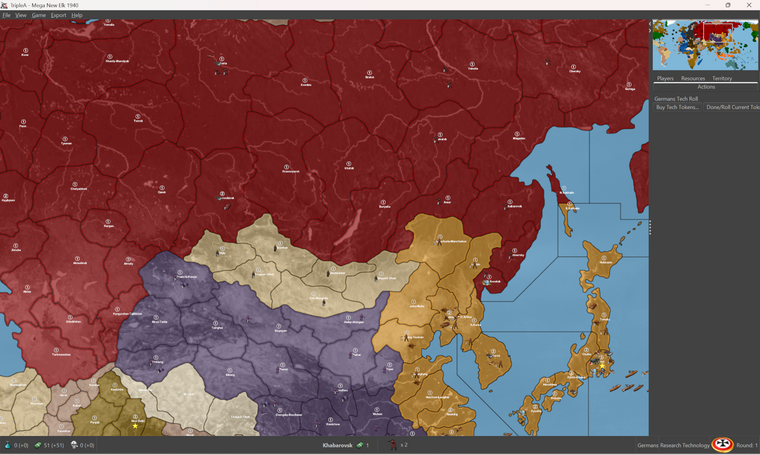
Anyhow, that's the set up I'm running right now to see how the computer uses the TUV and the extra mobility/resupply out of Siberia. Oh and then for Odesa prob raised to 2 PU as well, just since it has the minor factory there at the outset.
ps. hmmmm that adjustment actually just seemed to accelerate computer Japan's attacks lol. Probably gave them too many hitpoints there. The IJN is parked off LA. Might have to try a different approach, though I still think the Siberia factory makes sense. Currently the computer Soviet purchasing behavior is a bit curious though. They're buying a lot of heavy aircraft and only a handful of infantry per turn. Will have to see what can be done there.
Probably for the Soviet Far East just needs a couple subs to prowl and keep the Japanese transports at bay on J1. Americans pick up the slack, but take a few rounds to get up in position there to cross over from Alaska.
Here was the result after 5 rounds HardAI, I tapped in with France to grab the save. You can see the whole Soviet Japan back and forth thing going on. I think probably a Red October or two ready to hunt in the arctic will help prevent that from cracking off too soon. Meanwhile computer USA made a pretty nice press for Torch and sank the computer Kriegsmarine on the other side of the board hehe.
2025-3-10-Mega-New-Elk-1940_France_5.tsvg
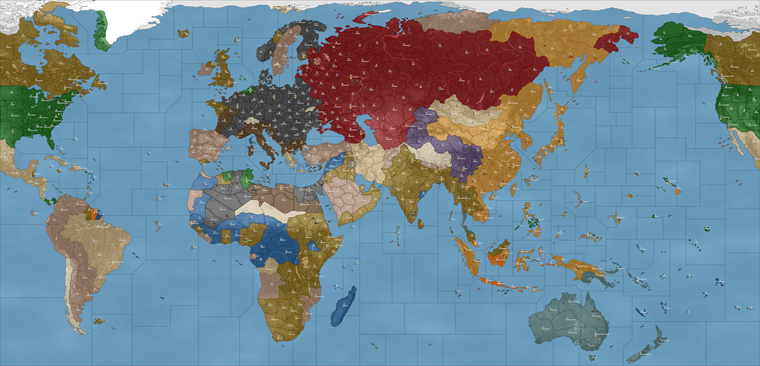
I'll look it again tomorrow after I've had some sleep
-
MNE WIP '40 version 1.35.9.zip
MNE WIP '40 version 1.35.9
New starting placement by @Black_Elk
Odesa-Mykoliav and Siberia are now at 2PUs eachCheers...
-
Ran a bunch of simulations to round 5-10, and made some adjustments. I thought this one gave a pretty good play pattern.
To jump start the Action in Greece tweaked where the Pro-Side infantry was located and gave Italy another tank in Montenegro. Computer targets TUV pretty readily so it was helpful to have 1 inf here or there to pull each team into the hotspots. Similar treatment with Sicily to serve as a draw for Allies. For Persia the best handling seemed to be a switch to Pro Axis, although I think this could be justified from the historical sweep, was more just to get the Allies moving where they needed to move. For the Western Hemisphere assigned control to USA for simplicity. Gets their income up to par to do what needs doing in round 2, for a somewhat better push.
For the Soviet Far East front with Japan also made some adjustments as well. Some slow roving infantry in the backfield for USSR, seemed to do the trick in stabilizing that front a bit better. Few other minor tweaks to get the computer humming.
For Germany, they should activate Finland more reliably now. At least like 3 times out of 4 they'd take every tile and activate those armies. Bulgaria is a bit more down to what sorts of hits the pro allies inf in Yugoslavia put up in the opener, but I spread the hitpoints out so it'd be more consistent. Seemed to work pretty well.
Here's the edit mode save with those adjustments
2025-3-10-Mega-New-Elk-1940.tsvg
Quickie screen with the Adjustments there
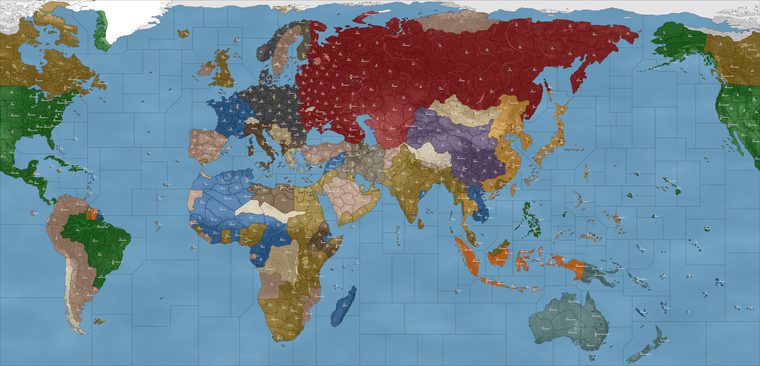
Here's an example of how it looked after 5 rounds HardAI, tapping in with France for the quicksave. Not too shabby for the computer.
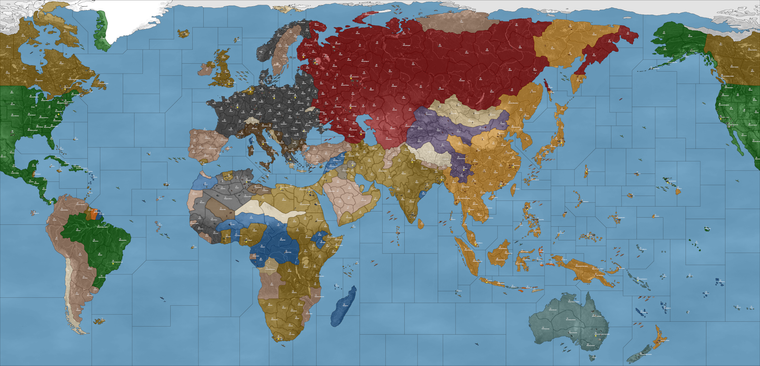
Then another HardAI run from the same starting edit save, except in that one computer Japan got diced hard at Pearl, then stalled by computer Russians.
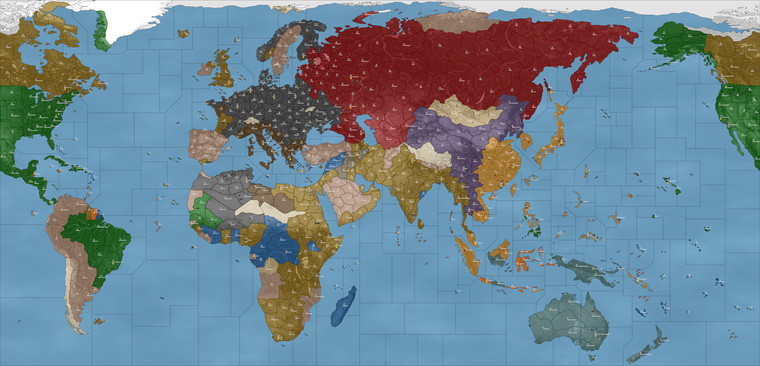
Different swing by round 5 there. That time computer Allies advanced and computer Japan was more against the ropes. Just down to how the openers cracked off.
Hopefully some alright variability, with the flavor still matching roughly the timeline of the game start.
In my head first turn is basically 1940 on G1, but by the time Japan is up on J1 it's more 41. Second round essentially 1941 leading into 1942-ish vibes, just to get to the fun part a bit faster.
-
ps. I noticed that the computer will often edge it's fights. So sometimes it's tricky when doing 1 hitpoint battles in some spots, cause then the computer will bring fewer units into the attack. I think we might need to remove the US fighter at Manila at the minor factory, and put in on Panay instead, cause it can make that battle for Manilla very swingy on J1. Japan tends to come lighter there now since I tried it with fewer hitpoints spread around.
Probably just a balance act of like 1 hitpoint here or there, just to make sure they don't totally reset their standard moves each time. Computer player I mean hehe
-
-
I'd just match to production for now, we can always reduce later in the final tally
-
MNE WIP '40 version 1.35.10.zip
MNE WIP '40 version 1.35.10
New starting setup by @Black_ElkAccording to my count there are only the following territories with a PUs value of 3 and can have a factory_major:
Berlin
London-S.England
Moscow-Cen.Russia
Sydney Canberra-New South Wales
Tokyo
Washington D.C.
Chicago
Milan-N.Italy
New York-New Jersey
Rhineland
San Francisco-Cen.CaliforniaCheers...
-
Sounds good! We can always boost up from there. I like this lower value approach to the production spread, I think it makes the board somewhat easier to parse.
I'd say right now that the French are surely having an outsized impact on the Allied war effort, mostly on accounting of purchasing Carriers and Bombers and such from Gabon hehe. While it certainly makes them a bit more interesting to play, it's probably a bit too overpowered. After a few rounds of them making the big ticket buys the effect is magnified, since their income is still relatively high. Probably they will work well using the China rules though, so that's always an option for a reset once we get it figured.
Currently the computer's defense of USSR's is pretty fragile. So we'll still have to see what can be done for them. It's possible we just need to get Germany into Leningrad a bit earlier, so that line can reset, otherwise USSR will defend it with everything available and stack there at the expense of just about everywhere else.
The computer already trades pretty inefficiently with fodder, HardAI in particular will edge all it's combat moves, making almost every attack by the computer very narrow and very swingy. They will frequently go light into combat, then often just end up moving the same units they held in reserve forward on Non Com anyway.
If computer prevails in their narrower attacks they do reasonably well, but if they dud or whiff, the lines can be easy to roll up. It's a bit awkward and they push their fronts rather slower than one might hope. Potentially I think USSR could be formidable if they also used China rules, but right now Japan will sorta nail up into Siberia if they don't reinforce or get lucking just sorta blundering into a defense with an Inf stack hehe. They do love their bombers, which is amusing to see - like who would have thought? lol In any case, probably will take some fine tuning to get them purchasing more regularly, or perhaps to find an alternative way of approaching USSR reinforcement when controlled by the AI.
For the Torch dynamic in the Med, I think the Sicily factory may have backfired, and made it a little too easy for computer Italy to stack there, but that could also have been the extra couple dudes I put in their backyard changing up their line. I'll have to run some more tests with the current to see how it shakes down game to game. Basically the goal is to get Allies more into Africa so they can pressure the boot and open a front down in Sicily, Southern Italy or in the Balkans. Might have been one step forward 2 back, but least it got Greece working, so we can keep working it up from there.
I figure we'll have the full slate of options in PvP or solo vs AI to increase challenge by sides or for player parity, but I think if it works under the more Classic do or die conditions, that could only help in getting a more nuanced thing dialed. Say for USSR Japan NAP, or staging J1 or neutral control a bit for USA to more accurately reflect the timeline of the start date. Pretty fun so far though
Big strides!
-
Rome-Cen.Italy should have a factory_minor because of it's 2PUs status. Milan-N.Italy is 3PUs and does have a factory_major for Italians.
Cheers...
-
Right on, makes sense. I will probably end up removing the Sicily minor next out, just so they're not stomping too hard. Chicago I think could be reduced down to a more normal 2 PUs, just so it's not too much of a standout, I don't anticipate much action there. Makes sense to shift somewhere more contested I'd imagine.
Speaking of which, probably makes sense to have Paris at 3 PU in that case, since they start with a Major there. Even though it is immediately conquered and downgraded to a factory_minor, would make sense to have at whatever level matches the starting situation.
I think we could probably shift the PUs from Orleans or Vichy to make that happen for Paris. Or probably would make sense to shift the other PU to Bordeaux while we're at it, since I'm thinking that Minor might need to make a comeback.
I've been running some FastAI games just to see how it compares to the HardAI for the pattern.
Right now there is a bit of a challenge in getting a Battle of the Atlantic up off the ground, mainly on account the coastal production locations being somewhat inconvenient for Axis placement, and relatively easy for Allies to cover.
Bordeaux would probably make sense as a starting minor factory location to give ok coverage vs the Atlantic while not being just right on top of London, but the issue is more that Germany just won't really purchase many subs regardless. If they're dropping naval it's usually to get defense power in the water and the placement limits favor the heavier hitting more expensive builds. We had it there initially though, in Bordeaux, so might just go back to that. I think it might be ideal if we can get Germany to snag Marseille on G1, or so the Italians don't checkerboard France too hard. That might require a bit of a tweak. I'll go back to the lab tonight and see if we can't tease something out there.
I think for a generic solution we can always just give Germany a few more subs to work with at the outset in the Atlantic, perhaps a bit further south so it doesn't jack up the approaches to North Africa too much. Or perhaps a way for players to place subs at some set distance from a given Coastal Factory. So for example placing subs directly into the Atlantic gap. It's a bit of a challenge just because of the way the computer (and most players) will treats subs more as attack/defense stacked with the other ships, rather than prowling. Creating special conditions or rules for that is something I was hoping we might be able to work around for now, since it's a bit of a can of worms.
Allowing Subs to place at some further distance from the coastal complexes than the normal surface ships seems like it could work, but not sure if that can be achieved with just regular vanilla factories, or short of some sort of spawn per turn mechanic. Again for the AI there are probably options there, but for now just sorta thinking about where they might need those starting coastal factories just to have a chance to get out on the water hehe.
Will be tinkering around the margins for sure. Good stuff!
-
@black_elk said in Mega New Elk WIP:
Allowing Subs to place at some further distance from the coastal complexes than the normal surface ships seems like it could work
Working on the North Africa map, for @VictoryFirst , there is a need to spawn German subs away from "production locations". To accomplish this, I created a canal that connect those locations. Because subs can use canals, even if they are not owned by the controlling power, they were able to be placed/spawned at that location. So, if you want distance spawning of subs, tell which location would be used and I'll create the "special" canals that link to those locations.
Cheers...
-
@black_elk said in Mega New Elk WIP:
Speaking of which, probably makes sense to have Paris at 3 PU in that case, since they start with a Major there.
I see a minor factory at Paris, so it can be raised to 3PUs and start with a major factory. Will include it in the next change.
Cheers...
-
Sounds like a plan
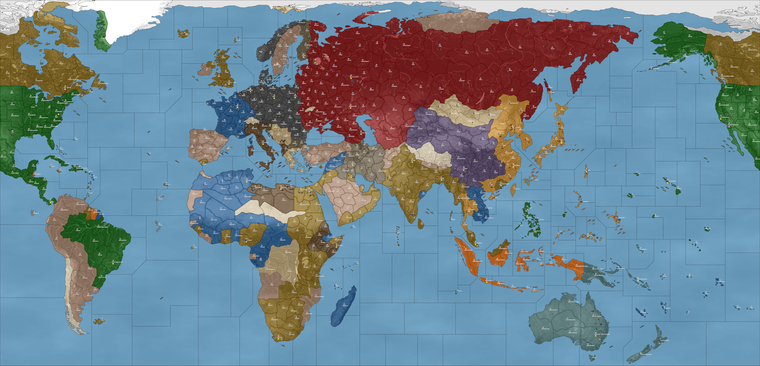
For now I did a rework of the situation in France G1...
2025-3-11-Mega-New-Elk-1940.tsvg
I moved the starting Italian force from Milan to Rome, then positioned a German force in Milan with Armor to reach Bordeaux. I think this gives a more satisfying sweep since it basically puts more of France under German control after G1, and less about Italy launching over there to gobble it up. Again mainly for the computer to open well.
It seemed helpful for the visual too, just to call attention to fact that some German units are located on Italian starting territory (the same way Brits and French start co-located in a few places),. The idea being that we sorta draw the players eye downward first to Milan and then to North Africa where there are is also a pocket force for the Afrika Corps. In any event, gives the right sort of push I think.
I removed the factory in Sicily and Gabon, added back the factory in Bordeaux. Left the rest the same so as not to shift the dynamic too much.
I think for Sub further than coastal placement, this may require a visual either with some convoy markers or just to differentiate those zones in some way. So perhaps say wherever the starting coastal factories are located we could establish a convoy in that sz, with a control flag and such. Then it makes it easier to see the spawn locations for submarines. I think it would be ideal to have something that works the same way for all nations, just so that say USA could do it in the Pacific, or maybe Italy in the med, that sort of thing.
For now the main Atlantic gap is basically sz 103, sz 108, where the north Atlantic subs are prepositioned. I grouped them so it'd easier to see. Probably the idea spot to trial it, since those spots are both a distance of 2 from the coastal factory minors in France.
-
@black_elk said in Mega New Elk WIP:
I removed the factory in Sicily and Gabon, added back the factory in Bordeaux. Left the rest the same so as not to shift the dynamic too much.
I've raised Bordeaux to 2PUs. I'll leave Sicily and Gabon alone, unless you want them reduced to 1PUs.
Cheers...



Hello! It looks like you're interested in this conversation, but you don't have an account yet.
Getting fed up of having to scroll through the same posts each visit? When you register for an account, you'll always come back to exactly where you were before, and choose to be notified of new replies (either via email, or push notification). You'll also be able to save bookmarks and upvote posts to show your appreciation to other community members.
With your input, this post could be even better 💗
Register Login