TripleA Logo TripleA Forum
    • TripleA Website
    • Categories
    • Recent
    • Popular
    • Users
    • Groups
    • Tags
    • Register
    • Login

    Add Unit Count and Damage Display Outline
    Scheduled Pinned Locked Moved Feature Requests & Ideas
    35 Posts 7 Posters 14.1k Views 7 Watching
    Loading More Posts
    • Oldest to Newest
    • Newest to Oldest
    • Most Votes
    Reply
    • Reply as topic
    Log in to reply
    This topic has been deleted. Only users with topic management privileges can see it.
    • redrumR Offline
      redrum Admin
      last edited by redrum

      @Hepps So is the main point having a nice outline for the unit numbers? If so I'd probably want to consider doing it without images first before falling back to that option. But what you propose should be theoretically doable and I'd probably agree with @alkexr to draw each digit so less images are needed.

      Also the benefit of figuring out how to do it programmatically is we keep the font size options. Though I guess in theory you could do something with image sizing.

      TripleA Developer with a Passion for AI: https://forums.triplea-game.org/topic/105/ai-development-discussion-and-feedback

      HeppsH alkexrA 2 Replies Last reply Reply Quote 2
      • HeppsH Offline
        Hepps Moderators @redrum
        last edited by Hepps

        @redrum I am open to all kinds of options... fast and loose that's how I like to play it. 😉

        I guess just working on a couple different maps lately I started to really see how the monochrome pixilated numbers are a huge opportunity for maps. And while antialiasing alone would be an improvement, it by no means solve the issue of maps with a variety of unit and territory colours, shading, reliefs, unit colours.....

        So while pondering it I thought the best would be a outline. the reason I suggested an image is really a by-product of two things...

        First I thought an outlined number was not possible to render currently. (as a font)

        Second I thought if they were images then it allows the creative juices to just flow, since you could do all kinds of wonderful things both with numbers as well as backgrounds.

        "A joyous heart sours with the burden of expectation"
        Hepster

        1 Reply Last reply Reply Quote 0
        • alkexrA Offline
          alkexr @redrum
          last edited by

          @redrum said in Inception: A dream within a dream (Unit stack numbers display):

          figuring out how to do it programmatically

          In C# what I would do is to draw the number (string) to a Bitmap first (don't know java equivalent). Then for each pixel P, you take the maximum of (alpha of pixel Q * strength - Euclidian distance(P, Q) * sharpness) over all pixels Q on the bitmap, this will be the alpha of the outline. Then you overlay the original bitmap over the outline. (Strength and sharpness are parameters.) If you only take the maximum over pixels Q within a radius of (255 * strength - sharpness), then you get the same result in O(n^2) relative to the height/width of the bitmap.

          "For the world is changing: I feel it in the water, I feel it in the earth, and I smell it in the air."

          redrumR 1 Reply Last reply Reply Quote 0
          • FrostionF Offline
            Frostion Admin
            last edited by

            Just outlining the current numbers would be a great improvement! The default white numbers can be hard to see and distinguish on bright territory backgrounds. (Yes, I know that I can change colors... But I don't want to 😊)

            Map maker of: Star Wars: Galactic War + Star Wars: Tatooine War + Caribbean Trade War + Dragon War + Age of Tribes + Star Trek: Dilithium War + Iron War + Iron War: Europe + Warcraft: War Heroes

            C 1 Reply Last reply Reply Quote 1
            • redrumR Offline
              redrum Admin
              last edited by redrum

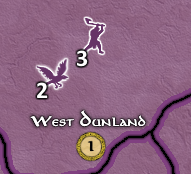
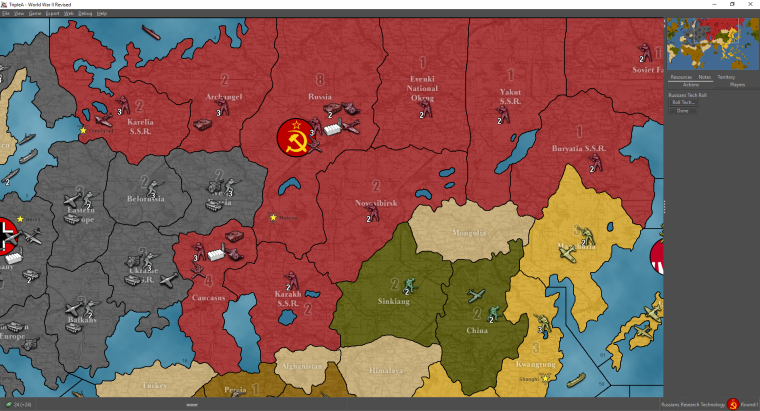
              So here a first go at it:
              0_1530226684526_6e1188b5-4c10-4686-8555-a1aa95f8e079-image.png

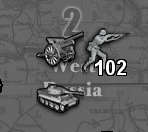
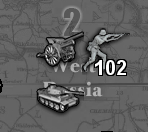
              And with a large number of units:
              0_1530226809487_3be9b57f-018a-4179-926f-ddecd0623437-image.png

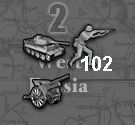
              Before:
              0_1530227830920_ba3f141f-da39-496d-a6ea-6673fe6c15b3-image.png

              TripleA Developer with a Passion for AI: https://forums.triplea-game.org/topic/105/ai-development-discussion-and-feedback

              HeppsH 1 Reply Last reply Reply Quote 4
              • HeppsH Offline
                Hepps Moderators @redrum
                last edited by

                @redrum How is that possible? How was this able to be done so quickly?

                "A joyous heart sours with the burden of expectation"
                Hepster

                1 Reply Last reply Reply Quote 0
                • redrumR Offline
                  redrum Admin @alkexr
                  last edited by redrum

                  @alkexr That's a bit more graphics kungfu then I'm doing at the moment. Initially, I'm just outlining the text by first drawing it at the 1 pixel over northwest, southwest, northeast, and southeast positions with the outline color and then drawing the text in the center with the text color. As well as enabling anti-aliasing.

                  TripleA Developer with a Passion for AI: https://forums.triplea-game.org/topic/105/ai-development-discussion-and-feedback

                  HeppsH 1 Reply Last reply Reply Quote 0
                  • HeppsH Offline
                    Hepps Moderators @redrum
                    last edited by

                    @redrum All good. I just thought this would be a much bigger undertaking...

                    "To the uninitiated everything appears to be made of magic"

                    "A joyous heart sours with the burden of expectation"
                    Hepster

                    redrumR 1 Reply Last reply Reply Quote 0
                    • redrumR Offline
                      redrum Admin @Hepps
                      last edited by

                      @hepps Well, my pretty simple approach took about 5 minutes. Ask and thou shall receive 🙂

                      Open to trying some other ideas if folks want. Probably gonna at least add an option to set the outline color as well.

                      TripleA Developer with a Passion for AI: https://forums.triplea-game.org/topic/105/ai-development-discussion-and-feedback

                      HeppsH 1 Reply Last reply Reply Quote 1
                      • HeppsH Offline
                        Hepps Moderators @redrum
                        last edited by Hepps

                        @redrum That was my very next question. 😃

                        I'm going to use inception more often. It appears to be highly effective as a title. 😉

                        "A joyous heart sours with the burden of expectation"
                        Hepster

                        1 Reply Last reply Reply Quote 0
                        • redrumR Offline
                          redrum Admin
                          last edited by

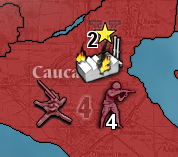
                          And did unit and bombing damage as well:
                          0_1530234019701_47e2665f-4a3f-4f62-b59f-d829e58340c3-image.png

                          TripleA Developer with a Passion for AI: https://forums.triplea-game.org/topic/105/ai-development-discussion-and-feedback

                          1 Reply Last reply Reply Quote 3
                          • redrumR Offline
                            redrum Admin
                            last edited by redrum

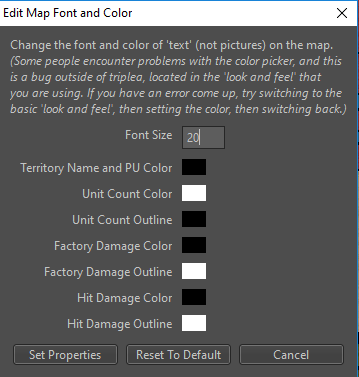
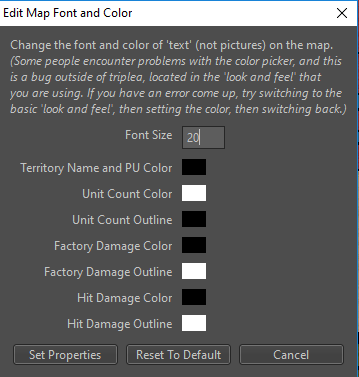
                            And the update font preferences:
                            0_1530235467266_d9569bb3-c8c1-4955-8dec-65f832f10c3d-image.png

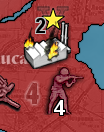
                            Any thoughts on defaults? Unit color/outline as white/black seems good. But black numbers with white outline are a bit jarring. Maybe do a gray for default outline for hit and bombing damage? Also should the default font size be a bit bigger? 12 seems really small on most screens/maps.
                            0_1530237214893_2c7d5fb5-f111-4ade-b075-9b56499ffe26-image.png

                            Current defaults:
                            private static final int MAP_FONT_SIZE_DEFAULT = 12;
                            private static final Color TERRITORY_NAME_AND_PU_AND_COMMENT_COLOR_DEFAULT = Color.BLACK;
                            private static final Color UNIT_COUNT_COLOR_DEFAULT = Color.WHITE;
                            private static final Color UNIT_COUNT_OUTLINE_DEFAULT = Color.BLACK;
                            private static final Color UNIT_FACTORY_DAMAGE_COLOR_DEFAULT = Color.BLACK;
                            private static final Color UNIT_FACTORY_DAMAGE_OUTLINE_DEFAULT = Color.LIGHT_GRAY;
                            private static final Color UNIT_HIT_DAMAGE_COLOR_DEFAULT = Color.BLACK;
                            private static final Color UNIT_HIT_DAMAGE_OUTLINE_DEFAULT = Color.LIGHT_GRAY;

                            TripleA Developer with a Passion for AI: https://forums.triplea-game.org/topic/105/ai-development-discussion-and-feedback

                            HeppsH 1 Reply Last reply Reply Quote 0
                            • redrumR Offline
                              redrum Admin
                              last edited by

                              Last but not least the PR with the changes: https://github.com/triplea-game/triplea/pull/3488

                              TripleA Developer with a Passion for AI: https://forums.triplea-game.org/topic/105/ai-development-discussion-and-feedback

                              1 Reply Last reply Reply Quote 0
                              • FrostionF Offline
                                Frostion Admin
                                last edited by

                                Personally I think 12 is nice. Especially since the unit pictures themselves are pretty small. If pictures were bigger, then the text should of course also be set to be bigger.

                                Map maker of: Star Wars: Galactic War + Star Wars: Tatooine War + Caribbean Trade War + Dragon War + Age of Tribes + Star Trek: Dilithium War + Iron War + Iron War: Europe + Warcraft: War Heroes

                                prastleP 1 Reply Last reply Reply Quote 0
                                • prastleP Offline
                                  prastle Moderators Admin @Frostion
                                  last edited by

                                  @frostion The colour blind bastd chimes in white is best 🙂 but either are an improvement 🙂 just my 2 cents

                                  If we open a quarrel between past and present, we shall find that we have lost the future! Sir Winston Churchill

                                  1 Reply Last reply Reply Quote 0
                                  • C Offline
                                    Cernel Moderators
                                    last edited by

                                    I'm a little bit shocked that this thing that has been discussed so much turned out to be such an apparently fast thing to do.

                                    Some considerations on my part:

                                    1. I definitely believe 12 font size is absurdly small I cannot believe it is ideal for anyone. I'm on a 27" full HD, not having any relevant visual impairments, and using 24, and know that many are on smaller screens or laptops. I would say default 24, but it should really at very least be 16.

                                    2. It would be good if the "Edit Map Font and Color" are set per map, not generally, as you can prefer different settings per map (maybe a button with "setting all", for all maps) and the mapmaker can set the defaults in map.properties, especially now that a better zoom is being made (I think the most extreme example to date is Conquest of the World, in which you would want to have a much bigger font size than other maps).

                                    3. Currently there is an issue (it can be argued it is a bug) with using Font Size together with name_place.txt: it draws the name from the left, thus their barycentre shift to the right when you increase the font size, making such an option scarcely useful, unless you are drawing images in place of names (see below) (you can test this with Pact of Steel, setting Unit Size at 24: Eastern Europe will be in the middle of itself and Belorussia and most name will overboard to the right, basically obtaining the opposite of what name_place.txt is supposed to be for). If this issue is not solved (in a way to keep the barycentre fixed, even tho the drawing is from the left), and especially if the default is changed, I then advise name_place.txt to be made ineffective in changing position of names not recalling images (meaning still working for 270BC but not anymore for Pact of Steel).
                                      This is also a liability to changing the default font size, as this option works in drawing names from the left, and I assume it has been optimized in current maps having it for font size 12, which is not advisable to keep as reference, if it is changed as default; so I don't really know how this issue can be feasibly solved. Maybe it is just anyway better to reserve the name_place.txt for image based names only (this would need updating pact_of_steel), tho the option itself does have a value, since sometimes the autoplace is not so good, and you may not want to go as far as having images for all names.
                                      A way to solve this issue may be to have a setting for specifying, inside the "name_place.txt", what font size such coordinate are meant for, and having the engine, then, assuring the barycentre stays the same when changing Font Size. In this case, pact_of_steel would need to be updated to specify a value of 12 for it, assuming a new default. If the settings are customizable per map (see the point above), we can, instead, just assume the reference is the setting. In this case, pact_of_steel would need to be updated to specify Font Size 12, generally.

                                    4. The Font Size setting defines the dimension of the regular names, but not of those drawn by calling images (it will change the dimensions of the names of World At War, but not of those of 270BC). I guess this is an advisable behaviour, as now, at least, as you can assume that images based names have been tailored for the map closely (so I agree better not having an option for specifically zooming them, also because of the placing issues at the point above), but this is somewhat generally incongruous, so it may be advisable splitting the Font Size setting between "Territory Name and PU Font Size" and "Unit Font Size".

                                    5. "Territory Name and PU Color" is wrong (PU means Production Unit, and identifies resource stocks, not territories productions (your PUs are the money you have, not what you can get)). It should be "Territory Name and Production Color".

                                    6. Are you sure it is still necessary to keep that bug disclaimer at the start? Any chance that bug is not so relevant anymore, after so many years?

                                    1 Reply Last reply Reply Quote 0
                                    • C Offline
                                      Cernel Moderators @Frostion
                                      last edited by

                                      @frostion said in Add Unit Count and Damage Display Outline:

                                      Just outlining the current numbers would be a great improvement! The default white numbers can be hard to see and distinguish on bright territory backgrounds. (Yes, I know that I can change colors... But I don't want to 😊)

                                      I don't want to, either; or rather I don't want to keep changing it each time I change map. That option would have more value if it would be per map.

                                      I hope this won't incentive mapmakers to have very bright territories anyways, as there are other reasons not to, beside the inability to read purely white numbers, in my opinion (I don't think we need to revert the colour changes of Italians in "world_at_war", for example).

                                      1 Reply Last reply Reply Quote 0
                                      • HeppsH Offline
                                        Hepps Moderators @redrum
                                        last edited by Hepps

                                        @redrum It all looks so good I can hardly bear it.

                                        As far as a default it hard to say... I normally use between 16 - 24. But now with the outline making the numbers more distinctive I might be inclined to reduce them down.

                                        Having it settable per map would be nice. Not sure whether that is an easy fix or more of getting into an major commitment. One idea would be to be to have it scaled based on the unit size or unit scale settings. (not really sure whether that would make it easier or harder to accomplish).

                                        Either way... just seeing this get resolved this quickly is a much appreciated step in the right direction.

                                        "A joyous heart sours with the burden of expectation"
                                        Hepster

                                        C 1 Reply Last reply Reply Quote 0
                                        • redrumR Offline
                                          redrum Admin
                                          last edited by

                                          I'm leaning towards increasing the font size default to 16 and see if I end up with a revised players rebellion 🙂

                                          Ideally, these should be a per map not global setting. That would be a bit more work than I wanted to do at the moment though. Mostly a lot of copy and pasting to create new map properties, remove the global settings, and wire it up. Not difficult but would take a few hours probably. Good feature request and something a new developer to the project could probably tackle.

                                          TripleA Developer with a Passion for AI: https://forums.triplea-game.org/topic/105/ai-development-discussion-and-feedback

                                          B 1 Reply Last reply Reply Quote 3
                                          • B Offline
                                            beelee @redrum
                                            last edited by

                                            @redrum just wanted to say Nice Work ! Huge Improvement !

                                            Fwiw I use 16 font on the global map. It's no big deal to change but probably look better to new players. Revised is pretty popular though, so yea, don't wanna bum those guys out : )

                                            HeppsH 1 Reply Last reply Reply Quote 0

                                            Hello! It looks like you're interested in this conversation, but you don't have an account yet.

                                            Getting fed up of having to scroll through the same posts each visit? When you register for an account, you'll always come back to exactly where you were before, and choose to be notified of new replies (either via email, or push notification). You'll also be able to save bookmarks and upvote posts to show your appreciation to other community members.

                                            With your input, this post could be even better 💗

                                            Register Login
                                            • 1
                                            • 2
                                            • 1 / 2
                                            • First post
                                              Last post
                                            Copyright © 2016-2018 TripleA-Devs | Powered by NodeBB Forums