Map Making Error
-
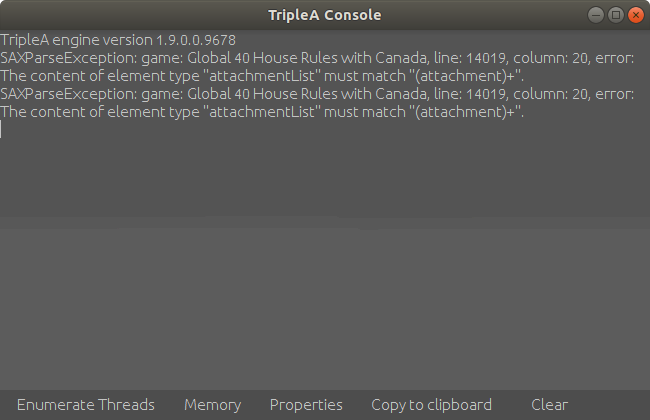
I get this:
This is what I tried todo:
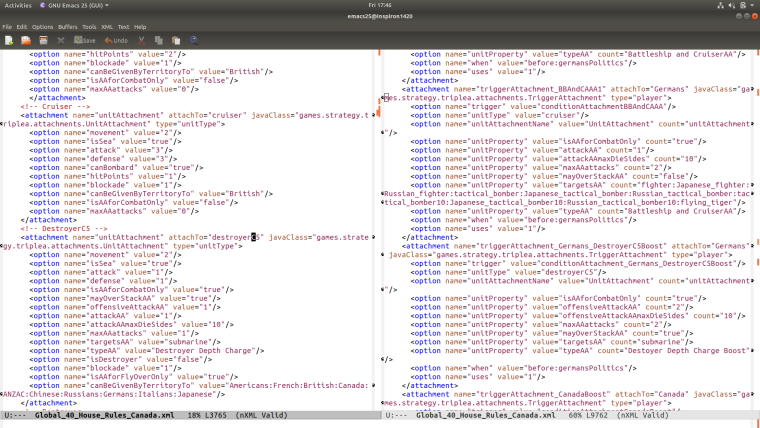
Here's is xml:0_1521242775216_Global_40_House_Rules_Canada.xml
Here's before changes:0_1521242863372_Global_40_House_Rules_Canada.xml
Been working on it for a couple days. Can't figure it out. Checked the "attachmentList" but everything seems ok.
Anyway, if anyone feels like checking it out, it'd be appreciated. : )
-
-
@prastle heh heh
Hate bugging "The Man" : ) Try not to give up too easily : )
-
@beelee You have some random "n" characters throughout the XML causing issues. I removed the ones I noticed please try this: 0_1521245260408_1521242775770-global_40_house_rules_canada.xml
-
Thank You
-
@beelee well I'm still struggling. Idk how to compare different xmls other than manually. Open both up and look at what i changed. Do I have a double of something ? Or hopefully, not a lot them ?
-
@beelee I'd recommend using something like Notepad++ which has a module to 'compare' 2 files so you can see the changes.
-
@redrum well sadly I'm not intelligent enough to figure it out.
Just went old school and still don't see any changes, except for one, Archangel, was wrong, but that shouldn't have affected anything.
I've tried notepad for a 2-3 weeks now and I don't even know how to split the screen.
Uggh. Guess I'll start over.
Sorry to whine. : ) just kinda frustrated
-
@beelee Not really following you. Did the XML I uploaded not fix the problem for you? Are you still seeing the same error after using that or a different error?
-
@redrum well i renamed the xml so it'd match the previous working name. No joy there either.
Guess I'll go punch some paper and try again tomorrow.
Thanks for your time
-
@beelee I use the program XML copy editor, which you can use to verify the XML code before running. It is good at catching typos.
-
@beelee What error did you get after using the XML I posted? It worked for me and the only other change I had to make was change the mapName property to match the folder:
<property name="mapName" value="world_war_ii_global" editable="false"/> -
@redrum well finally got it to work. Was a naming issue, had to get rid of all the numbers, which I tried last night, but...I screwed up somewhere. Anyway don't know why you had to rename the way you did. This is what i have:
<property name="mapName" value="global_40_house_rules" editable="false"/>
Still trying to figure out these editors. If @anyone knows where I can find some sort of tutorial on notepadqq, it would be way cool. I looked around a couple weeks ago and never found anything that helpful.
If you don't mind redrum, could you give me an example of what you changed ? Just want to understand where I screwed up. No biggie if you're busy ( which I'm sure you are
 ).
).Thanks for Everyone's time : )
Peace Out
-
@beelee good job bee
-
@beelee Here is what I use to compare files in Notepad++: http://www.technicaloverload.com/compare-two-files-using-notepad/
You actually had just random "n" characters at the beginning of some of the lines. Here is an example from your original XML:
<attachment name="conditionAttachment_Germans_BomberA3" attachTo="Germans" javaClass="games.strategy.triplea.attachments.RulesAttachment" type="player"> <option name="techs" value="BombersA3_GiveToAll" count="1"/> </attachment> n <attachment name="conditionAttachment_Russians_BomberA3" attachTo="Russians" javaClass="games.strategy.triplea.attachments.RulesAttachment" type="player"> <option name="techs" value="BombersA3_GiveToAll" count="1"/> </attachment> -
@redrum Thank you
as my buddy's dad used to say " if you're gonna be stupid you gotta be tough"
@prastle thanks bro : )
@RogerCooper thanks for the heads up on the XML copy editor. Gonna give it a go. Just one more challenge for me heh heh : )
-
Probably not the best place for this as i'm sure it's addressed somewhere but if you have:
<info name="Global 40 House Rules with Canada" version="1.2.1.a/>
instead of:
<info name="Global 40 House Rules with Canada" version="1.2.1.1"/>
it won't show up in the "select map" section when triplea is on. Just thought I'd I share since it took me 24 hours to figure it out : )
Please move to appropriate place or delete : )
-
you should use notepad++


Hello! It looks like you're interested in this conversation, but you don't have an account yet.
Getting fed up of having to scroll through the same posts each visit? When you register for an account, you'll always come back to exactly where you were before, and choose to be notified of new replies (either via email, or push notification). You'll also be able to save bookmarks and upvote posts to show your appreciation to other community members.
With your input, this post could be even better 💗
Register Login