Territory Tab / Always Showing Units on Hover
-
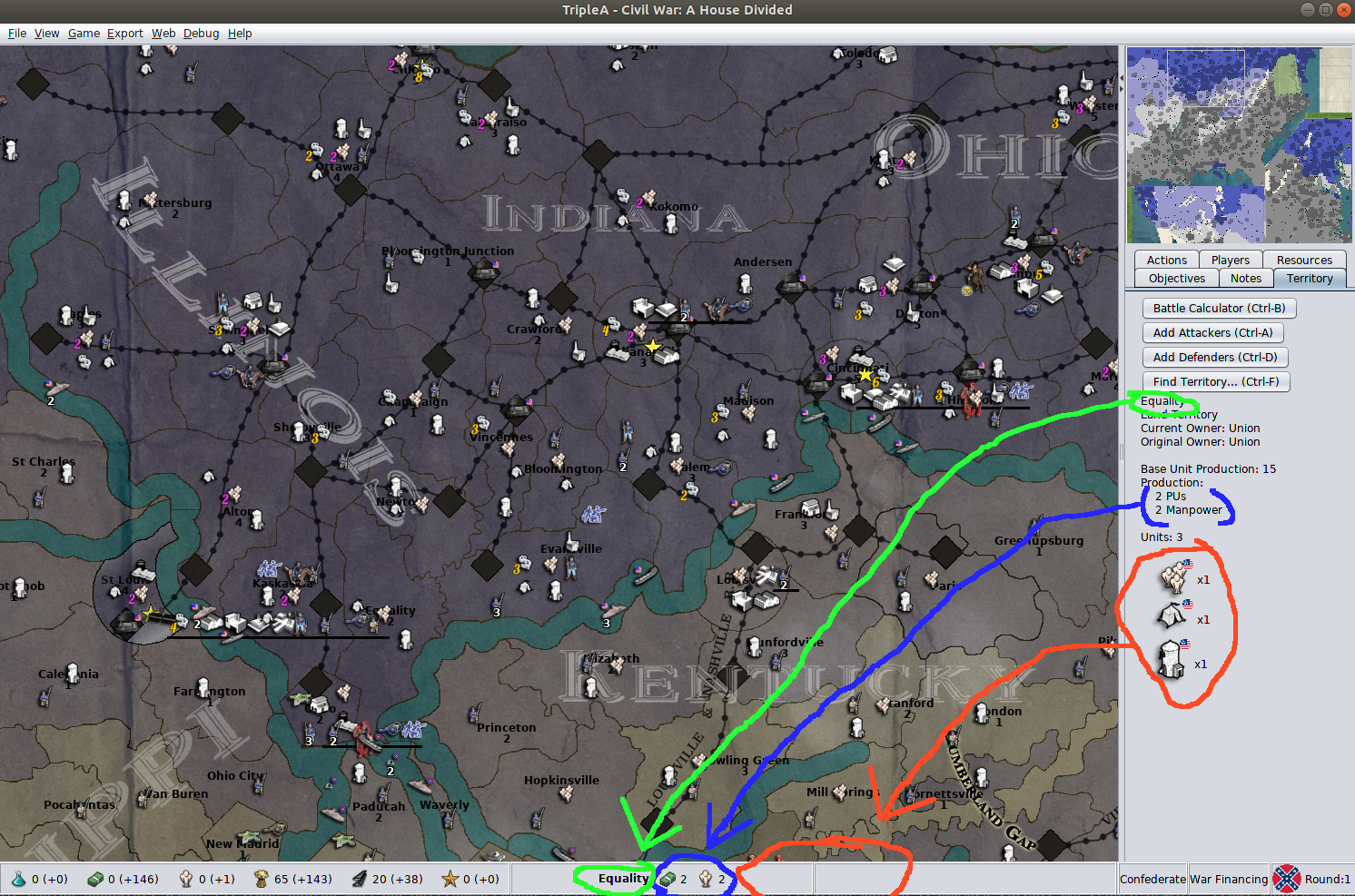
@redrum indeed battle calc is the goto. It should not be though, it's a work around. The island offload situation is prevalent, not efficient to use battle calc or territory tab to just be sure units made it to the right location.
Again, veterans learn these tricks, new players struggle immensely
-
Should mention, fwiw, I observed a new player having a major problem with this on 1941 v3
-
@LaFayette Ya it is an acquired skill Lol. in 41v3
-
@prastle That's the point, the skill acquisition is a barrier. Essentially this person walked away because there was too much to learn to get 'good at the game', the fun part was locked away. This is someone that should be a TripleA player , but it's virtually an experts game right now and unless you're really a die-hard to get there, you're going to walk away before seeing how fun of a game it is.
IMHO we need to focus and solve these types of issues to acquire more players and remember that all players start out as novices and be careful not to examine these issues from the eyes of a veteran. This example player did not even know the battle calculator existed and was not ready to learn about it even, it was basic gameplay that they were still struggling with.
-
@LaFayette I agree we made an agreement the other day I will stick to it. Even tho I hate git

-
So I have tried to keep up with the quick and successive posts on this thread and I feel I may be able to help with some suggestions... please bear with me while I try to create some visuals to explain my idea's ... stay tuned.
-
Thanks @Hepps, I'm curious to see what you''ll come up with.
FWIW, I'm currently leaning towards having the unit scroller "selected territory" follow the mouse and stay in sync with the territory tab & territory display in the status bar.
These are the reasons I'm thinking about:
- I like the consistency this brings, the unit scroller hotkeys changes the territory in the status bar, having it be bidirectional seems consistent
- With unit counts, we get a good "quick view" of the units in a territory, pretty minimal update. Unit counts were intentionally left out for the old display, with the new updated line formation display it starts to make sense (notably you'll be able to see it!)
- If a person is using their mouse, they are either clicking for the next units in the scroller or are just making moves and are not using the scroller, either way the information in the scroller is likely "stale" and so updating it to follow the mouse makes it more useful.
- If there are too many unit types for the status bar, we'll probably have the same issue in the unit scroller, so we are no worse off
- It seems like a better economy of screen real-estate, the change is just adding unit counts and following the mouse and otherwise we are using a pre-existing feature on the window.
- It's easier in some ways than updating the status bar, less changes, no need for mini-unit icons to be rendered and/or handling the case where there are is an excessive number of units.
-
So here it is... and bear with me as I am trying to do this whilst encompassed in a gin fueled philosophical blanket insulated by the warmth of not seeing anyone but my wife for like 10 days... so if I seem delusional... well... if it smells like shit and feels like shit... might just be shit...
Now that being said... let's see if I am still making any sense at all...
So we can't reengineer the entire engine...without revisiting every map we have and changing them extensively... however what if...
We looked at our display problem (especially with territorial spacial problems) and addressed it in a manner that would make the fix much easier...
So... I chose Global as the example as it provides some great examples where there are limited placements in an otherwise generous map.
Lets look at Belgium...
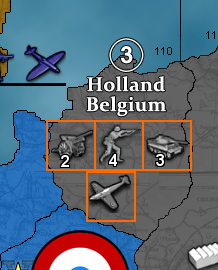
So while overall the map provides exceptional ability to provide ample placements on the map, a territory like Belgium becomes an issue as it has 4 possibly 5 max.
Now, lets presume this territory had one more potential placement... before an extension line is used to bleed units into an adjoining territory...
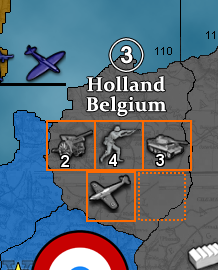
What if we simply used that last placement... ie. the last placement a map maker had specifically detailed as the last placement for any given territory... and then added a MAP PROPERTY that defined any unit presence beyond the last placement would be substituted with a icon that defined that there are more units in the territory...
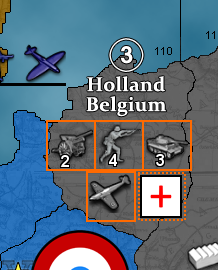
Then if you hover your cursor over the icon it would create a pop up window that shows you all the extra units that are contained within the territory.
This would mean that all we need to do is add the map property to every exisiting map... one line addition...
map.Surplus units in pop up
Then the engine would only need to have a generic icon added to its assets folder that is for the overflow...
Meaning that even the most spatially challenged maps... yes I'm looking at you WAW... would have a clear indicator of when the territory is severely over populated with units rather than just having huge swaths of the map cluttered with overflow lines that complicate the visual and clicking process.
"A joyous heart sours with the burden of expectation"
Hepster -
@Hepps I like the idea. You could also make it a game option instead of just a map property though so users can choose to have it or the existing overflow lines.
TripleA Developer with a Passion for AI: https://forums.triplea-game.org/topic/105/ai-development-discussion-and-feedback
-
@redrum Yes... of course.
-
@Hepps This was what I pictured by writing at my second point:
@Cernel said in Territory Tab / Always Showing Units on Hover:
@LaFayette I'm thinking that:
-
Only when you are hovering your mouse on a zone that has an overflow line (the number of unit types in there, excluding hidden, is bigger than the place coordinates available), then an additional lower bar, above the regular one, appears, showing the units on a line and centred with the screen (this way, if the map has never any overflow lines (you are playing Feudal Japan), then you never see this feature).
-
Whenever hovering your mouse on a zone that is being overlapped by units from other zones on overflow lines, hide those overflow lines (maybe adding a "plus" symbol, to mean some units are temporarily not shown).
Basically your proposal here, except happening only if the overflow lines would go into the zone you are currently hovering.
-
-
@Hepps Perhaps there could be some problems:
- some maps, like WaW or Cold War, there might be many territories where you have to hover, we could be losing visibility of a lot of units
- having to hover could lose the "feel" for a board game (I'm really concerned about this, IMHO one of TripleA's stronger points is that it has a good board game feel)
- we could have some players unhappy if they fail to realize critical units were present. For example, I typically look around the map for "where is that bomber that has been running around". If I don't spot it, going through history is one way, but tedious, it woudl also be tedious to have to go through every expand item to find it
- we could be making the problem slightly worse in some ways, every time we could have shown a single unit rather than an expand, it'll be a net negative
- does not help with the island offload scenario. I literally watched a new player shift click their units to offload and then not realize they did not actually make it to the island. For that case, it has nothing to do with the expanded visualization but just not easy to tell which territory the units are on
- thinking of island case, where you might have one available spot, this could be really limiting to not show any units or just the one
-
@LaFayette When you have only 1 spot, you only show the "plus" symbol, as that one is placed in the last placement available, unless the zone has exactly the same number of unit types as the placement spots.
-
Yeah, that was understood @Cernel.
we could be making the problem slightly worse in some ways, every time we could have shown a single unit rather than an expand, it'll be a net negative
we could have some players unhappy if they fail to realize critical units were present
having to hover could lose the "feel" for a board gameHere's a screenshot that shows an example of this problem:
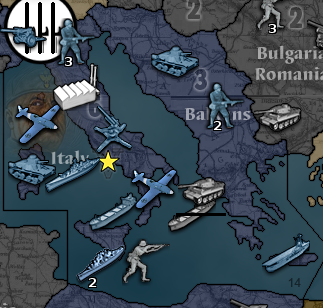
- It's not clear the italian tank is actually in italy and not an island.
- It's not very clear which fighter is which (the top left fighter is in italy, the bottom right one is the one on the SZ)
- there is only one unit drawn on extension, hiding that unit and another unit in italy would not really help. It still does not make it clear where the fighters are, or fix the tank.
- It could be worse if the plus sign is badly placed
- we could wind up with a lot of plus signs, could look ugly, and winds up hiding a lot of information (which adds a new problem - "I can't see all the units")
-
Summarizing some points:
- the unit extension bar is not really a problem, it usually helps
- the problem is more where units are drawn to begin with
- the territory tab is inconvenient, slow to use, and not necessarily obvious to new players
- using battle calc is a work-around, but should not be the solution (if we listen to ourselves, it does sound a bit odd, "It's hard to see where the units are on the map" Response: " Use the battle calculator for that")
- the territory tab does not show a lot of new information compared to what we have elsewhere on the game screen already
I'd agree ultimately the solution is for maps to be done really well and have non-ambiguous placement positions. That's not feasible and arguably the game engine should try to make a bad situation not as bad. Towards that end, I think we can do the following:
- have the unit scroller and territory tab stay in sync
- add scrollbars to the unit scroller to handle cases where units become too compressed (or maybe not depending on how it play tests, it's not that often you get more than 4 or 5 unique units owned by a single player in a territory)
- "lock" the territory tab and unit scroller on click instead of holding shift. Right click or escape would release the lock, or by clicking a new territory. A click IMHO is much more intuitive than holding shift.
-
@LaFayette You could also add the point that the Carrier is on a non-island (and, instead of a carrier, you could have a land unit that is cargo). That is what I was saying about the automatic placement finder.
Regarding Sardinia, I personally agree that mapmakers should better not add placements on unnamed non-islands like Sardinia (though the automatic placement finder does it too).
-
@LaFayette said in Territory Tab / Always Showing Units on Hover:
@Hepps Perhaps there could be some problems:
- some maps, like WaW or Cold War, there might be many territories where you have to hover, we could be losing visibility of a lot of units
- having to hover could lose the "feel" for a board game (I'm really concerned about this, IMHO one of TripleA's stronger points is that it has a good board game feel)
- we could have some players unhappy if they fail to realize critical units were present. For example, I typically look around the map for "where is that bomber that has been running around". If I don't spot it, going through history is one way, but tedious, it woudl also be tedious to have to go through every expand item to find it
- we could be making the problem slightly worse in some ways, every time we could have shown a single unit rather than an expand, it'll be a net negative
- does not help with the island offload scenario. I literally watched a new player shift click their units to offload and then not realize they did not actually make it to the island. For that case, it has nothing to do with the expanded visualization but just not easy to tell which territory the units are on
- thinking of island case, where you might have one available spot, this could be really limiting to not show any units or just the one
All good points. I figured the unit scroller was going to make forgotten units a thing of the past.

Anyways, was just an idea.
-
The unit scroller updates are now live with unit counts and follows the mouse cursor.
I'm curious if there is consensus that we probably will not need to use the battle calculator quite as much.@Hepps really the issue is more confusing rendering than forgotton units. Once folks have play-tested the updated unit scroller, I'd be curious if there are more ideas for making it clear which units are in which territories. AT some point it'll come down to updating/fixing maps, before we get to that point, I'm wondering if there is more that we can reasonably do.
There might be some overlap here with the 'highlight territory' on mouse enter idea. Having all units highlight when you hover over a territory should really help this too.



Hello! It looks like you're interested in this conversation, but you don't have an account yet.
Getting fed up of having to scroll through the same posts each visit? When you register for an account, you'll always come back to exactly where you were before, and choose to be notified of new replies (either via email, or push notification). You'll also be able to save bookmarks and upvote posts to show your appreciation to other community members.
With your input, this post could be even better 💗
Register Login