How to change unit appearance?
-
If you didn't yet, read this:
https://github.com/triplea-game/triplea/wiki/Map-and-Map-Skin-MakingThen feel free asking questions here.
-
@Cernel Actually, that documentation is quite obsolete, but I'm not aware there is anything better around. You'll have to collocate it correctly yourself, I suppose. For example, there is not anymore a "maps" folder where the program is installed, or anywhere else, and you should change that with your "downloadedMaps" folder, wherever it is.
-
I went into the units folder and added in one of my drawings (edited to be the right size and with a transparent background) but I played and nothing had changed. What do I do?
-
@JOSEPH-PRINCE You should really do this by making a mapskin for the map. Otherwise, you need to substitute your image to the same named image you want to change.
Also be sure to close and reopen TripleA, as I believe images are kept in memory in some places, otherwise (a strange behaviour that I've reported a few times but has never been fixed).
-
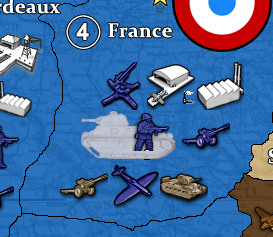
I got it! But it doesn't look quite right.
-
How do i fix the unit scale? I don't know what the correct scaling for the units are.
-
@JOSEPH-PRINCE All images are drawn from "place" coordinates on their top-left corner. In theory, every map should make sure that all its units images have the same dimensions (a lot of maps, and even the TripleA assets, don't, however), which in turn should exactly correspond to what defined in the map.properties file for the
units.widthandunits.height.Long story short, if the map is decently made to start with, look at the map.properties file and be sure that your image has the pixels dimensions defined in the
units.widthandunits.heightentries. And, no, you should not add bigger or smaller images, unless you redo the "place" file too and modify all units to have the same dimensions, as well. -
@JOSEPH-PRINCE Unfortunately the Global map.properties file does not have that information included. But you can easily see from the images in the map's unit-directories that most of them are 48x48 pixel.
-
@Panther Right, default is 48 pixels in both cases, if not specified (I would always).
-
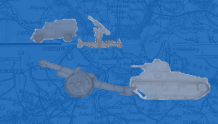
Thanks for the help you two! It looks great now and I think I got the hang of it!


Hello! It looks like you're interested in this conversation, but you don't have an account yet.
Getting fed up of having to scroll through the same posts each visit? When you register for an account, you'll always come back to exactly where you were before, and choose to be notified of new replies (either via email, or push notification). You'll also be able to save bookmarks and upvote posts to show your appreciation to other community members.
With your input, this post could be even better 💗
Register Login