TripleA Logo TripleA Forum
    • TripleA Website
    • Categories
    • Recent
    • Popular
    • Users
    • Groups
    • Tags
    • Register
    • Login

    ad a new sea zone to an existing map

    Scheduled Pinned Locked Moved Map Making
    46 Posts 7 Posters 6.8k Views 7 Watching
    Loading More Posts
    • Oldest to Newest
    • Newest to Oldest
    • Most Votes
    Reply
    • Reply as topic
    Log in to reply
    This topic has been deleted. Only users with topic management privileges can see it.
    • wc_sumptonW Offline
      wc_sumpton
      last edited by

      @Numetalfan

      That I can't answer. Someone with more graphic talent may be able to help. What I did was take b56, b57, b58, and b59 copied the '6' and pasted over the '5's. Then saved each with it new name, b66, b67, b68 and b69.

      For Sicily and Malta I did just about the same. Cut and copied letters until I found something that look right.

      That's the best I can tell you.

      Cheers...

      1 Reply Last reply Reply Quote 0
      • N Offline
        Numetalfan
        last edited by

        Hi,

        I created a new sea zone and a new country in the Asian area,

        however an island right to French Indochina is white - why?
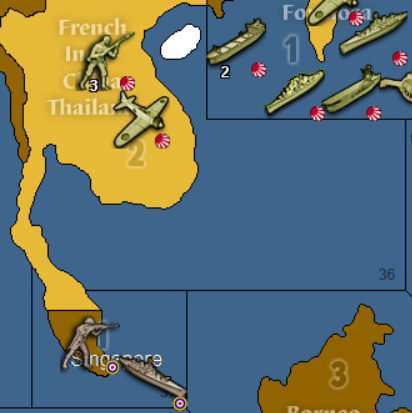
        white island.PNG

        everything else works with the new zones!

        1 Reply Last reply Reply Quote 0
        • wc_sumptonW Offline
          wc_sumpton
          last edited by

          @Numetalfan

          The island is part of French Indochina Thailand. When the polygon file was redone, the island was not selected. To fix while in 'Island Mode' reselect French Indochina Thailand and the island together.

          Cheers...

          C 1 Reply Last reply Reply Quote 0
          • C Offline
            Cernel Moderators Lobby Moderators @wc_sumpton
            last edited by

            @wc_sumpton said in ad a new sea zone to an existing map:

            @Numetalfan

            The island is part of French Indochina Thailand. When the polygon file was redone, the island was not selected. To fix while in 'Island Mode' reselect French Indochina Thailand and the island together.

            Cheers...

            Hainan was part of China, not of Indochina.

            Of course, in this game it can be part of whatever else, if anything, just be sure that connects propertly.

            1 Reply Last reply Reply Quote 0
            • wc_sumptonW Offline
              wc_sumpton
              last edited by

              @Numetalfan

              In the game 'Hainan' does not exist, and there are no Chinese owned territories close enough to graft it to. It could be like 'Malta' and removed from the Japanese as part of 'French Indochina Thailand' and given to the Chinese as it own territory.

              Those choices are your!:beaming_face_with_smiling_eyes:

              Cheers...

              1 Reply Last reply Reply Quote 1
              • N Offline
                Numetalfan
                last edited by

                here we go again,

                this time I added a new sea zone and changed a border.

                this is how my base image looks:
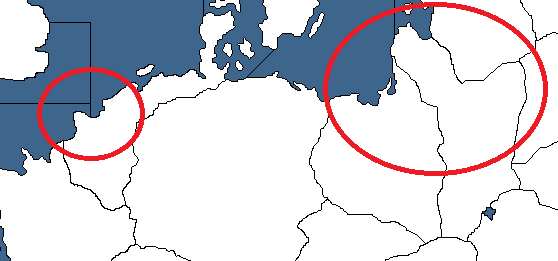
                borders_fail.png

                thats how I wanted it,

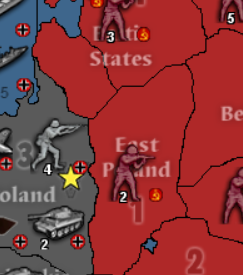
                but - after I start the game it looks different:
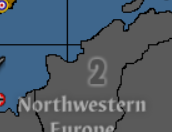
                borders_fail1.PNG

                and

                borders_fail2.PNG

                this means, some other images are also important - which?
                What else has to be done next to changing the base image to have the changes I want?

                1 Reply Last reply Reply Quote 0
                • N Offline
                  Numetalfan
                  last edited by

                  it is only a graphical problem, the game it self works fine, no problem with centers, place or polygons !

                  1 Reply Last reply Reply Quote 0
                  • SchulzS Offline
                    Schulz
                    last edited by

                    Even if the game works perfectly the graphic issue must something to do with either older polygons or base tiles.

                    1 Reply Last reply Reply Quote 0
                    • N Offline
                      Numetalfan
                      last edited by

                      the question is:

                      is it suffienct to just change the base image, or do I need to use the tile breaker after that or what else?

                      1 Reply Last reply Reply Quote 0
                      • SchulzS Offline
                        Schulz
                        last edited by

                        You need to use image breaker from new base image then creating new baseTiles than recreating polygons of East Poland and Baltic States

                        1 Reply Last reply Reply Quote 0
                        • N Offline
                          Numetalfan
                          last edited by

                          polygon grabber solved the porblems - this problem is solved !

                          thx @all

                          1 Reply Last reply Reply Quote 1

                          Hello! It looks like you're interested in this conversation, but you don't have an account yet.

                          Getting fed up of having to scroll through the same posts each visit? When you register for an account, you'll always come back to exactly where you were before, and choose to be notified of new replies (either via email, or push notification). You'll also be able to save bookmarks and upvote posts to show your appreciation to other community members.

                          With your input, this post could be even better 💗

                          Register Login
                          • 1
                          • 2
                          • 3
                          • 3 / 3
                          • First post
                            Last post
                          Copyright © 2016-2018 TripleA-Devs | Powered by NodeBB Forums