Images disappear when game is published to TripleA server
-
After months of playtesting on my local machine, I recently uploaded the "argomidweight" repository to the TripleA servers (it's filed under EXPERIMENTAL). The XML files for the games correctly list "argomidweight" as the mapname under properties, and the YAML file does as well. The map can be downloaded with no trouble, but when I try to launch one of the two games associated with the map (1939 or 1942), virtually all of the custom images are missing. I see the submersible unit and the glider unit, but it appears that the game is fishing for everything else in the general assets folder, rather than in my map folder specifically. Several units are missing altogether, and the ones that it does find are mostly the 'default' colors and silhouettes, rather than the colors and silhouettes I've selected for this particular map.
This is baffling for me because I have a full set of folders with all the images for each nation in the map folder, and they were all working perfectly across many versions when I was playtesting the game on my own computer -- it's only now that I've downloaded the files from TripleA that I'm seeing this error.
I have triple-checked to make sure there are no other similarly named map folders in my C:/Users/[USERNAME]/triplea/downloadedMaps folder that could be confusing the image search. There are no such other folders.
Does anyone have any suggestions for where else I can look to solve this problem? If you also download the map, are you experiencing the same bug?
Thank you!
-
-
-
@jason-green-lowe Oddly, the images are still showing up correctly in the Notes section, so it's not a problem with the image files themselves; it's something to do with the way the program is looking for them. I just wish I knew what that problem was.
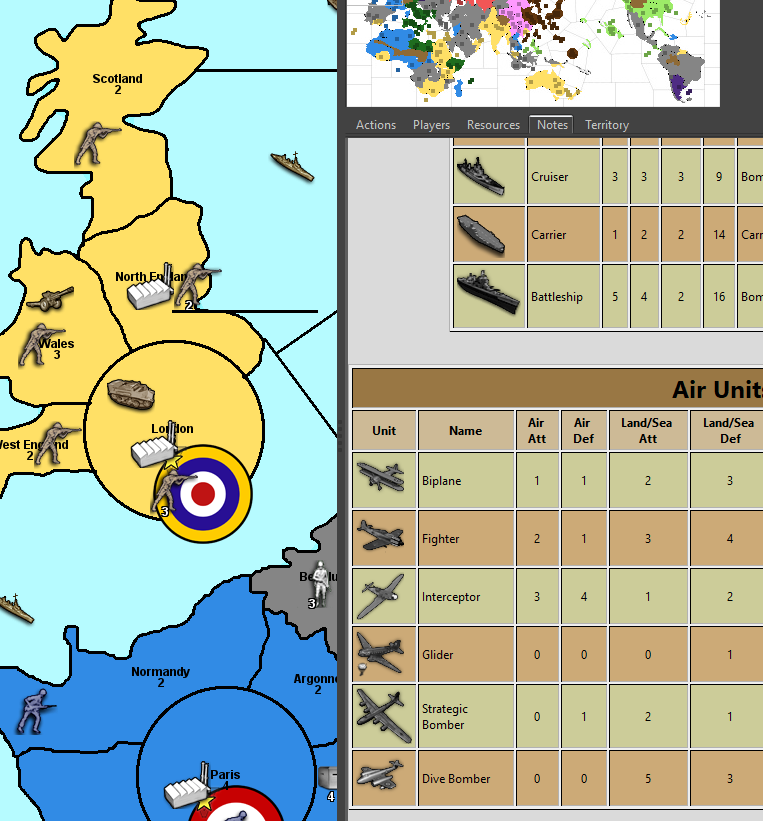
-
I can reproduce your issue when I start the map zipped, as it will be downloaded and kept unzipped with the current release.
Now when I start the game with a current pre-relase the map-zip will be unpacked, and all those images become visible when you start the game. No more related error-message.
There are other error messages then related to the fact that your map folder doesn't follow the current standards. There have been some changes. I recommend that you look into another current "core" map to notice the standards.
HTH

-
@panther OK, that's good to know. So what can I do to prevent users from encountering this error when they download the map using the standard, "stable" version of TripleA? Anything? Or do I just have to tell them to manually unzip the file after they download it? Part of the point of using the server for me is that many players are completely tech-illiterate and cannot figure out how to do things like unzip folders.
-
@Panther Also, I just tried downloading the pre-release and installing that, but it did not make the "missing image" error messages stop appearing on my machine. I got exactly the same errors as before.
Perhaps I am not quite understanding you. Are you unpacking any files manually?
Also, I notice that the folder as downloaded from tripleA on my hard drive is named "argomidweight-master", presumably after the "master" branch of the repo on github. Could this be part of what is messing up the search for the image files? The XML instructs the software to look for "argomidweight," not for "argomidweight-master." All my other maps have the same -master suffix in their folder names, and they work fine, but that's the only change I can think of between when I was playtesting on my local machine and when I was playtesting the version downloaded from the server.
-
@jason-green-lowe said in Images disappear when game is published to TripleA server:
@panther OK, that's good to know. So what can I do to prevent users from encountering this error when they download the map using the standard, "stable" version of TripleA? Anything? Or do I just have to tell them to manually unzip the file after they download it? Part of the point of using the server for me is that many players are completely tech-illiterate and cannot figure out how to do things like unzip folders.
I can only hope that someone familiar with all those changes in 2.6.prereleases finds some time to document it - else many people will experience some surprises when playing 2.6, as I feel.
There are three ways to deal with it:
- Unzip manually, delete the zip file, use either the stable or the pre-release.
- Download with the current stable, but after that start a pre-release to unzip the mapfile automatically.
- Download with a pre-release, let the pre-release unzip the file and use the pre-release. However downloading with the pre-release might be problematic for other reasons.
-
@jason-green-lowe said in Images disappear when game is published to TripleA server:
@Panther Also, I just tried downloading the pre-release and installing that, but it did not make the "missing image" error messages stop appearing on my machine. I got exactly the same errors as before.
Be sure to delete the zip file from the downloaded-maps folder. The missing image error should not occur, then. At least it does not here.
Perhaps I am not quite understanding you. Are you unpacking any files manually?
You can unpack it manually, or leave that to the pre-release version. However be sure to have only the unzipped version left in the downloaded maps folder.
Also, I notice that the folder as downloaded from tripleA on my hard drive is named "argomidweight-master", presumably after the "master" branch of the repo on github. Could this be part of what is messing up the search for the image files? The XML instructs the software to look for "argomidweight," not for "argomidweight-master." All my other maps have the same -master suffix in their folder names, and they work fine, but that's the only change I can think of between when I was playtesting on my local machine and when I was playtesting the version downloaded from the server.
Yes. Remove the "-master" from the unzipped foldername.
I must leave it to others to go into further details here, as all of this is not very transparent to me.
-
@jason-green-lowe said in Images disappear when game is published to TripleA server:
Simply, as the error says, you do not have a "flak" image in
https://github.com/triplea-maps/argomidweight/tree/master/map/units/Neutral
You have "Flak", not "flak".I assume it worked for you because you are on a case-insensitive system.
I assume the other errors are of the same kind.
Be sure all cases are always correct! Not everyone is on a case-insensitive system and you should better have the exact case anyway.
-
@cernel OK, that seems to have been the problem. Thank you!



Hello! It looks like you're interested in this conversation, but you don't have an account yet.
Getting fed up of having to scroll through the same posts each visit? When you register for an account, you'll always come back to exactly where you were before, and choose to be notified of new replies (either via email, or push notification). You'll also be able to save bookmarks and upvote posts to show your appreciation to other community members.
With your input, this post could be even better 💗
Register Login