UHD World War II Global
-
@black_elk if you decide todo anything with Malta, here's a shot of where were currently at.
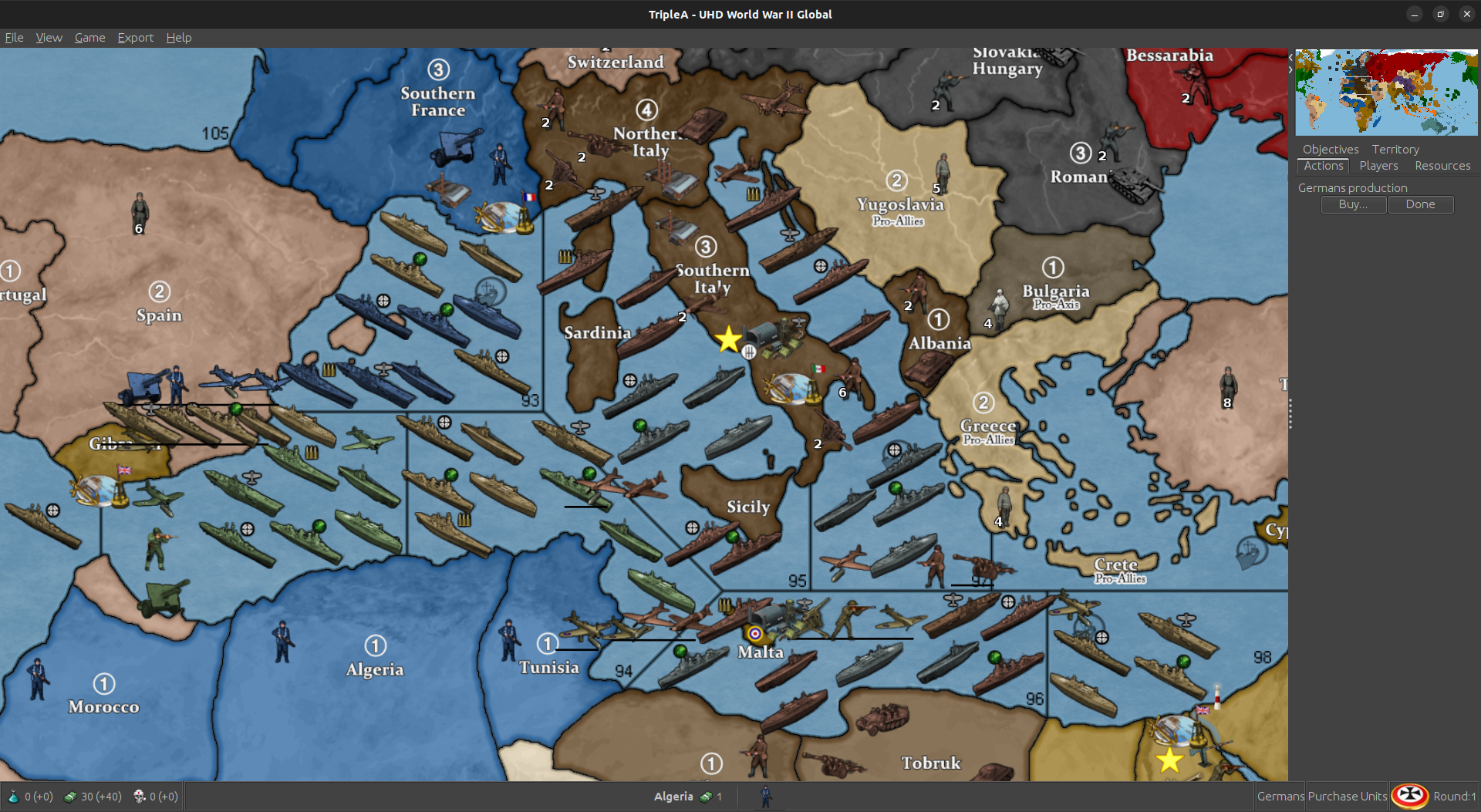
So 94 is probably the least used SZ. You could move west to where the Tunis coast starts moving north again. Keep the same angle you currently have. Basically cut that trprt in half.
I can fudge the trprt into Tunis a smidge and we'll only lose 1 place. Still have 9. Should usually be more than enough.
The BB is placing over western malta. That's why it only has 1 place. We should have room to move the BB off Malta and then give Malta another place.
Maybe make it slightly bigger ? Push the whole thing a tad west ?
I don't see much more than that really being feasible without dickin everything up. You have to keep 97, 95 and 92 as big as possible. You don't want to cut into 98 either.
Anyway, if you do change it, that's the way i'd go or just leave as is.
-
The above actually won't work. Tunis would be bordering 96 then. You could do it for a mod, but ... yea, it needs to stay as is.
-
I redid the place for Malta, Tunisia, 96, Tobruk and Libya.
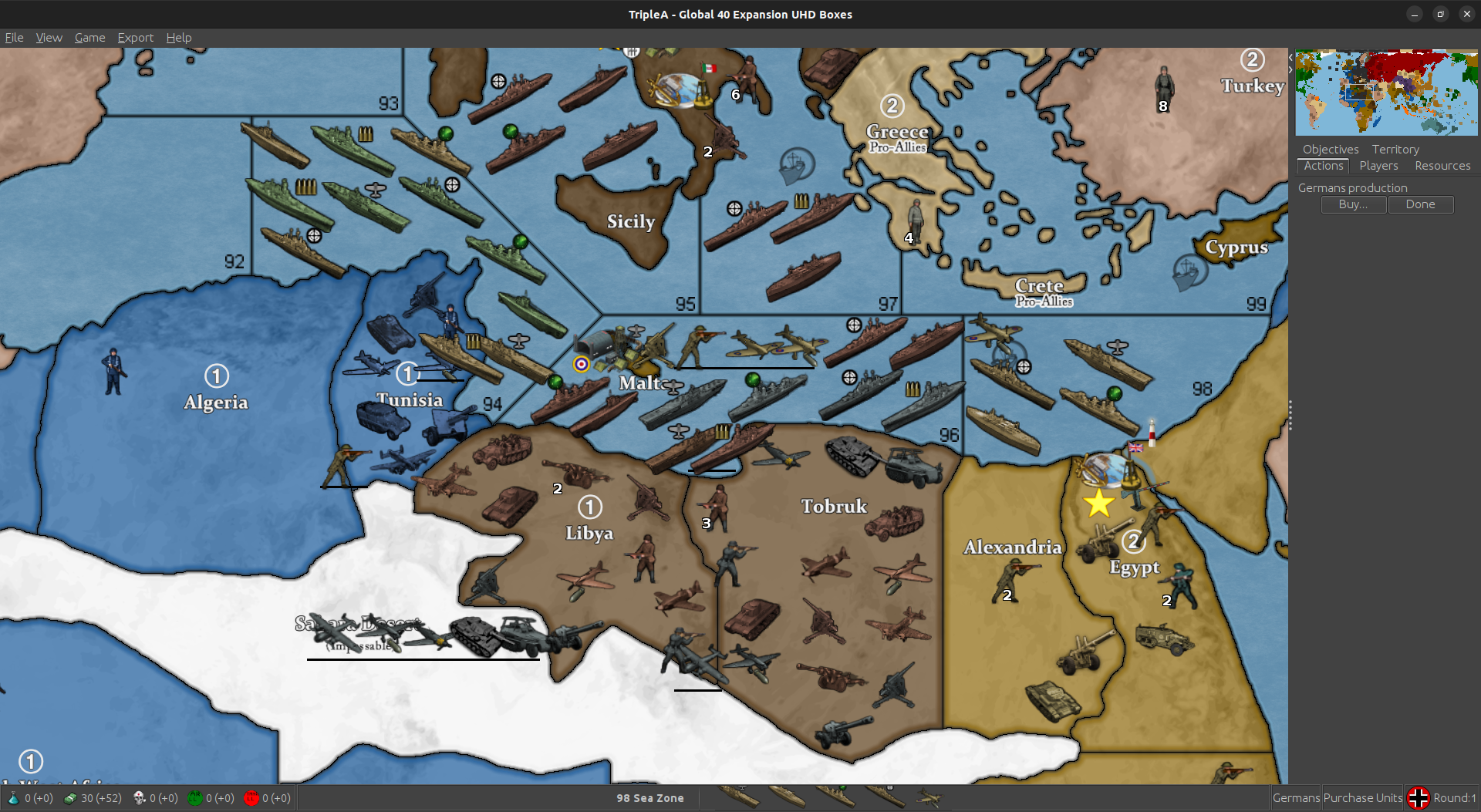
Removed the BB place in 96 and gave it to Malta, so Malta has 2 place and then overflow. Can place 5 total before it runs into anything in 96.
96 I squeezed in another place, so we still have 9 and reversed the flow into Tobruk.
Moved around the place order in Tunisia so 2nd to last gets hit with the flow first. Actually, all the flows work that way. Tried todo that for the whole map, but ...

Tweaked Libya and Tobruk place order as well. Looks as if we have room for one more in Tobruk. I'll add him too.
This will be in next update.
-
Here is a relief for the UHD global that just uses a very simple marbled pattern rather than a topographical vibe, for peeps who want it subtle.
https://drive.google.com/file/d/19mgiUmwoyg9R78d5OQLLmwOXytE_U5ao/view?usp=sharing
Couple screens to show how it presents...
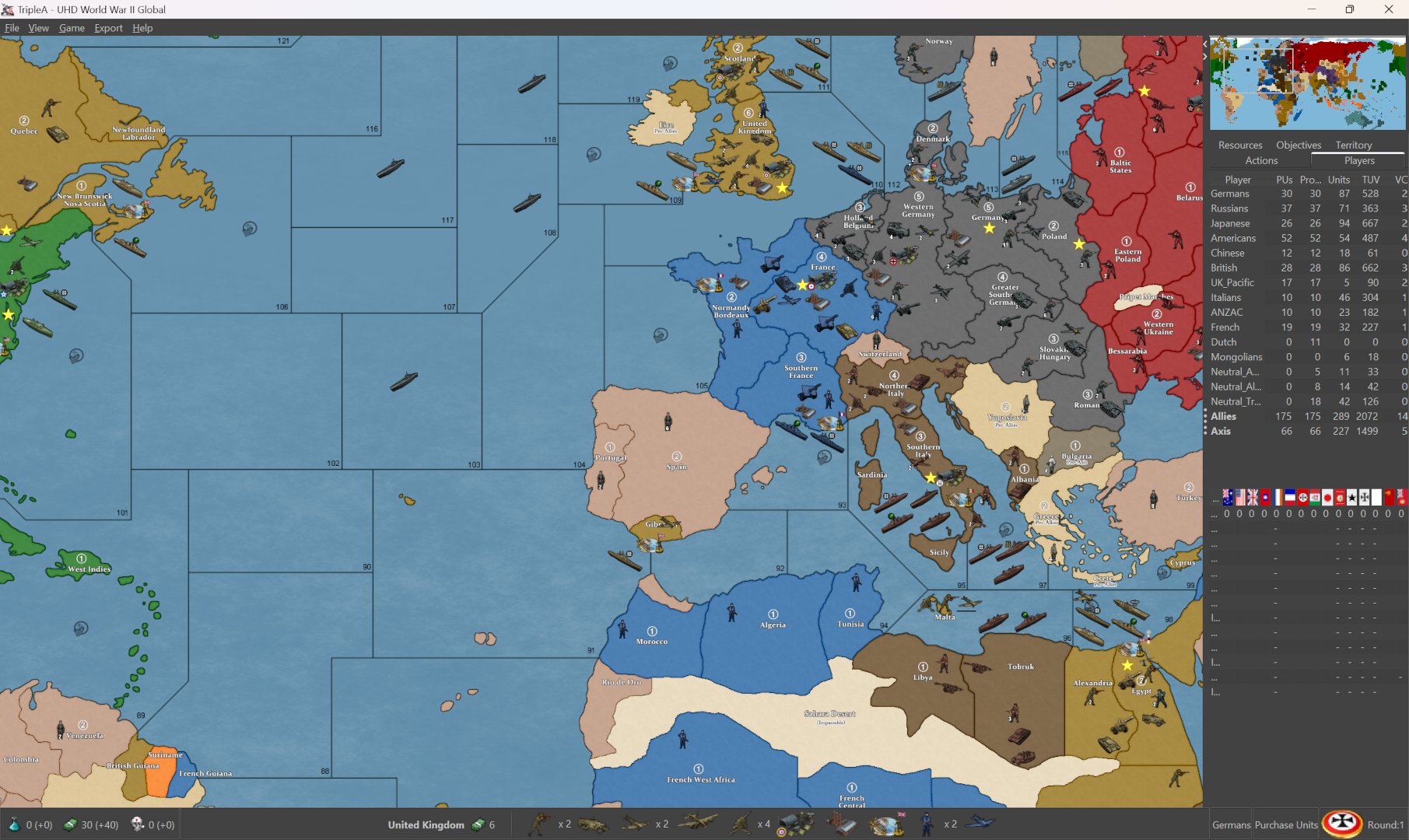
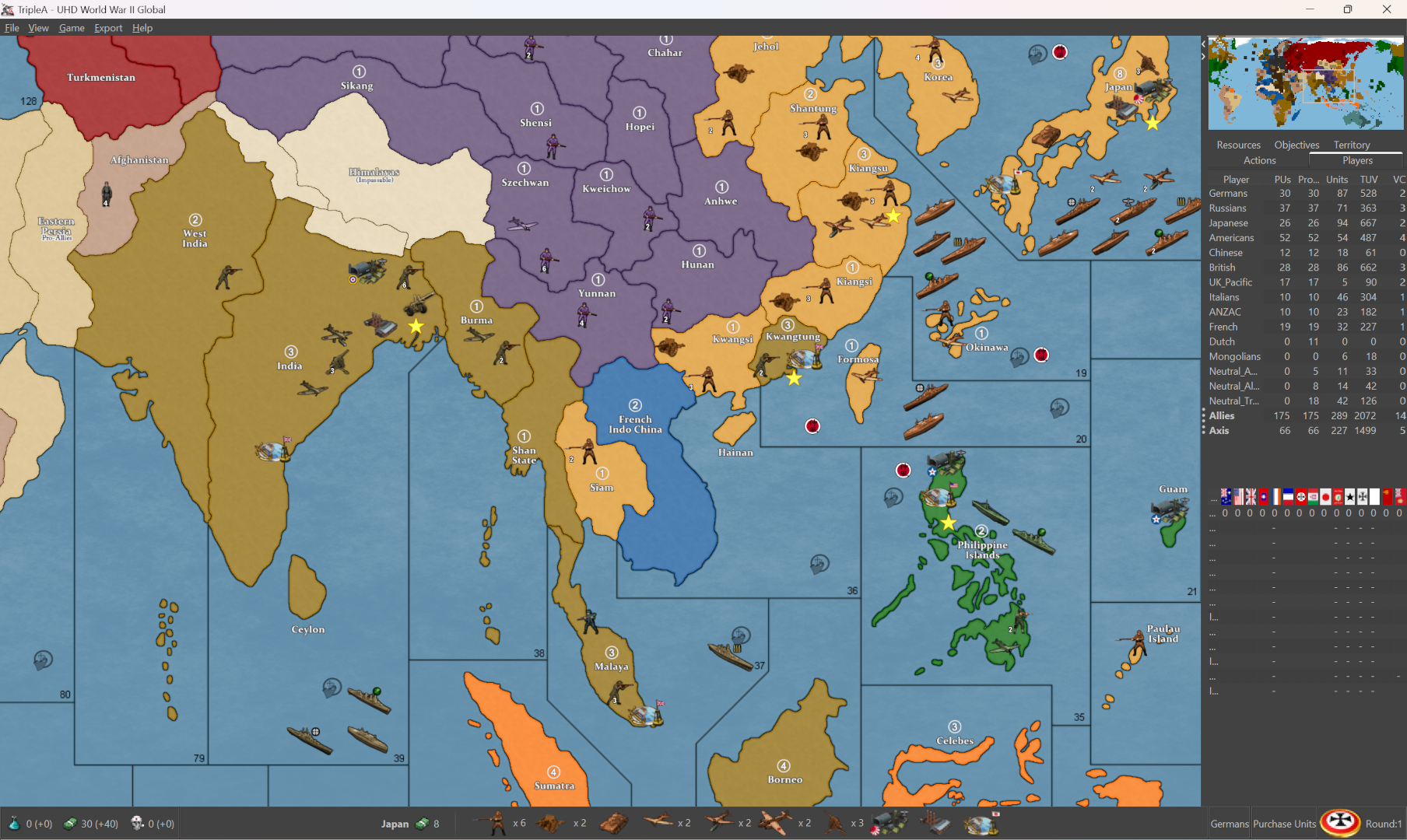
Nation colors can be changed via HEX in the map props. To change the blue of the ocean, I use the baseline to grab the selection on the relief, to isolate just those areas, then adjust. Here I just kept it the same as the default relief for simplicity, but you could insert graphics like WOPRs, change the clouds or add a glow, stuff like that. Hopefully works for most tastes. I tried to do a rail relief, but ended up looking kinda busy. Thought something like this would might be cleaner, and a bit easier to modify if peeps want to customize stuff. The templet there was GIMPs default marble pattern just to give an example.
Basically I used the baseline to grab the all the land tiles, reduce selection by 2px, edit>fill>pattern, then expand the selection by 1 px and hit it with some blur, so it just becomes like a texture.
You can do it with any image to make a pattern, but I figured that would be easy to reproduce. Then cut the entire selection (all the area in white from the base, but selected on the relief layer) paste that cutout portion with the pattern as a new layer on top, and reduce opacity of that layer to the desired level. Low opacity will give a color that is more true to HEX, higher opacity will mix that HEX color towards white, so you can basically control it that way towards more pastel.
For different borders, say using white, or blending the border in different ways, you can make a selection from the baseline 1 px then grow that selection add a little blend to the edge, paste it on top as a new layer. That way you can control the opacity there as well, for different border effects. Last step is to add the little canal graphics or whatever else. Here the 1px line shows through with just a bit of color pop at the edge, so it'd be easier to grab and to see what's going on there.
-
I like the other one better
-
Stupid question, why this?
    <attachment name="conditionAttachment_False" attachTo="Germans" javaClass="games.strategy.triplea.attachments.RulesAttachment" type="player">
      <option name="switch" value="false"/>
    </attachment>
It is used 262 times. 261 conditions/triggers that will never execute. Over 800 lines that should not be there.
I don't understand this.Cheers...
-
heh heh Idk. Probably because I didn't know what I was doing
-
LMAO... For real man. You made my day. I'm just rolling all over the floor. Just give me a minute!


Cheers...
-
Checking this xml to help @crockett36. There are some strange things here, but don't blame yourself cause the original ww2global40_2nd_edition.xml has some of the same code and I can't blame Bung or Veqryn.
Cheers...
-
Wow what a tangled mess. The "false" triggers are call by activateTrigger. This so that "removeUnits" can be done to one player while "placeUnits" can be handled by another player. But it uses a count of conditions/triggers. Are there 3 enemy units? Take one put one. Are there 2 enemy units? Take one put one. Is there one enemy unit? Take one put one. So, there are about 10 to 15 conditions/triggers for each such territory to count. Lots and lots of redundant coding. It seems that doing a change territory owner, then changing the unit's ownership to the new owner would be a fasters way of doing this because you don't have to count the number of units to change for each type of unit.
Might take a little time to test, but you could cut the code in half, and it should be simpler to read.
Just some thoughts.
Cheers...
-
yea i think that's probably for the Vichy code for the BM option. I'm not sure but I think it was done the way it was because the units weren't changing at the correct time.
I'm pretty sure redrum did the initial code for it or at least provided an example to the BM guys. I don't remember for sure.
-
I understand what is being done. It just feels like brute force. What happens if there are more than 3 units. Counting does not work. Plus, all the removeUnits, placement for each territory can be combined for each player.
There is a note telling players that if playing "Oztea 1941" change units to damaged units while damaged units can be placed and then replaced with undamaged units if necessary.
There just a lot here that seems over worked. I once took TWW xml from over 37,000 lines to just over 15,000.
Sometimes this stuff bugs me... I'm going back to watching Wednesday and then maybe some WFF.Cheers...
-
@wc_sumpton said in UHD World War II Global:
There just a lot here that seems over worked.
oh there absolutely is. A lot of room for improvement but it works.
Yes, have to have a different unit count for it to work. Think they went with the most likely combinations.
You should check out "Global 40 House Rules" if you really want to see a disaster. Back when I first started
-
@wc_sumpton said in UHD World War II Global:
It just feels like brute force
your conclusion would be correct
Edit
Yea this needs to be revisited at some point. My present time and interest is taken up with EXP.With the TTy corrections all fixed, it will probably be better to decouple the BM and Oz mods. I don't like having a pile of repos to keep updated but I suppose it'll be for the best.
Any placement change would be a pita but most of those are dialed in as well.
At any rate, it's a ways off. Just remembered crockett used UHD on my recommendation, so I should at least turn off Oz and BM in map options for him
as well as any pertinent Notifications. -
Ok, here's another "Stupid Question". There is a game option to place down "Ownership Flags". If this option is selected, flags appear on all territories designating which player owns these territories.
    <attachment name="unitAttachment" attachTo="Flag" javaClass="UnitAttachment" type="unitType">
      <option name="isInfrastructure" value="true"/>
    </attachment>
What is this for?
    <attachment name="conditionAttachment_GermansRemoveProAxisFlagFinland" attachTo="Germans" javaClass="RulesAttachment" type="player">
      <option name="directPresenceTerritories" value="Finland" count="1"/>
       <!-- Are any of these German units in Finland -->
      <option name="unitPresence" value="infantry:artillery:mech_infantry:armour:aaGun" count="1"/>
    </attachment>
    <attachment name="triggerAttachment_GermansRemoveProAxisFlagFinland" attachTo="Neutral_Axis" javaClass="TriggerAttachment" type="player">
      <option name="conditions" value="Flag:conditionAttachment_GermansRemoveProAxisFlagFinland"/>
      <!-- If German units are in Finland remove the Flag -->
      <option name="removeUnits" value="Finland:Flag" count="1"/>
      <option name="when" value="after:germansNonCombatMove"/>
    </attachment>
    <attachment name="triggerAttachment_GermansPlaceFlagFinland" attachTo="Germans" javaClass="TriggerAttachment" type="player">
      <option name="conditions" value="Flag:conditionAttachment_GermansRemoveProAxisFlagFinland"/>
      <!-- If German units are in Finland replace the removed Flag -->
      <option name="placement" value="Finland:Flag" count="1"/>
      <option name="when" value="after:germansNonCombatMove"/>
    </attachment>
Flags are "isInfrastructure" and so cannot participate or be destroyed in battle, but can be captured like factories and change ownership to whomever owns the territory. So why the musical flag swap and why only for neutral territories?
Cheers...
-
I think it's the way the pro axis turn into whoever takes them over. I can't remember but it seemed as if they weren't changing.
The Flags themselves were something Elk had at the begininng of the project. He decided not to use them as they just take up a placement spot.
I had made the option so people such as myself who didn't like them, could turn them off.
-
@beelee said in UHD World War II Global:
I had made the option so people such as myself who didn't like them, could turn them off.
I understand about the option, that is a nice idea!


It's the flag dance that was giving me trouble, if the captured unit does not change into the proper players unit, then that would be a bug that would need to be checked. Will test this out later.I've been able to chop about 2,000 lines of code, and I haven't even started on the fun stuff.
Cheers...
-
heh heh
with there not being one for pro Allies, I may have realized I didn't need the trigger and just didn't delete it.
I try to keep stuff clean and have gotten somewhat better but as you can see, I'm not always successful
Edit
Actually I will probably just remove the Flags whenever I get around to working on it again -
Learn by doing. Even something I perceived as simple had me chasing my tail for a couple of hours this morning. Then when I discovered what was the cause of my little 'bug', I wanted to kick myself down the street.
Stupid, stupid. Stupid is as stupid does. That's me!

Sometimes I surprise myself that I get anything to work.
Cheers...
-
heh heh I just asked a buddy if I could use his 12' trailer to haul some brush. He said sure.
Then I thought, why don't I just use my pickup instead lol
Can't burn in town or that's what I'd do
We used to have a bonfire about once a week in Alaska. Rainforest. Grows back in a week lol


Hello! It looks like you're interested in this conversation, but you don't have an account yet.
Getting fed up of having to scroll through the same posts each visit? When you register for an account, you'll always come back to exactly where you were before, and choose to be notified of new replies (either via email, or push notification). You'll also be able to save bookmarks and upvote posts to show your appreciation to other community members.
With your input, this post could be even better 💗
Register Login