Ancient Empires: 222 BC
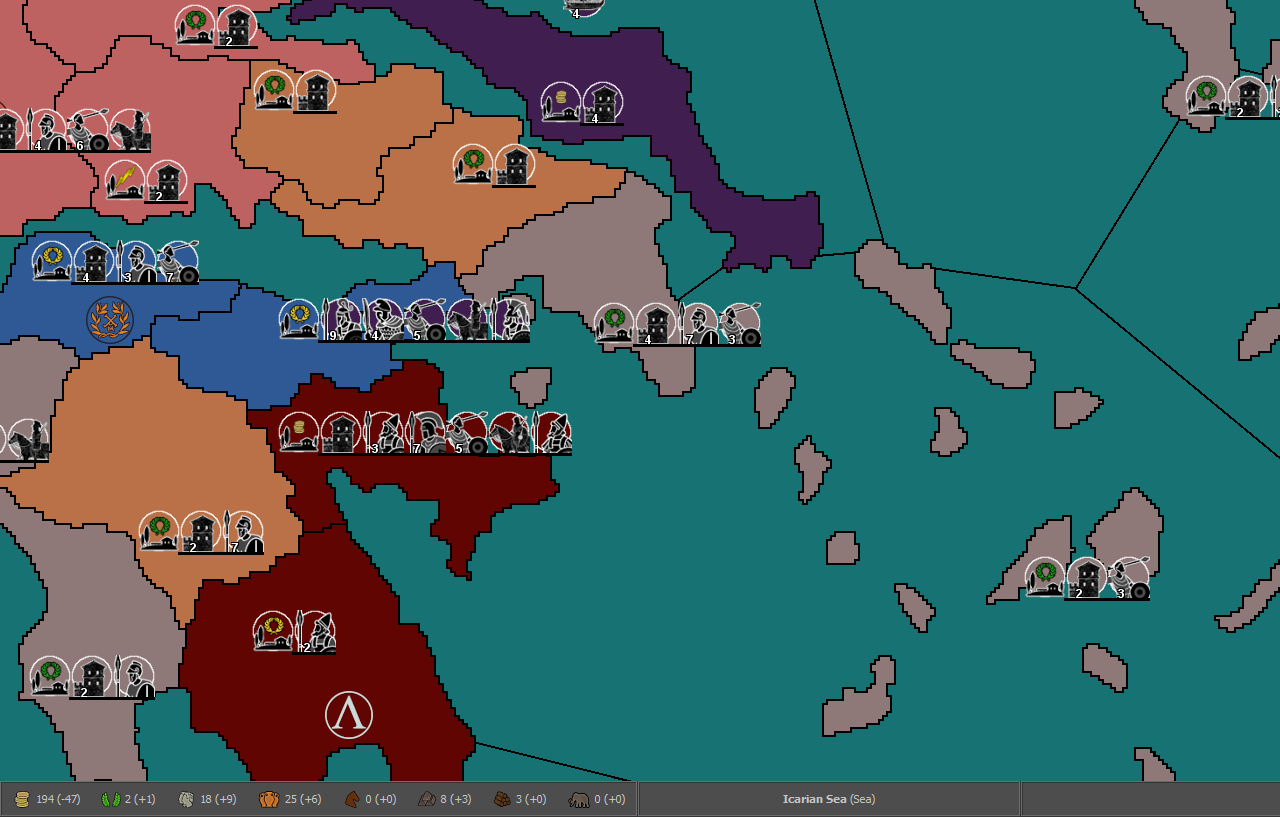
-
@redrum If they stay just capturable, wouldn't the AI handling of them be the same, since it only values PUs when chosing for invasions?
I'm not sure yet on muptiple placements, I kind of like the organized look of the lines (though not when they get too long). Whatever the case, single placements will stay at least for quite a while.
On the border issue, I dislike them as well. But since I still can't do much in Gimp (though such a change should be easy) and most of the map is at an earlier state than what you see here, it's something for later I think.
Btw, if anyone is interested in ancient primary sources, I've found two nice collections:
http://www.attalus.org/index.html
http://classics.mit.edu/Browse/index.html -
@Name Yeah, I meant the AI wouldn't really understand the value of say building additional ones if that were an option. I think it would still try to place ones you gave it for free but probably would just be randomly placed.
The challenge with single placements and using the line is once you start having multiple different allies in the same territory the number of different units can become 2-3x as many and cause lots of overflow then.
-
@Name said in Ancient Empires: 222 BC:
On the border issue, I dislike them as well. But since I still can't do much in Gimp (though such a change should be easy) and most of the map is at an earlier state than what you see here, it's something for later I think.
Is this something fixible by just making the borders a few pixels wider so they would look "smoother"?
-
@redrum I'll think about the free ones later. For now the issue is, keep those resource structures or not? It's kind of tied to the placements and map look issue as well. But it looks like I'll have to go with muptiple placements anyway at some point. You made me imagine unit lines reaching from Greece to Asia Minor.
@Zaroph But wouldn't redrawing them to be more curved look even better than that?
EDIT: I also thought of an alternative method to keep things AI compatible. What if each development level allows the placement of 1 unit? Then the AI would treat those as factories (and I guess place them at rather safe spots).
-
@Name If the number of resource structures is going to be pretty static then its probably better to just make them territory resources and draw them onto the map. If you plan to have them grow through granting free structures or building them or destroying them then resource structures are better. All depends what your vision is. I personally prefer deeper game play with structures so players can influence resource production beyond just conquering new territories but the AI has limitations there in how much it currently understands.
I think currently the AI only builds 1 factory per territory regardless of the type or how much that factory can build so I don't think it would make a difference.
-
@redrum I was already brainstorming on a system like this:
"Structure" ------ "Cost"------- "Resource Production"
Agriculture-----PUs, Supplies---1 Supplies, 1 Freeman (Basic unit Manpower)
Slave Estates-------PUs---- -----1 PU, 1 Noble (Advanced unit Manpower)
Husbandry-----PUs, Horses-----1 Horse , 1 Noble
Metallurgy------PUs, Iron-------1 Iron, 1 Freeman
Forestry-------PUs, Wood--- ---1 Wood, 1 Freeman
etc..Would be rather interesting to represent population, professions, recruitment capacity and development this way. Also giving a choice of buying units of a type now or gaining more income towards that type some turns later, by buying development instead. Anyway, back to working on the more compatible system.
EDIT: Thinking of it more, I could base my system on that, without the purchase part. Then if at some point it's AI compatible (or with a "rule" choice), those could be buildable. Also, territory PU income could be the sum (or a multiple) of all starting development structures, giving the AI some guidance on places worth to capture.
-
@Name I like the concept. One thing to consider is whether you want to cost to align to what it produces like you kind of have laid out vs the cost to be a different resource than it produces. It mostly comes down to if you want buildings to sort of be a way to invest one type of resource to generate a different one slowly over time (this helps if players have certain resource surpluses vs lacking others) or the way you have it which unless balanced well can lead to just having lots of a single resource (ie. I have lots of horses so I keep building more husbandry to generate even more horses).
And yes the good part about going with some sort of resource structure approach is you could start simple and evolve it over time based on how the game plays and how the AI does.
-
I'm working on the overhault of resources and structures.
RESOURCES
PUs: Unit upkeep, Mercenary/Government purchase.

Nobles: Loyal aristocrats/officials or something. A mix of the previous Authority resource and Special Manpower. Elite unit purchase and upkeep. Garrison/Government purchase.

Freemen: Basic Manpower. Basic unit purchase and upkeep.

Food: Purchase of Skirmishers/Governments and movement (Fuel).

Horses, Metal, Wood, Elephants: Used for the purchase of of Cavalry, (melee type) Infantry, Fleets and War Elephants respectively.


RESOURCE STRUCTURES:
The following are preset on territories and capturable. A few more will be added later. They provide the following income bonusesAgriculture: +1 Food, +1 Freemen.

Husbandry: +1 Horses, +1 Nobles.

Metallurgy: +1 Metal, + Freemen.

Forestry: +1 Wood, +1 Freemen.

Slave Labor (Slavery?): +2 PUs.

Next step is a change of the Government Structures. Some, like Holy Site and Pirate Haven will be converted to special resource structures, so that they can co-exist with real governments (Pirate Haven destroyed on capture). Governments like Client State and Local Autonomy will stay as they are (destroyed on capture), but Government Centers will be overhaulted. Each player will have their version of "native" government center, representing their core regions. Those will be converted to a far lesser version when captured by other players and converted back if recaptured by the original owner.
Not sure yet on what to do with other "governments" like military settlement (+4 freemen), horses pastures (+4 horses) and slave estates (+4 PUs).
Question
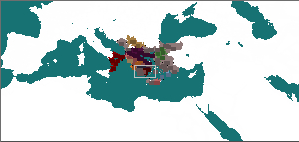
Any clue why minimap colors mix with sea regions?
-
@Name said in Ancient Empires: 222 BC:
Question
Any clue why minimap colors mix with sea regions?
I think mostly it has to do with the shrinking process. When you have a giant map (as you do) the mini map gets a little distorted because the rendering has to choose what to colour when it is reduced to (in some areas) 1 pixel. So the mini map has to either render it as part of one territory... or another. Thus there is some distortion depending on the scale difference between the map and the mini.
-
@Hepps Thing is, when I tried a larger minimap (like 400p wide instead of 300), the issue was worse. Or maybe it looked worse because of the extra size? Not sure.
-
@Name Hard to say without looking at it. But as @Hepps mentioned, it mostly has to do with shrinking and having to pick what color for much fewer pixels. The other thing is you can adjust some of the minimap properties to see if that improves things, for really large maps, the unit block size on the minimap is often better as smaller than the default since you have so many units on a large map: https://github.com/triplea-maps/the_pact_of_steel/blob/master/map/map.properties#L100
-
@redrum smallMap.unit.size=1 fixed most of it, looks like it was the units extending into other territories/seas. Now I need to edit smallmap a bit (small white dots revealed theirselves at points), and I guess there's no way for perfect borders at this scale.
-
@Name Those white dots are likely island territories that can only be rendered with 1 pixel.
"A joyous heart sours with the burden of expectation"
Hepster -
@Hepps Most of them yes, but some are also parts of the coastline with one of their dimensions 1 pixel and the other 1 to 3-ish.
-
@Hepps This is why on some designs I over size Island territories so that they will be better rendered on the mini map rather than showing up as a single pixel. I like to call it "artistic discresion".
-
@Name If you open Civil War you will see it suffers from the same issue. If you look closely you will notice that the single pixels in white correspond to the corners of many the diamond shaped territories of the rail system. It is simply something you need to design around while you draw the map.
-
@Hepps Agree. Though usually having islands a bit larger on the main map is also beneficial as otherwise you get like 1 placement and they are easy to miss when looking at it.
TripleA Developer with a Passion for AI: https://forums.triplea-game.org/topic/105/ai-development-discussion-and-feedback
-
@redrum Yes... agreed. Having more than only a few pixels to hit with your cursor on the main map is incredibly beneficial from a game-play standpoint.
-
@Name said in Ancient Empires: 222 BC:
@redrum smallMap.unit.size=1 fixed most of it, looks like it was the units extending into other territories/seas. Now I need to edit smallmap a bit (small white dots revealed theirselves at points), and I guess there's no way for perfect borders at this scale.
The problem of too big small map units outboarding their zones into nearby ones (which you can test always happens in the case the small map unit is being drawn into a zone to the right and bottom of its own one, never to the left or top) is actually doubled up by the fact (there is also a similar problem for units zoom customization for the user) that those minimap units are drawn from an approximation of the actual coordinates where the units are drawn on the actual map, which is not the centre of the units themselves, but their top-left corner. What follows, from this, is that if the dimension of the quadrangulum, showing the unit on the small map, relative to the dimensions of the small map itself are bigger than the ratio between the actual map's units dimensions and the actual map's dimensions, then the true centre of those quadrangula will be more and more out of place, shifting to the right and down.
This can, and should, only be fixed at the engine level, as the engine should place those quadrangula on the minimap having their centres the closest possible where the centres of the respective units on the actual map are, not just drawing them from the top-left point coordinates, irrispectively of relative dimensions.
Assuming such a fix at the engine level is not coming, the only way, for mapmakers, to restrict such a distortion within less than a single pixel, is to approssimate the dimensions of the quadrangula on the minimap, following this formula:
"small map unit size"=("small map size"*"units scale"*"units size")/"map size"
Both with "small map size" (you need to look at the actual size of the smallMap image) and "map size" (values in map.properties), you can take either the width or the height for both (assuming the width/height ratio is, to the pixel, the same for the actual map and the minimap, as it should). If you use the width, this should maximize the centring of the small map units with respect to X, instead to Y for the height. You can also use the area, to obtain a geometric average between both. You cannot really exactly precise both coordinates for the minimap, as, for doing so, you would need being able to define small map quadrangula that are not perfect squares. However, as long as the map you are using has the same width and height for all images, you are perfectly fine here (and you are almost perfectly fine anyways, unless the map features images that have a width and height ratio very far from 1).
For example, if you take the current dimensions of "the_pact_of_steel"
https://github.com/triplea-maps/the_pact_of_steel/blob/master/map/map.properties#L100this should be the "smallMap.unit.size", that the map should have, in order to have the centring of the small map units the closest to the position of the actual units on the map, at the default units zoom (doing it using the width for all sizes, as, anyways, the given units.width and units.height are the same, in this map):
smallMap.unit.size=(233*1*48)/3500=11184/3500=3.195...
Hence, the pact_of_steel map should better have this setting, in map.properties:
smallMap.unit.size=3Instead, it currently has no setting. This means that it is going with the default 4 pixels settings (at least this is what I believe it is going to be, but I'm not a developer). Thus the quadrangula on the small map, representing the units on the actual map, are going to be about half a pixel more to the right and down than they should be, but, since here we are splitting the pixel, this matter is hardly noticeable at all. However, if you look very close at the "Pact of Steel" game minimap, you may see that the fighter and infantry in Norway, at start game, are relatively closer to Sweden on the minimap than they are on the actual map.
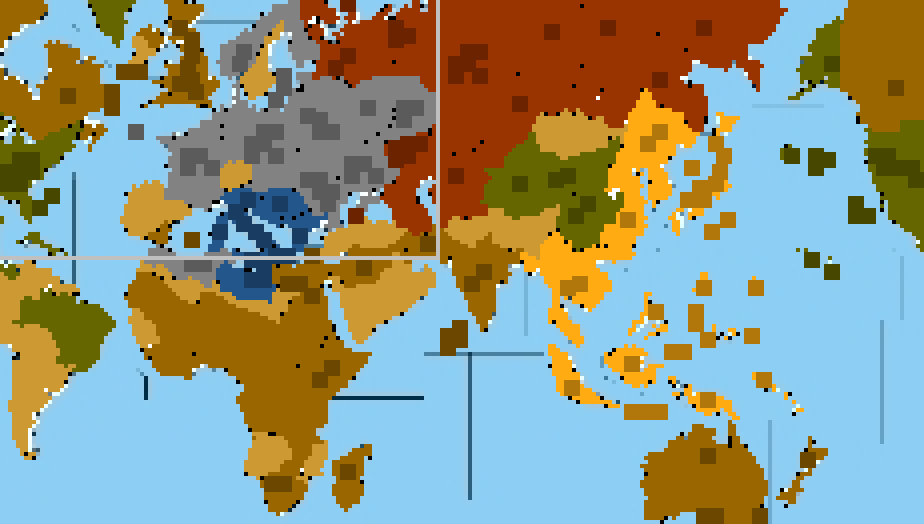
To clarify the matter, here it is a 400% zoomed image of the default "Pact of Steel" game minimap at start game (small map unit size is 4):
Here it is a 400% zoomed image of the "Pact of Steel" game minimap at start game, except only setting the small map unit size at 2:
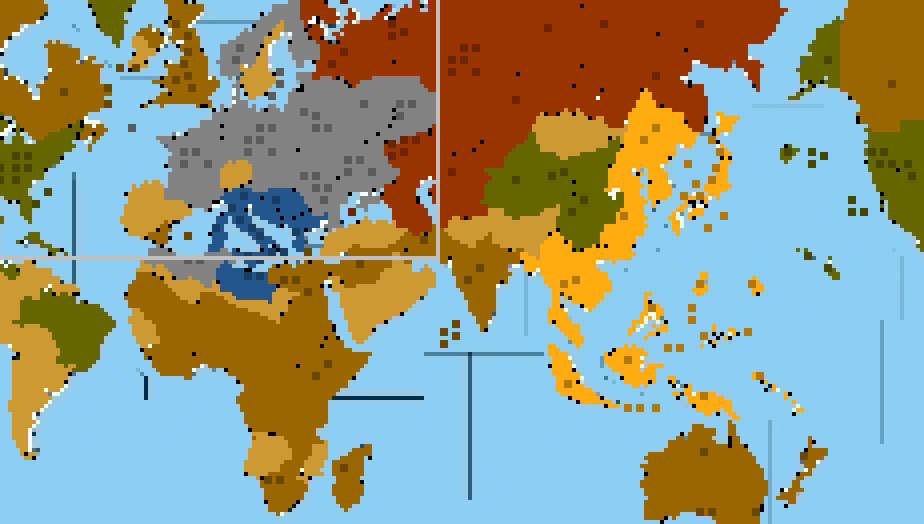
As you can see, they are both drawn from the same top-left corner, which, as I said, implies that, at 4 pixels, their actual centre is too much bottom-right with respect to the map's units, while, at 2 pixels, their actual centre is too much top-left, with respect to the same units.
That is why, assuming no developers will ever fix this matter on the program itself (that is the program having minimap unit centred with respect to what they are relatively representing, instead of centring their top-left corner regardless), I would suggest mapmakers taking care to set the closest value for "smallMap.unit.size" as what you would get by using the formula I provided here. That would be also good in that the minimap units will look the closest in dimensions to the relative size of the units they are representing on the map (likely something one may easily argue the engine should infer too (I assume it doesn't, but I don't actually know, nor I can look at it, since I'm not a developer)), as that also matters in case you want to have a similar empty space or overlap between units in the small map as you have for the same units in the actual map (you can see that in the second image I posted it is much easier to tell how many unit types there are in each territory, while in the default small map they overlap a lot, making hard telling the various squares apart).
-
@Name The other thing I fogot to mention was that because in your test map all the territories only have 1 placement... all the extension bars of units will also muddy up the mini map.


Hello! It looks like you're interested in this conversation, but you don't have an account yet.
Getting fed up of having to scroll through the same posts each visit? When you register for an account, you'll always come back to exactly where you were before, and choose to be notified of new replies (either via email, or push notification). You'll also be able to save bookmarks and upvote posts to show your appreciation to other community members.
With your input, this post could be even better 💗
Register Login