How to Host (using a Relay-Service)
-
Port checking in canyouseeme is invalid.
-
You have to use the domain provided by ngrok, not your IP address.
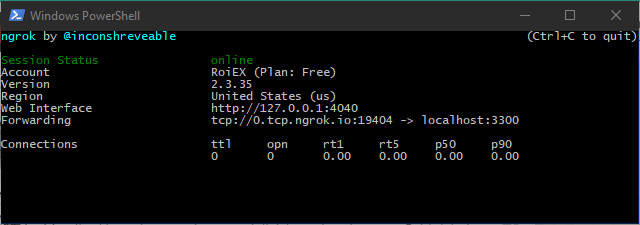
ngrok doesn't do the port forwarding for you, it relays the traffic they receive at their end to your machine -
I have no idea what should I do.
-
So after entering
.\ngrok tcp 3300it should show you a window similar to the one in my original post, right? -
Correct.
-
Did you download prastle's script and modify it like I said in the original post?
-
What to do with this text?
@ECHO OFF REM REM This is a sample batch file for running a TripleA bot on a Windows system. REM REM THIS SCRIPT MAY NOT RUN CORRECTLY UNLESS YOU CUSTOMIZE SOME OF THE REM VARIABLES BELOW! Please read each variable description carefully and REM modify them, if appropriate. REM REM To run this script, change to the directory in which you unpacked the REM headless game server archive, and type "run_bot.bat". REM REM ########################################################################### REM VARIABLES THAT YOU MAY CUSTOMIZE BEGIN HERE REM ########################################################################### REM REM The folder from which the bot will load game maps. REM REM The default value is the folder in which the TripleA game client stores REM maps that it downloads. Under normal circumstances, you will not have to REM change this variable. However, if you customized the settings in your REM TripleA client to use a different maps folder, you should change this REM variable to refer to the same location. REM SET MAPS_FOLDER=%USERPROFILE%\triplea\downloadedMaps REM REM The port on which the bot will listen for connections. This port must be REM reachable from the Internet, so you may have to configure your firewall REM appropriately. REM REM Under normal circumstances, you will not have to change this variable. REM However, if you choose to run multiple bots on your system, you need to REM select a different available port for each bot. REM SET BOT_PORT=3300 REM REM The name of the bot as displayed in the lobby. Each bot must have a unique REM name. REM REM The default value uses a combination of your username and the local port REM you selected above on which the bot will run. Under normal circumstances, REM you will not have to change this variable. REM SET BOT_NAME=Bot_%USERNAME%_%BOT_PORT% REM REM The password used to secure access to games running on your bot. Users REM attempting to start a new game or connect to an existing game on your bot REM will be prompted for this password. If the password is an empty string, REM the user will not be prompted, and any lobby user will be able to use your REM bot. REM REM The default value is an empty password. You should change this to a REM non-empty string if you do not want arbitrary users to use your bot. For REM example, you may wish to run a private game for you and some friends. In REM that case, set the password to a non-empty string and communicate it to REM your friends in some manner (e.g. via email). REM SET BOT_PASSWORD= REM REM The hostname of the lobby to which the bot will connect. REM REM The default value is the hostname for the TripleA community's public lobby. REM Under normal circumstances, you will not have to change this variable. REM SET LOBBY_HOST=lobby.triplea-game.org REM REM The port on which the lobby to which the bot will connect listens for REM connections. REM REM The default value is the port for the TripleA community's public lobby. REM Under normal circumstances, you will not have to change this variable. REM SET LOBBY_PORT=3304 REM REM The email address at which you can be contacted. Lobby moderators will REM communicate with you using this email address if they notice problems with REM your bot, or if they need to perform remote maintenance on your bot (e.g. REM to shut down your bot). REM REM The default value is meaningless. IT IS STRONGLY RECOMMENDED THAT YOU REM CHANGE THIS VARIABLE TO A VALID EMAIL ADDRESS THAT YOU CONTROL. REM SET LOBBY_SUPPORT_EMAIL=%USERNAME%@localhost.localdomain REM REM The password used to secure remote maintenance of your bot. A lobby REM moderator who wishes to perform remote maintenance on your bot will be REM required to enter this password in order to complete any maintenance REM action. If the password is an empty string, a lobby moderator will be able REM to perform remote maintenance on your bot without your permission. REM REM The default value is an empty password. You should change this to a REM non-empty string if you do not want lobby moderators to interfere with the REM operation of your bot. Note that a lobby moderator that cannot perform REM remote maintenance of your bot may choose to boot your bot from the lobby. REM SET LOBBY_SUPPORT_PASSWORD= REM ########################################################################### REM VARIABLES THAT YOU MAY CUSTOMIZE END HERE REM REM DO NOT MODIFY ANYTHING BELOW THIS LINE! REM ########################################################################### java^ -server^ -Xmx256M^ -Djava.awt.headless=true^ -jar bin\triplea-game-headless-1.9.0.0.13066-all.jar^ -Ptriplea.game=^ -Ptriplea.lobby.game.comments=automated_host^ -Ptriplea.lobby.game.hostedBy=%BOT_NAME%^ -Ptriplea.lobby.game.supportEmail=%LOBBY_SUPPORT_EMAIL%^ -Ptriplea.lobby.game.supportPassword=%LOBBY_SUPPORT_PASSWORD%^ -Ptriplea.lobby.host=%LOBBY_HOST%^ -Ptriplea.lobby.port=%LOBBY_PORT%^ -Ptriplea.map.folder="%MAPS_FOLDER%"^ -Ptriplea.name=%BOT_NAME%^ -Ptriplea.port=%BOT_PORT%^ -Ptriplea.server=true^ -Ptriplea.server.password=%BOT_PASSWORD%^ -PcustomHost=0.tcp.ngrok.io^ -PcustomPort=19404 -
Oh, you put it in a File.
So you open Notepad, paste the text and save it as "script.bat" or something.
You'll have to download the headless version of TripleA which can be found here:
https://github.com/triplea-game/triplea/releases/latest
After that you unzip the downloaded file and place the script inside the unzipped folder, so that thebin\triplea-game-headless-1.9.0.0.13066-all.jarpart inside the script (which has to be adjusted for the downloaded version in the script) points to an actual file.
After that you have to run.\script.bat(or whatever you called the file) inside the command prompt where you have to 'cd' into the same directory you just extracted.This is not really related to networking but rather related how stuff on the command line works. I probably should've clarified this in the original post that this isn't a complete in-depth guide but rather a sort of extra if you know how to host a bot, but don't want to go through the hassle of setting up your router or know that your ISP doesn't allow for this
-
I've dragged all files from 2.2 headless zip (I can't open maps beyond 2.2) to deskop. I've pasted the text to notepad, saved and named as script.bat then put it in bin folder.
Then I commanded .\script.bat in ngrok but it doesn't recognized as bat file.
-
Sorry for the late response.
Please make sure yourscript.batis actually called that way and notscript.bat.txt, Windows tends to automatically add this extension and hides it by default.
There are several guides on how to show them, this is the first one I could find.
Also you don't want the script inside the bin folder, you want it side by side. so the bin folder and the script are in the same directory. -
Thank you for all helps, but I just gave up trying



Hello! It looks like you're interested in this conversation, but you don't have an account yet.
Getting fed up of having to scroll through the same posts each visit? When you register for an account, you'll always come back to exactly where you were before, and choose to be notified of new replies (either via email, or push notification). You'll also be able to save bookmarks and upvote posts to show your appreciation to other community members.
With your input, this post could be even better 💗
Register Login