TripleA Logo TripleA Forum
    • TripleA Website
    • Categories
    • Recent
    • Popular
    • Users
    • Groups
    • Tags
    • Register
    • Login

    ad a new sea zone to an existing map

    Scheduled Pinned Locked Moved Map Making
    46 Posts 7 Posters 6.8k Views 7 Watching
    Loading More Posts
    • Oldest to Newest
    • Newest to Oldest
    • Most Votes
    Reply
    • Reply as topic
    Log in to reply
    This topic has been deleted. Only users with topic management privileges can see it.
    • wc_sumptonW Offline
      wc_sumpton
      last edited by

      @Numetalfan

      This is talking about the map.properties file. This is another file that can be created by the 'Map Creator' utility, and is located in the 'map' directory.

      There should have been no reason to change this file, so I am unsure what may have happened to it. Even though the 'Map Creator' can create this file, you can not 'Load' it for editing, so any text editor can be used.

      But I'm worried that if 'map.width=3773' and 'map.height=1830' have been messed up, that there might be other problems. So the easiest solution would be to take a copy of the file from 'world_war_ii_v3', and replace the one in your directory.

      Cheers...

      1 Reply Last reply Reply Quote 0
      • N Offline
        Numetalfan
        last edited by

        YES, everything works now, no more errors.

        yet, I missed some details:
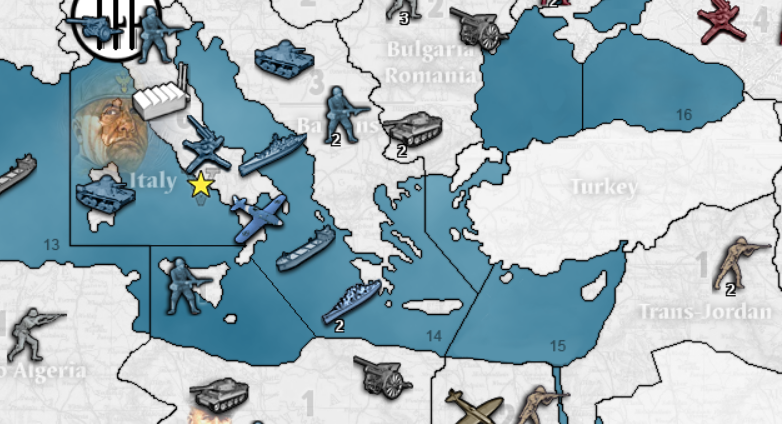
        italy.PNG

        as you can see the new sea zones 66,67 und 68 do exist, but they have no numbers graphically.
        sea zone 16 now belongs to the western part of Black Sea, but it has no number too. even worse the "16" is located where now the SZ 68 should be

        there is another problem - the whole map ist white, the territories do not have the colors of the countries, e.g. blue for Italy.

        How to fix those problems?

        B HeppsH 2 Replies Last reply Reply Quote 0
        • B Offline
          beelee @Numetalfan
          last edited by

          @Numetalfan check the map properties. That's where the colors are. Idk about the SZ numbers

          1 Reply Last reply Reply Quote 0
          • N Offline
            Numetalfan
            last edited by

            color settings for the map

            values must be a 6 digit hex number

            color.Italians=394d86
            color.British=916400
            color.Americans=5a5a00
            color.Russians=af2828
            color.Germans=5a5a5a
            color.Japanese=e6b937
            color.Chinese=4a7300
            color.Neutral=e87112
            color.Impassable=d8ba7c

            map.hasRelief=true
            map.width=3773
            map.height=1830

            should we draw territory names

            map.showTerritoryNames=false

            screenshot overlay stuff

            screenshot.title.x=100
            screenshot.title.y=50
            screenshot.title.color=000000
            screenshot.title.font.size=20
            screenshot.stats.enabled=true
            screenshot.stats.x=560
            screenshot.stats.y=1465
            screenshot.stats.text.color=000000
            screenshot.stats.border.color=FFFFFF

            that's whats the map properties are about

            B 1 Reply Last reply Reply Quote 0
            • B Offline
              beelee @Numetalfan
              last edited by

              @Numetalfan that looks fine. Obviously something else causing it. Have to wait for map Wizard wc I guess 🙂

              1 Reply Last reply Reply Quote 0
              • N Offline
                Numetalfan
                last edited by

                Hi,

                what about the naming of the sea zones, where has this to be done?

                B 1 Reply Last reply Reply Quote 0
                • B Offline
                  beelee @Numetalfan
                  last edited by

                  @Numetalfan yea idk you could check centers and make sure they're in there. I don't know much about the graphics part

                  1 Reply Last reply Reply Quote 0
                  • wc_sumptonW Offline
                    wc_sumpton
                    last edited by

                    @Numetalfan

                    Sea Zone numbers are done as decoration in the decorations.txt file. I personally do not like running the "Decorations Placer" under "Map Creator". Usually I just poke and guess with a text editor until it looks right.

                    Have you updated the smallMap.jpeg. I'm looking into what might be causing your color problems.

                    Back soon...

                    Cheers...

                    1 Reply Last reply Reply Quote 0
                    • wc_sumptonW Offline
                      wc_sumpton
                      last edited by wc_sumpton

                      @Numetalfan

                      For the Sea Zone numbers, I have the following in the directions.txt:
                      b16.png (1386,641)
                      b66.png (1161,830)
                      b67.png (1107,735)
                      b68.png (1480,641)
                      b69.png (1333,227)

                      Make sure that the images for these new Sea Zones are in the 'misc' folder.

                      Also Sicily and Malta:
                      Sicily.png (1080,769)
                      Malta.png (1098,801)

                      As to the missing colors, like @beelee stated it probably has something to do with map.properties.

                      Cheers...

                      1 Reply Last reply Reply Quote 0
                      • N Offline
                        Numetalfan
                        last edited by

                        Hi,

                        I did all this already and it worked.

                        Colors: but I doubt it's the map.properties, I copied that file from the WWII_v3.

                        Or this copy&paste is the reason for the effect

                        1 Reply Last reply Reply Quote 0
                        • N Offline
                          Numetalfan
                          last edited by

                          Hi,

                          still have the graphical problems,
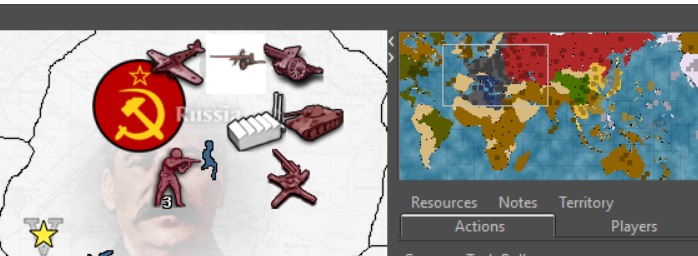
                          colors2.PNG

                          small map fine
                          main map white color for the countries

                          what might be the reason for that effect?

                          HeppsH 1 Reply Last reply Reply Quote 0
                          • HeppsH Offline
                            Hepps Lobby Moderators @Numetalfan
                            last edited by

                            @Numetalfan said in ad a new sea zone to an existing map:

                            YES, everything works now, no more errors.

                            yet, I missed some details:

                            italy.PNG

                            as you can see the new sea zones 66,67 und 68 do exist, but they have no numbers graphically.
                            sea zone 16 now belongs to the western part of Black Sea, but it has no number too. even worse the "16" is located where now the SZ 68 should be

                            there is another problem - the whole map ist white, the territories do not have the colors of the countries, e.g. blue for Italy.

                            How to fix those problems?

                            You have to open the relief tiles... find the tiles where the numbers should go... and draw them in manually with a graphics program.

                            "A joyous heart sours with the burden of expectation"
                            Hepster

                            1 Reply Last reply Reply Quote 0
                            • HeppsH Offline
                              Hepps Lobby Moderators @Numetalfan
                              last edited by

                              @Numetalfan If I had to guess I am thinking you saved the relief tiles with a solid white background... if you turn off "show reliefs" in game and can see the actual colours when they are off. That will confirm my suspicions.

                              "A joyous heart sours with the burden of expectation"
                              Hepster

                              1 Reply Last reply Reply Quote 1
                              • N Offline
                                Numetalfan
                                last edited by

                                THX for the advice,
                                that problem was already solved.

                                my last problem is the one with the white color all over them map, see the screenshot.

                                1 Reply Last reply Reply Quote 0
                                • N Offline
                                  Numetalfan
                                  last edited by

                                  Hi,

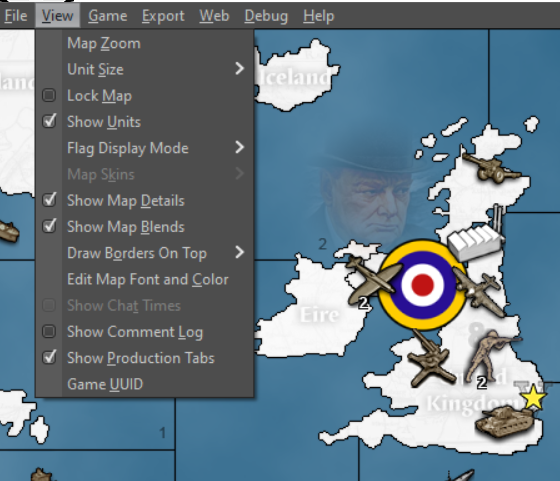
                                  this are the options:

                                  view.png

                                  I don't see relief options

                                  1 Reply Last reply Reply Quote 0
                                  • wc_sumptonW Offline
                                    wc_sumpton
                                    last edited by wc_sumpton

                                    @Numetalfan I think @Hepps is suggesting that you turn of 'Show Map Details' and see if the country colors will show on the map.

                                    There is no easy fix for this. You would need to redo the relief tiles.

                                    Let us know.

                                    Cheers...

                                    N 1 Reply Last reply Reply Quote 1
                                    • N Offline
                                      Numetalfan @wc_sumpton
                                      last edited by

                                      @wc_sumpton

                                      perfect - now it looks normal
                                      thx

                                      1 Reply Last reply Reply Quote 1
                                      • N Offline
                                        Numetalfan
                                        last edited by

                                        Hi,

                                        the new terroritories and sea zone decoration pictures do not look like the original ones

                                        what is the

                                        • color
                                        • font size
                                        • font

                                        of those pictures, e.g. Alaska.png or b17.png

                                        1 Reply Last reply Reply Quote 0
                                        • wc_sumptonW Offline
                                          wc_sumpton
                                          last edited by

                                          @Numetalfan

                                          That I can't answer. Someone with more graphic talent may be able to help. What I did was take b56, b57, b58, and b59 copied the '6' and pasted over the '5's. Then saved each with it new name, b66, b67, b68 and b69.

                                          For Sicily and Malta I did just about the same. Cut and copied letters until I found something that look right.

                                          That's the best I can tell you.

                                          Cheers...

                                          1 Reply Last reply Reply Quote 0
                                          • N Offline
                                            Numetalfan
                                            last edited by

                                            Hi,

                                            I created a new sea zone and a new country in the Asian area,

                                            however an island right to French Indochina is white - why?
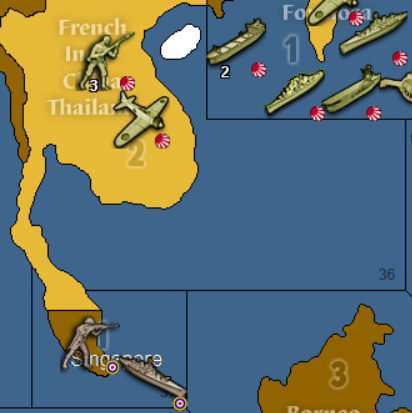
                                            white island.PNG

                                            everything else works with the new zones!

                                            1 Reply Last reply Reply Quote 0

                                            Hello! It looks like you're interested in this conversation, but you don't have an account yet.

                                            Getting fed up of having to scroll through the same posts each visit? When you register for an account, you'll always come back to exactly where you were before, and choose to be notified of new replies (either via email, or push notification). You'll also be able to save bookmarks and upvote posts to show your appreciation to other community members.

                                            With your input, this post could be even better 💗

                                            Register Login
                                            • 1
                                            • 2
                                            • 3
                                            • 3 / 3
                                            • First post
                                              Last post
                                            Copyright © 2016-2018 TripleA-Devs | Powered by NodeBB Forums