Fontsize and dpi scaling
-
@lafayette
Forced Black foreground is easy to remove and does improve things with dark look and feels. But the result is still most readable when you select (invert) the text.
When nothing is coded in the html, forcing both dark text AND a light background might be preferable independently of look and feel. Without the Notes panel I think this becomes a realistic option.A font size preference for Notes, would help with small text issues which can result from disabling dpi scaling.
-
@lafayette Maybe there were plans to move the game notes outside of the game file (just like recently done) but inside the "doc" folder.
Actually, I've no idea why to have the notes in the "games" folder instead of in the "doc" folder.
-
@lafayette
The issue is that there seems to be limited control over rendering both in the html and the code.- The reason the foreground is forced to black in code is because some maps set background color to white in html, and by default the text displays as grey in this case. Setting foreground color in html doesn't help.
- As I mentionned this causes unreadable text with dark look and feel if background color isn't set in the html.
- The map I tested also sets font size to 12 in html, this doesn't display well in an external web-browser.
This has probably all been discussed previously, the problem is that the current approach doesn't work and I'm not sure what the solution is.
-
@cernel No, there was no plans to move the game notes file. It's closely linked to the XML, it needs the same spelling and casing, having it be in another folder will make it more difficult to know it exists, is spelled correctly, and is paired with an XML. The XML can now be in sub-folders of their own in 2.6, so this helps keep related files together.
@butterw I'm confused, was there something that changed the default font color in 2.6? The HTML being read from one location vs another should not really change that, so I'm curious what, if anything did. Is this a problem that existed before 2.5? Have you filed a bug report about it, if not it sounds like it should get one written up so it can be more effectively tracked.
-
@lafayette said in Fontsize and dpi scaling:
@butterw I'm confused, was there something that changed the default font color in 2.6? The HTML being read from one location vs another should not really change that, so I'm curious what, if anything did. Is this a problem that existed before 2.5? Have you filed a bug report about it, if not it sounds like it should get one written up so it can be more effectively tracked.
yes it was changed by you in GameNotesMenu.java (#8925)
gameNotesPane.setForeground(Color.BLACK); -
@butterw That was simply moved code: https://github.com/triplea-game/triplea/pull/8925/files#diff-65cfff67b87c7e4821388129b9072c5a5863ceb1eb881f0e4b4a2c359a7f989cL22
Perhaps something else is at play or the move was not as simple as one would think?
-
@lafayette
The change is not related to the tab move, it just happened at the same time.
It makes basic notes unreadable with a dark look and feel. This change should be reverted IMO. Map-makers who want to ensure a light background should set color in the html."<div style='color:black; background-color:#d3d3d3;border:4px solid #d3d3d3'>">> when applied to the MoveHelpMenu
To get this result I had to override the EditorPane.font in the UIManager to compensate for disabled Java HiDpi (125%).
-
@cernel: I believe the default units stack numbers size (12) is way too small.
You suggested changing this font size value to 24 (the value is defined in MapImage). I agree this would be a better default.
This is with Font Size 36 (@dpi=100% )
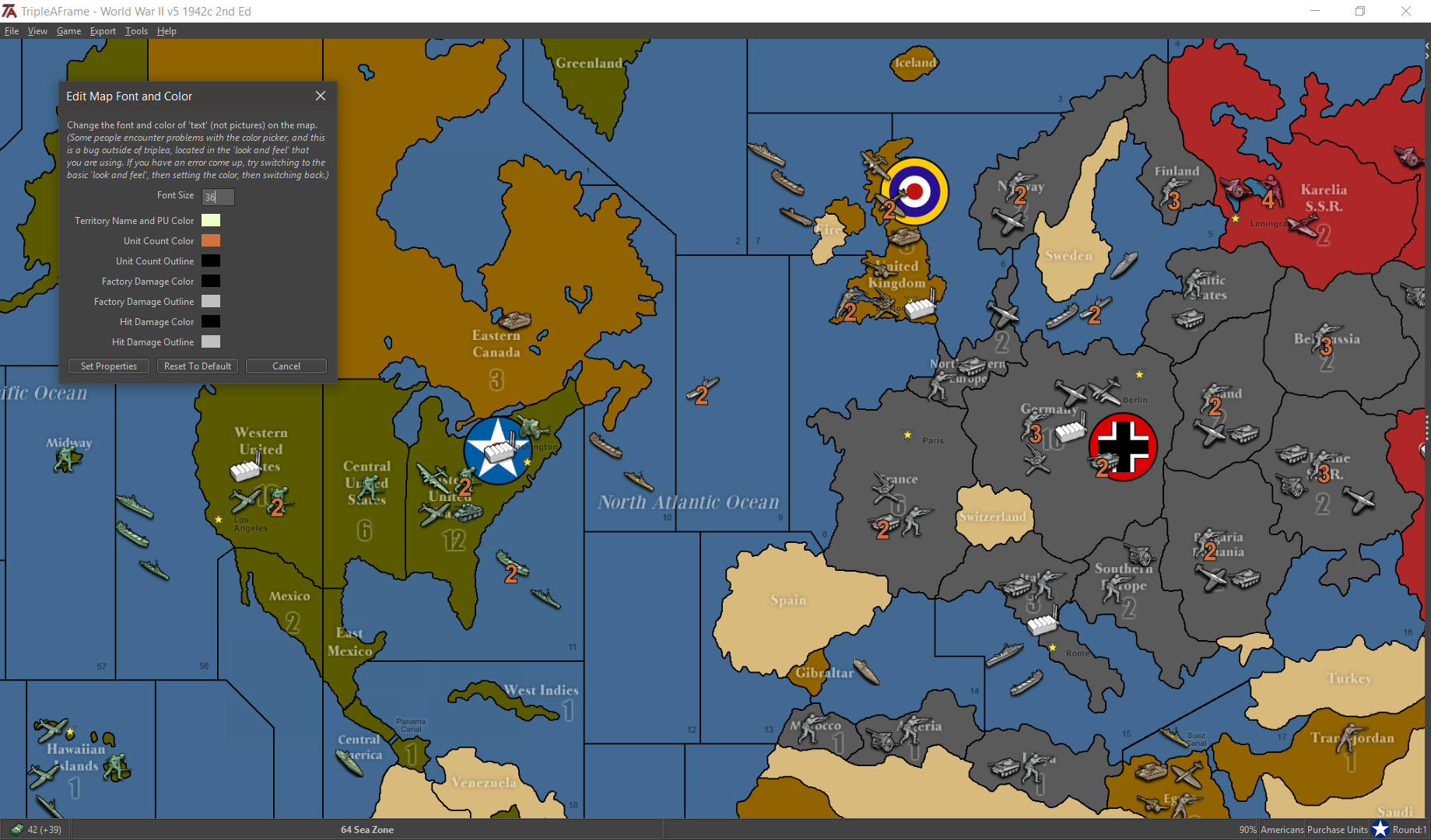
-
@butterw You'll have to be more specific how inlining code changed anything at all and what you mean by "just happened at the same time".
-
-
Issue: auto-Applied HiDpi settings result in blurry images. When HiDpi is disabled, text is too small.
- Overriding system hidpi setting (ex:125%) to avoid blurry images can be done in Triplea code but only at startup before the GUI starts.
- Current dpi setting can be displayed (ex: in About... dialog).
- Changing font size is Look and Feel dependent and not straightforward.
Nimbus does have a default Font Setting.
In Substance, it seems you have to override individual font settings in code for each type of component (there are many of them). With this approach obscure options/workarounds are then sometimes required for the font setting to be applied (Metal JEditorPane, Nimbus Label ?), but overall it does work. - An option could be added in engine Settings > ui > font custom scaling: 125%. It would be applied at next startup and would disable system HiDpi scaling
- at startup, disable system default image scaling, apply a custom scale to fonts.
EDIT: Done in my dev build: https://forums.triplea-game.org/topic/2798/achievable-improvements-to-the-triplea-user-interface
- Overall the single font scaling approach (with Nimbus) mostly works, but the text does end up being a bit small when there is a lot of text to read (ex: Game Notes).
- Using a single sans serif font for the whole ui works. Varying the font size a bit, which is the approach taken with Substance, enables a more fine-grained result.
Because users have different screen size & resolutions , hardcoding font sizes should be avoided, Instead fontsize should be determined by a user preference
So we could have a single user preference with the base font, and the scaling or desired output size. Both settings would be applied at Triplea Startup via (Look and Feel) UIManager. System HiDpi scaling could be disabled by default, but still available if needed.
-
@cernel said in Fontsize and dpi scaling:
If it is feasible, the program should always enforce a pixel-per-pixel rendering as default (assuming vectorial graphic will never be supported).
Vector graphics require fundamentally different software tools from png and svg isn't natively supported in java swing.
Vectorizing the existing maps and artwork would be a lot of work. Then the map handling engine is based on pixel coordinates.Vector graphics would make more sense for interface icons (ex: icons on buttons, menuitems), which TripleA makes very limited use of currently. Icon Fonts would likely be the right solution as they allow scaling and theming.

Hello! It looks like you're interested in this conversation, but you don't have an account yet.
Getting fed up of having to scroll through the same posts each visit? When you register for an account, you'll always come back to exactly where you were before, and choose to be notified of new replies (either via email, or push notification). You'll also be able to save bookmarks and upvote posts to show your appreciation to other community members.
With your input, this post could be even better 💗
Register Login