Proposed Map: Domination 1941
-
@black_elk
You have been busy!
Downloaded and stored, thank you for your generous Thanksgiving gift!.
A request, can you put a third chimney stack on these two images?

.
Now is it back to the map? -
No prob! Hope they're fun!
Yeah I guess it's back to maps lol. I think G40 is about ready to roll, so that's encouraging.
For sure, here ya go with a real quick third stack there hehe...


-
Thanks!
-
Right on, let me know if I missed anything. From playing around with the flag display, I think the 12x12 circular roundel is probably best, just given the current limitations for the display sizes there. Going oval would only gives us 12x9px for the smallest size, which is too small in my view, like just not really enough pixels to get the job done. So better to keep it round I'd think.
Most of the standard circular roundels look pretty good in the unit flag display. I gave the Soviets a Red Star for their ABs so that may stand out for now, but I think it gives those ABs some charm.
The only thing I noticed that I really want to fix on the next pass has to do with the Naval Units at flag display size small. The flag always displays on the lower righthand corner of the unit field, so on the right-facing Allied ships, the 12x12 small flags looks like they're sitting on the bows of ships. Basically I want to extend the field for those naval units by like 12px or whatever we can manage, so that the roundel will be more off to the right instead of smacking the Allied naval units on the nose lol.
I think I do prefer the Oval puck roundels for the capital markers the more I sit with them. Just for a little more visual variety in the colors and for the national flare. Like Italy looks nice with that splash of Green and Red I find. I included the Flag Oval roundels as unit images in the folders, because I think it'd be cooler if these were treated like capturable units rather than permanent/fixed map decorations.
Doing them as capturable units the display image could change dynamically when a capital is taken, e.g. Moscow becomes the Iron Cross roundel if taken by Germany, or vice versa, if Berlin falls to show then we get a Sickle and Hammer there or Stars and Stripes, or whatever. Control marker flags would work the same way, basically like it's handled in Iron War. So that when a TT changes hands the control flag changes to the reflect the current "owner." I think that'd be nice.
-
@black_elk said in Proposed Map: Domination 1941:
Moscow becomes the Iron Cross roundel if taken by Germany
H yea ! Love it ! lol
-
@black_elk
I agree 12x12 round roundel is the way to go.Adding +12px to naval units is a nice to have, hold off and lets see if we can persuade a new Dev to add a new feature to the map.properties file to position the flag with coordinates, so not in the corner.
Currently he is working on this (Its not Justins group, but ArieLevental on GitHub)
https://forums.triplea-game.org/topic/3311/student-group-studying-triplea/2?page=1Capturable Capital oval roundels infrastructure units is on the TODO list.
"I think that'd be nice." Yes it would be nice.
-
Sounds good! That'd be cool.
It's a relatively quick fix if they can't pull it off. I think the canvas can go to like at least 96px wide right? Basically Allied ships and Axis bombers are the only units that clip the flag display in the lower right. For display Flags "size large" the roundel graphic is backgrounded, but still reads too large for me. It works better with some roundel designs than others there, depending on the color of the outer ring or whatever, but mostly I think it's not a very useful view at that size. Something like a 18-24px flag roundel would be best I think. Larger to give more visual information at that super tiny scale, but still small enough not to clip too hard into the unit, if it were to remain in the foreground.
The other reason it would be nice to select the flag display location is to avoid overlap with any other symbols included in the unit graphics, like the radar symbol or heavy bomber symbol etc. I'd think it would be nice to center the flag for most units, basically so it looks like it's right below the unit instead of off to one side. I think that would be cleaner and show less overlapping or clipping for the tiny flags.
Like ideally we could just extend the field from 54px tall to 68px tall and stick the flag dead center at the bottom. This would be nice for unit flipping too, since then the small flag wouldn't move position relative to the unit when the image is flipped.
I think a good feature to focus on would be that one - the flip. Something that allows us to dynamically flip units in-game, because that's a feature that the players could really engage with I bet. Like I think if it existed, players would probably use that one all the time.
The coolest would be if we could flip units based on the TT. But even if it was a universal flip for all the units by nation, I can still see that being a lot of fun during gameplay. Some view features are a lot more useful than others, map scaling and unit scaling for example, those are super useful, the other stuff in the view tab is more like set it and forget it based on the preferred view. But a Unit flipper would be hotkey worthy. I think players would dig it.
-
@black_elk BTW I wonder is there any way to make AI handling this sub spawn feature?
I guess if the German subs spawn after the end of German turn, AI can respond but this will probably make these subs doomed to be killed before taking any action.
-
Yeah the sub spawning unit in Iron War would basically just add a sub during the placement phase, but then there were some issues if the facility had already placed it's max units since it was tied to coastal factories. Also that game used a different phase order with purchase after combat, so it fit a bit better there. I think a combat move first phase order is a faster paced and more entertaining. Purchasing after, you can make more straightforward purchasing decisions, so players don't have to spend as much time prognosticating about it, and keep things moving at a steady clip. For G40 I like combat move before purchase, though they still run the combat phase proper after the buy. I guess it's maybe more dramatic that way, like 'oh goodness, let's make the right call here and not goof the buy!' lol But I think purchase/placement last is equally entertaining.
For spawning subs out of just random zones in the Atlantic, you'd want that to happen prior to combat move as like the first phase I guess. That way they can be used in attacks which are fun. Whereas if they just spawn to cause distractions on defense, that seems rather less entertaining hehe.
Reminds me that I never really finished the submariner dude lol. I'll have to add that one to the unit pile when I get a minute. The current _All Units stickers I added to the unit folder shows duplicates for the factories and resources etc that don't really need to be repeated for each nation. I'd like to tighten up the rows, and then do something down at the bottom for all the factories or generic unit graphics like that in one spot. Then add in a set of sculpts for the Neutrals or all the extra flags or rando alt inf dudes or whatever hehe.
-
@black_elk Probably <stepProperty name="resetUnitStateAtStart" value="true"/>
</step> should be put under German combat move. It had worked in my previous map. Idk why it gives me error in this time. -
@black_elk so combat move, combat then purchase, place is how Iron War rolls ?
Yea Ive seen combat move first before. Think it was NWO and that's how they did it. The G40 CM first seems a little different.
I don't think you can trigger it with a map option. ISU kids, we got another feature request lol
Probably hungover from celebrating there basketball win against north carolina last nite lol
Edit
Oh yea NCM before Purchase as well lol -
Haha no doubt!
OK here are the Baselines and the Reliefs for the 4k maps...
Global Baseline
https://www.dropbox.com/s/pcvl7jjpenpld7t/World_War_II_Global 1940 relief 25 opacity.png?dl=0Global Relief
https://www.dropbox.com/s/pcvl7jjpenpld7t/World_War_II_Global 1940 relief 25 opacity.png?dl=0Domination Baseline
https://www.dropbox.com/s/khxkql58g73q1n3/Domination_1940_baseline.png?dl=0Domination Relief
https://www.dropbox.com/s/x1qei5rhc137hip/Domination_1940 relief 25 opacity.png?dl=0I've posted the terrain map I used at 100% opacity a few times. To create those painted previews I've been pasting my color map at 75% opacity on top of the terrain map at 100% opacity, so here I basically did the exact reverse. The terrain relief windows are at 25% opacity so when they paint over the base colors it will create that same visual look.
I have used the following Hex colors in the map previews thus far... So to recreate that look you'd use those in the map properties and then tripleA should produce an image that looks like the one's I've been posting.
Americans: 026400
ANZAC: 5ba399
British: 9e7035
Chinese: 533c69
Dutch: e77600
French: 0063a5
Germans: 656565
Italians: 6c4513
Japanese: e19521
Mongolians: a13030
Neutral Allies: d9ab6f
Neutral Axis: 6d664e
Neutral True: e7d2b5
Russians: 940000
Ocean: 66ccff
Ice: d2eef4Now we just need someone to do the grunt work of busting it up into tiles and getting the skeleton going so we can start mapping the centers and the like lol. I feel like I've taken it about as far as I can for the stuff I enjoy doing. The nitty gritty of the mapmaking utilities makes my eyes glaze over, but I can add to the unit graphics and such as it gets built out.
-
@black_elk said in Proposed Map: Domination 1941:
Now we just need someone to do the grunt work of busting it up into tiles and getting the skeleton going so,
heh heh I got the time but not the knowledge lol. See if I can figure it out lol
-
Right on! I updated the reliefs just now with a little more noise reduction on the borders. Should make it a bit cleaner when scaling hopefully. We can fine tune that stuff if we want. I tried to kinda optimize it for displays at 75% and 50% as much as at 100%. It's a bit of a trade off there, cause sharper borders display somewhat cleaner when zoomed out, but softer borders looks better when you're right on top of it at 100%. I went with noise reduction 4 for the lines on these, but maybe 5 or 6 would be better? Kinda hard to say till I see how it displays in-game, but I think this should work to get the ball rolling.
https://www.dropbox.com/s/pcvl7jjpenpld7t/World_War_II_Global 1940 relief 25 opacity.png?dl=0
https://www.dropbox.com/s/x1qei5rhc137hip/Domination_1940 relief 25 opacity.png?dl=0
Let me know how it goes or if there's anything I need to fix lol
Fingers crossed!
TripleA 2.6 has a lot of cool stuff going on already. I think if we get to TripleA 3.0, having a bunch of trick new stuff for the G40 package would definitely be a draw hehe
-
Also, here again is the terrain map at 100% opacity.
https://www.dropbox.com/s/rsf949i4qih94c5/terrain world ocean fill.png?dl=0
If one wants adjust the opacity of the relief, or to change the color or detailing of the oceans, or modify/improve it however, they can use that image.
To create the relief, I did the following in GIMP...
Terrain Map set at at 25% opacity for the bottom layer.
From the baseline I isolated the Ocean SZ by color selecting the blue, then pasted that on top of the Terrain at 100% opacity.
Then to get the borderlines into the relief, from the baseline I color-select the black, expand that selection by 2px, fill with white, copy/paste onto the final layer at the top of the relief.
Merge visible for the Relief
Then Anti-Alias, Filters/Enhance noise reduction 4, Blur Gaussian 1. For the blur I did the lowest setting, I think default is 1.5, but I used 1, which kept things a little sharper. Too much blur and it'll make you want glasses at 100%, too little and the edges appear kinda hard/pixelated, so it's sort of just striking the right balance there I guess. But for those lines you can pull from the baseline bitmap for the selections, and just add to the terrain/relief as the last step. Like if one wanted to change any of the borders in the baseline and transfer to relief, that's a good method. Or at least we got all the puzzle pieces available I guess if people want to tinker with it down the road lol
I'd actually be curious to see the next steps, as this is the part of map making process that I'm least familiar with. I'm like low key dyslexic when it comes to parsing a bunch of txt and coordinate information in the map properties and some of that stuff honestly like using the polygon grabber just gives me heartburn hehe, plus I'm a terrible typist so I usually tune out at this part to focus on whatever else. But I'd imagine G40 would be simpler though right, because the XML is already built out for that? Like once it's pushed through and busted up? Anyway, let me know how if we make any progress on that front. Meantime I'm going to double check the units again. As I'm sure I probably missed something somewhere. I mean I banged out so many that day, there's gotta be something that gave me the slip lol
Here's the other stuff again...
Global Baseline
https://www.dropbox.com/s/pcvl7jjpenpld7t/World_War_II_Global 1940 relief 25 opacity.png?dl=0Global Relief
https://www.dropbox.com/s/pcvl7jjpenpld7t/World_War_II_Global 1940 relief 25 opacity.png?dl=0Domination Baseline
https://www.dropbox.com/s/khxkql58g73q1n3/Domination_1940_baseline.png?dl=0Domination Relief
https://www.dropbox.com/s/x1qei5rhc137hip/Domination_1940 relief 25 opacity.png?dl=0HEX Colors
Americans: 026400
ANZAC: 5ba399
British: 9e7035
Chinese: 533c69
Dutch: e77600
French: 0063a5
Germans: 656565
Italians: 6c4513
Japanese: e19521
Mongolians: a13030
Neutral Allies: d9ab6f
Neutral Axis: 6d664e
Neutral True: e7d2b5
Russians: 940000
Ocean: 66ccff
Ice: d2eef4 -
@black_elk
Below are some suggestions for SZ merging, that is removing some lines within the red areas.I did base the removal on not removing G40 lines, but worth checking.
These are only suggestions. (As Im not an avid ww2-er)
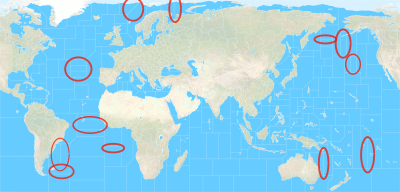
-
Sounds good, I'll give it another crack tomorrow most likely to nix whatever ya don't need in the SZ stuff.
Checking out the other thread in map making, I wonder if the gaussian blur I did at the end to soften the borders there in the relief, might have made the under terrain a little hazy, like happened with my attempt at that Iron War tweak lol. I did a quick paste to the color map and it looked pretty much the same to me, but I didn't have it way under the magnifying glass. I think there's probably an acceptable level of blur one could allow, especially since the terrain is more suggested flare here, maybe it's better not quite as sharp? Like when the units and other graphics are laid down, and the eye has something else to cling too besides just the map itself, the gaussian might seem less noticeable. On the other hand if there's a cleaner way to only have that effect on the border lines, that'd probably be preferable. Just to have it separated by layer. I'll take a closer look when I get home later
-
Ok here ya go...
https://www.dropbox.com/s/xnvwl23sf092dia/Domination_1941_baseline.png?dl=0
Let me know if you want to ditch anything else on the baseline. I'll just pull a new relief from that, since I wanted to fix the blur anyway hehe
-
@Cernel
what SZ would you change for this new map.
https://www.dropbox.com/s/xnvwl23sf092dia/Domination_1941_baseline.png?dl=0Transports, Battleships, Subs will move 2
Fleet units Destroyers, Cruisers, Fleet Carriers will move 3
Harbours do not add +1 move -
For what it's worth, I think Sea Zones are pretty abstract in A&A, and naval movement/combat is really kinda hard to make sense of as anything other than just sort of gamey. Whatever you decide on probably the starting unit distribution and the TT values will be the key factor in making it all hum together. I think players will generally tend to shuck along the shortest path available for their transports and usually you end up with just a few very large combat fleets converging on the main chokepoints on either side of the board to face each other down. Sorta playing chicken or cat and mouse till one side offers a gambit or a goof. The balance typically tilts on aircraft and spamming fodder every round for the big naval stand offs, till one side breaks and either has to withdraw or just gets smoked in a decisive blow out. Or at least that seems to be the standard A&A naval dynamic.
I think on the Pacific side, it's good for the gameplay to inflate the values of the TTs in the Central Pacific, like if you want Japan to have some reason to face off against the US there rather than just making the B line for India, or slamming into Russia, as tends to happen in most A&A games, I think that's a reasonable method. In A&A there's just not really enough production contested there to give Japan much reason to sprawl vs the US or ANZAC, but I think you could fix that by juicing the TT values a bit. Then the IJN ships would have more reason to stay forward to guard the contested tiles and shore up their lines there.
Anyhow, let me know what you come up with, and I'll try to get it dialed. Many of those sz subdivisions I made kinda on the fly just based on the what was flying at me from the requests earlier, but people can always just go back and mess with that earlier base if they want. I saved the new one with 41 in the title, so I'll just make it however you want into the next phase heheh



Hello! It looks like you're interested in this conversation, but you don't have an account yet.
Getting fed up of having to scroll through the same posts each visit? When you register for an account, you'll always come back to exactly where you were before, and choose to be notified of new replies (either via email, or push notification). You'll also be able to save bookmarks and upvote posts to show your appreciation to other community members.
With your input, this post could be even better 💗
Register Login