How to pass on hits with "whenHitPointsDamagedChangesInto"
-
@thedog thanks for suggestion, it did not bring me to the answer yet :
as I look for an example where the actual hits are transferred to the new unit, ( so shown as a black 1 or 2 in upper corner of the "new" unit and by this considered hit & triggering a repair pop-up )
which I cannot reconstruct and find working examples of , allthough http://www.starlords3k.com/XOB.html suggests it could work.. hmmmnice micro play and game system The Arena of Death" by the way.....
-
Hi ebbe
yea so if you want to have something that is multi hit and change into a unit that has one less hit, this is how hepster or maybe Ralph, think it was hepps
 did it in TWW.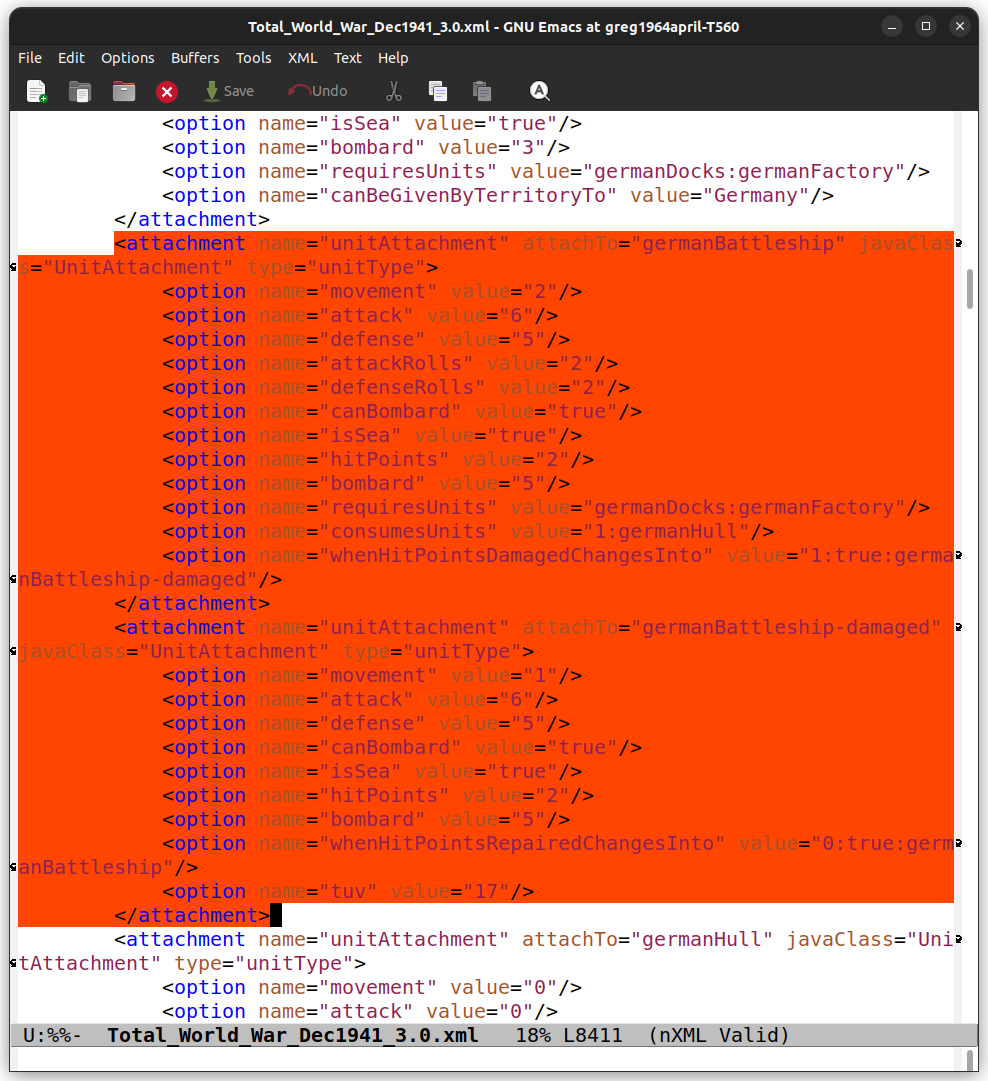
Give the new unit 2 hit points
<option name="hitPoints" value="2"/>and a 1
So <option name="whenHitPointsDamagedChangesInto" value="1:true:germanBattleship-damaged"/>The 1 represents 1 HP.
And in repair it's 0
<option name="whenHitPointsRepairedChangesInto" value="0:true:germanBattleship"/>Idk how to start the game with damaged units though. Have to edit the 1 hit is what i do
-
so for repair i did it this way
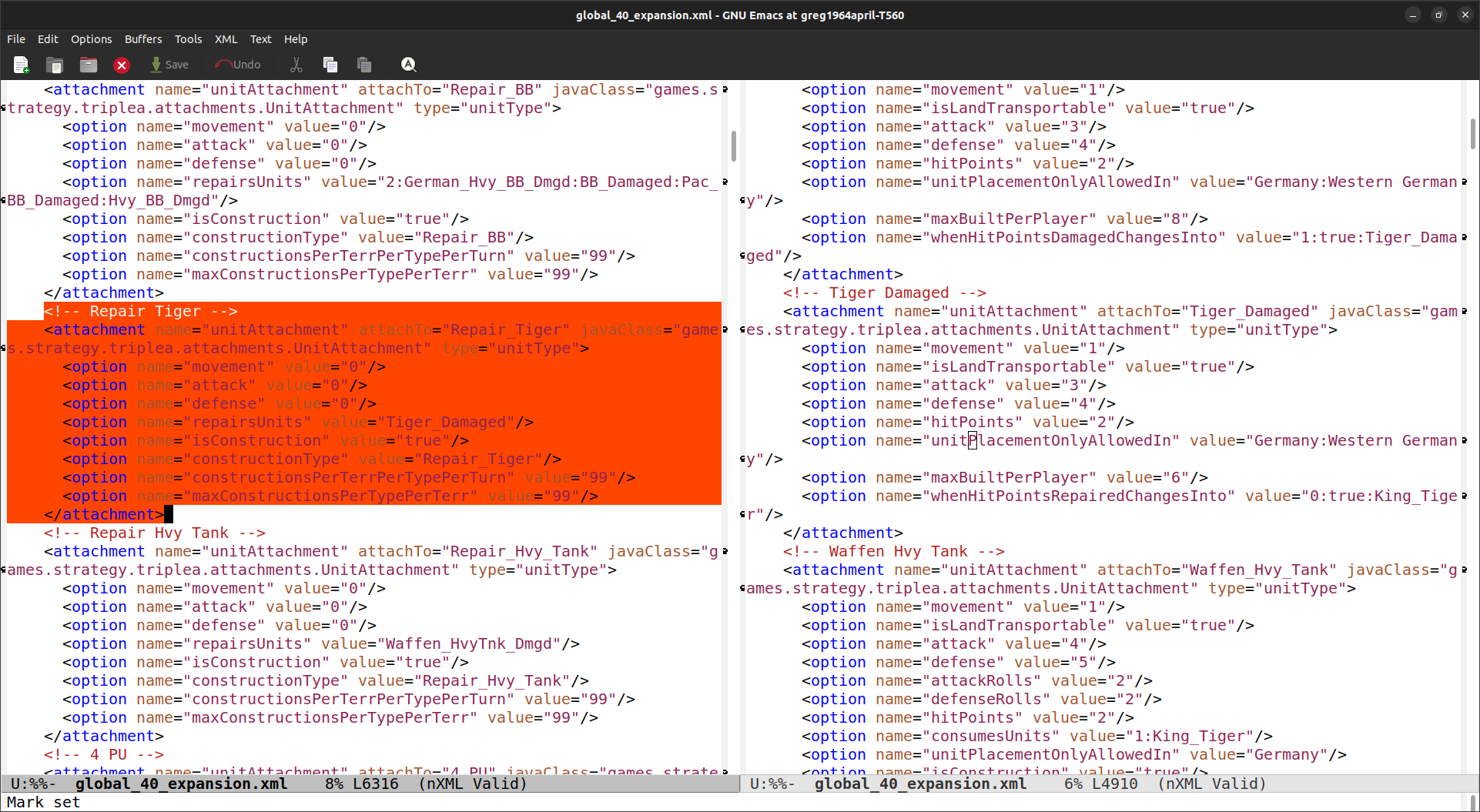
and you can place the repair unit anywhere you control. Land TTys will fix adjacent SZs
-
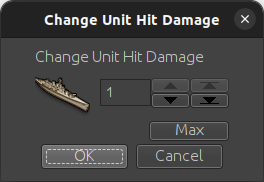
@ebbe I used it with Global 40 Expansion. Here's an example.
Uk BB starts out undamaged
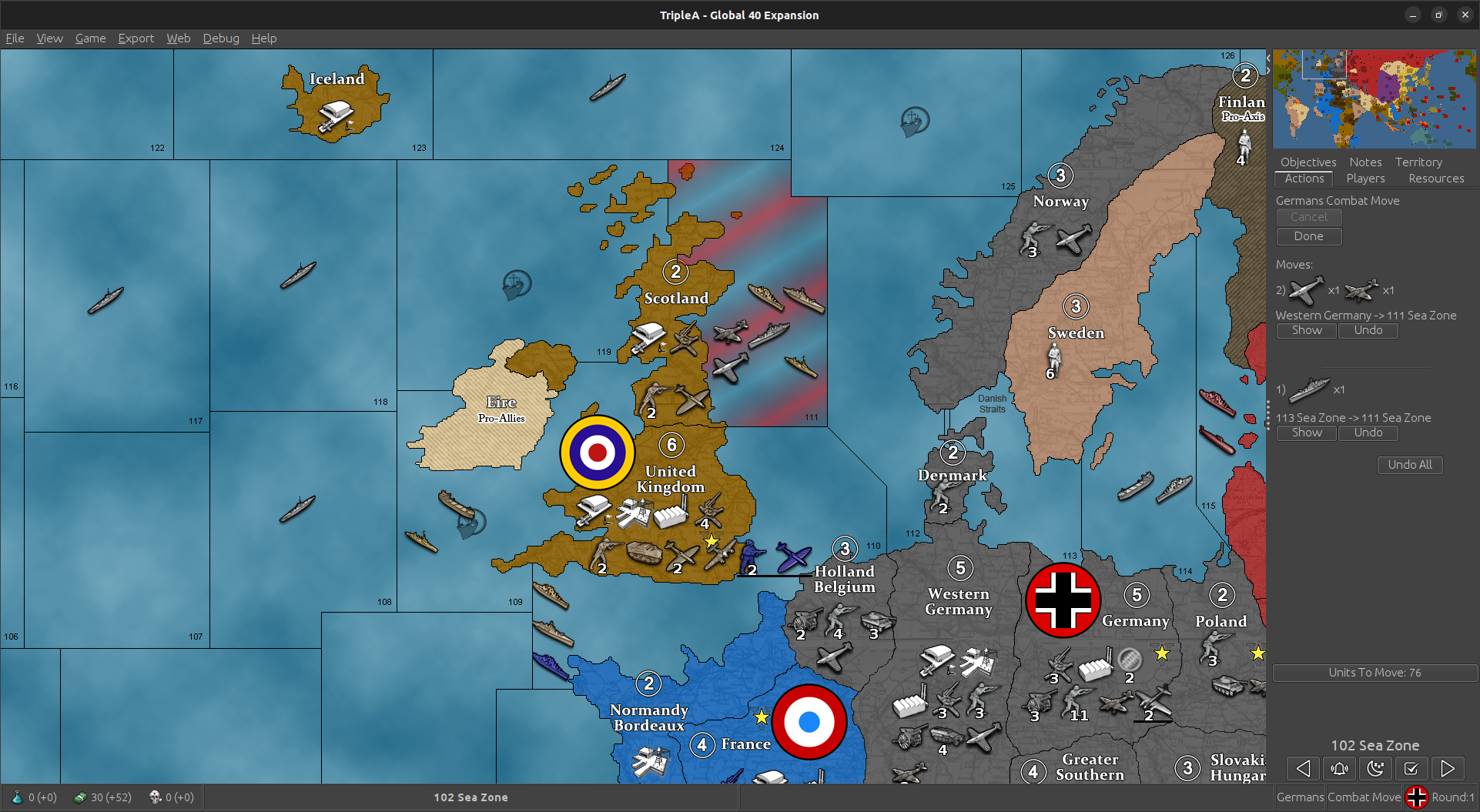
Takes a Hit and changes into BB Damaged
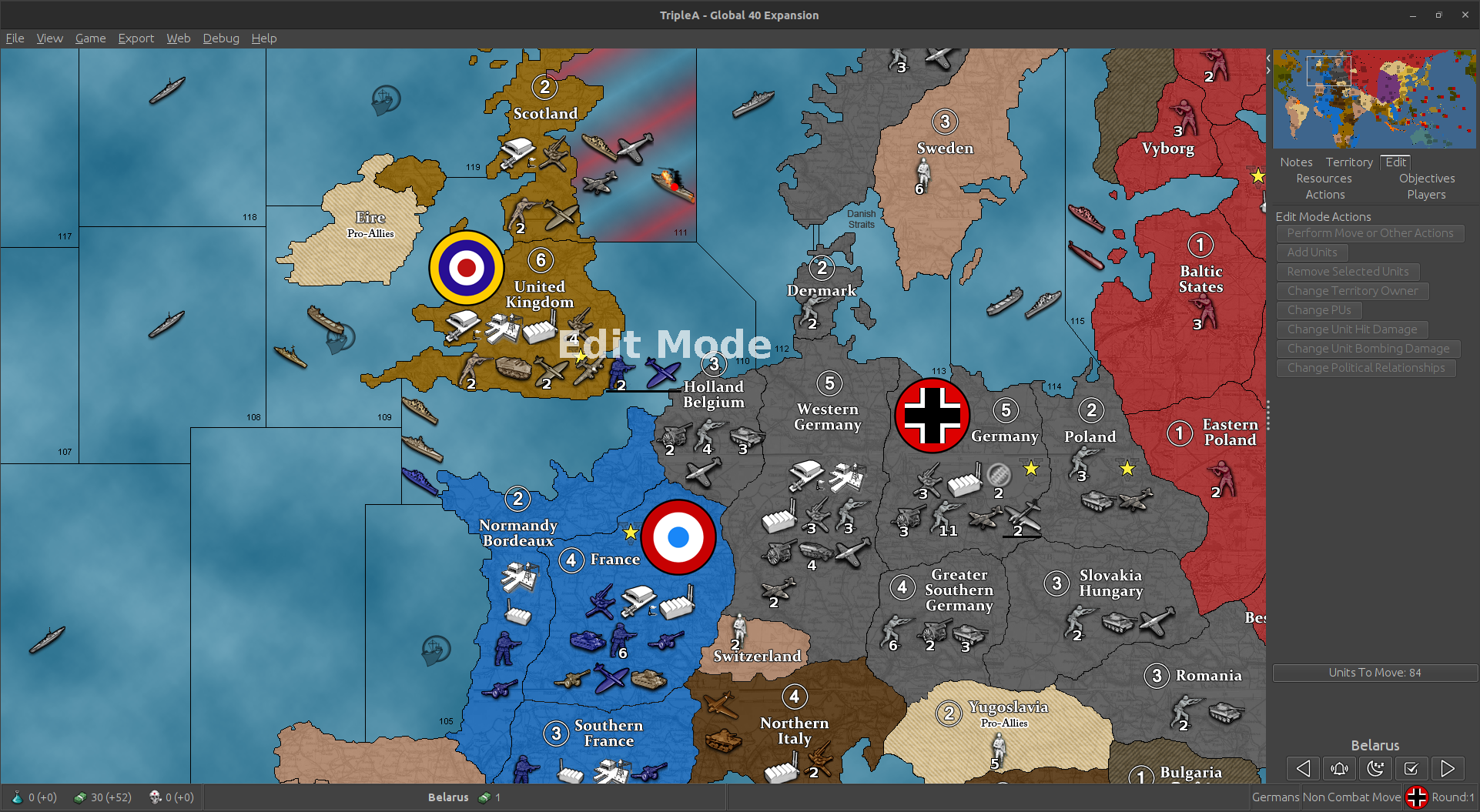
Then when in Edit mode if you click on BB damaged it will show 1 Hit of damage
-
Dear @ebbe,
I use units with 2 hp and 4 hp. I have found a solution for the current 2.5 TripleA version. I hope this will help you:
1.) Do not use triggers! AI does not understand them.
2.) Units with more than 4 hp are difficult to kill. Better split them into parts with no more than 4 hp in each part and mutual support bonuses. You can use multiple support attachments per unit. For offence/defence/both. Positive/negative. For normal/first strike and AA. For “strength” and “rolls” etc. For detailed information please see pact_of_steel_2.xtml.
3.) How to pass on hits with "whenHitPointsDamagedChangesInto". My solution:
3.1.) For 2 hp unit (all versions below must have <option name="hitPoints" value="2"/>)
:<attachment name="unitAttachment" attachTo="britishInfantry_2hp" javaClass="UnitAttachment" type="unitType">
<option name="…
<option name="whenHitPointsDamagedChangesInto" value="1:true:britishInfantry_1hp(sup)"/>
</attachment>
<attachment name="unitAttachment" attachTo="britishInfantry_1hp(sup)" javaClass="UnitAttachment" type="unitType">
<option name="whenHitPointsRepairedChangesInto" value="0:false:britishInfantry_2hp"/>
</attachment>The TripleA engine understands the symbols «(» and «)» in the unit name! Most games I have seen only use «_» and «-» but «(» and «)» are also possible!
3.2.) For 4 hp unit (all versions below must have <option name="hitPoints" value="4"/>):
<attachment name="unitAttachment" attachTo="britishMech.Infantry_4hp" javaClass="UnitAttachment" type="unitType">
<option name="…
<option name="whenHitPointsDamagedChangesInto" value="1:true:britishMech.Infantry_3hp"/>
<option name="whenHitPointsDamagedChangesInto" value="2:true:britishMech.Infantry_2hp(sup)"/>
<option name="whenHitPointsDamagedChangesInto" value="3:true:britishMech.Infantry_1hp(sup)"/>
</attachment>
<attachment name="unitAttachment" attachTo="britishMech.Infantry_3hp" javaClass="UnitAttachment" type="unitType">
<option name="…
<option name="whenHitPointsRepairedChangesInto" value="0:false:britishMech.Infantry_4hp"/>
<option name="whenHitPointsDamagedChangesInto" value="2:true:britishMech.Infantry_2hp(sup)"/>
<option name="whenHitPointsDamagedChangesInto" value="3:true:britishMech.Infantry_1hp(sup)"/>
</attachment>
<attachment name="unitAttachment" attachTo="britishMech.Infantry_2hp(sup)" javaClass="UnitAttachment" type="unitType">
<option name="…
<option name="whenHitPointsRepairedChangesInto" value="1:false:britishMech.Infantry_4hp"/>
<option name="whenHitPointsDamagedChangesInto" value="3:true:britishMech.Infantry_1hp(sup)"/>
</attachment>
<attachment name="unitAttachment" attachTo="britishMech.Infantry_1hp(sup)" javaClass="UnitAttachment" type="unitType">
<option name="…
<option name="whenHitPointsRepairedChangesInto" value="2:false:britishMech.Infantry_4hp"/>
</attachment>- (sup) means «suppressed». It is only for my game and only to show to the TripleA community that the TripleA engine understands the symbols «(» and «)» in the unit name.
3.3.1) You have to create additional .png files for each unit.
britishInfantry_2hp.png
britishInfantry_2hp_hit.png
britishInfantry_1hp(sup).png
britishInfantry_1hp(sup)_hit.pngbritishMech.Infantry_4hp.png
britishMech.Infantry_4hp_hit.png
britishMech.Infantry_3hp.png
britishMech.Infantry_3hp_hit.png
britishMech.Infantry_2hp(sup).png
britishMech.Infantry_2hp(sup)_hit.png
britishMech.Infantry_1hp(sup).png
britishMech.Infantry_1hp(sup)_hit.png3.3.2) My advice:
Create different unit images for each .png. Otherwise all .png will look similar and will be hard to distinguish.
For example:
britishInfantry_2hp.png

britishInfantry_2hp_hit.png

britishInfantry_1hp(sup).png

britishInfantry_1hp(sup)_hit.png

britishMech.Infantry_4hp.png

britishMech.Infantry_4hp_hit.png

britishMech.Infantry_3hp.png

britishMech.Infantry_3hp_hit.png

britishMech.Infantry_2hp(sup).png

britishMech.Infantry_2hp(sup)_hit.png

britishMech.Infantry_1hp(sup).png

britishMech.Infantry_1hp(sup)_hit.png

Currently I use units from Panzer Corps and have a huge unit build.
Some advice that might help you:
1.) <diceSides value="96"/> is well suitable for AI for the current 2.5 TripleA game version! <diceSides value="192"/> but I prefer <diceSides value="96"/>.
2.) use attackRolls and defenseRolls
3.) use canEvade / canNotTarget / canNotBeTargetedBy / canScramble for land/sea units without isAir !!! as well as for units with isAir !!!
4.) use different options for subs for air/land/units without being isSub !!!For example, my land units can «submerge» but also AI perfectly uses «submerge» both for offence and defence for its land units etc. with for example 4 hits up to last hp and then «submerge» while defending against me and than AI can counterattack!
-
For repair of units with multiple HP (like 4 HP from my example above) do not use triggers! AI does not understand triggers!
Please use only normal repair like for BB with 2 HP in the basic game:
<property name="Units Repair Hits End Turn" value="true" editable="false">
<boolean/>No triggers!!! And no user-required special actions!!!
I only use things suitable for Hard AI. -
@unternehmer Okej, I implied and triple checked your approach but without the desired result: a damaged unit remains untouched after next turn, no "to repair pop-up" ( I prefer) not even a automatic repair... hmm..
okej I tried this:
<!-- Repair rules -->
    <!-- if you use ww2v3 style factory damage, you need repair rules -->
    <repairRule name="repairCastle">
		<cost resource="PUs" quantity="2"/>
		<result resourceOrUnit="Castle" quantity="1"/>
    </repairRule>
    <repairRule name="repairCastle_damaged_2HP">
		<cost resource="PUs" quantity="1"/>
		<result resourceOrUnit="Castle" quantity="1"/>
    </repairRule>
    <repairRule name="repairCastle_damaged_1HP">
		<cost resource="PUs" quantity="2"/>
		<result resourceOrUnit="Castle" quantity="1"/>
    </repairRule>
    <repairRule name="repairCastle_damaged_0HP">
		<cost resource="PUs" quantity="3"/>
		<result resourceOrUnit="Castle" quantity="1"/>
    </repairRule>

---------------
<repairFrontier name="repair">
  <repairRules name="repairCastle"/><repairRules name="repairCastle_damaged_0HP"/><repairRules name="repairCastle_damaged_1HP"/><repairRules name="repairCastle_damaged_2HP"/>
</repairFrontier>

------------------------

<!-- GO Castle   3HP-->
    <attachment name="unitAttachment" attachTo="Castle" javaClass="UnitAttachment" type="unitType">
      <option name="attack" value="0"/><option name="defense" value="2"/><option name="defenseRolls" value="3"/>
      <option name="isFirstStrike" value="true"/>
      <option name="movement" value="0"/>
      <option name="canProduceUnits" value="true"/><option name="canProduceXUnits" value="3"/>						<!-- produce X max units per producer  -->
      <option name="isConstruction" value="true"/><option name="constructionType" value="Castle_structure"/><option name="maxConstructionsPerTypePerTerr" value="1"/><option name="constructionsPerTerrPerTypePerTurn" value="1"/>
      <!--<option name="hitPoints" value="3"/>-->
      <option name="canOnlyBePlacedInTerritoryValuedAtX" value="3"/><option name="consumesUnits" value="1:Fort"/>
      <option name="whenHitPointsDamagedChangesInto" value="1:true:Castle_damaged_2HP"/>
      <option name="whenHitPointsDamagedChangesInto" value="2:true:Castle_damaged_1HP"/>
      <option name="whenHitPointsDamagedChangesInto" value="3:true:Castle_damaged_0HP"/>

      <option name="tuv" value="15"/>
        <option name="createsResourcesList" value="1:PUs"/>
        <option name="givesMovement" value="1:Daimyo:Sodaisho:Bajutsu:Niganata-Bajutsu:Yumi-Samurai:Samurai:Yumi-Ashigaru:Gungsu:Teppo-Ashigaru:Yari-Ashigaru:Ronin:Teppo-Sohei:Yumi-Sohei:Sohei:Peasant:Rennyo-Gatekeeper:Shrine-Bearer:Raider:Sea-Lord:Ninja:Kensei:Changbyeong"/>
        <option name="tuv" value="25"/>
        <option name="repairsUnits" value="1:Atakebune:Teitoku-Atakebune:Panokseon:Geobukseon"/>
    </attachment>

    <!-- GO Castle damaged 2HP-->
    <attachment name="unitAttachment" attachTo="Castle_damaged_2HP" javaClass="UnitAttachment" type="unitType">
      <option name="attack" value="0"/><option name="defense" value="2"/><option name="defenseRolls" value="3"/>
      <option name="isFirstStrike" value="true"/>
      <option name="movement" value="0"/>
      <option name="canProduceUnits" value="true"/><option name="canProduceXUnits" value="3"/>						<!-- produce X max units per producer  -->
      <option name="isConstruction" value="true"/><option name="constructionType" value="Castle_structure"/><option name="maxConstructionsPerTypePerTerr" value="1"/><option name="constructionsPerTerrPerTypePerTurn" value="1"/>
      <!--<option name="hitPoints" value="3"/>-->
      <option name="whenHitPointsDamagedChangesInto" value="1:true:Castle_damaged_1HP"/>
      <option name="whenHitPointsDamagedChangesInto" value="2:true:Castle_damaged_0HP"/>
      <option name="whenHitPointsRepairedChangesInto" value="1:false:Castle"/>

      <option name="tuv" value="15"/>
        <option name="createsResourcesList" value="1:PUs"/>
        <option name="givesMovement" value="1:Daimyo:Sodaisho:Bajutsu:Niganata-Bajutsu:Yumi-Samurai:Samurai:Yumi-Ashigaru:Gungsu:Teppo-Ashigaru:Yari-Ashigaru:Ronin:Teppo-Sohei:Yumi-Sohei:Sohei:Peasant:Rennyo-Gatekeeper:Shrine-Bearer:Raider:Sea-Lord:Ninja:Kensei:Changbyeong"/>
        <option name="tuv" value="25"/>
        <option name="repairsUnits" value="1:Atakebune:Teitoku-Atakebune:Panokseon:Geobukseon"/>
    </attachment>

        <!-- GO Castle damaged 1HP-->
    <attachment name="unitAttachment" attachTo="Castle_damaged_1HP" javaClass="UnitAttachment" type="unitType">
      <option name="attack" value="0"/><option name="defense" value="2"/><option name="defenseRolls" value="3"/>
      <option name="isFirstStrike" value="true"/>
      <option name="movement" value="0"/>
      <option name="canProduceUnits" value="true"/><option name="canProduceXUnits" value="3"/>						<!-- produce X max units per producer  -->
      <option name="isConstruction" value="true"/><option name="constructionType" value="Castle_structure"/><option name="maxConstructionsPerTypePerTerr" value="1"/><option name="constructionsPerTerrPerTypePerTurn" value="1"/>
      <!--<option name="hitPoints" value="3"/>-->
      <option name="whenHitPointsDamagedChangesInto" value="1:true:Castle_damaged_0HP"/>
      <option name="whenHitPointsRepairedChangesInto" value="1:false:Castle_damaged_1HP"/>
      <option name="whenHitPointsRepairedChangesInto" value="2:false:Castle_damaged_2HP"/>

      <option name="tuv" value="15"/>
        <option name="createsResourcesList" value="1:PUs"/>
        <option name="givesMovement" value="1:Daimyo:Sodaisho:Bajutsu:Niganata-Bajutsu:Yumi-Samurai:Samurai:Yumi-Ashigaru:Gungsu:Teppo-Ashigaru:Yari-Ashigaru:Ronin:Teppo-Sohei:Yumi-Sohei:Sohei:Peasant:Rennyo-Gatekeeper:Shrine-Bearer:Raider:Sea-Lord:Ninja:Kensei:Changbyeong"/>
        <option name="tuv" value="25"/>
        <option name="repairsUnits" value="1:Atakebune:Teitoku-Atakebune:Panokseon:Geobukseon"/>
    </attachment>

    <!-- Castle_disabled 0HP-->
  <attachment name="unitAttachment" attachTo="Castle_damaged_0HP" javaClass="UnitAttachment" type="unitType">
      <option name="attack" value="2"/><option name="defense" value="2"/>
      <option name="isFirstStrike" value="true"/>
      <option name="movement" value="0"/>
      <option name="isFactory" value="true"/><!--<option name="canProduceXUnits" value="1"/>-->
      <option name="isInfrastructure" value="true"/>
      <option name="whenHitPointsDamagedChangesInto" value="1:true:Castle_damaged_0HP"/>

      <option name="whenHitPointsRepairedChangesInto" value="1:false:Castle_damaged_1HP"/>
      <option name="whenHitPointsRepairedChangesInto" value="2:false:Castle_damaged_2HP"/>
      <option name="whenHitPointsRepairedChangesInto" value="3:false:Castle"/>
      <option name="isConstruction" value="true"/><option name="constructionType" value="Castle_structure"/><option name="maxConstructionsPerTypePerTerr" value="1"/><option name="constructionsPerTerrPerTypePerTurn" value="1"/>

      <option name="tuv" value="20"/>
  </attachment>

----------------------------------------------

  <property name="Units Repair Hits End Turn" value="true" editable="false"><boolean/></property>

(tried also :)

<property name="Units Repair Hits Start Turn" value="true" editable="false"><boolean/></property>
hmmm, what did I miss?
-
@ebbe said in How to pass on hits with "whenHitPointsDamagedChangesInto":
<!--<option name="hitPoints" value="3"/>-->
Dear @ebbe,
sorry for not answering your question immediately. I was very busy last Monday and Tuesday.
Please pay attention to the <option name="hitPoints" value="3"/>.
It should be without <!-- before and --> after the option. -
@ebbe said in How to pass on hits with "whenHitPointsDamagedChangesInto":
@unternehmer Okej, I implied and triple checked your approach but without the desired result: a damaged unit remains untouched after next turn, no "to repair pop-up" ( I prefer) not even a automatic repair... hmm..
okej I tried this:
<!-- Repair rules -->
    <!-- if you use ww2v3 style factory damage, you need repair rules -->
    <repairRule name="repairCastle">
		<cost resource="PUs" quantity="2"/>
		<result resourceOrUnit="Castle" quantity="1"/>
    </repairRule>
    <repairRule name="repairCastle_damaged_2HP">
		<cost resource="PUs" quantity="1"/>
		<result resourceOrUnit="Castle" quantity="1"/>
    </repairRule>
    <repairRule name="repairCastle_damaged_1HP">
		<cost resource="PUs" quantity="2"/>
		<result resourceOrUnit="Castle" quantity="1"/>
    </repairRule>
    <repairRule name="repairCastle_damaged_0HP">
		<cost resource="PUs" quantity="3"/>
		<result resourceOrUnit="Castle" quantity="1"/>
    </repairRule>

---------------
<repairFrontier name="repair">
  <repairRules name="repairCastle"/><repairRules name="repairCastle_damaged_0HP"/><repairRules name="repairCastle_damaged_1HP"/><repairRules name="repairCastle_damaged_2HP"/>
</repairFrontier>

------------------------

<!-- GO Castle   3HP-->
    <attachment name="unitAttachment" attachTo="Castle" javaClass="UnitAttachment" type="unitType">
      <option name="attack" value="0"/><option name="defense" value="2"/><option name="defenseRolls" value="3"/>
      <option name="isFirstStrike" value="true"/>
      <option name="movement" value="0"/>
      <option name="canProduceUnits" value="true"/><option name="canProduceXUnits" value="3"/>						<!-- produce X max units per producer  -->
      <option name="isConstruction" value="true"/><option name="constructionType" value="Castle_structure"/><option name="maxConstructionsPerTypePerTerr" value="1"/><option name="constructionsPerTerrPerTypePerTurn" value="1"/>
      <!--<option name="hitPoints" value="3"/>-->
      <option name="canOnlyBePlacedInTerritoryValuedAtX" value="3"/><option name="consumesUnits" value="1:Fort"/>
      <option name="whenHitPointsDamagedChangesInto" value="1:true:Castle_damaged_2HP"/>
      <option name="whenHitPointsDamagedChangesInto" value="2:true:Castle_damaged_1HP"/>
      <option name="whenHitPointsDamagedChangesInto" value="3:true:Castle_damaged_0HP"/>

      <option name="tuv" value="15"/>
        <option name="createsResourcesList" value="1:PUs"/>
        <option name="givesMovement" value="1:Daimyo:Sodaisho:Bajutsu:Niganata-Bajutsu:Yumi-Samurai:Samurai:Yumi-Ashigaru:Gungsu:Teppo-Ashigaru:Yari-Ashigaru:Ronin:Teppo-Sohei:Yumi-Sohei:Sohei:Peasant:Rennyo-Gatekeeper:Shrine-Bearer:Raider:Sea-Lord:Ninja:Kensei:Changbyeong"/>
        <option name="tuv" value="25"/>
        <option name="repairsUnits" value="1:Atakebune:Teitoku-Atakebune:Panokseon:Geobukseon"/>
    </attachment>

    <!-- GO Castle damaged 2HP-->
    <attachment name="unitAttachment" attachTo="Castle_damaged_2HP" javaClass="UnitAttachment" type="unitType">
      <option name="attack" value="0"/><option name="defense" value="2"/><option name="defenseRolls" value="3"/>
      <option name="isFirstStrike" value="true"/>
      <option name="movement" value="0"/>
      <option name="canProduceUnits" value="true"/><option name="canProduceXUnits" value="3"/>						<!-- produce X max units per producer  -->
      <option name="isConstruction" value="true"/><option name="constructionType" value="Castle_structure"/><option name="maxConstructionsPerTypePerTerr" value="1"/><option name="constructionsPerTerrPerTypePerTurn" value="1"/>
      <!--<option name="hitPoints" value="3"/>-->
      <option name="whenHitPointsDamagedChangesInto" value="1:true:Castle_damaged_1HP"/>
      <option name="whenHitPointsDamagedChangesInto" value="2:true:Castle_damaged_0HP"/>
      <option name="whenHitPointsRepairedChangesInto" value="1:false:Castle"/>

      <option name="tuv" value="15"/>
        <option name="createsResourcesList" value="1:PUs"/>
        <option name="givesMovement" value="1:Daimyo:Sodaisho:Bajutsu:Niganata-Bajutsu:Yumi-Samurai:Samurai:Yumi-Ashigaru:Gungsu:Teppo-Ashigaru:Yari-Ashigaru:Ronin:Teppo-Sohei:Yumi-Sohei:Sohei:Peasant:Rennyo-Gatekeeper:Shrine-Bearer:Raider:Sea-Lord:Ninja:Kensei:Changbyeong"/>
        <option name="tuv" value="25"/>
        <option name="repairsUnits" value="1:Atakebune:Teitoku-Atakebune:Panokseon:Geobukseon"/>
    </attachment>

        <!-- GO Castle damaged 1HP-->
    <attachment name="unitAttachment" attachTo="Castle_damaged_1HP" javaClass="UnitAttachment" type="unitType">
      <option name="attack" value="0"/><option name="defense" value="2"/><option name="defenseRolls" value="3"/>
      <option name="isFirstStrike" value="true"/>
      <option name="movement" value="0"/>
      <option name="canProduceUnits" value="true"/><option name="canProduceXUnits" value="3"/>						<!-- produce X max units per producer  -->
      <option name="isConstruction" value="true"/><option name="constructionType" value="Castle_structure"/><option name="maxConstructionsPerTypePerTerr" value="1"/><option name="constructionsPerTerrPerTypePerTurn" value="1"/>
      <!--<option name="hitPoints" value="3"/>-->
      <option name="whenHitPointsDamagedChangesInto" value="1:true:Castle_damaged_0HP"/>
      <option name="whenHitPointsRepairedChangesInto" value="1:false:Castle_damaged_1HP"/>
      <option name="whenHitPointsRepairedChangesInto" value="2:false:Castle_damaged_2HP"/>

      <option name="tuv" value="15"/>
        <option name="createsResourcesList" value="1:PUs"/>
        <option name="givesMovement" value="1:Daimyo:Sodaisho:Bajutsu:Niganata-Bajutsu:Yumi-Samurai:Samurai:Yumi-Ashigaru:Gungsu:Teppo-Ashigaru:Yari-Ashigaru:Ronin:Teppo-Sohei:Yumi-Sohei:Sohei:Peasant:Rennyo-Gatekeeper:Shrine-Bearer:Raider:Sea-Lord:Ninja:Kensei:Changbyeong"/>
        <option name="tuv" value="25"/>
        <option name="repairsUnits" value="1:Atakebune:Teitoku-Atakebune:Panokseon:Geobukseon"/>
    </attachment>

    <!-- Castle_disabled 0HP-->
  <attachment name="unitAttachment" attachTo="Castle_damaged_0HP" javaClass="UnitAttachment" type="unitType">
      <option name="attack" value="2"/><option name="defense" value="2"/>
      <option name="isFirstStrike" value="true"/>
      <option name="movement" value="0"/>
      <option name="isFactory" value="true"/><!--<option name="canProduceXUnits" value="1"/>-->
      <option name="isInfrastructure" value="true"/>
      <option name="whenHitPointsDamagedChangesInto" value="1:true:Castle_damaged_0HP"/>

      <option name="whenHitPointsRepairedChangesInto" value="1:false:Castle_damaged_1HP"/>
      <option name="whenHitPointsRepairedChangesInto" value="2:false:Castle_damaged_2HP"/>
      <option name="whenHitPointsRepairedChangesInto" value="3:false:Castle"/>
      <option name="isConstruction" value="true"/><option name="constructionType" value="Castle_structure"/><option name="maxConstructionsPerTypePerTerr" value="1"/><option name="constructionsPerTerrPerTypePerTurn" value="1"/>

      <option name="tuv" value="20"/>
  </attachment>

----------------------------------------------

  <property name="Units Repair Hits End Turn" value="true" editable="false"><boolean/></property>

(tried also :)

<property name="Units Repair Hits Start Turn" value="true" editable="false"><boolean/></property>
hmmm, what did I miss?
Dear @ebbe,
your code seems to be wrong not only because the option <option name="hitPoints" value="3"/> is presented incorrectly.
Your «Castle» should be a unit with 4 HP, namely, «Castle_4hp»
Then all substages of these unit should also have 4 HP:Castle_damaged_3hp
with <option name="hitPoints" value="4"/>Castle_damaged_2hp
with <option name="hitPoints" value="4"/>Castle_damaged_1hp
with <option name="hitPoints" value="4"/>Units without HP or with 0 HP are not allowed to be in the TripleA code!!!
It’s much better first to create a working code and only after that rename the units. If you have «Castle_4hp» first, then you will easily understand whether you have or whether you lack «Castle_3hp», «Castle_2hp» and «Castle_1hp».
And only after you get a working code, you should rename units. For example, from «Castle_4hp» into «Castle».
-
@unternehmer Thansk for guiding me through this, I do another attempt!
-
@unternehmer Okej, some steps closer now: So, after implementing again things run smoothly ...
( *so this way is Auto repair; I still hope for a way to get Pop-up choice to repair.. but seems like not possible this way; well than I prefer "degraring units when hit ")how do you note the Repair rules and repair Frontier for the 4hp Mechanized unit? does it include all the 4 hp- variants of the mech. unit?
-
@ebbe said in How to pass on hits with "whenHitPointsDamagedChangesInto":
@unternehmer Okej, some steps closer now: So, after implementing again things run smoothly ...
( *so this way is Auto repair; I still hope for a way to get Pop-up choice to repair.. but seems like not possible this way; well than I prefer "degraring units when hit ")how do you note the Repair rules and repair Frontier for the 4hp Mechanized unit? does it include all the 4 hp- variants of the mech. unit?
Dear @ebbe,
please read this thread https://forums.triplea-game.org/topic/327/unit-option-when-damaged-change-into-different-unit-weakened-battleships You will find many new questions and answers.
Also there are many maps using the option «whenHitPointsDamagedChangesInto». They are free to download within the game menu. Just try to copy&paste the already existing and functioning code from these maps. Please go step-by-step and you will finally get the code work properly. All the basic mechanics to the option «whenHitPointsDamagedChangesInto» is already fully provided in these maps.
I am currently testing the Hard AI behavior. There are several ways of how to change a unit into other unit within the current game TripleA engine but not all ways are suitable for Hard AI. As soon as I am ready with Hard AI testing I will provide some more proven information.
-
@unternehmer I got it up and running! thanks for all the info & feedback ifever you feel like Samurai & Sushi
 by playing a few rounds , let me know.... then I deliver you the latest version ...
 -
works very fine except 1 thing:
for some strange reason if a multi-hitpoint unit gets pre-battle isAAforCombatOnly AA-hits
( in my map "bow missiles"strike before the main melee occurs)
its regular "downgrading" doesn't seem to work well....with 1 or 2 AA hit a 4 hit unit is directly lost
and seems to bypass all "degrading steps"... which is very weird...
I triple checked all <option name="whenHitPointsDamagedChangesInto"
they are ok: ( they function well when getting hit by regular unit hits!
but not the AA hits.... )
what map is the code from you forwarded me?
then I can check if this is the case there too, to find a way to solve it.... as you noticed I am determnied , haha and so close to completing the whole project!
thanks! -
Taken from my Arena of Death, note the order of the hits/wounds caused, that is 3,2,1 for this map to work it had to be 321 not 123.
<option name="hitPoints" value="4"/> <option name="whenHitPointsDamagedChangesInto" value="3:false:Warrior-1"/> <option name="whenHitPointsDamagedChangesInto" value="2:false:Warrior-2"/> <option name="whenHitPointsDamagedChangesInto" value="1:false:Warrior-3"/> -
@thedog Hej thanks for the suggestion; it didn't change the trouble unfortunately: it still takes 1 Hit by AA-(missile/bow unit)
to degenerate a 4 Hit unit to its max hitpoints... hmmm
and as stated before, it works fine versus a non-AA regular melee unitcould it simply be that <option name="whenHitPointsDamagedChangesInto" value=" is not connected with receiving hits from AA-units with is AA in combat?
I have to check more
-
is not connected with receiving hits from AA-units
I have not tried what you are doing, so targeted AA attacks might be stand alone.
-
@ebbe yea I think the AA pre regular Combat Shots Kill with 1 Hit no matter how many Hits you have.
I didn't realize that till now. At least that happened in my tests too.
It would take a coder/developer to fix and then have accepted.
Seems as if it'd be maybe an easy fix ? lol I have no idea. Too bad one of those ISU kids doesn't want extra credit lol
Sadly, i can't think of any type of work around, other than edit and hand roll the battle. Not ideal lol
Kind of a major drawback on the AA hit units. I guess, you'd have to make multi hit units non targeted for now and let 1 hit units die in their stead. That's there job anyway lol
If the multi hit unit is running solo, idk, i guess maybe you'd have to hand roll the battle. That, at least, wouldn't be too involved with fewer units
-
@beelee yes, that is the way it became... if a multi-hit unit is going solo... it is asking for trouble
so in this case it is a defensive structure, which makes a bit sense... when all supporting units are down, it will be more vulnerable ....


Hello! It looks like you're interested in this conversation, but you don't have an account yet.
Getting fed up of having to scroll through the same posts each visit? When you register for an account, you'll always come back to exactly where you were before, and choose to be notified of new replies (either via email, or push notification). You'll also be able to save bookmarks and upvote posts to show your appreciation to other community members.
With your input, this post could be even better 💗
Register Login