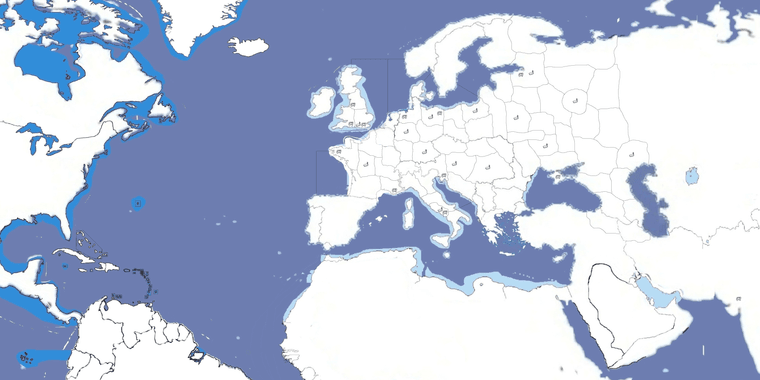
WW1 contour baseline map 4000px
-
@thedog Right on
In that case I blocked in some quick sz divisions to show how might translate. I did the interior land contours with beefier red line so it can be isolated out and retraced using the OOB connections. The whole thing can be morphed again to create a less extreme stretch overall which may be preferable. 16:9 would allow for a zoom out view that doesn't require dragging to see the entire map field. The image attached below is a 2:1 draft, but just cause I already had that one saved out.
I inserted the standard diamond board into the corners as a placeholder, but you can imagine that rather than these, it might have some sort of WW1 themed montage images with Biplanes and Trenches and Dreadnaughts. Or again the battle board or unit roster with descriptions and images just built into the map display in those areas. North America can be stitched back on to upper left, or with the ocean field extended to suit the overall dimensions etc. This is just trying to create a visual impression for a WIP.
If trying to work up a redux, this would be the sort of thing I'd do.
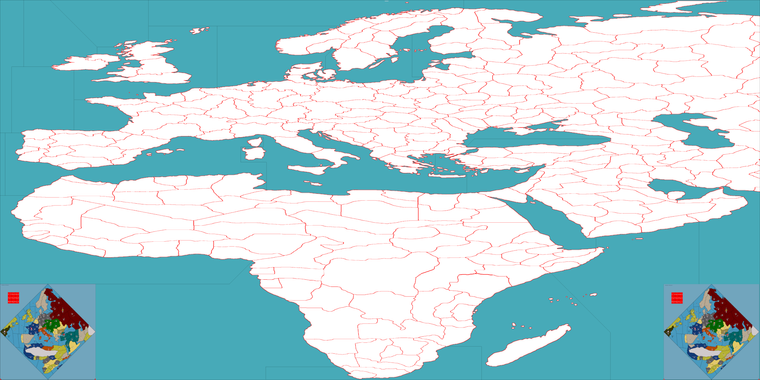
OOB there is more compression on Russia so basically the whole thing could be slid over slightly to make room for the North America stuff.
I think morphs from a more regular orientation, sans tilt, it will be easier to create in those areas near the edges of the board. If it seems agreeable I will keep going in this direction and see if we can get a port going.
-
I don't mind the tilt, but yes, the rectangle looks better than the diamond. But this last map seems to focus on Africa then Europe.
My two cents
Cheers...
-
@wc_sumpton Agreed
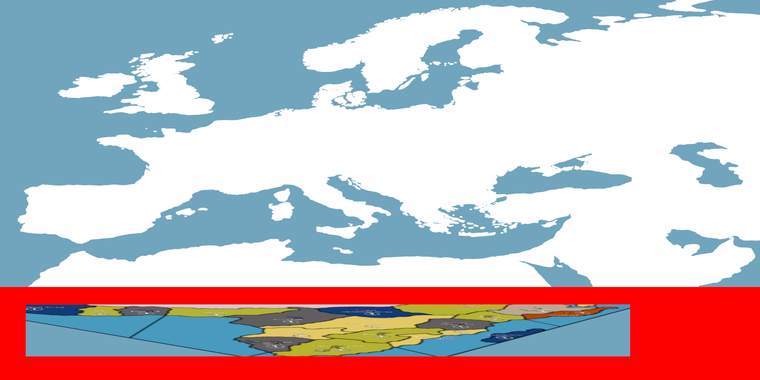
I think the problem is trying to include sub-Saharan Africa at all, or rather trying to dedicate so much board-space to that area. I think instead, the dozen or so territories and sea zones that comprise that front might be abstracted into more simplistic or even basic geometric shapes. To create something that works more like a checkerboard down there. Here's a concept, pretty vague. But the idea being to somehow fit it all into that more narrow band of red at the very bottom of the board.
-
Unlike WWII, WWI was more centrally located around the Mediterranean, Middle East, central Europe and Asia along with Great Britain. The United States can be abstracted to the left, with the southern portions African condensed/abstracted at the bottom.
This was all I'm saying.
Cheers...
-
For units I think we should use some of the stuff Hepster made for the Central Powers, then do something similar for team Entente.
https://drive.google.com/file/d/1pj6MNXUTrhYvvh3hVIDkbwtEf6Zh2efx/view?usp=sharing
These could be tinted, redrafted or reworked to display at 54 px with the colors for Austria and the Ottoman Empire for example.
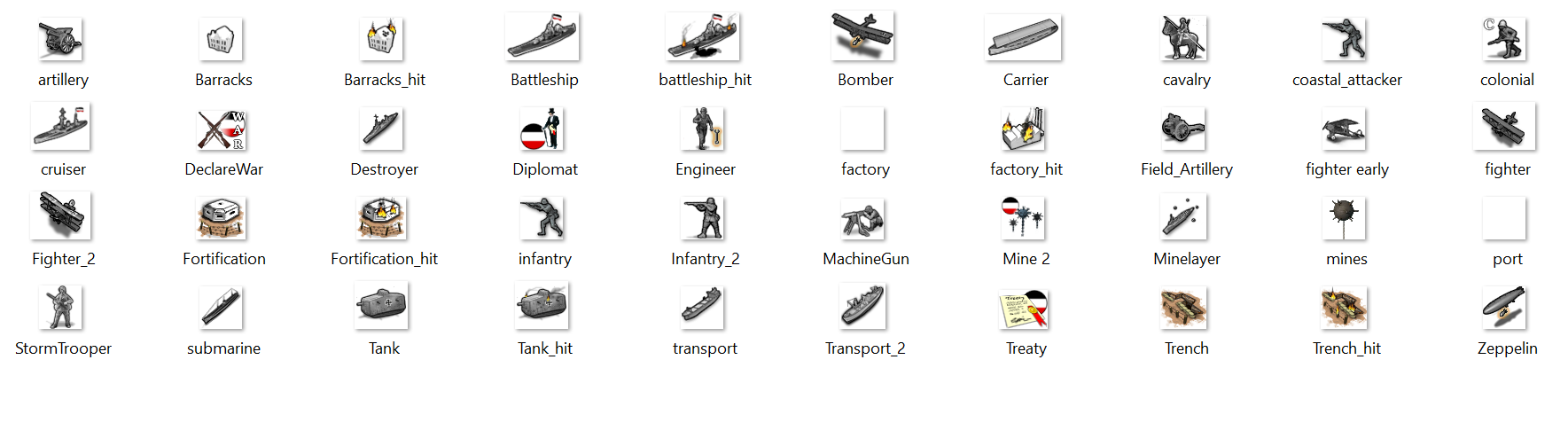
Some of those unit graphics wouldn't have a function in the normal game, but could possibly be used for stuff like WW1 technology or mods.
-
@wc_sumpton said in WW1 contour baseline map 4000px:
Unlike WWII, WWI was more centrally located around the Mediterranean, Middle East, central Europe and Asia along with Great Britain. The United States can be abstracted to the left, with the southern portions African condensed/abstracted at the bottom.
This was all I'm saying.
Cheers...
How about something like this?
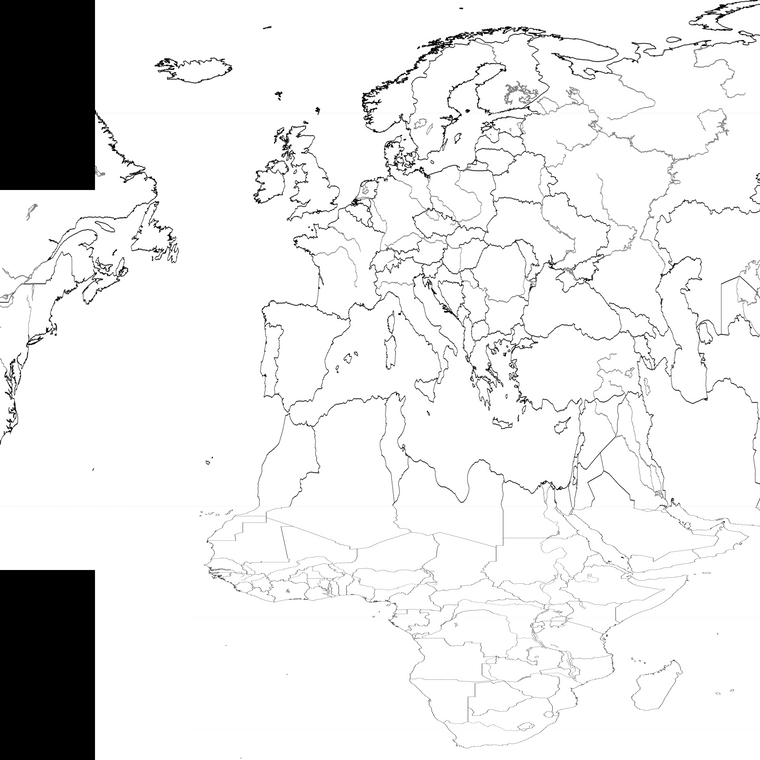
The black spaces can be used to put something in them like the title of the game, units legends or things like WW1 propaganda posters. They are actually there to hide South America and the fact that Iceland would be right next to Baffin Island.
(Anyone feel free to use this image.)
-
@cernel yeah, I think something of that sort would be the way to go, with an abstraction clearly delineated in the design. In tripleA there are a number of solutions that wouldn't be available for a physical map, since we can zoom in and out or scale the sculpts. The challenge I think is to create a map image that is exactly analogous in terms of the connectsion/tiles, but which might also work on a standard dining table.
This image may help to get a ballpark going. Using an 8ft banquet table for comparison.
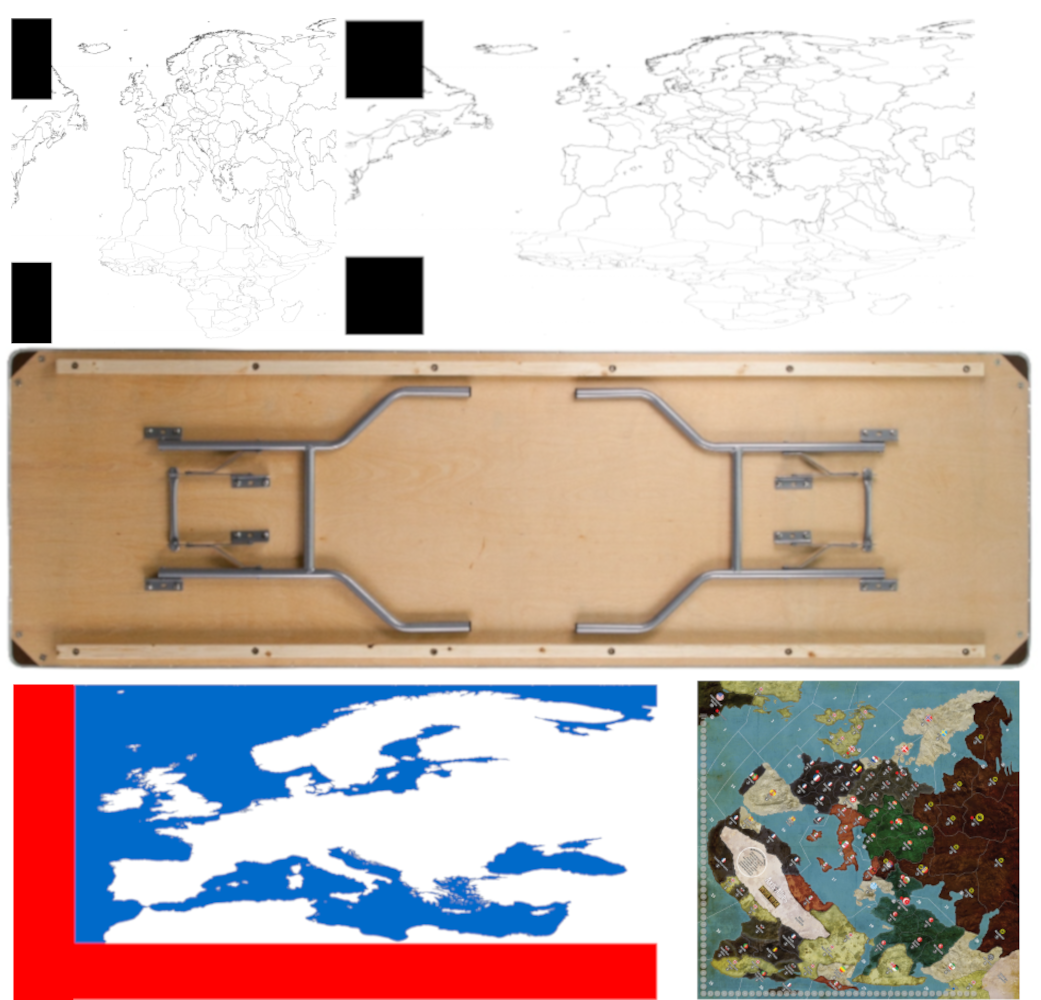
Goal would be to ensure that the areas of highest activity (or which must house many units) be larger relative to the tilted OOB board in the same spots. I think the only way to really overcome the tight space for sculpts is to do some sort of very wide stretch for Europe to max out the space there, at least along the horizontal axis. We can get pretty close to matching it I think, the space of the OOB in Europe, while still preserving a somewhat familiar sweep. Though it may be simpler to go more abstract if using very heavy distortion, since retaining the contours can be tough. I like the idea that the map would indicate that the bottom portion is very telescoped, perhaps using design elements like you mentioned, so period posters or little images to help accent the transition, which would basically be right below the southern portion of the med. Since the Ottoman's are a main faction in this one, it makes sense I think to try and get enough of the Persian Gulf and Arabia into the main Europe display without so much distortion as I used initially. I had been using an already highly tweaked map of Europe and the Med for drafting, but since a stretch might look better than a tilt for that, I think we could get closer to using a very standard map or Europe like the one you provided. Will also help when trying to do fancy stuff for the relief.

-
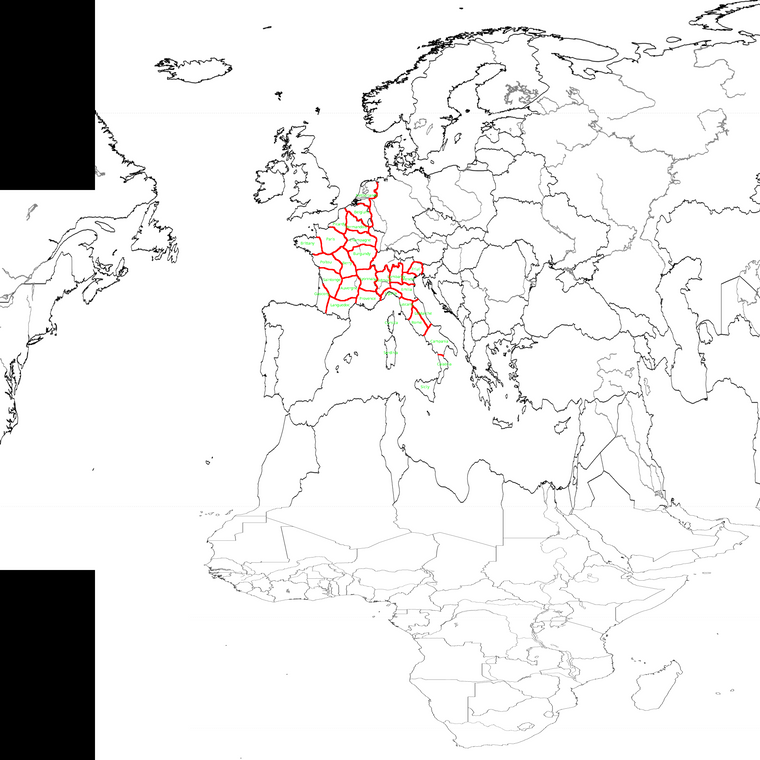
This is an attempt I just made to depict territories for Lowlands, France and Italy to replicate WW1 while keeping territories as big as possible but also fairly consistent (and have a fairly big territory for Paris).
-
I upscaled from 4000px to 6000px, using the units at like 48-54 tall with some example ground in Champagne and off Jutland for some Naval units. Gives a sense for the unit place at that scale. I think it should work there for height, or pretty close. I tossed an extra cavalry dude in there and one of the larger fighters to see what it might look like for place before overflow. Here's a quick detail to fit the scale of the image attachments here on the forums...
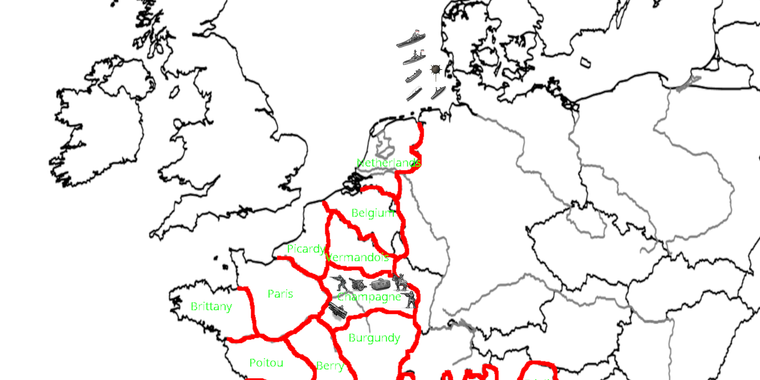
Taking basically that same warp you provided and going double wide I think is another nice option if we need extra room. Maybe between 4:3 to start and see how it looks before trying 16:9. Ideally where most TTs can fit like two rows at least a couple unit types deep. Width varies a little in hepsters units from about 60-80ish px but still pretty manageable I think from that starting point. Any extra tile divisions can be drawn in at 1 px, then collapsed back down into larger regions or yanked out to make it OOB at the last step where the connections require. Seems cool to me!
We'll go with that sort vibe for the contour and then if something needs to be tweaked after we can just keep reworking it in the base till it feels good, before I try to go too ham with the relief stuff. But I like the idea of a WW1 that's maybe a little gilded up with cool period illustrations or something on the margins, or a nice battleboard style presentation for quick overview like unit notes. Having the notes with graphics drawn onto the map they might scale somewhat better than within the UI for a quick glance, or at least for the higher resolution displays. I'll try to key it out at 1080 and 1440 to make sure it's ok for both. Good times!
-
@black_elk It looks to me that those units are about 48 pixels wide. I mean the ones which you uploaded in a single image in this thread.
The image is 4,000 wide simply because of this forum's limits (and because this topic says 4000px). I would go with it being 10,000 on both axis.
This is how it would look with those about 48px units.
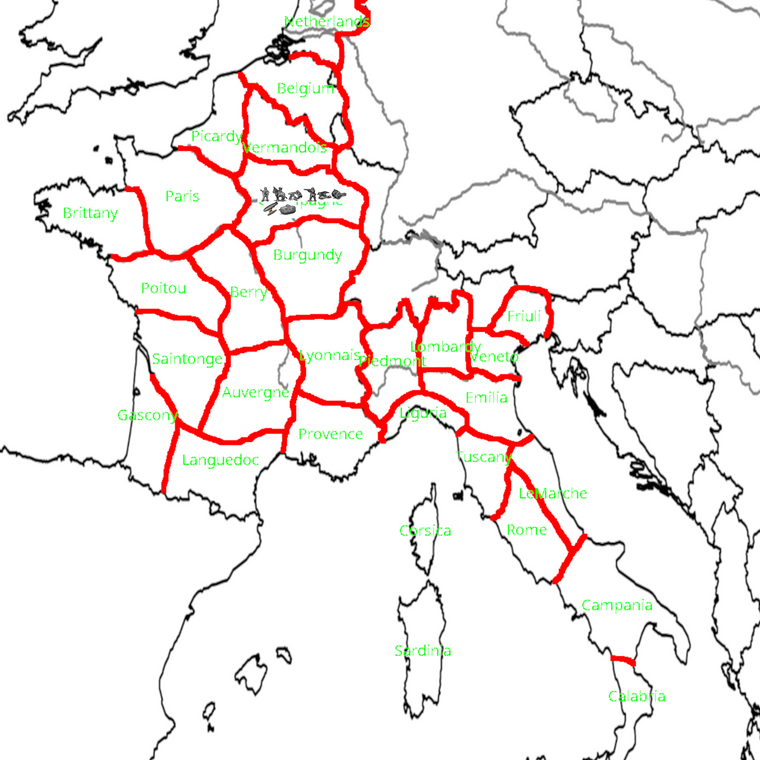
As it is traditional in WW1 games, I assume the game would have frequent stalemates, with enemy units sharing the same territory across turns, so I guess it would be normal to have German, French and English units on the same territory for some rounds.
Actually, the original which I made was 6,000 on both axis, but I shrunk it because forum would not allow it.
-
I like maps that are aesthetically pleasing to look at.
Map rotations, curves, extreme squeezings/stretches, and abnormally big Scandinavia, Eastern Europe, or Africa are just not good. Standard maps aren't suitable either because they make Europe too small.
It’s better to use an equirectangular projection, get rid of all the unpleasant stuff I listed, and subtly shrink non-European territories.



Hello! It looks like you're interested in this conversation, but you don't have an account yet.
Getting fed up of having to scroll through the same posts each visit? When you register for an account, you'll always come back to exactly where you were before, and choose to be notified of new replies (either via email, or push notification). You'll also be able to save bookmarks and upvote posts to show your appreciation to other community members.
With your input, this post could be even better 💗
Register Login