TripleA Logo TripleA Forum
    • TripleA Website
    • Categories
    • Recent
    • Popular
    • Users
    • Groups
    • Tags
    • Register
    • Login

    WWII Revised - Facelift

    Scheduled Pinned Locked Moved Maps & Mods
    55 Posts 7 Posters 24.6k Views 6 Watching
    Loading More Posts
    • Oldest to Newest
    • Newest to Oldest
    • Most Votes
    Reply
    • Reply as topic
    Log in to reply
    This topic has been deleted. Only users with topic management privileges can see it.
    • General_ZodG Offline
      General_Zod Moderators
      last edited by

      @Cernel Hmm... I may have to hijack the PU markers from 270bc. They might look nice on this map. I also like how they are located in fringe areas of the territories. Where units are less likely to be, thus not covering them.

      1 Reply Last reply Reply Quote 0
      • C Offline
        Cernel Moderators @General_Zod
        last edited by

        @general_zod said in WWII Revised - Facelift:

        Also I've read somewhere in help doc or elsewhere that we don't use blends anymore.

        What? I hope you are wrong. That would be a bad decision. Was it at least discussed in forum?

        1 Reply Last reply Reply Quote 0
        • C Offline
          Cernel Moderators @General_Zod
          last edited by

          @general_zod said in WWII Revised - Facelift:

          @cernel
          Is there a list/help for settings on the following or map.properties settings in general.

          There are some info in Napoleonic Empires map.properties.

          For a peculiar example, you can see that in Conquest of the World the blends remove the coloured ownership display, as per traditional Risk. You can set it partially, in any case. There are a few different tipologies of blends; kind of long to explain, as some are a mix of different blending on different levels.

          1 Reply Last reply Reply Quote 0
          • C Offline
            Cernel Moderators @General_Zod
            last edited by

            @general_zod said in WWII Revised - Facelift:

            The other alternative is to modify units, but that's sounds even more tedious. If some one wants to pitch in on that, would be great.

            There are programs to mass-apply same changes to a bunch of images. However, WWII Revised uses the units of the TripleA assets, and I would keep the practice, for all basic maps.

            General_ZodG 1 Reply Last reply Reply Quote 0
            • General_ZodG Offline
              General_Zod Moderators @Cernel
              last edited by General_Zod

              @cernel I will look around for that particular thing I read regarding blends not used anymore. I think it was one of the official map creating docs.

              Anyways it is still supported so it's really a moot point.

              It works on this map but makes it much darker. I could compensate with color manipulation if needed.
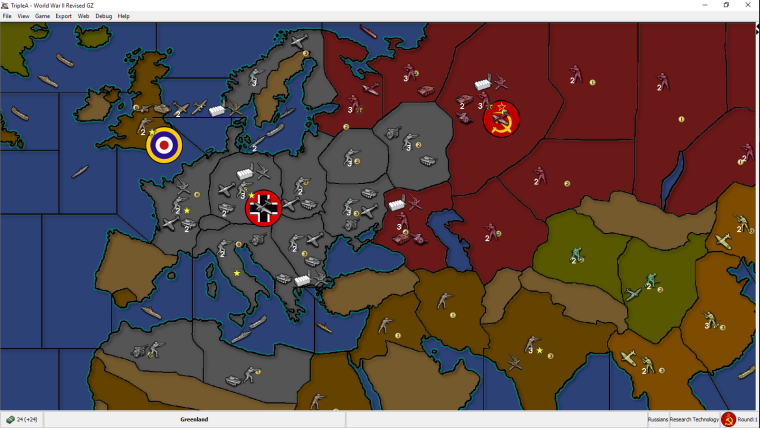
              0_1522371249348_wwii_revised_gz.003_blends.PNG
              However since I haven't tried tweaking them yet (beyond this one setting). Do you recall what settings of blend will make it brighter, not darker?

              If you have the time maybe post those tipologies you mentioned. 🙂

              Either way this is a cool tool for map making. Only thing is to get players to use it (game notes) on the maps, that utilize it correctly. Cause like I said ^^ many maps don't look correct when using blends.

              General_ZodG 1 Reply Last reply Reply Quote 0
              • General_ZodG Offline
                General_Zod Moderators @General_Zod
                last edited by

                @Cernel

                Almost forgot. What's the program you mentioned for mass producing image changes?

                C 1 Reply Last reply Reply Quote 0
                • General_ZodG Offline
                  General_Zod Moderators
                  last edited by General_Zod

                  I picked this project up again. I changed the colors as suggested for Germany, Japan and oceans (and filtered rest). I also added some texture. Thanks to @Hepps for textures. I made them subtle so zoom in to see them in this image.

                  I didn't address the geometry because I have a few layers composing the relief image and I don't really want to redraw all of them. Plus this one isn't too shabby anyways.

                  If @Hepps is ok with it, I would love to use his TWW units here as well 🙂 . But most likely without the roundels. Also I will update the game notes to be very noob friendly, since this map likely draws many TripleA first timers which may be looking for Axis & Allies emulations.

                  If any one has more suggestions, post them soon or forever hold your peace 😉 .

                  My newest version.
                  0_1537302336887_WW2.Revised_GZ_Sample_001.PNG

                  Btw, I don't intend this to replace the original map just nicer map skin really. Unless the units do get replaced then it is more than a map skin alternative.

                  My previous version for comparison.
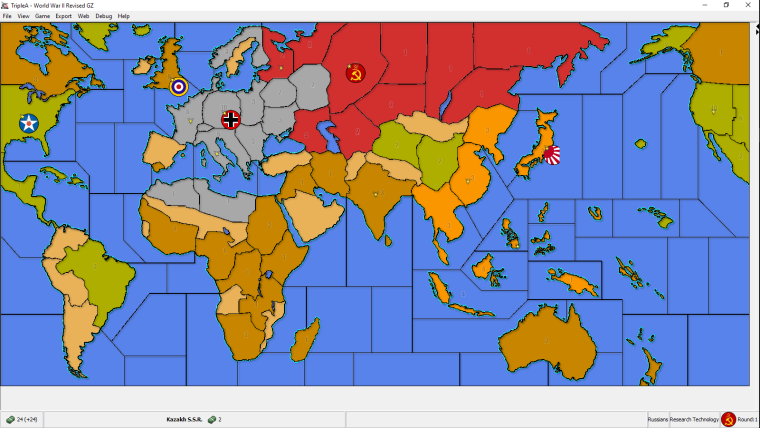
                  0_1522307617315_wwii_revised_gz.001.PNG

                  Original ww2 Revise map skin for comparison.
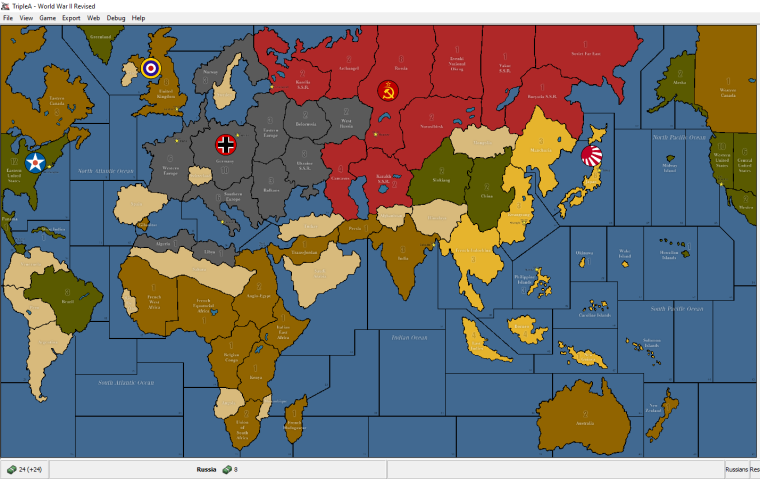
                  0_1521793043949_wwii_revised_original.PNG

                  C HeppsH 2 Replies Last reply Reply Quote 0
                  • C Offline
                    Cernel Moderators @General_Zod
                    last edited by

                    @general_zod GIMP doesn't have anything integrated for that, but you can do batch in a number of ways. What I use is this plugin made by Alessandro Francesconi:
                    https://alessandrofrancesconi.it/projects/bimp/

                    General_ZodG 1 Reply Last reply Reply Quote 0
                    • General_ZodG Offline
                      General_Zod Moderators @Cernel
                      last edited by

                      @cernel Cool, thanks this will come in handy.

                      1 Reply Last reply Reply Quote 0
                      • C Offline
                        Cernel Moderators @General_Zod
                        last edited by

                        @general_zod Don't you feel the Japanese lime green being too bright?

                        General_ZodG 2 Replies Last reply Reply Quote 0
                        • General_ZodG Offline
                          General_Zod Moderators @Cernel
                          last edited by

                          @cernel The filter changed the shade of the yellow below it. I can adjust it to be like original yellow in final product.

                          1 Reply Last reply Reply Quote 0
                          • General_ZodG Offline
                            General_Zod Moderators @Cernel
                            last edited by General_Zod

                            @cernel Here is the new yellow.

                            0_1537372074231_wwii_revised_gz.003.PNG

                            HeppsH C 2 Replies Last reply Reply Quote 1
                            • HeppsH Offline
                              Hepps Moderators @General_Zod
                              last edited by

                              @general_zod Looks more yellow. Thumbs up.

                              "A joyous heart sours with the burden of expectation"
                              Hepster

                              1 Reply Last reply Reply Quote 0
                              • General_ZodG Offline
                                General_Zod Moderators
                                last edited by General_Zod

                                It just dawned upon me that creating a stand alone duplicate of this map will be confusing for people playing each other. The 2 versions will not be compatible. Is there any objections to replace the original with this one?

                                Otherwise I might as well chalk this one up as a training exercise.

                                C 1 Reply Last reply Reply Quote 0
                                • C Offline
                                  Cernel Moderators @General_Zod
                                  last edited by

                                  @general_zod Why can't you make a mapskin?

                                  General_ZodG 1 Reply Last reply Reply Quote 0
                                  • C Offline
                                    Cernel Moderators @General_Zod
                                    last edited by

                                    @general_zod In my opinion, the Japanese colour is still too bright, also relatively to the other ones. I'd suggest something like the Yamamoto colour of World At War, but a tad more saturated.

                                    1 Reply Last reply Reply Quote 0
                                    • General_ZodG Offline
                                      General_Zod Moderators @Cernel
                                      last edited by

                                      @cernel Well I haven't tried it yet so not 100% sure. But does it use all artwork (from all my new folders) if I make it a just a map skin?

                                      I do know I can't fix game notes and make it a mapskin however, since that's in xml.

                                      C 1 Reply Last reply Reply Quote 0
                                      • C Offline
                                        Cernel Moderators @General_Zod
                                        last edited by

                                        @general_zod Mapskins take only the xml code from the original map. Game notes are taken from the original map for the html code and from the mapskin for anything else (images, etc.). For example, a game like Total World War would get most game notes from the mapskin.

                                        1 Reply Last reply Reply Quote 0
                                        • HeppsH Offline
                                          Hepps Moderators @General_Zod
                                          last edited by

                                          @general_zod said in WWII Revised - Facelift:

                                          If @Hepps is ok with it, I would love to use his TWW units here as well 🙂 . But most likely without the roundels. Also I will update the game notes to be very noob friendly, since this map likely draws many TripleA first timers which may be looking for Axis & Allies emulations.

                                          Wasn't sure if I responded to this formally. But yes Zod feel free to reuse the TWW units. You will have to manually remove the roundels.

                                          "A joyous heart sours with the burden of expectation"
                                          Hepster

                                          1 Reply Last reply Reply Quote 1
                                          • General_ZodG Offline
                                            General_Zod Moderators
                                            last edited by General_Zod

                                            Here is what the final product looks like with map blends = ON. Next step is to figure out the GitHub uploading. And yes this will be just a map skin for the existing revised map, so it's not forced on anyone.

                                            Unfortunately TripleA ignores some of my layers and it doesn't look as nice as it does in the graphics editor, but it still an improvement over original.
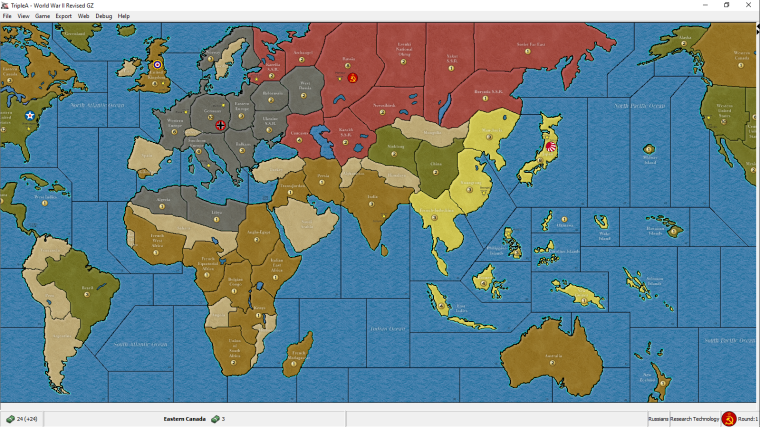
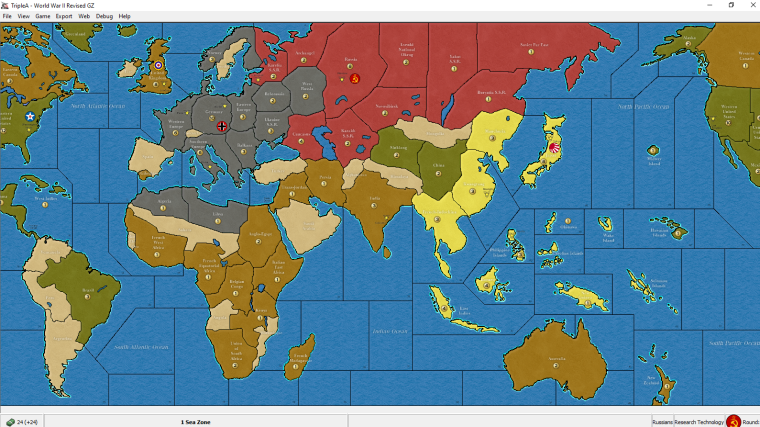
                                            0_1538125212247_wwii_revised_gz.004.1_final.PNG

                                            0_1538125191161_wwii_revised_gz.005.1_final.PNG
                                            This one is with maps blend =off. A bit brighter version.

                                            HeppsH PantherP prastleP C 4 Replies Last reply Reply Quote 4

                                            Hello! It looks like you're interested in this conversation, but you don't have an account yet.

                                            Getting fed up of having to scroll through the same posts each visit? When you register for an account, you'll always come back to exactly where you were before, and choose to be notified of new replies (either via email, or push notification). You'll also be able to save bookmarks and upvote posts to show your appreciation to other community members.

                                            With your input, this post could be even better 💗

                                            Register Login
                                            • 1
                                            • 2
                                            • 3
                                            • 1 / 3
                                            • First post
                                              Last post
                                            Copyright © 2016-2018 TripleA-Devs | Powered by NodeBB Forums