TripleA Logo TripleA Forum
    • TripleA Website
    • Categories
    • Recent
    • Popular
    • Users
    • Groups
    • Tags
    • Register
    • Login

    64 Bit & Downloading Maps Issue

    Scheduled Pinned Locked Moved Player Help
    22 Posts 6 Posters 9.7k Views 6 Watching
    Loading More Posts
    • Oldest to Newest
    • Newest to Oldest
    • Most Votes
    Reply
    • Reply as topic
    Log in to reply
    This topic has been deleted. Only users with topic management privileges can see it.
    • redrumR Offline
      redrum Admin @MiSC23
      last edited by

      @misc23 I'd delete all your maps from your maps folder and try re-downloading them to start. If that doesn't solve it then can you post what version of TripleA you installed or trying re-installing with the latest download.

      TripleA Developer with a Passion for AI: https://forums.triplea-game.org/topic/105/ai-development-discussion-and-feedback

      1 Reply Last reply Reply Quote 2
      • M Offline
        MiSC23
        last edited by

        @redrum I've deleted all the maps and tried re-downloading them to no avail. Addition I have removed and re-installed TripleA and it still hasn't worked.

        I have a HP Zbook with Windows 64 Bit. I have tried to install the latest version of TripleA which was released on Nov. 25th: 1.9.0.0.7621.

        Any additional ideas or suggestions?

        redrumR 1 Reply Last reply Reply Quote 0
        • redrumR Offline
          redrum Admin @MiSC23
          last edited by

          @misc23 Hmm. Do you get any other details in an error popup when you see that message?

          If not then in order to figure out what's going on, I need more information. Can you do the following and post results in this thread:

          1. Open TripleA
          2. Go to Engine Preferences
          3. Go to Folder tab
          4. Post your maps folder path here
          5. Open Windows File Explorer and navigate to that path
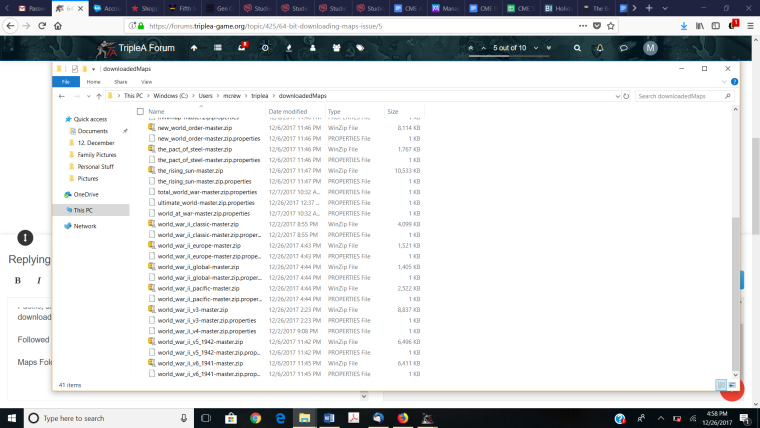
          6. Post a screenshot of the maps in that folder

          TripleA Developer with a Passion for AI: https://forums.triplea-game.org/topic/105/ai-development-discussion-and-feedback

          prastleP 1 Reply Last reply Reply Quote 1
          • prastleP Offline
            prastle Lobby Moderators Admin @redrum
            last edited by

            @redrum Actually I have had this issue yesterday after installing a new (used) hard drive yesterday. Occurred for v3 41 and TWW and a few other maps. For most it did not. For those ones I just took them from the repo on git hub and it worked that way.

            If we open a quarrel between past and present, we shall find that we have lost the future! Sir Winston Churchill

            prastleP 1 Reply Last reply Reply Quote 0
            • prastleP Offline
              prastle Lobby Moderators Admin @prastle
              last edited by

              @prastle https://github.com/triplea-maps Try installing it this way and drag and drop to your downloaded maps folder in user @MiSC23

              If we open a quarrel between past and present, we shall find that we have lost the future! Sir Winston Churchill

              redrumR 1 Reply Last reply Reply Quote 0
              • redrumR Offline
                redrum Admin @prastle
                last edited by

                @prastle Oh really? That's kind of concerning if maps downloaded through TripleA are showing errors.

                TripleA Developer with a Passion for AI: https://forums.triplea-game.org/topic/105/ai-development-discussion-and-feedback

                prastleP 1 Reply Last reply Reply Quote 0
                • prastleP Offline
                  prastle Lobby Moderators Admin @redrum
                  last edited by

                  @redrum @ the time I thought it was due to the size of the file and my hard drive failing. Apparently others have had same error appear.

                  The map downloads correctly and then installs correctly or appears to. After closing the download maps page and attempting to load the map to play it (I also tried an offline game) The engine states in a small box as he said.

                  "Could not parse map file correctly, would you like to remove it?" with a yes or no response. Interestingly if you choose no it actually doesn't remove the file. I had to delete it and overwrite from GitHub repo. First time I have ever seen this and it did not do it for all maps.

                  If we open a quarrel between past and present, we shall find that we have lost the future! Sir Winston Churchill

                  prastleP 1 Reply Last reply Reply Quote 0
                  • prastleP Offline
                    prastle Lobby Moderators Admin @prastle
                    last edited by

                    @redrum New hard drives! 0 Problems! So perhaps he has a hard drive on the crapper as as well?
                    @MiSC23

                    If we open a quarrel between past and present, we shall find that we have lost the future! Sir Winston Churchill

                    1 Reply Last reply Reply Quote 0
                    • ssoloffS Offline
                      ssoloff Admin @MiSC23
                      last edited by

                      The only thing that's changed in this area recently was parallelization of map processing. However, that code looks pretty safe to run concurrently.

                      It would be interesting to see if the map .zip files are really corrupt or if this is caused by code. @MiSC23, could you please attach one of the (smaller) map .zip files with which you are seeing this error?

                      1 Reply Last reply Reply Quote 0
                      • M Offline
                        MiSC23
                        last edited by

                        @prastle I have a new computer, so its not the hard drive which is the error. The errors I receive are through downloading maps through TripleA.

                        @redrum I cannot upload the maps causing problems as the files are too big here-Europe, Pacific, and Global are the ones that I'm struggling with. I've tried deleting all files and re-downloading them and that has not made any difference.

                        Followed steps you outlined in several previous messages:

                        Maps Folder: C:\Users\mcrew\triplea\downloadedMaps

                        Attached Screen Shot here.0_1514325604636_2017-12-26.png

                        1 Reply Last reply Reply Quote 0
                        • M Offline
                          MiSC23
                          last edited by

                          @ssoloff [0_1514339176047_pacific_1942-master.zip](Uploading 4%) which is approx 1,700 kb but receive an error that the entity file is too big. Is there another method to get you the info you need?

                          It seems it does not matter whether I download directly from GitHub or triplea certain maps have the same error that I encountered when I started this thread. In particular: Europe, Pacific, Civil War, Cold War, Star Trek...

                          B prastleP 2 Replies Last reply Reply Quote 0
                          • B Offline
                            beelee @MiSC23
                            last edited by

                            @misc23
                            the smart people will get back to you soon but you might try deleting everything and starting over. Install java first, then triplea. There is a issue for some users that do triplea first.

                            Doubt this is your problem, but you could try it.

                            1 Reply Last reply Reply Quote 0
                            • prastleP Offline
                              prastle Lobby Moderators Admin @MiSC23
                              last edited by

                              @misc23 What I found was
                              the new installer auto installed 32 bit

                              rec u install java on clean system or confirm you have newest java
                              then install triplea
                              but yes 64 bit caused me probs

                              try the new
                              https://github.com/triplea-game/triplea/releases/download/1.9.0.0.8000/TripleA_1.9.0.0.8000_windows-64bit.exe

                              If we open a quarrel between past and present, we shall find that we have lost the future! Sir Winston Churchill

                              1 Reply Last reply Reply Quote 0
                              • RoiEXR Offline
                                RoiEX Admin
                                last edited by RoiEX

                                @MiSC23
                                The issue with file uploads can be fixed rather simple: Our server has limited disk space, so we require users to upload large files to public clouds. There's stuff like Google Drive or Dropbox where you need an account to store files, but there are also temporary file hosters where you don't need to have any account but the files are being deleted after a set amount of time.
                                Based on your description of the problem it seems to be rather system specific and not a general problem of TripleA, so I'd assume the map file is probably going to be fine, I'd still recommended to upload it to somewhere.
                                In order to figure out what your specific issue is: Could you post the exact error message?
                                Is there just a small window telling you something went wrong or does the actual error console with a detailed description pop up?

                                prastleP 1 Reply Last reply Reply Quote 0
                                • prastleP Offline
                                  prastle Lobby Moderators Admin @RoiEX
                                  last edited by

                                  @roiex test upload![0_1514390498186_th[1].jpg](Uploading 100%)

                                  If we open a quarrel between past and present, we shall find that we have lost the future! Sir Winston Churchill

                                  prastleP 1 Reply Last reply Reply Quote 0
                                  • prastleP Offline
                                    prastle Lobby Moderators Admin @prastle
                                    last edited by

                                    @prastle ![0_1514390681802_th[1].jpg](Uploading 100%)

                                    If we open a quarrel between past and present, we shall find that we have lost the future! Sir Winston Churchill

                                    1 Reply Last reply Reply Quote 0
                                    • M Offline
                                      MiSC23
                                      last edited by

                                      @prastle: I have confirmed that I have the latest version of Java. I removed the prior version of TripleA, restarted the computer, and then used the GitHub link to download the 64 bit version. Some more of the maps downloaded correctly this time (than before) but there were several maps did not download again: WWII Pacific, Feudal Japan, Star Trek, Star Wars, etc.

                                      prastleP 2 Replies Last reply Reply Quote 0
                                      • prastleP Offline
                                        prastle Lobby Moderators Admin @MiSC23
                                        last edited by

                                        @misc23 Two separate issues
                                        the downloader
                                        uploads here
                                        btw my uploads failed as well
                                        Rec you try to uninstall the maps in ?
                                        with the downloader
                                        and reinstall

                                        If we open a quarrel between past and present, we shall find that we have lost the future! Sir Winston Churchill

                                        1 Reply Last reply Reply Quote 0
                                        • prastleP Offline
                                          prastle Lobby Moderators Admin @MiSC23
                                          last edited by

                                          @misc23 also s @RoiEX showed me elsewhere
                                          you might still be running 32 bit in background

                                          BUT

                                          this should not affect downloads

                                          If we open a quarrel between past and present, we shall find that we have lost the future! Sir Winston Churchill

                                          1 Reply Last reply Reply Quote 0
                                          • M Offline
                                            MiSC23
                                            last edited by

                                            @prastle I think you are suggesting uninstalling everything (maps and downloader) and then try again?

                                            prastleP 1 Reply Last reply Reply Quote 0

                                            Hello! It looks like you're interested in this conversation, but you don't have an account yet.

                                            Getting fed up of having to scroll through the same posts each visit? When you register for an account, you'll always come back to exactly where you were before, and choose to be notified of new replies (either via email, or push notification). You'll also be able to save bookmarks and upvote posts to show your appreciation to other community members.

                                            With your input, this post could be even better 💗

                                            Register Login
                                            • 1
                                            • 2
                                            • 1 / 2
                                            • First post
                                              Last post
                                            Powered by NodeBB Forums