TripleA Logo TripleA Forum
    • TripleA Website
    • Categories
    • Recent
    • Popular
    • Users
    • Groups
    • Tags
    • Register
    • Login

    Jurassic v2.0

    Scheduled Pinned Locked Moved Maps & Mods
    36 Posts 4 Posters 761 Views 4 Watching
    Loading More Posts
    • Oldest to Newest
    • Newest to Oldest
    • Most Votes
    Reply
    • Reply as topic
    Log in to reply
    This topic has been deleted. Only users with topic management privileges can see it.
    • TheDogT Online
      TheDog @GREGOREK
      last edited by

      @gregorek

      1. Shogun Advanced has random territories and random drops called Kami/Spirits/Fate. 1888 has random territories.
        Random Territories uses Territories Are Assigned Randomly
        Random drops needs another neutral/none player and isConstruct to help distribute the Random drops

      2. 1941 Global Command Decision does do weather but it is not random.

      3. You need a Neutral/none player and yes infrastructure is the main way to do this. However there are exceptions.
        The Drops can be /turn or can be one off loot. The one off loot needs an end of turn trigger to remove the drop/kami.

      4. Shogun has blocked mountain passes, are variant could be, make them destructible/units, so you attack them to make the pass useable/passable.

      @wc_sumpton might have more ideas.

      https://forums.triplea-game.org/tags/thedog
      https://forums.triplea-game.org/topic/3741/curated-best-top-maps-triplea-guides

      1 Reply Last reply Reply Quote 3
      • wc_sumptonW Offline
        wc_sumpton
        last edited by

        @GREGOREK

        Sorry for not replying sooner, I've been busy with my own little side project.
        I've played a few rounds, there are some interesting concepts here. With regards to some of the comments at the bottom of your notes dealing with maxBuiltPerPlayer and requiresUnits. There were updates to the AI when dealing with these types of units. But the AI considers "What is best for me now?" when purchasing and cannot handle upgrades/future consideration type of purchase.
        Did a scan review of the xml. I've been reading to many of @TheDog's stuff. That one is the Master of foreach/looping 👍, which makes an xml so much easier to read.

        @gregorek said in Jurassic v2.0:

        Can new territory connections be made during the game as part of game play?

        Think of "Canals". They are a type of territory connection and their attachments can be modified.

        Cheers...

        1 Reply Last reply Reply Quote 3
        • G Offline
          GREGOREK
          last edited by

          Working on random drops (items/units) and hitting some barriers.

           <option name="removeUnits" value="all:infantry" count="1"/>
          

          Does this trigger option remove ONE infantry from the MAP, or from EACH territory?
          and only owned by the PLAYER the trigger is attached to?

          also... Is there a way to convert/change a unitType into a Resource? (without using a trigger)
          [whenCapturedChangesInto] does not allow PUs, only unitTypes.

          <option name="whenCapturedChangesInto" value="Russians:Germans:false:gold:3:lumber:1"/>
          

          also... creating random units across the MAP, seems to require separate CHANCE triggers for EACH territory!

          The existing maps dont create in random locations or convert the units dropped into resources. Only singular artifacts that are retained and not mass collected and transformed. I have a path to accomplish mass randoms for a hunter-gatherer feature, but the removeUnits might require a PER TERRITORY check for all items/units collected to be converted to PUs. Hopefully I missed something simple; otherwise, this is going to get ugly.

          In terms of weather conditions....
          Via Relations and Treaties can player A & B fight even though they are both Allied with C & D who are also fighting each other? It would allow surface Units to fight while another battle rages over head with weather Units. The weather Units would also need to have effects (like territory) on the surface Units even though allied. In this way, two games can be played simultaneously on the same Map with some interaction between like planes unable to fly through hurricanes and rain preventing canBlitz movement.

          TheDogT 1 Reply Last reply Reply Quote 0
          • TheDogT Online
            TheDog @GREGOREK
            last edited by

            @gregorek

            <option name="removeUnits" value="all:infantry" count="1"/>

            This mean in all territories with infantry remove 1 of them in each territory.

            .

            Is there a way to convert/change a unitType into a Resource?

            No, trigger only.

            .

            random units across the MAP, seems to require separate CHANCE triggers for EACH territory

            No, chance needed.
            You need to use
            <delegate name="randomStartDelegate" javaClass="games.strategy.triplea.delegate.RandomStartDelegate" display="Pregame Nation Placements"/>

            <step name="setupRandomStartDelegate" delegate="randomStartDelegate" maxRunCount="1"/>

            Lots of heldUnits, these are distributed randomly one to each none owned territory
            <heldUnits unitType="Flag" player="Orc" quantity="5"/>
            <heldUnits unitType="Flag" player="Goblin" quantity="5"/>
            <heldUnits unitType="Flag" player="Undead" quantity="5"/>

            and
            <property name="Territories Are Assigned Randomly" value="true" editable="false"> <boolean/> </property>

            weather conditions
            It sounds like you need a none/dummy player to be a weather system like rain/monsoon. This weather system would be at war with all players, and its units called say monsoon would attack only say isAir, by using

            <option name="canNotTarget" value="$All-Land$"/>
            so it cannot attack land units.

            https://forums.triplea-game.org/tags/thedog
            https://forums.triplea-game.org/topic/3741/curated-best-top-maps-triplea-guides

            TheDogT 1 Reply Last reply Reply Quote 1
            • TheDogT Online
              TheDog @TheDog
              last edited by

              @thedog said in Jurassic v2.0:

              Is there a way to convert/change a unitType into a Resource?

              Thinking more on this, on death of a unit, you could change into a none moving unit, say 5:meat.

              This would give 5:meat every turn. So you would need a trigger to remove these meat units after the players endTurn

              https://forums.triplea-game.org/tags/thedog
              https://forums.triplea-game.org/topic/3741/curated-best-top-maps-triplea-guides

              1 Reply Last reply Reply Quote 2
              • G Offline
                GREGOREK
                last edited by

                Updated Jurassic: unit a/d/m mods, map cleaning, and 20-sided dice. Makes for a very WIDE battle menu but was needed for balance. Maybe the battle-menu could be modified to not display dice with no units. That would shrink it back down.

                http://john.gregorek.com/Games/jurassic-master.zip
                

                I'm making another game-map called Neanderthal. It is a test bed for the item/monster triggers to be added to Jurassic. For now, they can both be addressed here.
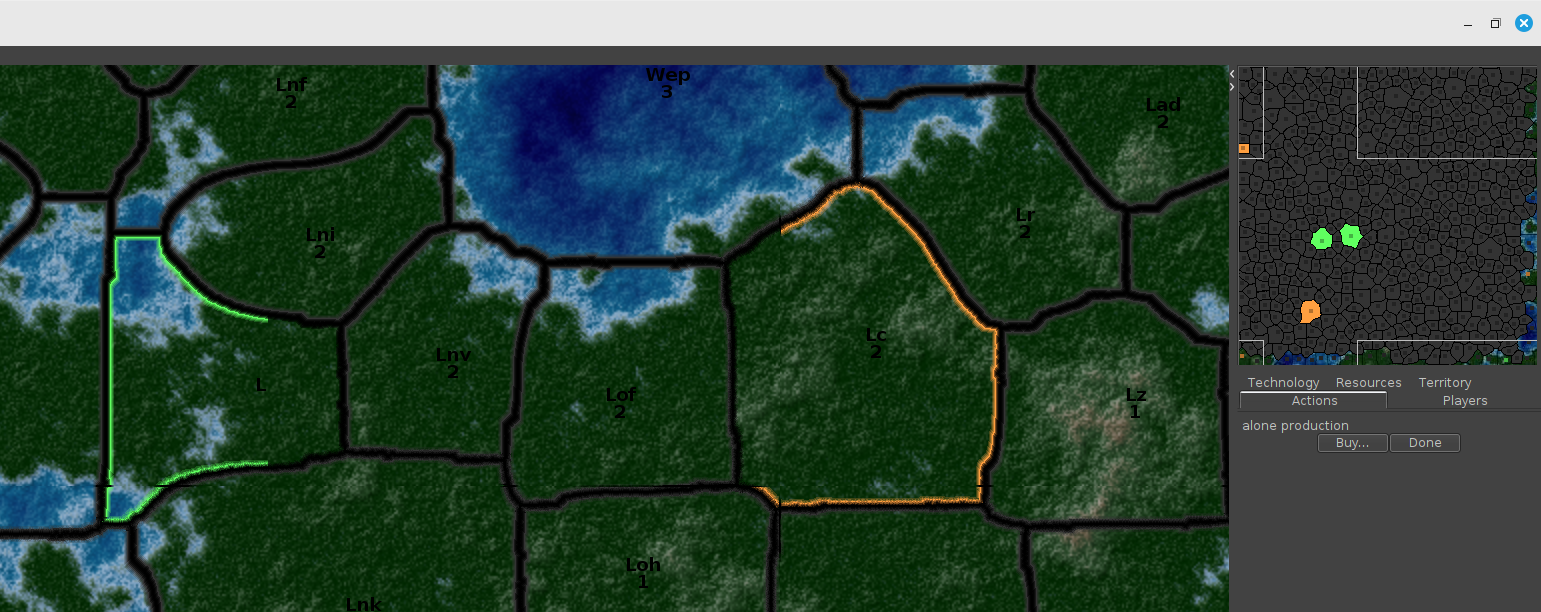
                This is a sample top-left corner of the map. Scripts auto-generate (XY-wrapped) topology, terrain, territories, borders, cell gutters and relationships. If there is interest, I could post a few unit-less maps for use in other game developments. But first ...

                ![NeanderthalMap.png](/assets/uploads/files/1779198528459-neanderthalmap.png) 
                

                ... I have one concern. Note: 'Lj' and 'Lad' territories run off the border and wrap to the other side of the map (not shown). How do I define the points in the 'polygons.txt' file? The loops are currently defined around the territory center. Thus, border loops that run off the left or top edge will have negative values and values greater than the map dimensions if portions run off the right or bottom.

                G 1 Reply Last reply Reply Quote 1
                • G Offline
                  GREGOREK @GREGOREK
                  last edited by

                  NeanderthalMap.png

                  RogerCooperR TheDogT 2 Replies Last reply Reply Quote 0
                  • RogerCooperR Offline
                    RogerCooper @GREGOREK
                    last edited by

                    @GREGOREK If you want territories that wraparound, you could treat them like archipelagos like Kyushu and Honshu on almost any map.

                    I am interested in automatic generation software you have.

                    1 Reply Last reply Reply Quote 1
                    • TheDogT Online
                      TheDog @GREGOREK
                      last edited by TheDog

                      @GREGOREK said:

                      How do I define the points in the 'polygons.txt' file?

                      You dont.

                      Also there are no negative coordinates, the map is treated as if no wrap around existed, except for below.

                      The wrap around map edges will share a vertical map line, one to the left one to right.
                      You then need to stitch the wrap around TT/SZ manually together with connections in the xml like so;
                      <connection t1="Chihuahua-Durango" t2="Mexico City"/>
                      <connection t1="Acapulco-Chiapas" t2="Sinaloa-Guadalajara"/>
                      <connection t1="064 Sea Zone" t2="011 Sea Zone"/>
                      <connection t1="064 Sea Zone" t2="028 Sea Zone"/>

                      In map.properties this must be true
                      map.scrollWrapX=true

                      That should work.

                      https://forums.triplea-game.org/tags/thedog
                      https://forums.triplea-game.org/topic/3741/curated-best-top-maps-triplea-guides

                      1 Reply Last reply Reply Quote 2
                      • G Offline
                        GREGOREK
                        last edited by

                        <connection...> just facilitates the movement between separate territories.

                        Is there a way to declare two separate territories and then join them so the game treats them as a single territory?

                        This would get around the hard map borders limiting wrapped territory definitions, and getting rid of the ugly common vertical/horizontal map border lines.

                        For example a territory defined overlapping the top-left corner would get defined as four separate territories to fall completely within the map borders. Then a [join command] stitches the pieces back together making a truly seamless fully wrapped map.

                        TheDogT 1 Reply Last reply Reply Quote 0
                        • TheDogT Online
                          TheDog @GREGOREK
                          last edited by

                          @GREGOREK

                          Is there a way to declare two separate territories and then join them so the game treats them as a single territory?

                          I don't think that is possible. Its the vertical/horizontal map border lines or no wrapping.
                          Maybe someone else can help?

                          https://forums.triplea-game.org/tags/thedog
                          https://forums.triplea-game.org/topic/3741/curated-best-top-maps-triplea-guides

                          RogerCooperR 1 Reply Last reply Reply Quote 0
                          • RogerCooperR Offline
                            RogerCooper @TheDog
                            last edited by

                            @TheDog You can't do it in the xml file. You need to do it in polygons.txt. Here is New Zealand in World War II v3.

                            New Zealand < (3234,1789) (3234,1789) (3235,1788) (3235,1787) (3236,1786) (3238,1786) (3239,1787) (3239,1791) (3235,1795) (3235,1799) (3236,1800) (3236,1802) (3237,1803) (3238,1803) (3240,1805) (3240,1806) (3242,1806) (3242,1805) (3243,1804) (3248,1804) (3249,1805) (3249,1806) (3251,1808) (3251,1809) (3249,1811) (3249,1813) (3251,1813) (3252,1814) (3256,1814) (3260,1810) (3261,1810) (3262,1811) (3265,1811) (3266,1812) (3266,1817) (3265,1818) (3265,1819) (3264,1820) (3264,1828) (3263,1829) (3219,1829) (3218,1828) (3218,1825) (3219,1824) (3219,1822) (3222,1819) (3222,1803) (3224,1801) (3224,1798) (3226,1796) (3226,1795) (3227,1794) (3229,1794) (3230,1793) (3230,1792) (3231,1791) (3232,1791) (3232,1790) (3233,1789) > < (3289,1698) (3290,1698) (3290,1693) (3288,1691) (3289,1690) (3292,1690) (3293,1691) (3294,1691) (3297,1694) (3298,1694) (3299,1695) (3299,1704) (3300,1705) (3300,1707) (3301,1708) (3302,1708) (3305,1711) (3306,1711) (3308,1713) (3309,1713) (3310,1712) (3313,1712) (3315,1710) (3328,1710) (3330,1712) (3330,1713) (3331,1714) (3331,1719) (3330,1720) (3330,1721) (3329,1722) (3329,1723) (3326,1726) (3325,1726) (3322,1729) (3322,1730) (3321,1731) (3321,1737) (3319,1739) (3319,1742) (3318,1743) (3318,1744) (3317,1745) (3317,1748) (3316,1749) (3315,1749) (3314,1750) (3313,1750) (3312,1751) (3311,1751) (3310,1752) (3309,1752) (3308,1753) (3308,1754) (3307,1755) (3307,1756) (3305,1758) (3304,1758) (3304,1759) (3302,1761) (3302,1780) (3301,1781) (3301,1791) (3298,1794) (3298,1795) (3297,1796) (3296,1796) (3296,1797) (3295,1798) (3295,1811) (3294,1812) (3294,1817) (3292,1819) (3291,1819) (3290,1820) (3289,1820) (3288,1821) (3284,1821) (3283,1820) (3283,1816) (3282,1815) (3280,1815) (3277,1812) (3277,1810) (3276,1810) (3272,1806) (3272,1801) (3273,1800) (3273,1799) (3275,1797) (3275,1795) (3277,1793) (3277,1792) (3278,1791) (3278,1789) (3274,1785) (3274,1783) (3272,1781) (3271,1781) (3269,1779) (3262,1779) (3261,1778) (3260,1778) (3259,1777) (3256,1777) (3255,1776) (3253,1776) (3252,1775) (3251,1775) (3248,1772) (3248,1767) (3249,1766) (3249,1765) (3251,1763) (3252,1763) (3253,1762) (3254,1762) (3254,1760) (3255,1759) (3256,1759) (3261,1754) (3261,1750) (3262,1749) (3262,1748) (3263,1747) (3263,1745) (3264,1744) (3264,1741) (3266,1739) (3266,1738) (3267,1737) (3267,1714) (3266,1713) (3266,1712) (3264,1710) (3264,1709) (3263,1708) (3263,1698) (3262,1697) (3262,1694) (3261,1693) (3261,1692) (3260,1691) (3260,1690) (3259,1689) (3259,1688) (3258,1687) (3258,1685) (3255,1682) (3255,1674) (3252,1671) (3252,1670) (3251,1670) (3249,1668) (3249,1667) (3245,1663) (3245,1662) (3240,1657) (3240,1649) (3239,1648) (3238,1648) (3237,1647) (3236,1647) (3235,1646) (3235,1645) (3233,1643) (3233,1637) (3235,1635) (3237,1635) (3238,1636) (3239,1636) (3240,1637) (3240,1640) (3242,1642) (3250,1642) (3255,1647) (3255,1648) (3258,1651) (3258,1652) (3259,1652) (3266,1659) (3266,1661) (3267,1662) (3267,1663) (3269,1665) (3269,1666) (3271,1668) (3271,1671) (3273,1673) (3273,1674) (3274,1675) (3274,1677) (3276,1679) (3278,1679) (3279,1680) (3279,1682) (3280,1683) (3280,1694) (3281,1695) (3282,1695) (3283,1696) (3283,1697) (3284,1697) (3285,1698) > < (3172,1599) (3172,1599) (3173,1600) (3174,1600) (3180,1606) (3180,1607) (3181,1608) (3182,1608) (3183,1609) (3183,1610) (3185,1612) (3186,1612) (3187,1613) (3189,1613) (3191,1615) (3191,1619) (3189,1621) (3188,1621) (3187,1620) (3185,1620) (3184,1619) (3182,1619) (3180,1617) (3178,1617) (3177,1616) (3175,1616) (3173,1614) (3172,1614) (3170,1612) (3169,1612) (3168,1611) (3168,1610) (3167,1610) (3166,1609) (3165,1609) (3163,1607) (3163,1604) (3162,1603) (3161,1603) (3159,1601) (3157,1601) (3153,1597) (3153,1596) (3157,1592) (3158,1592) (3159,1593) (3161,1593) (3162,1594) (3163,1594) (3165,1596) (3166,1596) (3167,1597) (3168,1597) (3169,1598) (3171,1598) > < (3219,1581) (3220,1581) (3221,1582) (3224,1582) (3228,1586) (3228,1592) (3229,1593) (3229,1594) (3230,1595) (3230,1597) (3229,1598) (3226,1598) (3224,1596) (3223,1596) (3222,1595) (3221,1595) (3220,1594) (3219,1594) (3218,1593) (3218,1592) (3214,1588) (3213,1588) (3212,1587) (3210,1587) (3209,1586) (3209,1578) (3210,1577) (3211,1577) (3212,1576) (3213,1576) (3216,1579) (3216,1580) (3217,1580) (3218,1581) > < (3219,1566) (3223,1566) (3224,1567) (3227,1567) (3228,1568) (3228,1570) (3224,1574) (3222,1574) (3221,1575) (3218,1575) (3214,1571) (3214,1569) (3215,1568) (3216,1568) (3217,1567) (3218,1567) > < (3224,1555) (3226,1555) (3229,1558) (3229,1562) (3228,1563) (3223,1563) (3220,1560) (3220,1558) (3222,1556) (3223,1556) > < (3230,1538) (3230,1538) (3232,1540) (3232,1546) (3231,1547) (3231,1548) (3230,1549) (3230,1550) (3229,1551) (3228,1551) (3226,1553) (3222,1553) (3221,1552) (3221,1551) (3220,1550) (3220,1547) (3222,1545) (3222,1543) (3224,1541) (3224,1537) (3225,1536) (3228,1536) > < (3288,1573) (3289,1573) (3291,1575) (3291,1578) (3288,1581) (3288,1582) (3287,1583) (3284,1583) (3280,1587) (3277,1587) (3276,1586) (3276,1583) (3282,1577) (3282,1576) (3285,1573) > < (3279,1592) (3279,1592) (3279,1591) (3280,1590) (3285,1590) (3289,1594) (3289,1597) (3285,1601) (3283,1601) (3281,1603) (3280,1603) (3280,1604) (3279,1605) (3273,1605) (3272,1604) (3270,1604) (3266,1600) (3266,1599) (3265,1598) (3265,1592) (3266,1591) (3272,1591) (3274,1593) (3277,1593) (3278,1592) >

                            Note the angle brackets define each particular section.

                            G 1 Reply Last reply Reply Quote 1
                            • G Offline
                              GREGOREK @RogerCooper
                              last edited by

                              @RogerCooper THANK YOU

                              The polygons.txt defines the separate zones to get player-colored (will have a single pixel black border), and the overlay reliefTiles can hide that hard edge border to give the appearance of fully wrapped irregular territories.

                              1 Reply Last reply Reply Quote 0
                              • G Offline
                                GREGOREK
                                last edited by

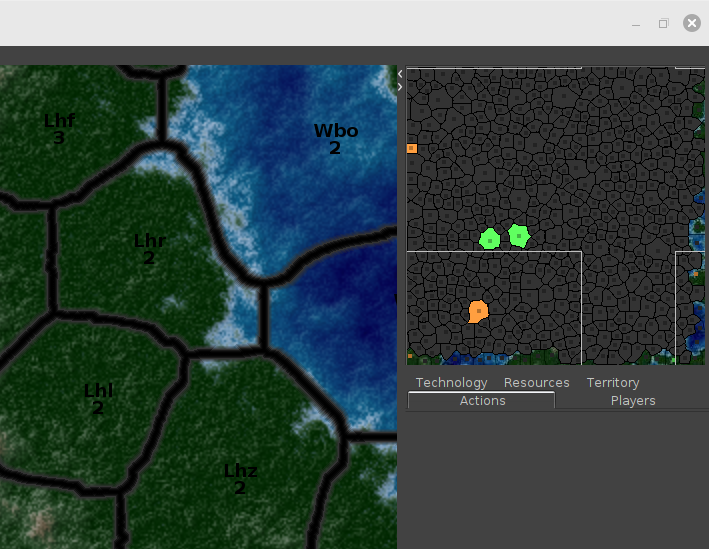
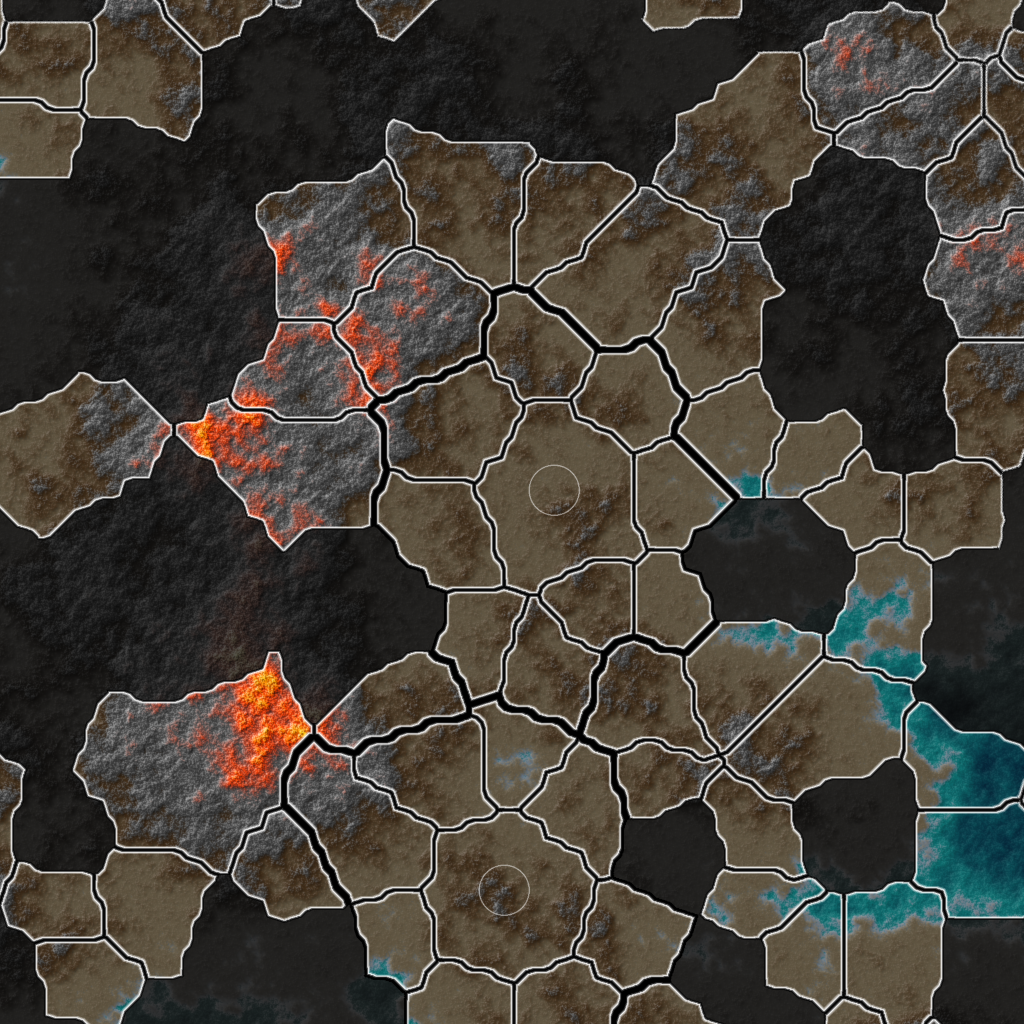
                                Frustration mounting. Carved up territories where they overlap map boundaries. All looking good with a few exceptions. The problem is no reliefTiles displaying. So, I purged the territory boundaries and just registered squares for each around centers. Just to get them out of the discussion, should an error there have some impact on the display not using the reliefTiles. All defined exactly like Jurassic, et al. Very simple map.properties file with a single player (alone) and game unit (nobody). The scroll works but no baseTiles or reliefTiles. All folders present and unzipped in downloadedMaps folder to get better debugging messages.

                                color.alone=ff9f40
                                color.Neutral=333333
                                color.Impassable=000000
                                units.scale=1.00
                                map.hasRelief=true
                                map.scrollWrapX=true
                                map.scrollWrapY=true
                                map.showCapitolMarkers=false
                                map.width=5120
                                map.height=5120
                                

                                Note: If neanderthal is zipped in the downloadedMaps folder then I get an error polygons.txt cannot be found, even though it's in the map folder. Extract the zip in place and error goes away. I've basically cloned jurassic to make neanderthal. It has to be something simple overlooked. Any insights?

                                G 1 Reply Last reply Reply Quote 0
                                • G Offline
                                  GREGOREK @GREGOREK
                                  last edited by

                                  neanderthal.png

                                  TheDogT 1 Reply Last reply Reply Quote 1
                                  • TheDogT Online
                                    TheDog @GREGOREK
                                    last edited by

                                    @GREGOREK
                                    Just checking you have View> Show Map Details TICKED

                                    https://forums.triplea-game.org/tags/thedog
                                    https://forums.triplea-game.org/topic/3741/curated-best-top-maps-triplea-guides

                                    G 1 Reply Last reply Reply Quote 1
                                    • G Offline
                                      GREGOREK @TheDog
                                      last edited by

                                      @TheDog
                                      it's checked and debug console empty.
                                      I ordered a Ouija board from Amazon.

                                      1 Reply Last reply Reply Quote 0
                                      • G Offline
                                        GREGOREK
                                        last edited by

                                        This is irritating.

                                        I turned off the surrounding territories by replacing their boundary with a simple square. Then did all, except for the two offending cells. Removed duplicate pixels in other loops. Reduced all cells by averaging every three pixels (with an integer snap) to get rid of 'staircases'. Same Result.

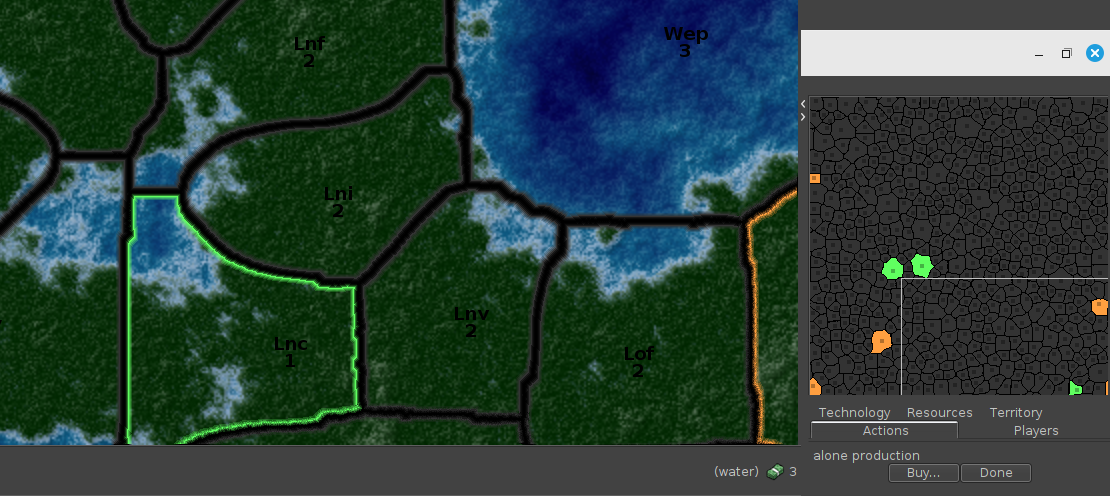
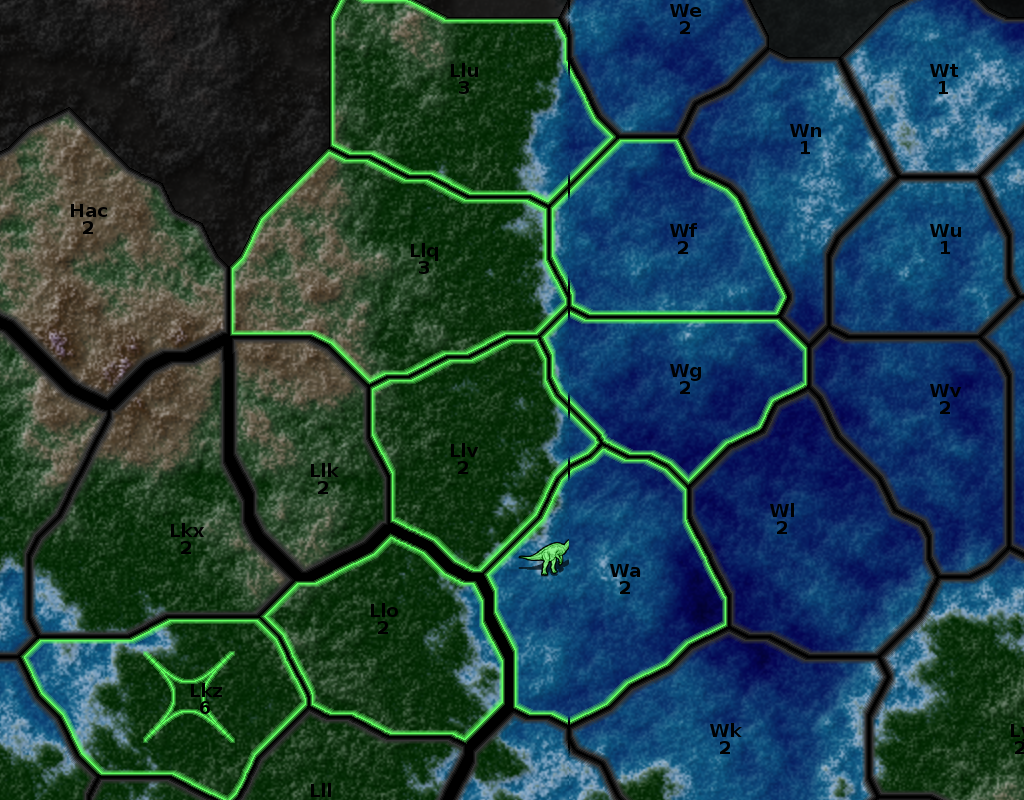
                                        borderTestLc.png borderTestLnc.png

                                        Dumped their data into a separate display. Look fine. Bright light, crosses, I dont know what else to try. Note: these loops are the first in each of the associated territory's polygons.txt definition. One houses its territory center. The other does not. Doesnt seem to matter.

                                        The reliefTiles also continue to annoy. Sparse forum posts on the subject. I'm going to try finding TripleA cache files with Neanderthal in the name and deleting them. Maybe some legacy data preventing their display.

                                        G 1 Reply Last reply Reply Quote 0
                                        • G Offline
                                          GREGOREK @GREGOREK
                                          last edited by

                                          reliefTiles are now displaying.
                                          I have once again brought shame to my family.

                                          still have the two territories not displaying all their parts as posted above.

                                          1 Reply Last reply Reply Quote 1
                                          • G Offline
                                            GREGOREK
                                            last edited by

                                            Here's an interesting wrinkle. I have a memory fault. something I've done or omitted, is trashing memory.
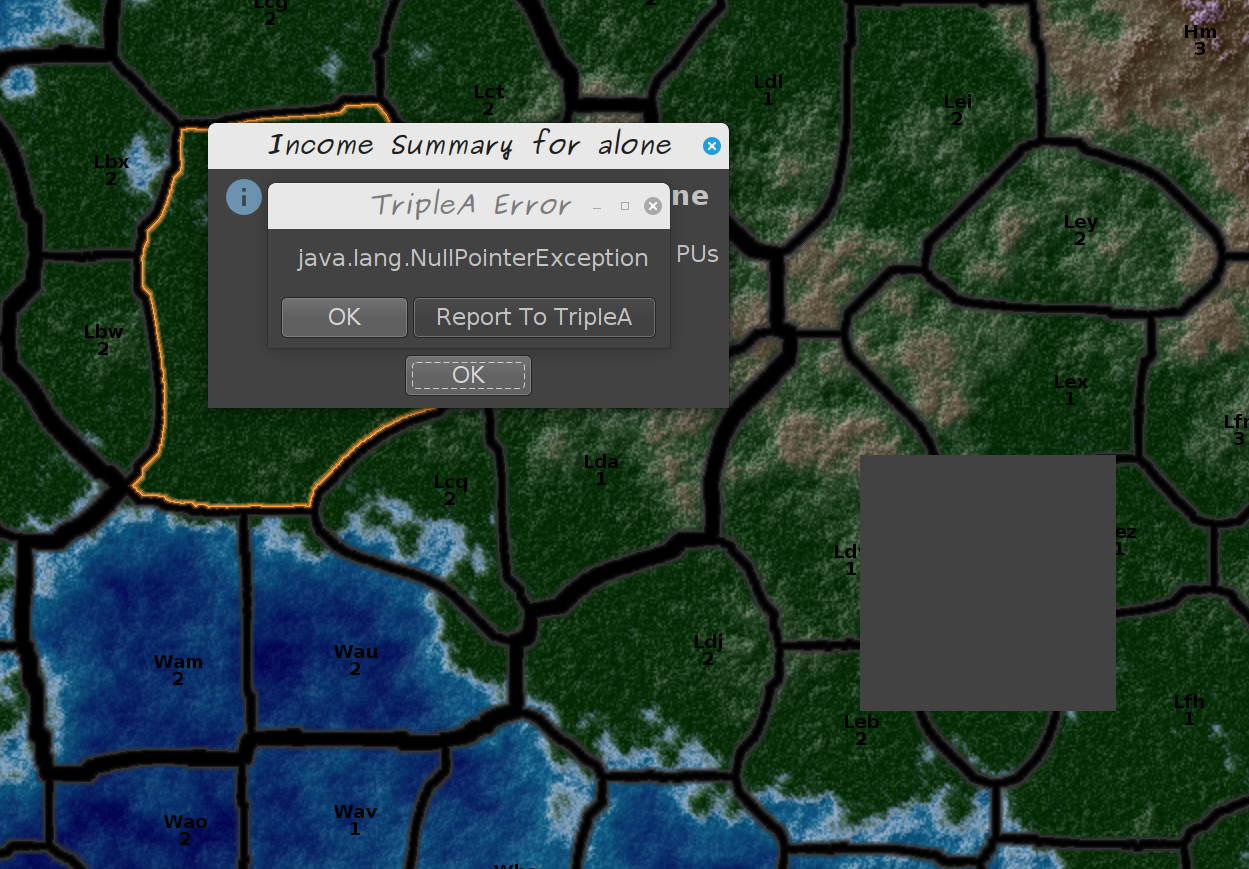
                                            neanderthal.png

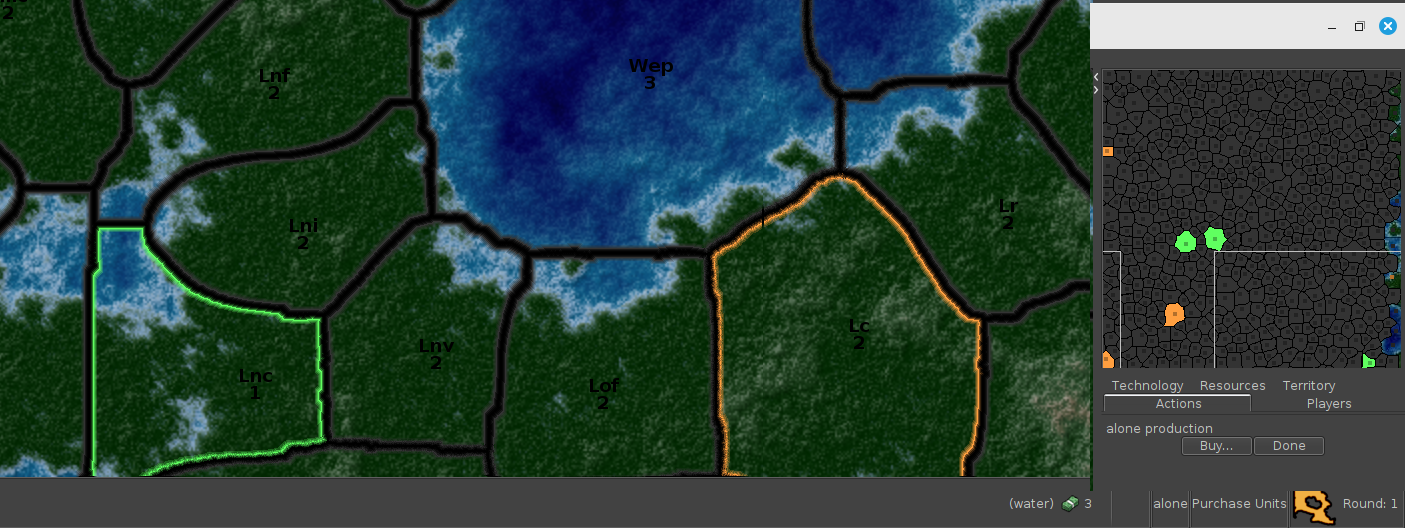
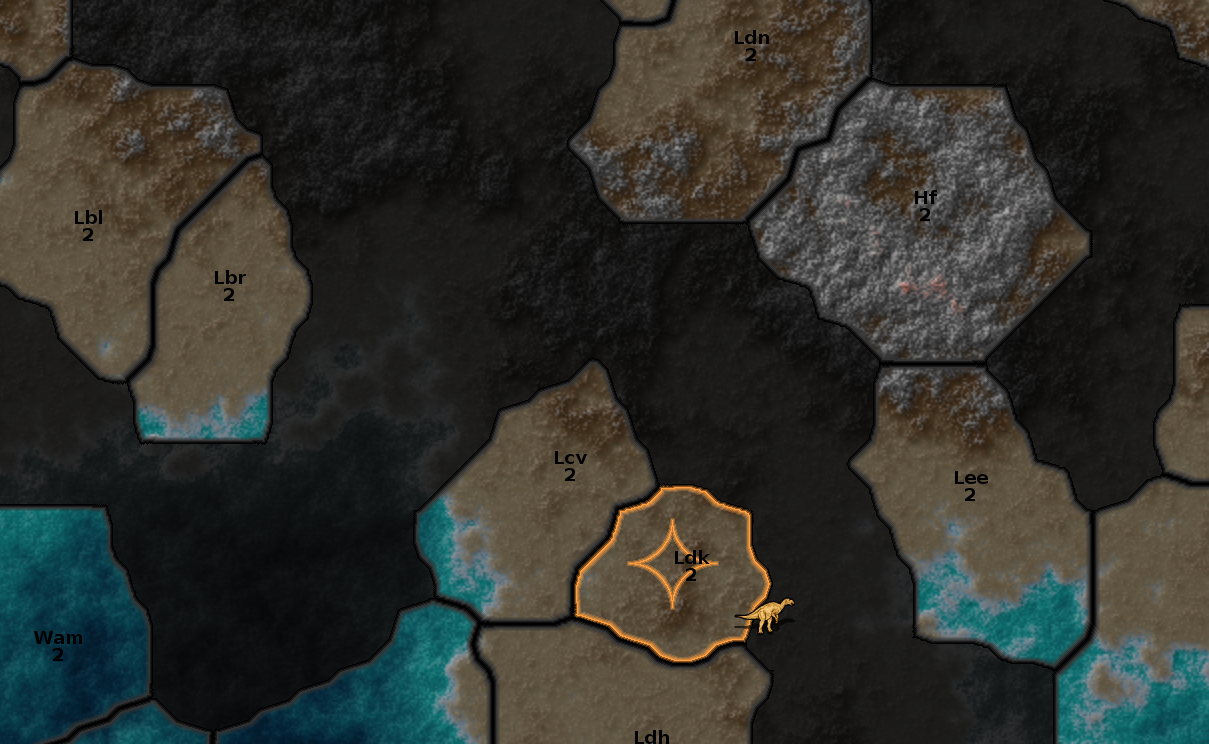
                                            I associated a territory with one of the players simply to mark it in the game, and suddenly a working territory cannot find the forest factory image which is used everywhere.
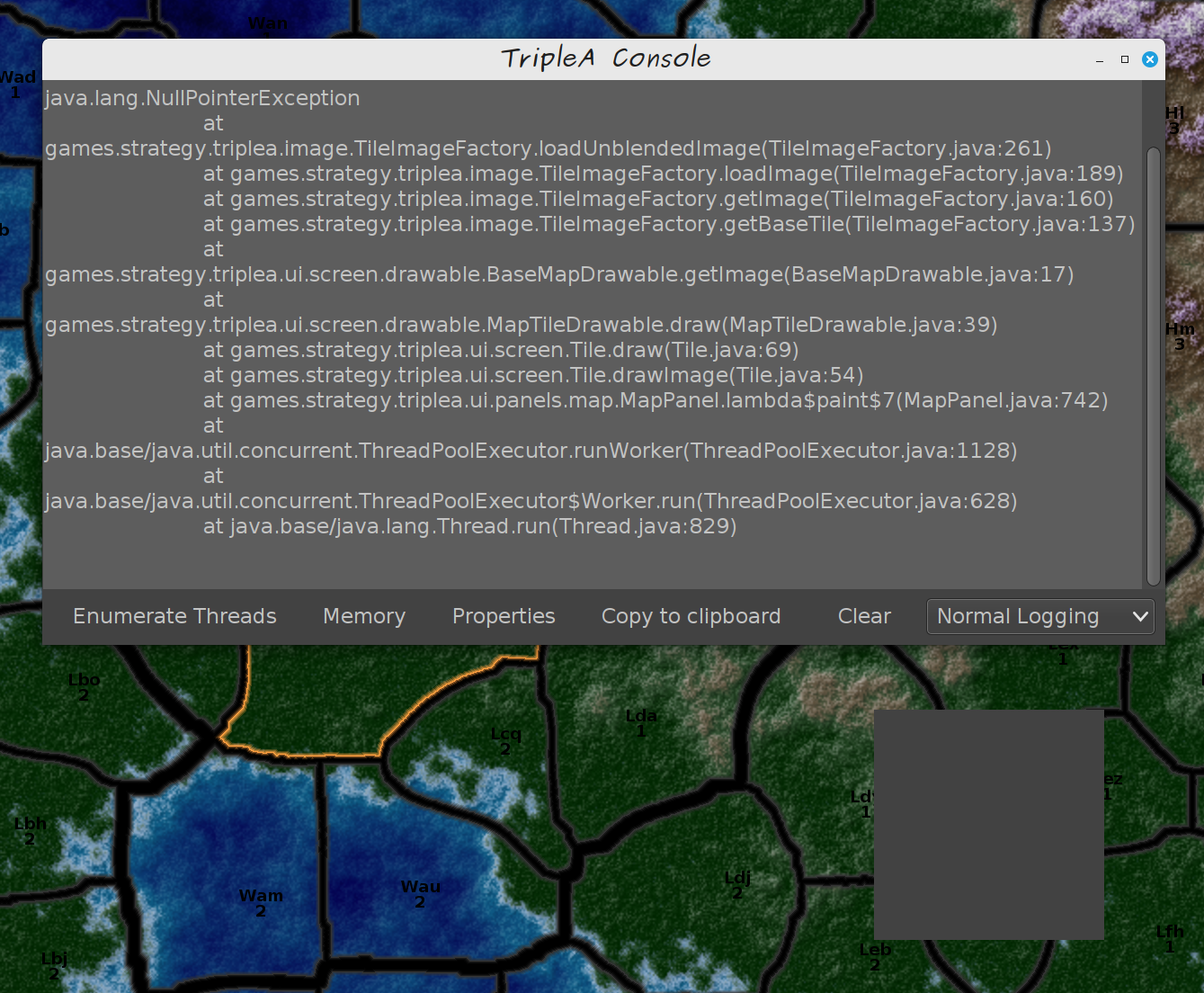
                                            neanderthalNull.png

                                            The gray box is the new anomaly. All forest territories have an invisible 16x16 factory. Nothing special about this one. Defined exactly like all the others. This error does not happen when the larger polygon loop described above is not assigned a player owner.

                                            TheDogT 1 Reply Last reply Reply Quote 0

                                            Hello! It looks like you're interested in this conversation, but you don't have an account yet.

                                            Getting fed up of having to scroll through the same posts each visit? When you register for an account, you'll always come back to exactly where you were before, and choose to be notified of new replies (either via email, or push notification). You'll also be able to save bookmarks and upvote posts to show your appreciation to other community members.

                                            With your input, this post could be even better 💗

                                            Register Login
                                            • 1
                                            • 2
                                            • 2 / 2
                                            • First post
                                              Last post
                                            Powered by NodeBB Forums