Taking your suggestions for a new UI
-
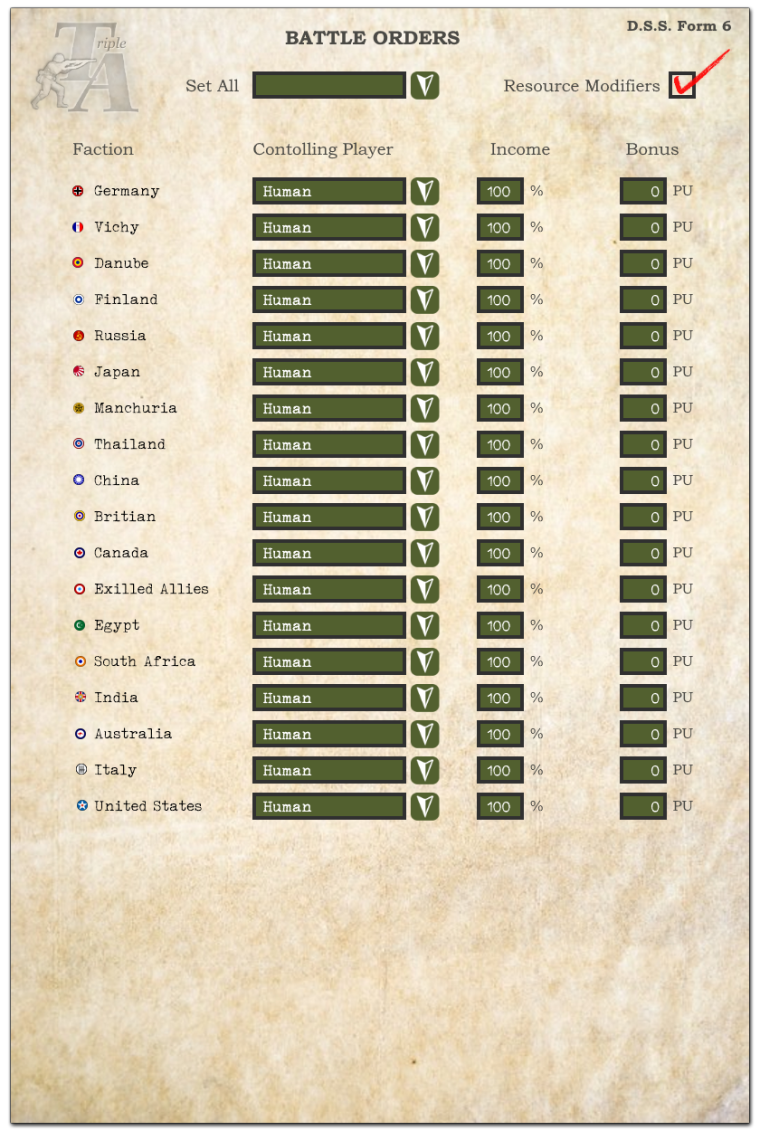
Here is a draft of the game launch screen...
-
@Hepps
Nice but don't forget the "Use" checkboxes and "Alliance" identifiers.Also wondering, if the "Select Map", "Open Saved Game", "Download Maps" and "Map Options" buttons will be located somewhere else?
Actually all the information on that window is useful, would like to see the info in top left remain somewhere.
-
@general_zod Yup already added the alliance slot.
-
@general_zod said in Taking your suggestions for a new UI:
@Hepps
"Use" checkboxesWhat do you mean? what is the use checkbox?
-
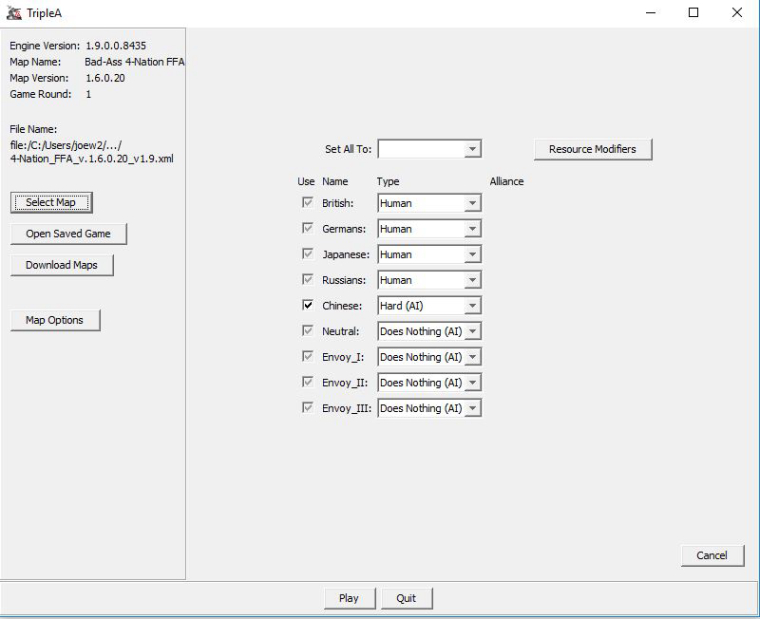
@hepps There is canBeDisabled XML property on players that if true then a small checkbox appears on the very far left of each player it is true for.
It looks awesome.
TripleA Developer with a Passion for AI: https://forums.triplea-game.org/topic/105/ai-development-discussion-and-feedback
-
@redrum What map is that present on?
-
@hepps I use it in my FFA, and theres other FFAs that use it as well.
-
@general_zod Badass?
-
@hepps yeah, I allow the players to disable the Chinese reinforcements if they wish. And the checkbox achieves that since AI controls that.
-
@general_zod Ok. I'll check it out.
Only because you are a General and the other is the God of Lightning.
-
@hepps lol
-
@general_zod So does the "use" feature allow you to simply omit a play from the game?
"A joyous heart sours with the burden of expectation"
Hepster -
@hepps Heres a pic. It removes the players phases and resources from game.
Except units on map remain.
-
me thinks I did a good job...
@RoiEX
@Hepps
@General_Zod
and a long list
thus why I abstained from council Hepps
so please remove me
great job guys! -
I am trying to keep the selection box for the individual players as small as possible....
Would anyone object to renaming the "Does Nothing (AI)" to "Inactive (AI)"?
Would just allow me to shorten the box by 4 characters.
-
@hepps Inactive might be slightly misleading, because the units will still defend. But I'm not opposed to changing it to "Static_AI".
-
@general_zod Static works.
-
@general_zod Thanks for the quick response.
- However clicking the arrows on the left and right panels only minimize them for the rest of the turn.
- I am either doing something wrong or the 'make default' button does keep when you create the next game.
-
@hepps You are probably right. To some extent it is the monitor and video card as well. Some maps are too big and I use the zoom to reduce map size. Some maps are too small. But most are the right size, but still I want to zoom in on an area that has a lot of units to get a clearer picture of what is there. (270BC is such a map)
-
Yes the left panel always pops back up when opponents turn comes, it displays game history. The right panel can be minimized but it's also the primary interface, so it really can't stay minimized all game, if that's what you mean.
As the "make default" goes, it should reload those settings whenever you reload the same map/game from scratch. So you just need to check the options you want all the time and click said button. These settings will change from map to map, so you will need to do it again on new maps.



Hello! It looks like you're interested in this conversation, but you don't have an account yet.
Getting fed up of having to scroll through the same posts each visit? When you register for an account, you'll always come back to exactly where you were before, and choose to be notified of new replies (either via email, or push notification). You'll also be able to save bookmarks and upvote posts to show your appreciation to other community members.
With your input, this post could be even better 💗
Register Login