Large Middle Earth queries
-
@alkexr Yeah it would be pretty easy given that most of it is just cut and past. You would probably only have to write like 5 new lines in the XML.
-
@alkexr said in Large Middle Earth queries:
@hepps . Also, if you have ideas for better production / unit production pictograms, don't hold yourself back

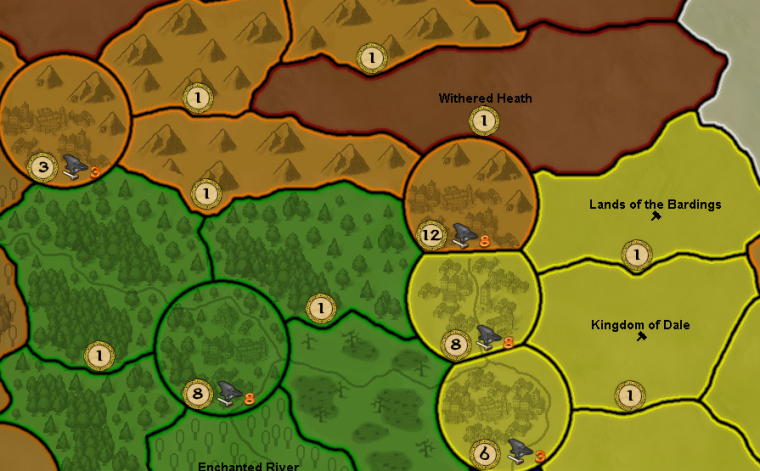
You mean something like this?

"A joyous heart sours with the burden of expectation"
Hepster -
@hepps Looks pretty good. Only drawback of the anvil is that the orange number doesn't pop out that much for the orange players.
-
@redrum That's ok. the Dwarves don't really stand a chance anyways.

-
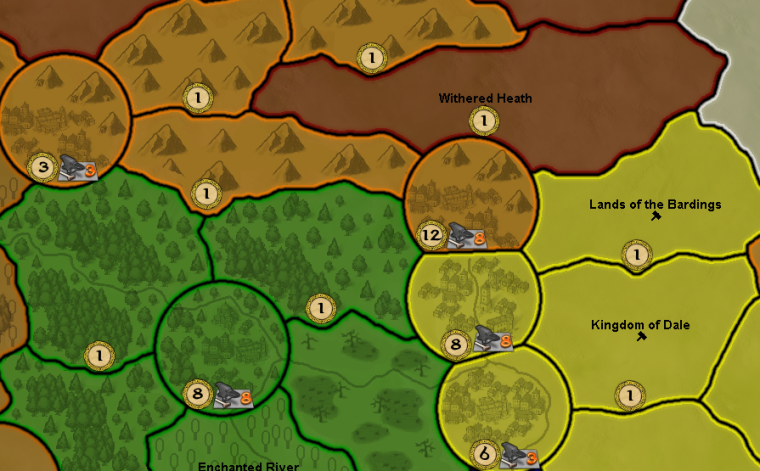
Perhaps this?
-
@hepps It's not intuitive to me why anvil is unit production and gold is PUs. Also, the orange numbers are a bit weird.
The background is just sooo cool tho. At this point I'm not entirely sure my plain font generated names can match this visual quality."For the world is changing: I feel it in the water, I feel it in the earth, and I smell it in the air."
-
@alkexr I'd actually say most people associate PUs with money/gold/etc and unit production with hammers/anvil/etc. I think some of it is just other TBS games but it also makes some sense since you are 'collecting' PUs and then using that to determine where to 'produce/build' units/structures.
@Hepps Its definitely better with the background. I kind of like it and feels pretty intuitive to me. Its definitely much easier to comprehend and notice than the existing symbols.
-
@alkexr Kinda to what Red just said... You have PU (Production Unit) and UP (Unit Production) on this map.
I figured the PU was meant to reflect economy... ie. Gold or currency.
While UP is meant to reflect arming and training men for an army.I don't really care either way. Your map.
-
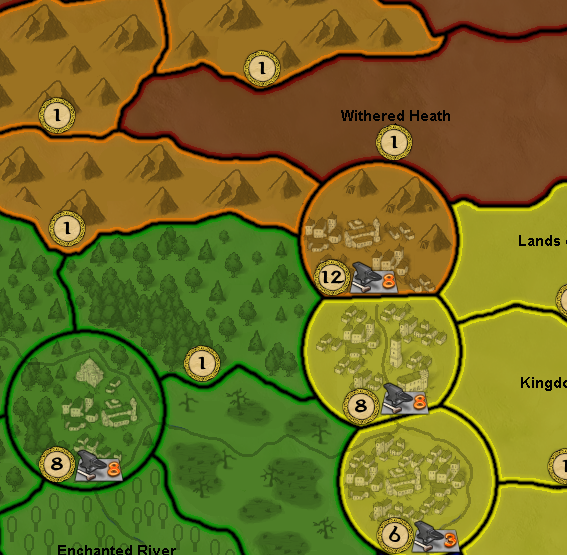
Seemed to me the settlements didn't really pop enough given their importance within the game. So I added a little someth'n someth'n.
-
@alkexr said in Large Middle Earth queries:
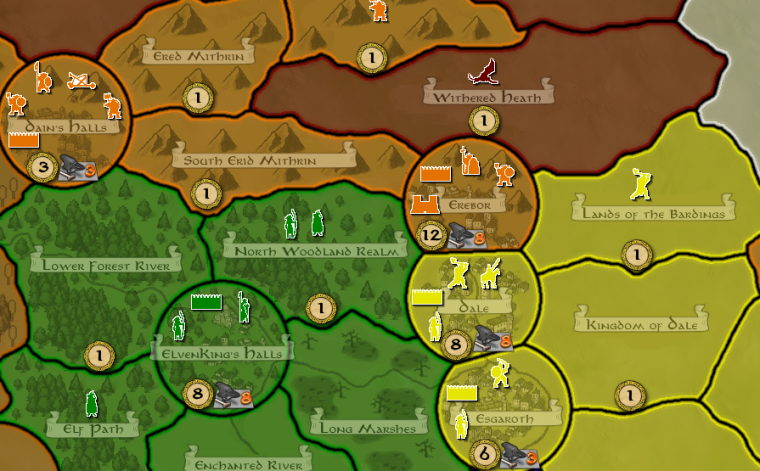
The background is just sooo cool tho. At this point I'm not entirely sure my plain font generated names can match this visual quality.
Perhaps something like this might be more suitable...
-
@hepps I wish I could proc. gen. fancy font like that. But I'm stuck with the c# Font class

Anyway... reworked the territory effects. Now every unit has one single territory preference archetype, so no more matrix multiplication for you. "Light" is infantry without armor, "Heavy" is armored infantry, "Ranged" is ranged and siege category. The effects are more or less the same as they were before, but some changes may significantly affect gameplay.
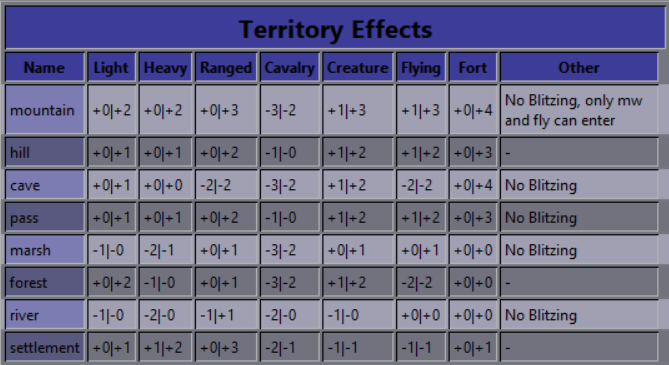
Also, cavalry can now enter caves. It was a rather arbitrary rule, as flying units and siege engines could still enter. So the Witch-King can no longer lock himself out of Carn Dum. They still do get a severe penalty to att/def in caves.
Further plans:
-
Just doodling around.
Here are some ideas to give the map a little more LOTR feel.
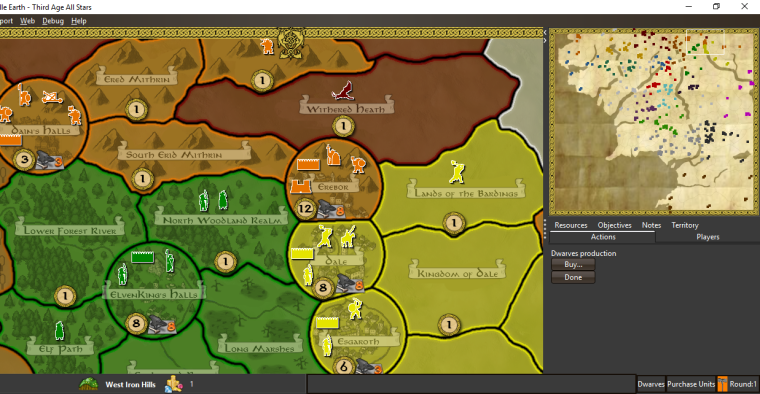
-
@hepps One thing that is sorely missing is player flags. Looks like you might have added something for Dwarves already. If you open up the history panel you'll immediately see the problem.
TripleA Developer with a Passion for AI: https://forums.triplea-game.org/topic/105/ai-development-discussion-and-feedback
-
@redrum 100% I mentioned the very same thing earlier in the thread.
I just quickly insert a rough image for display purposes.
-
@redrum I've already added "flags" - monochromatic squares of the player color. That should help with telling whose turn it is. In fact, this sort of flag is better suited for this purpose than 17 elaborate flags that you'd have to memorize. Also most factions have no flag/symbol mentioned in canon, with the notable exceptions of Gondor, Mordor, Isengard and Harad (that pop to my mind), so you'd have to be creative, possibly leaving players confused.
But it's all up to @Hepps
I think at this point it's safe to say that Hepps is more or less in charge of the visual style.
One point though, there are two sea zones (Nenuial, next to the capital of Arnor and Gulf of Umbar, down next to Harad) that Frostion apparently mistook for land territories, and now they have a blue border. Will you be able to fix those when you get there?Btw you can keep track of changes here: https://github.com/triplea-maps/large_middle_earth/commits/version-1.3
-
@alkexr I can take care of those. NP.
-
Something I have noticed when trying to change image in the JPEG format.
Why does it save a file as a JPG when editting with Paint.net... and how is that different from a JPEG file. Furthermore, how are they different and how do I convert one from the other?
Very confusing.
-
@hepps Here ya go: http://lmgtfy.com/?q=jpeg+vs+jpg
-
@redrum Ok. But why does a map break when you replace one with the other?
And how do I change the format name?
-
@hepps Lol. Didn't enjoy my video?
In theory, for maps it shouldn't matter and I believe we should support .png, .jpg, and .jpeg for images. I'd have to look at the code to see if its only accepting certain image types.
For .jpg and .jpeg, you should be able to just rename the extension back and forth and it shouldn't have any negative impact. Assuming you are on windows, you just have to enable the property to show the file extensions then you can change them as you please: http://www.thewindowsclub.com/show-file-extensions-in-windows
PS. It appears the only place that specifies only ".jpeg" and not ".jpg" is "smallMap.jpeg".



Hello! It looks like you're interested in this conversation, but you don't have an account yet.
Getting fed up of having to scroll through the same posts each visit? When you register for an account, you'll always come back to exactly where you were before, and choose to be notified of new replies (either via email, or push notification). You'll also be able to save bookmarks and upvote posts to show your appreciation to other community members.
With your input, this post could be even better 💗
Register Login