Image Icons


-
@zjelcop It takes a little getting used to but I do feel having a background on the movement indicator makes it much easier to read and look more professional. Many people either didn't notice or had a hard time reading the old movement indicator.
-
I am in the process of testing Iron War with the new movement indicator, fuel consumption indicator and bottom bar rearranged info with icons. (A test version of iron War will be available for everyone to test when I have made a roughly balanced and playable XLM) I have played a lot lately, and I must say that the new features collectively raise the play experience quite a bit.
Iron War uses multiple resources. With the added small icons my eyes and mind are now much more focused on the bottom bar counters. Before, I had a tendency to just ignore the resource info, maybe only thinking of PUs, and then just get annoyed at the purchase window when I realized that I did not have enough special resources to purchase what I wanted. Maybe it is because of the replacement of text with pictures, and that the mind does not have to read but just se and recognize stuff that makes it easier to think about. I dunno.
The above is also affected by the new fuel system, including the counter that really works great. The fuel consumption counter could not in any practical way work without the new movement indicator. One could say that the indicator should maybe be transparent, but I would argue against that. It’s pretty important info, and I guess that this was also why the old indicator was so large and in so sharp colors. Also the new indicator has been reduced in size to a minimum.
Regarding the bottom bar, because one’s eyes are focused a lot on the bottom bar, in maps like Iron War, it makes good sense and makes it easy to look when the info is fixed to the left. It’s just easier to find and read quickly than if it was somewhere near the center of the bar and the eyes had to scan and find its left starting point.
I would say that one should play quite a few games with the new features to get a better impression and feel in relation to pros and cons. It is still only in pre-release, so I guess it will be a long time before anything is final.
In regards to the 1 move info, if there is an actual demand from a larger audience, maybe there could be an UI option where players could opt out 1 move indicator information completely? Like “Show 1-move indicator information” or something like that?
-
@redrum In my opinion, the old one was unpolished and the new one is annoying. As I said, I would just let the players able to switch this feature on/off; how hard can that be? It would not be the most unpopular option we have on the menu, fairly sure of that.
Of course, once you have done the menu switch, you can also have a minimum distance setting, from 1 to, say, 99 (so, if you put it off, you never see it; if you put it on, you see it for distances equal or bigger than the setting, default at 1, which means all). -
@cernel Rather than spending time creating settings that <1% of people use, I'd rather figure out how to make it better so that the 99% that aren't ever going to change that setting get the benefit.
-
@redrum Well, wanting to keep it polished and well visible, the only way to do that is assuring it won't usually hover the target territory.
-
@redrum Also, instead of a straight on/off, the setting can be that it may be alternatively shown on the bottom bar only, if off; meaning in the same place when now you get the warnings like "Cannot blitz on that route".
-
First issue:
I am testing a lot right now, and looking a lot on the bottom bar. The fixed position of the overall recourse income works great IMO. There is still a minor issue with the fact that territory name flickers back and forth a bit. I would like to propose a fix:• If the resource icons were left aligned in a box set to perhaps 30% of the total bottom bar, then a new 30% box could start right of that. In this second box things could also be left aligned displaying first territory name, income and territory effects. After this, the box for “Warnings” could start, and would then be 60% in. This way the names would not flicker, instead it would only do as the resources now do, expand more or less towards the right.
• If you try to experiment with the above, then I would also call for the “Warnings box”, “Player/nation name box” and the “Step box” to get some margin space before/after text. Income text and the round counter text have space before/after, so I guess the other boxes could also haveit. Just for the looks and readability.
Second issue:
I hope that the Actions and Operations window will also get a facelift. There seems to be some issues atm. With this window. In the current example, I have just spent 20 PUs on supplies to Thailand. Problems:- The order of displaying resources in the Actions and Operations window is different.
- The Actions and Operations displays the CR (Colonial resource) even though Japan should not have it displayed. (Japan will generate a few of this recourse at the end of the round, but it will be removed again by triggers.)
- The Actions and Operations window does not display the Pilot resource like the bottom bar. (I guess because Japan in this round will not generate any “Pilot” resources.)
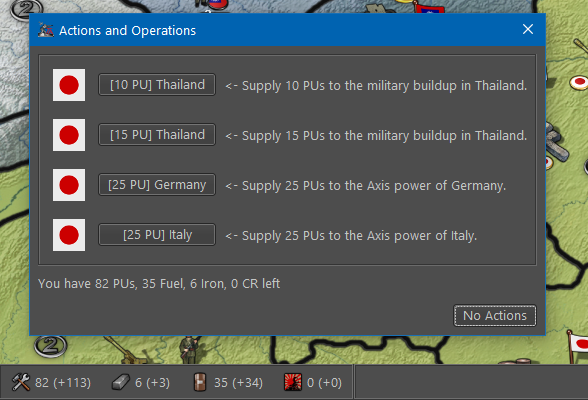
This is how resourses are listed in XML:
<resourceList>
<resource name="PUs"/>
<resource name="Iron"/>
<resource name="Fuel"/>
<resource name="CR" isDisplayedFor="France:British-Colonies:Italy:British-India:French-Colonies:KNIL"/>
<resource name="SS" isDisplayedFor="Germany"/>
<resource name="Pilot" isDisplayedFor="Japan"/>
<resource name="Officials" isDisplayedFor="USSR"/>
</resourceList>
-
@frostion Responses:
- There are a few cases it still flickers but given that I'm planning to move much of what's in the bottom bar to a top bar, I'm not planning to sink any more time into adjusting its layout.
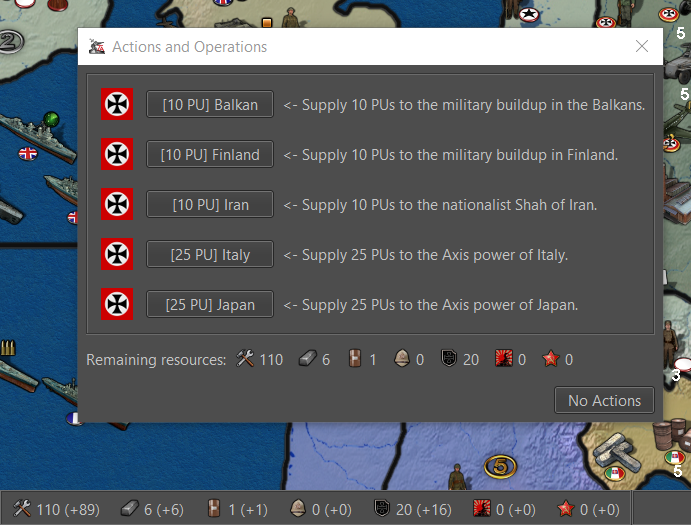
- Would it be better to just remove the resources left from the actions and operations window now that they are in the bottom bar? Otherwise if I fix it, its going to be the same information as the bottom bar minus the incomes. Here is what it looks like leaving it and enhancing it:
-
@redrum I would say that the Actions and Operations window, small as it is, could just have its resource display removed. No need to have the same info two places on the same screen. No reason I can think of.
Edit: On the other side, just like in the purchase screen, it is kind of convenient to have the information close by, not forcing the player to look elsewhere or a totally different place when evaluating if any actions are worth paying for.
-
@frostion Yeah, after enhancing it, I had the same feeling. Gonna go ahead and just remove it as if play testing proves otherwise we can always add it back in easily.
-
Just got done with the next update and started a playtest. I'm pretty much assimilated to the new icons and movement indicator. I like it

Anyway, I have some "convoy zones" and was wondering if additional info could be added showing what they convoy.
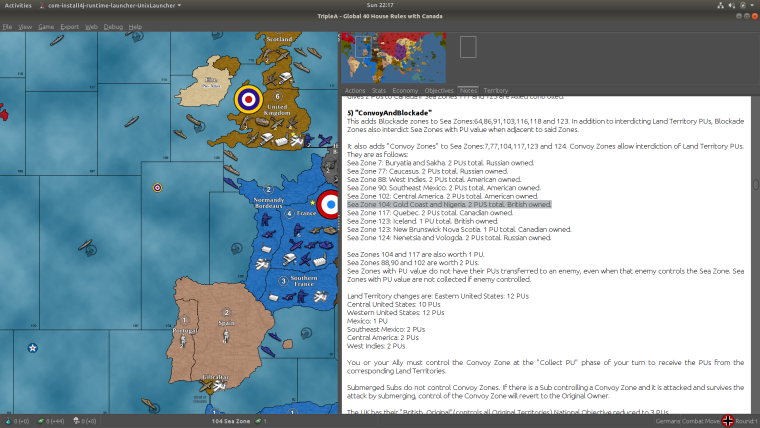
Idk if that would be a problem for maps that use a lot of different resources or not but it'd be cool if the highlighted part in the screenshot would show up to the right of the PU icon on the bottom bar.
Just a thought
Or maybe a convoy icon with the PU amount since TT names can be pretty long or multiple TTs
-
@redrum For the Oil, Manpower, Leadership, Food I prefer the second images, currently listed. Namely:


This one I don't actually think about leadership, looking at it:

It makes me think about the experience of the units; so maybe "Experience".
For example, in case you get "Experience" by destroying TUV, and use it to upgrade units.
Leadership, instead, makes me think about a fuel cost to move units. -
@beelee Things that involve multiple territories for certain income are more aligned to NOs rather than individual territory information. Otherwise if you have multiple NOs that involve 1 territory, it would get to complex to display at the bottom like that.
-
@redrum right on thanks
-
I like where your going with the new convoys/blockades in the Atlantic and else where. I'm looking at a something similar as an option for my Big World 3 map.
The main obstacle I see is that the submarine dynamic as it exists in most maps does not favor the subs. And the Germans and Italians most likely can not successfully operate a surface fleet in the Atlantic. Thus the Atlantic may not see much naval action if at all.
Are you giving subs anything to help overcome this potential problem?
-
@general_zod Thanks general
I'm using a HouseRule/Tech for subs. So, different than the 1 DD shuts down endless subs. Goes like:
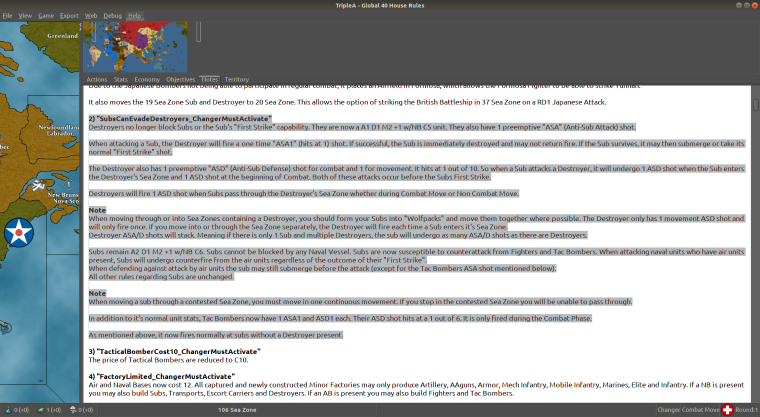
So far they seem to be working out pretty good. Biggest concern is an unbeatable sub spam. Think a person can find some sort of combination to make it work. I find it a lot more fun : )
Test games have a real "battle of the Atlantic" to them so far.
Pacific see's some mid late game pressure on Japan.Well...anyway : ) Back to testing
-
@beelee might try "TransportC8 D1 (already available) " if subs get out of Line. Seems ok so far though, ( U-Boats just took a beating as I type this ) but
"Those Boys been in Dry Dock too Long". : )
With a C5 DD it'd no longer be the Fodder Unit. Also, just noticed, if a DD is fired on in CM while going to another SZ, You cannot move through that zone in NCM due to it have been being in a "Combat Zone".Another boost for the DD : )
Oops ! Sorry just realized probably not the right spot for this : )



Hello! It looks like you're interested in this conversation, but you don't have an account yet.
Getting fed up of having to scroll through the same posts each visit? When you register for an account, you'll always come back to exactly where you were before, and choose to be notified of new replies (either via email, or push notification). You'll also be able to save bookmarks and upvote posts to show your appreciation to other community members.
With your input, this post could be even better 💗
Register Login