Image Icons


-
@general_zod said in Image Icons:
@hepps I like the idea of icons/symbols instead of images. As long as they don't clash too much with existing styles.
Agreed. As I said... this is just me.... being me. I tend to take a feature and then dink around while it is in development to get some idea's as to how to use this down the road. In this case I just figured I'd post some of my artistic meanderings as it really costs us nothing. If we end up with something we can use as a basic package (which we could then include into the POS 2 game) then we come out ahead with a tool just to show people what can be done. Normally all of these experimental designs never see the light of day.
-
-
@redrum
Will you change the picture pulling of the bottom bar, and make the bar pull the non-"_large.png" images?I tested a pre-release, and right now it seems that the bottom bar uses the same _large.png images as the purchase screen. It would make little sence to have the bar pull pictures called something like PUs_large.png, as those bar icons would actually be small pictures, and at the same time have the purchase window pull large icons and have these not be called large.
I would suggest having the large icons used by the purchase window be called PUs_large.png (Approximately 48x48 pixels)
And have the smaller bar icons be called PUs_small.png or just PUs.png (Approximately 24x24 pixels)
And if we would ever think about using the images to display prices in the purchase screen (as @Hepps showed us), then have these icons be called PUs_tiny.png or PUs_small.png (Approximately 12x12 pixels)
-
@frostion We had discussed making 3 image sizes for the resource folder. Small medium and large.... for exactly what you just mentioned.
-
@hepps @frostion Yeah, I'm thinking along the same lines that we need probably 3 different resource image sizes:
- Large (*_large.png) - used anywhere that the resource is used for unit images (purchase/place/etc), can be up to the size of the unit images
- Normal/Medium (*.png or *_medium.png) - used for resource bar either 24x24 or 32x32
- Small (*_small.png) - used for areas that is aligned with text like purchase costs 12x12
If we have general agreement on that then I can update the resource bar to pull *.png instead of *_large.png. And I'll probably just take the default images already included in TripleA and rename the 12x12 to *_small.png and duplicate the *_large.png to be both the *.png and *_large.png for now. Then we can modify these as we work through icons.
-
-
@redrum Just curious as to plan for the economy tab, since we have the info on bar. If we are keeping it, then maybe the "resource_small.png" can be used the in place of text. Similar to the tech sections flags on stats tab. But tooltip should work there if so.
-
@general_zod No hard plan but that would fall most likely into the "Small" category. Anywhere we have resource text today in theory could be replaced with small resource icons. I definitely think economy tab has value since you can see everyone's resources though many of the tabs on the right panel, I'd argue would be better as pop ups like diplomacy as the right panel should really just be actions IMO and the rest should be factored into other areas of the UI or into popups.
-
@redrum So the plan for a *_small.png, *_medium.png, *_large.png and just *.png but the unit sized one's are called 'large'. I think changing it that way causes more confusion down the road. Normal size IMOA would be called *.png and small 12x12, medium 24x24 and large 32x32 are use elsewhere.
But that's my 2 cents...
Cheers...
-
@wc_sumpton
But the 24x24 and 32x32 size pictures are the same. It is just that 24x24 looks to be a good size for the pictures used in the bar, but they could in theory be as large as 32 high without being too high for the bar. So there are just 3 sizes atm. -
@frostion Ok thank for the explain! Maybe I was reading to much into what was being typed!
<option name="question" value="All questions should be formatted in this manner to be understood better"/>
<option name="remark" value="You must be crazy!"/>Clearly understood...
Cheers...
-
So here are some initial takes with the purchase window using Civil War. Here is an interesting screenshot of HOI4 unit production for reference: https://i0.wp.com/www.matchstickeyes.com/wp-content/uploads/2016/08/HOI4-Spitfire-Production.jpg. My initial thoughts are 12x12 is really small and hard to distinguish but 24x24 might be too large. Might be interesting to see 16x16 or 20x20. I think it would be nice to get rid of the resource name if possible.
Small icon then quantity
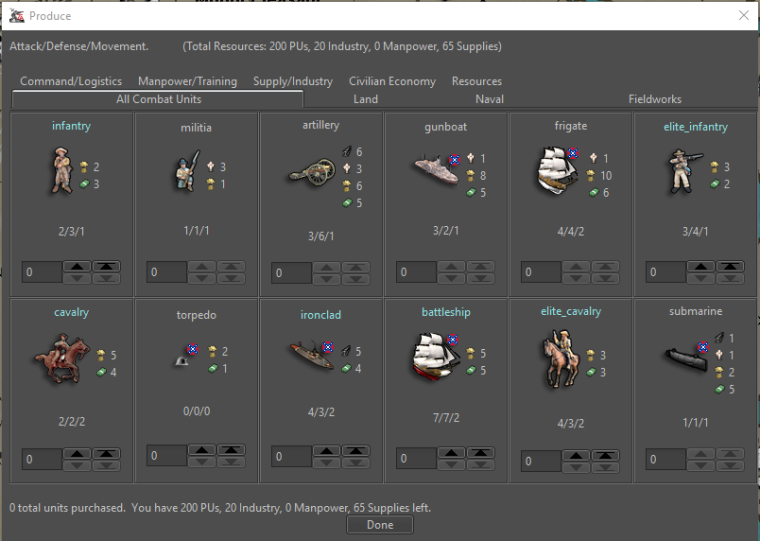
Quantity then small icon
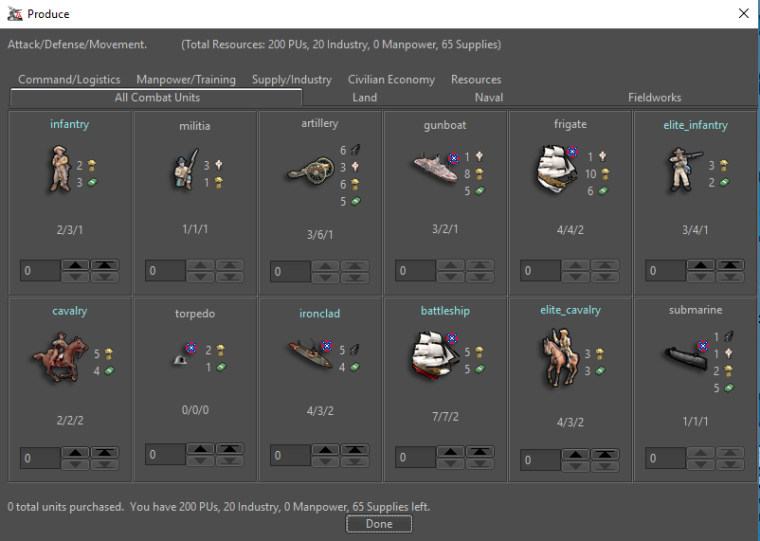
Quantity then name then small icon
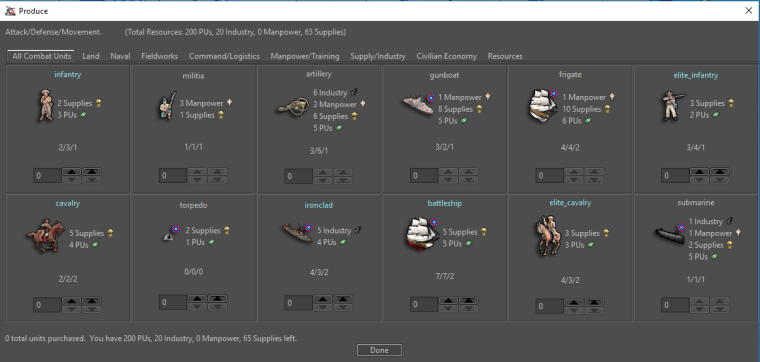
Quantity then medium icon w/ some additional space between unit and costs
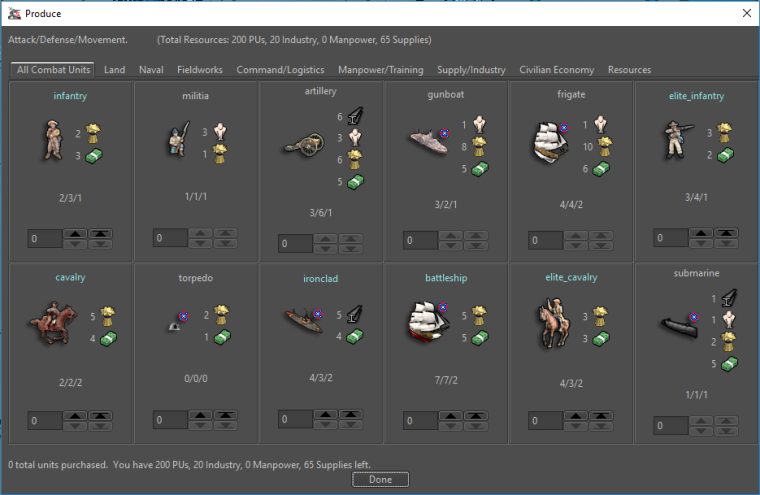
Votes and feedback welcome!
TripleA Developer with a Passion for AI: https://forums.triplea-game.org/topic/105/ai-development-discussion-and-feedback
-
@redrum medium but I'm old and blind
 Great job either way
 -
@redrum I like the one with the "quantity then medium icon". I'm with prastle on this, tiny ones would be difficult. (with tooltips for resources)
Although, a very close second choice is "quantity, name, small icon".
I don't think new player would enjoy if purchase appeared ambiguous.
-
I vote for the HOI window...

-
@heppsisuarus ya know he is a TripleA junkie when while on a holiday he still has to use his phone to check forum
-
@prastle I am an unabashed junkie. I feel neither remorse nor shame.... just feed the addiction.
-
@heppsisuarus But apparently can't remember his regular password...
-
@heppsisuarus hehe i will upvote a heppisaurus
sadly it doesn't tie to your alter ego -
Definitely medium.
I have some recommendations as to the overall presentation of all the info.... but alas I am a (relatively) far away from home and cannot draw the pictures that would otherwise be said by a thousand words.






Hello! It looks like you're interested in this conversation, but you don't have an account yet.
Getting fed up of having to scroll through the same posts each visit? When you register for an account, you'll always come back to exactly where you were before, and choose to be notified of new replies (either via email, or push notification). You'll also be able to save bookmarks and upvote posts to show your appreciation to other community members.
With your input, this post could be even better 💗
Register Login