TripleA Logo TripleA Forum
    • TripleA Website
    • Categories
    • Recent
    • Popular
    • Users
    • Groups
    • Tags
    • Register
    • Login

    Improve Hotkeys

    Scheduled Pinned Locked Moved Feature Requests & Ideas
    66 Posts 13 Posters 31.5k Views 12 Watching
    Loading More Posts
    • Oldest to Newest
    • Newest to Oldest
    • Most Votes
    Reply
    • Reply as topic
    Log in to reply
    This topic has been deleted. Only users with topic management privileges can see it.
    • B Offline
      beelee
      last edited by

      Awesome job redrum ! I dig full screen : )

      prastleP 1 Reply Last reply Reply Quote 0
      • prastleP Offline
        prastle Moderators Admin @beelee
        last edited by

        @beelee we had it in 1.8 🙂 Nice eh?

        If we open a quarrel between past and present, we shall find that we have lost the future! Sir Winston Churchill

        B 1 Reply Last reply Reply Quote 0
        • B Offline
          beelee @prastle
          last edited by beelee

          @prastle heh heh I never knew that. Tried using these things last night < > but didn't work for me. Yea is way sweet 🙂

          might need to speed up my scroll speed now 🙂

          1 Reply Last reply Reply Quote 0
          • B Offline
            beelee
            last edited by

            New keys work great ! A quick observation. Although I'm sure I'll get used to it, having PUs listed first instead of "Tech Tokens" in "Resources" would be better imo.

            Having the PU number right next to the Player name would be easier to access at a glance. I know the bottom bar lists them in that order so probably why it's done the way it is.

            As I said, not a big deal, just a thought.

            B 1 Reply Last reply Reply Quote 0
            • B Offline
              beelee @beelee
              last edited by

              @beelee maybe one could "Bold" the first number and have the (parentheses) ones stay the same ? On Resources ?

              Just seems, for a quick glance, some sort of differentiation would be nice. (can't believe I spelled that right the first time. Sorry :))

              Hope I'm not sounding negative. : ) Because I'm using all the Commands : )

              Heppster Rock Image

              redrumR 1 Reply Last reply Reply Quote 0
              • redrumR Offline
                redrum Admin @beelee
                last edited by

                @beelee The order of the resources is determined by the XML. Which map were you looking at that has techTokens listed before PUs?

                Bolding the first number (amount) is an interesting idea. We'll see what other feedback users have before iterating too much more on this.

                TripleA Developer with a Passion for AI: https://forums.triplea-game.org/topic/105/ai-development-discussion-and-feedback

                B 1 Reply Last reply Reply Quote 1
                • B Offline
                  beelee @redrum
                  last edited by

                  @redrum right on. I was on the global 40 game. I'll tweak the xml. Thanks

                  1 Reply Last reply Reply Quote 1
                  • B Offline
                    beelee
                    last edited by beelee

                    really digging these hot keys. Want to suggest one more: ctrl-Leave. Instead of exiting completely ctrl-q mode, it'd be nice to just leave and still have triplea running. Ctrl-l is already taken, so we can't use that, but should be able to figure something out. Ctrl-d maybe ? As in Done ? yea, well, maybe not.

                    Anyway, when testing, I leave a lot but don't exit. Would be cool to do it via keyboard

                    Wow. Sometimes i wonder if I can be any stupider. Ctrl-q does the leave game thing already. For some reason i can't delete this post. Probably because I deserve to be publicly shamed heh heh.

                    Anyways, disregard and delete if you want. : )

                    General_ZodG prastleP 2 Replies Last reply Reply Quote 0
                    • General_ZodG Offline
                      General_Zod Moderators @beelee
                      last edited by

                      @beelee Lol, fyi. You can edit it further or ask a mod to delete it.

                      1 Reply Last reply Reply Quote 1
                      • prastleP Offline
                        prastle Moderators Admin @beelee
                        last edited by

                        @beelee HeHe All good Bee Hepp's continuously enjoys pointing out when I have done something dumb as well. 😉

                        If we open a quarrel between past and present, we shall find that we have lost the future! Sir Winston Churchill

                        1 Reply Last reply Reply Quote 2
                        • B Offline
                          beelee
                          last edited by

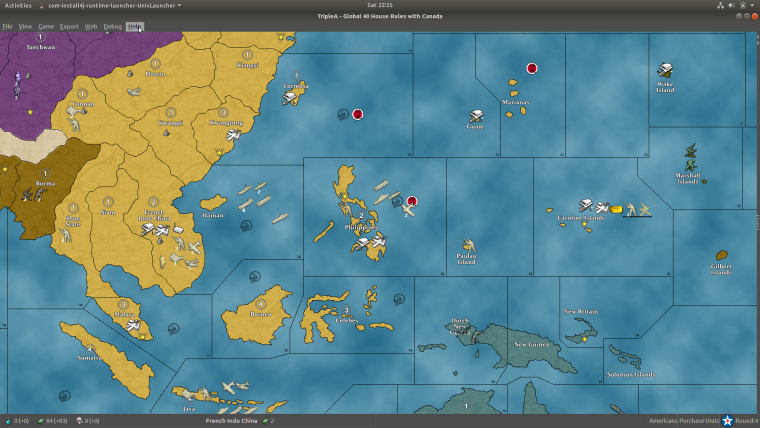
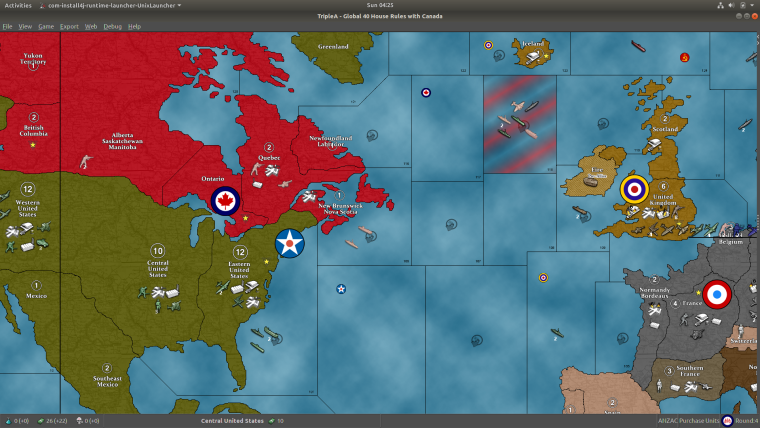
                          I've noticed when i go Full screen some units will highlight.
                          0_1522791022470_Screenshot from 2018-04-01 04-25-33.png

                          0_1522791094226_Screenshot from 2018-03-31 22-55-22.png

                          Not a huge deal because it eventually goes away but it is a little distracting. Just thought I'd mention it since it's probably not intended behavior.

                          redrumR 1 Reply Last reply Reply Quote 0
                          • redrumR Offline
                            redrum Admin @beelee
                            last edited by

                            @beelee Guessing it is picking up the 'F' click as well as 'CTRL+F'. As 'F' is used to highlight units that have remaining moves. Might need to change the full screen hotkey.

                            TripleA Developer with a Passion for AI: https://forums.triplea-game.org/topic/105/ai-development-discussion-and-feedback

                            B 1 Reply Last reply Reply Quote 0
                            • B Offline
                              beelee @redrum
                              last edited by beelee

                              @redrum wonder if it'd be better to change "f" ? That's been around for a while and would probably annoy some people that use it though.

                              Probably cause same problem unless it used a unused letter/character ?

                              redrumR 1 Reply Last reply Reply Quote 0
                              • redrumR Offline
                                redrum Admin @beelee
                                last edited by

                                @beelee Decided to change full screen hotkey to "CTRL+Z". PR: https://github.com/triplea-game/triplea/pull/3345

                                TripleA Developer with a Passion for AI: https://forums.triplea-game.org/topic/105/ai-development-discussion-and-feedback

                                B 1 Reply Last reply Reply Quote 1
                                • B Offline
                                  beelee @redrum
                                  last edited by

                                  @redrum Awesome 🙂 Ctrl Z is like a "infinity" type thing. Very intuitive lol. It just keeps going 🙂 Good Action

                                  1 Reply Last reply Reply Quote 0
                                  • B Offline
                                    beelee @redrum
                                    last edited by

                                    @redrum why does ctrl a = ctrl c now ? I saw something about it a while back but don't remember.

                                    The preRelease

                                    redrumR 1 Reply Last reply Reply Quote 0
                                    • redrumR Offline
                                      redrum Admin @beelee
                                      last edited by

                                      @beelee Because I wanted to make ctrl+A add attackers to the battle calc.

                                      TripleA Developer with a Passion for AI: https://forums.triplea-game.org/topic/105/ai-development-discussion-and-feedback

                                      C 2 Replies Last reply Reply Quote 4
                                      • FrostionF Offline
                                        Frostion Admin
                                        last edited by

                                        @redrum I propose altering CTRL+L to CTRL+I (ctrl+i) for unit help window.

                                        And when doing this, also renaming this window to "Unit Information" It would be more in line with the already used "i" button to get some info when hovering over units/territories.

                                        Also, it would then end any conflict between H standing for history, while people might intuitively think (unit)help. And let's face It, one does not get help by looking at this window, but one does get information.

                                        Map maker of: Star Wars: Galactic War + Star Wars: Tatooine War + Caribbean Trade War + Dragon War + Age of Tribes + Star Trek: Dilithium War + Iron War + Iron War: Europe + Warcraft: War Heroes

                                        C 1 Reply Last reply Reply Quote 3
                                        • C Offline
                                          Cernel Moderators @redrum
                                          last edited by

                                          @redrum I think the Ctrl+A/D can be significantly improved in 3 ways:

                                          1. It would be better if they always add the units to the battlecalculator, as long as you are hovering that zone. Now if you open the battlecalculator, then click on the battlecalculator (maybe to add some units manually), then hover a territory and click Ctrl+A/D, the units will not be added (despite the fact that, for example, you can see them in the "territory" tab), unless you first focus on the board again, by clicking on it (not a big deal, but still one unnecessary click you must always remember to do). Also, having the battlecalculator selected, while adding units on a zone basis, would make the process clear when Ctrl+A/D adding to one battlecalculator with multiple of them open, at the same time.

                                          2. It would be good if Ctrl+A switches the selected offensive player to the owner of the unit of the zone you are hovering, in case all eligible units belong to the same player (aside from the facts that in v1 you should be able to use allied fighters on your carriers as fodder in attack (not currently supported, as far as I remember), and that property that allows fully using allied fighters on your carriers in attack (that I believe it is a TripleA only invention, currently used by very few games), you can have only one player attacking, so I think it's safe to have it automatically switching to what you are trying to add, if univocal).

                                          3. It would also be good if Ctrl+D opens the battlecalculator, but adding only the defenders, if you have no battlecalculators open already.

                                          Other than those, instead of having Ctrl+A, it would be good having Ctrl+*, where * is any number from 1 onwards (no need to go above 9, really), adding all units in the territory with a movement value equal or bigger than that (so, Ctrl+1 would do the same as currently Ctrl+A). If so, then I would make Ctrl+0 as the key for adding defenders (whatever movement, from 0 to infinite), to keep them together.

                                          1 Reply Last reply Reply Quote 0
                                          • C Offline
                                            Cernel Moderators @redrum
                                            last edited by

                                            @redrum said in Improve Hotkeys:

                                            @beelee Because I wanted to make ctrl+A add attackers to the battle calc.

                                            Ctrl+A has been a major advancement in usability. Makes playing intermediate or bigger maps so much easier!


                                            B 1 Reply Last reply Reply Quote 0

                                            Hello! It looks like you're interested in this conversation, but you don't have an account yet.

                                            Getting fed up of having to scroll through the same posts each visit? When you register for an account, you'll always come back to exactly where you were before, and choose to be notified of new replies (either via email, or push notification). You'll also be able to save bookmarks and upvote posts to show your appreciation to other community members.

                                            With your input, this post could be even better 💗

                                            Register Login
                                            • 1
                                            • 2
                                            • 3
                                            • 4
                                            • 4 / 4
                                            • First post
                                              Last post
                                            Copyright © 2016-2018 TripleA-Devs | Powered by NodeBB Forums