TripleA Logo TripleA Forum
    • TripleA Website
    • Categories
    • Recent
    • Popular
    • Users
    • Groups
    • Tags
    • Register
    • Login

    Unit differences on map

    Scheduled Pinned Locked Moved Feature Requests & Ideas
    22 Posts 6 Posters 7.5k Views 6 Watching
    Loading More Posts
    • Oldest to Newest
    • Newest to Oldest
    • Most Votes
    Reply
    • Reply as topic
    Log in to reply
    This topic has been deleted. Only users with topic management privileges can see it.
    • prastleP Offline
      prastle Lobby Moderators Admin @jonpfl
      last edited by

      @jonpfl ask @hepps to give you a list of unit images πŸ™‚ then you can create your own in your own view in the image files.

      If we open a quarrel between past and present, we shall find that we have lost the future! Sir Winston Churchill

      HeppsH 1 Reply Last reply Reply Quote 0
      • General_ZodG Offline
        General_Zod Lobby Moderators @jonpfl
        last edited by

        @jonpfl You should make the changes to the folder called "downloadedmaps\map_name\map\units". The assets folder is likely not used for your map.

        1 Reply Last reply Reply Quote 0
        • HeppsH Offline
          Hepps Lobby Moderators @prastle
          last edited by

          @prastle My suspicion is he is likely playing one of the maps that has the unit resolution at like 4% (WAW comes to mind).

          But yes you can unzip any map and change unit images or add little decorations to each type to distinguish them from each other.

          "A joyous heart sours with the burden of expectation"
          Hepster

          prastleP 1 Reply Last reply Reply Quote 0
          • prastleP Offline
            prastle Lobby Moderators Admin @Hepps
            last edited by prastle

            @hepps maybe he is blind like me I set the destroyers as donkeys πŸ™‚ pokes daymar

            If we open a quarrel between past and present, we shall find that we have lost the future! Sir Winston Churchill

            1 Reply Last reply Reply Quote 0
            • C Offline
              Cernel Moderators Lobby Moderators @jonpfl
              last edited by

              @jonpfl What map?

              1 Reply Last reply Reply Quote 0
              • C Offline
                Cernel Moderators Lobby Moderators @jonpfl
                last edited by Cernel

                @jonpfl The TripleA assets folder is used only by maps lacking the respective assets in their own folders. For example, maps not having the units folder will use the units in TripleA assets (tho it is possible to have maps that have only part of the units, taking the rest from TripleA assets).

                1 Reply Last reply Reply Quote 0
                • C Offline
                  Cernel Moderators Lobby Moderators @jonpfl
                  last edited by

                  @jonpfl I'll place a bet: New World Order.

                  1 Reply Last reply Reply Quote 0
                  • RogerCooperR Offline
                    RogerCooper @jonpfl
                    last edited by

                    @jonpfl This is also a problem with the board game, with cruisers & battleships being hard to distinguish. I would like to see unit names added to the territory tab.

                    1 Reply Last reply Reply Quote 0
                    • J Offline
                      jonpfl
                      last edited by jonpfl

                      Wow, I go off to a football game and come back with a ton of responses!!

                      Awesome.

                      Anyway, I am playing Anniversary with someone and I can’t tell at a glance what a ship is and with the above response, I can now modify the ships!!!

                      Thx
                      jonpfl

                      C 1 Reply Last reply Reply Quote 0
                      • C Offline
                        Cernel Moderators Lobby Moderators @jonpfl
                        last edited by

                        @jonpfl I would have never guessed. I cannot think of making cruisers, battleships and carriers more distinctive than they are in v3.

                        J 1 Reply Last reply Reply Quote 0
                        • J Offline
                          jonpfl @Cernel
                          last edited by

                          Re: Unit differences on map

                          All,

                          I found the maps here : C:\Users\jonpfl\triplea\downloadedMaps

                          But when I go there they are just zip files. Does TripleA actually unzip at the time you create a game?

                          If so, how can I change the units to my liking? Do I just unzip it, modify what I want and then zip it back up?

                          Thx
                          jonpfl

                          prastleP 1 Reply Last reply Reply Quote 0
                          • prastleP Offline
                            prastle Lobby Moderators Admin @jonpfl
                            last edited by

                            @jonpfl you can also modify them here for the general units. (non map specific units)
                            G:\11715\TripleA\assets\units
                            I have my TripleA installed on g drive for testing purposes of each pre release.

                            If we open a quarrel between past and present, we shall find that we have lost the future! Sir Winston Churchill

                            J 2 Replies Last reply Reply Quote 0
                            • J Offline
                              jonpfl @prastle
                              last edited by

                              Well, I am trying to modify the following units :
                              Destroyer
                              Cruiser
                              Battleship
                              Transport

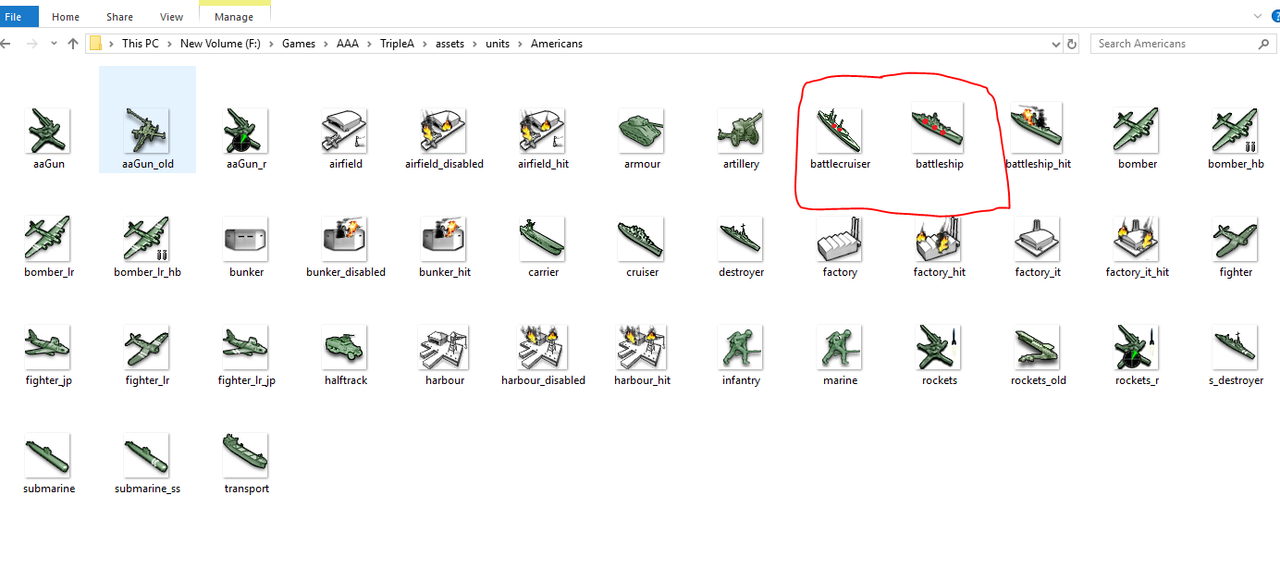
                              So I went into F:\Games\AAA\TripleA\assets\units\Americans
                              and modified the battleship for my WW2 1941 Anniversary game and loaded it and the changes didn't show up.

                              Confused?

                              Thx
                              jonpfl

                              1 Reply Last reply Reply Quote 0
                              • J Offline
                                jonpfl @prastle
                                last edited by

                                alt text

                                Here is what I did for the Americans, curious why it is not showing up in my WW2 1941 Anniversary game.

                                Thx
                                jonpfl

                                prastleP 1 Reply Last reply Reply Quote 0
                                • prastleP Offline
                                  prastle Lobby Moderators Admin @jonpfl
                                  last edited by

                                  @jonpfl it must pull directly from the map images for v341
                                  C:\Users\prast\triplea\downloadedMaps\world_war_ii_v3-master.zip\world_war_ii_v3-master\map\units\Americans

                                  If we open a quarrel between past and present, we shall find that we have lost the future! Sir Winston Churchill

                                  J 1 Reply Last reply Reply Quote 0
                                  • J Offline
                                    jonpfl @prastle
                                    last edited by

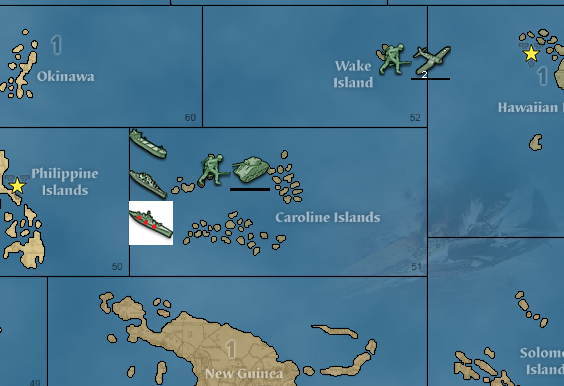
                                    Ok, I unzipped it and then added red dots and zipped it back up.

                                    Now it has a white background 😞

                                    alt text

                                    Any ideas?

                                    Thx
                                    jonpfl

                                    prastleP 1 Reply Last reply Reply Quote 0
                                    • prastleP Offline
                                      prastle Lobby Moderators Admin @jonpfl
                                      last edited by

                                      @jonpfl poke @Hepps

                                      If we open a quarrel between past and present, we shall find that we have lost the future! Sir Winston Churchill

                                      J 1 Reply Last reply Reply Quote 0
                                      • J Offline
                                        jonpfl @prastle
                                        last edited by

                                        @Hepps I am just using MSPaint to open it.

                                        I then resize it to 400% bigger, add some red dots and then resize it by 25%.

                                        Thx
                                        jonpfl

                                        C HeppsH 2 Replies Last reply Reply Quote 0
                                        • C Offline
                                          Cernel Moderators Lobby Moderators @jonpfl
                                          last edited by

                                          @jonpfl You need to use a program that allows for keeping transparency. A free program is GIMP, and there are others.

                                          J 1 Reply Last reply Reply Quote 1
                                          • J Offline
                                            jonpfl @Cernel
                                            last edited by

                                            Cool, I will try that later on today.

                                            Thx!!

                                            1 Reply Last reply Reply Quote 0

                                            Hello! It looks like you're interested in this conversation, but you don't have an account yet.

                                            Getting fed up of having to scroll through the same posts each visit? When you register for an account, you'll always come back to exactly where you were before, and choose to be notified of new replies (either via email, or push notification). You'll also be able to save bookmarks and upvote posts to show your appreciation to other community members.

                                            With your input, this post could be even better πŸ’—

                                            Register Login
                                            • 1
                                            • 2
                                            • 1 / 2
                                            • First post
                                              Last post
                                            Copyright Β© 2016-2018 TripleA-Devs | Powered by NodeBB Forums