[Open] Connection Lost
-
I had this problem about 2 years ago and finally got it fixed about 2 months ago. Not sure how it fixed itself but I went through the normal steps (port forwarding 3300 in dlink router, allow TripleA in windows firewall) and it worked for about 2 months. About 2 weeks ago it started again. I play BW V3 mostly but it happens in every map. Sometimes quicker than other times but usually can't get through my turn with a country. Always seems to happen when I move a unit. I go to move it and nothing happens. It just locks. Then I get the "Disconnected" message.
Any ideas of other things I can try? -
Hmm this is odd.
Before we start we need to clarify a couple of things:
We need to know how exactly you start your game.
Do you connect to the lobby and host there, or is it just you hosting a private match?
Are there some other errors you experience that might seem unrelated?
Which exact version of TripleA are you using?
Perhaps if you can pin down the exact version the "bug was fixed" for you, this could help us as well (see https://github.com/triplea-game/triplea/releases ) -
Wow. I had no idea there were that many updates. Hard to say which exact version I was using when it worked but the one I have installed now is 13066. Believe the one that worked was in the 12,000 range.
I connect to the lobby and enter a bot there. Doesn't matter if I enter first or my opponent enters first. Whether it's in a bot room or I host or my opponent hosts, the same thing happens. I usually lose connection during my turn but I know too that my opponent will sometimes be on combat move and in my history will show they are on purchase units phase. My screen will lag and then I type something and my opponent replies the history will jump ahead to the phase they are on.
Let me know if there is any more information you may need.
I really hope you can fix this once and for all. Been very frustrating and I feel bad for my opponents as I can only tell if my attempts to fix the problem work by entering a game. This inevitably ends up in me apologizing because it keeps locking up.
VanB..... -
Yeah, the build server automatically builds a new version whenever we make a code change, thus the many versions.
Hmm I assume you're usually playing at home and your Internet is otherwise "stable" I.e. It works fine for everything else?In any case: Any chance you can press "show details" or something when the error message pops up?
Also you aren't using satellite Internet by any chance? -
@RoiEX
Yes internet is stable. Cable internet. 60 mbps. Have done speed tests that show avg. of 45 mbps download & 10+ upload. 44 ping
I will try to get some screen shots of the error messages. Stay tuned.
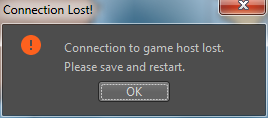
Question: does my operating system affect things in any way?Further to what is happening with my connection..........I entered a game to watch tonight. I was not playing. Game was already underway. I was able to see movement for a while and then it stopped. I figured it was locked again and typed "you guys have a gg going here". When they answer in the chat screen it skipped ahead about 4 phases. Went good for a while after that and then it happened again. Stayed locked for a long time but never disconnected like when I am playing. Once I typed in the chat screen I got this.
-
@ssoloff @redrum @LaFayette
Hmm we don't really log the throwable anywhere, should we create another hotfix to add a log statement here to help us debug this issue? -
@RoiEX Yeah, probably should.
-
@RoiEX We may already be logging it, but it is at
FINERlevel. I traced the call inClientModelback, and it may be coming from eitherNioReaderorNioWriter. TheNioWritercode is:(The
NioReadercode is almost identical.)Unfortunately, everything below
INFOlevel is dropped byConsoleeven if All Messages is selected for the log level.Note also that if you were to add a log where you proposed, depending on the log level you choose, two message boxes may be displayed for the one error: one from
ErrorMessageand one fromEventThreadJOptionPane. -
So would you suggest to increase the logging level to info?
Or do you think modifying the vmoptions file to log this level just for debugging would be sufficient here?
I think I managed to do it when trying to debug scousemart's issue so time ago -
@RoiEX There's probably a short-term solution and a long-term solution here.
The short-term issue is assisting @VanBattlesick in debugging his issue. In that case, I'd say do whatever is the quickest. If you can provide a one or two-line change to the .vmoptions file that will display the exception, that sounds good.
In the long term, I think we need to consider what to do about all the log messages below
INFOlevel that we're losing (without a possible manual workaround). At the time theErrorMessagefeature was introduced, I believe there was a discussion about having a way, via theConsoleUI, for the user to really see all the logs. That may be as simple as adding a third option that only displaysINFOand above (similar to what happens today when you select All Messages) and then having All Messages truly displayALLlog levels. -
I finally found the post where I proposed the original solution.
I modified the properties file to behandlers=games.strategy.debug.ConsoleHandler games.strategy.net.nio.NioWriter.level=FINEST games.strategy.net.nio.NioReader.level=FINESTbut unfortunately I got a
Can't load log handler "games.strategy.debug.ConsoleHandler"
java.lang.InstantiationException: games.strategy.debug.ConsoleHandler
Because the
ConsoleHandlerclass no longer has a default constructor.
So we need a code change either way unfortunately, adding a default constructor might be the fastest way nevertheless though. -
@RoiEX Ugh, too bad about that.
One other thing to consider... If it looks like we'll just be hacking up the 1.9 branch to get something working, it might be better to produce a private build for @VanBattlesick to test instead of committing the changes to the 1.9 branch. I can show you how to do that in your fork (it's like a 10-line change to two files), or I can set up such a branch in my fork and you can submit PRs there.
-
@ssoloff I'd appreciate if you could setup a branch for this.
If you could do this within the next 7 hours I'd try submitting a PR this evening -
Also if we're going to create a hack anyways, I'll just going to increase the log level to error, so that @VanBattlesick doesn't need to set something up, even if it might open too much windows
-
@RoiEX I created the branch
spike/topic-1104-connection-lost-debuggingin my fork for your use. I sent you a collaborator invite to my fork so you don't have to wait for me to merge PRs. Please be careful while it's in effect. (GitHub collaboration seems to be an all-or-nothing affair--I couldn't find a way to limit collaboration to specific branches.)
Pushing to the above branch will generate a new GitHub release here: https://github.com/ssoloff/triplea-game-triplea/releases. Once you post a link to a testable release in this thread, I'll clean up any previous releases that were generated.
-
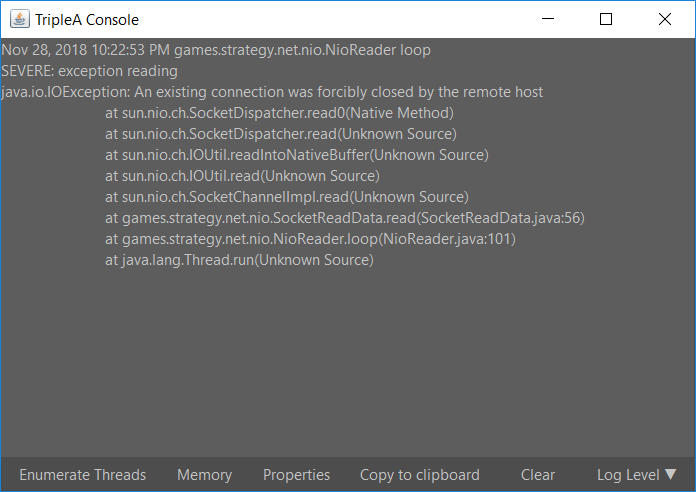
@VanBattlesick So I modified the code in a way that should force it to display an error message even for "harmless errors" i.e. normal disconnects.
Please install the modified version you can find here, and try to reproduce your steps.
This time you should get an error dialog with a "Show Details" button you can click.
This will open an error console window, which could perhaps be out-of focus and behind the main window, so check your opened windows if nothing seems to appear for you.
If you finally found the console, please post the content here so we can proceed to help you with your issue.Thanks @ssoloff for providing the infrastructure

-
-
@VanBattlesick
Ok, that definitely helps, but not as much as I thought.
I googled this error message and it seems to be a known problem that appears to occur to a lot of Minecraft players.
I didn't find a definite answer on how to fix this though, so I can't guarantee they will work for you.Option 1
If you have java installed and can access the java configuration via the control panel which looks like this, except in your language:
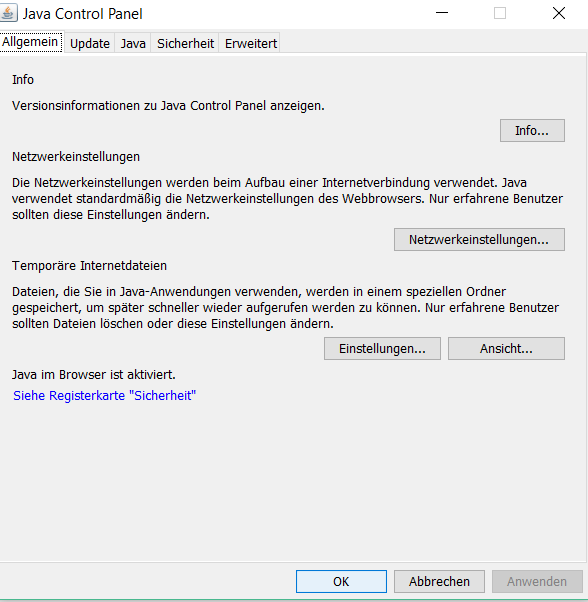
If you switch to the "Advanced" Tab and scroll down to check this checkbox this is supposed to help some people
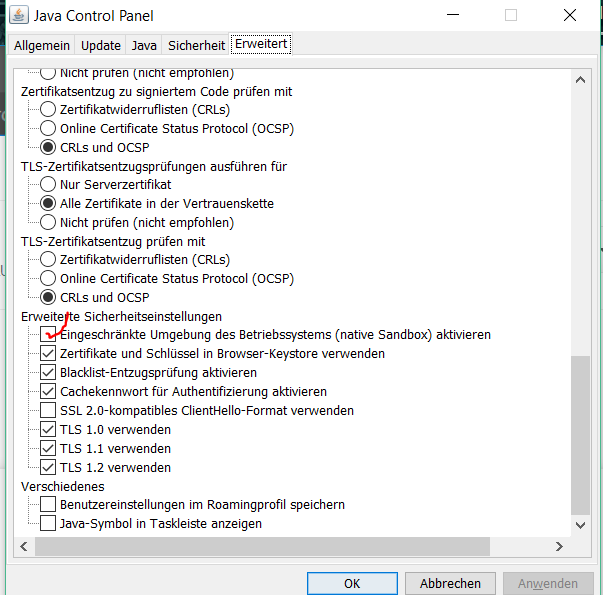
I don't really kow why this is supposed to work, but I just wanted to note it down.Option 2
This one is a little bit more complicated and not that straightforward, but is more promising IMO.
Basically redoing your local Firewall rules to allow java to communicate with the internet:
Try searching for this Firewall menu in your local control panel: (Unfortunately I can't really tell you the english terms for the individual setting windows, I don't have an english windows installation)
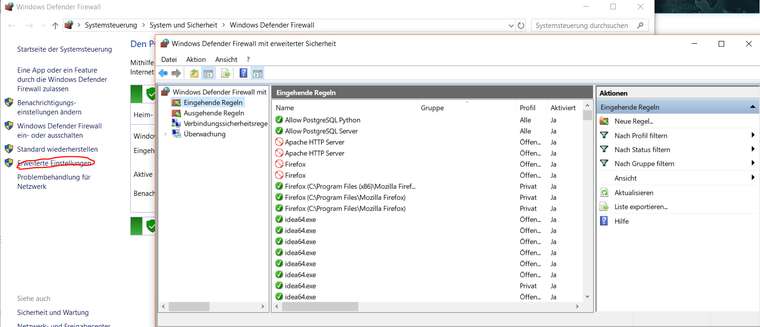
And check if theres an entry for java in the outgoing or the incoming rules section.
If there's an entry try removing it.
If you then start TripleA again it should ask you if you want to allow java in certain network types.
Try selecting all checkboxes (public and private) and see if that helps.@ssoloff We should really modify the NioReader and NioWriter classes to actually log those IOExceptions with a higher level, this one shouldn't be treated as a "normal disconnect"
-
@RoiEX Playing tonight and it went good for a little while and then started lagging. It froze and jumped ahead again once my opponent typed in chat screen. Then I got disconnected.
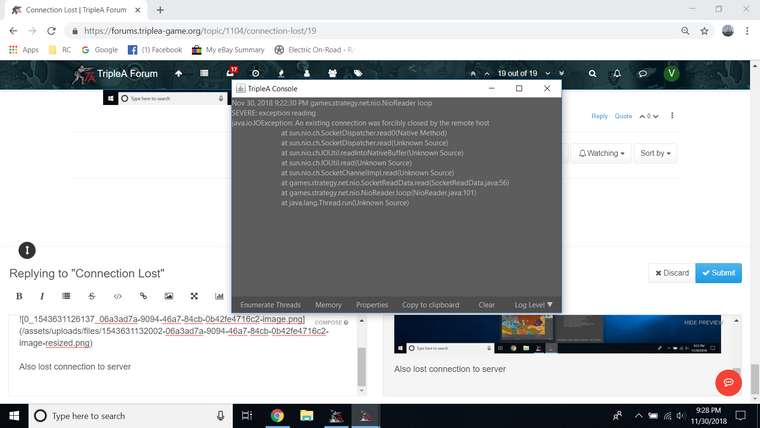
Also lost connection to server
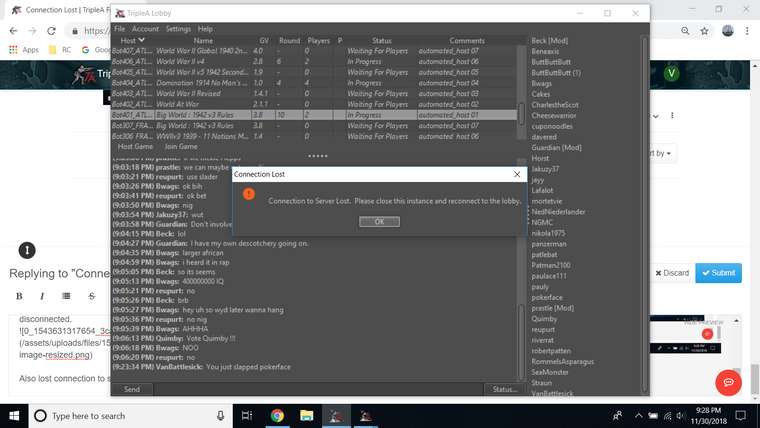
-
Which "Option" did you try?



Hello! It looks like you're interested in this conversation, but you don't have an account yet.
Getting fed up of having to scroll through the same posts each visit? When you register for an account, you'll always come back to exactly where you were before, and choose to be notified of new replies (either via email, or push notification). You'll also be able to save bookmarks and upvote posts to show your appreciation to other community members.
With your input, this post could be even better 💗
Register Login