Troubleshooting: Connection Refused
-
Hi,
I'm new here and in need of help for starting.Connection is refused and firewall is off.
-
@nicolasdaneau Con refused from what? Hosting? Most cannot host. please elaborate sir.
-
@prastle Tanks for the reply. I'll put as much details as possible.
From the main menu:
When I click "Play Online" button, I get a window titled "Could not connect to server" with text message "Connection reset"
When I click "Connect to Networked Game" button, I get a window titled "Client options" with 3 filled fields. And if I click the "Connect" button on it, I get a window titled "Error" with text message "Unable to connect:Connection refused"
I have:
Engine Version: 1.8.0.9
Mac OS 10.6.8 -
@nicolasdaneau Can you please download the latest TripleA version and see if that resolves your issue: https://triplea-game.org/download/
-
@nicolasdaneau You should update to the latest stable and try again.
Macs are a little troublesome : )
heh heh looks like redrum beat me too it : )
-
@redrum Unfortunatly, I can't. I'm stuck at OS 10.6.8. Latest Triplea version will not run...
-
@nicolasdaneau Sorry Win 10 here can't help much. I can safely say that hosting is a long drawn out issue Mac or Windows. perhaps just use a bot? either way you do need 1.9 to use the lobby. 1.89 gone long time sir
-
@prastle Ok. I believe it does answer my question... Thanks.
-
@nicolasdaneau On your version of the OS it should be able to run without problems.
Are you having trouble installing triplea or is it just not starting after installing? -
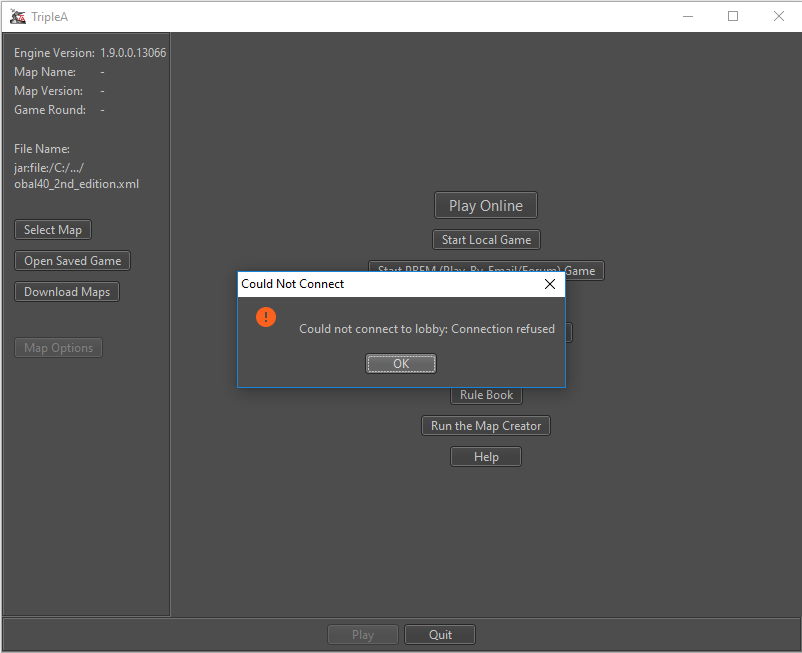
I moved this here and deleted my other thread I started. Didn't see this.
I can not connect to the lobby.
I opened ports 3300 and 3100. I turned off all firewalls. Windows Defender firewall and Xfinity Firewall on the router itself.
I can't figure it out.
I have Windows 10 Pro
I have tried to look for help with this issue and I couldn't find anything. I even put the "Could not connect to lobby: Connection refused" into google and couldn't get anything. I reinstalled Java to the latest edition. I am at a loss.
I was able to connect without issue a few days ago, this only started happening a day ago.
Thanks for the help.
-
@baron1282 Please turn your router firewall back on, it's likely not the issue.
So nothing has changed since you could connect to the lobby?
Any chance you you entered a value in the engine preferences lobby settings by accident and saved it? -
Also @baron1282 your issue is a completely different issue,so you should've kept your own thread



Hello! It looks like you're interested in this conversation, but you don't have an account yet.
Getting fed up of having to scroll through the same posts each visit? When you register for an account, you'll always come back to exactly where you were before, and choose to be notified of new replies (either via email, or push notification). You'll also be able to save bookmarks and upvote posts to show your appreciation to other community members.
With your input, this post could be even better 💗
Register Login