TripleA Logo TripleA Forum
    • TripleA Website
    • Categories
    • Recent
    • Popular
    • Users
    • Groups
    • Tags
    • Register
    • Login

    ”Failed to read file at:…” when trying to download maps

    Scheduled Pinned Locked Moved Player Help
    7 Posts 2 Posters 1.2k Views 2 Watching
    Loading More Posts
    • Oldest to Newest
    • Newest to Oldest
    • Most Votes
    Reply
    • Reply as topic
    Log in to reply
    This topic has been deleted. Only users with topic management privileges can see it.
    • FrostionF Offline
      Frostion Admin
      last edited by

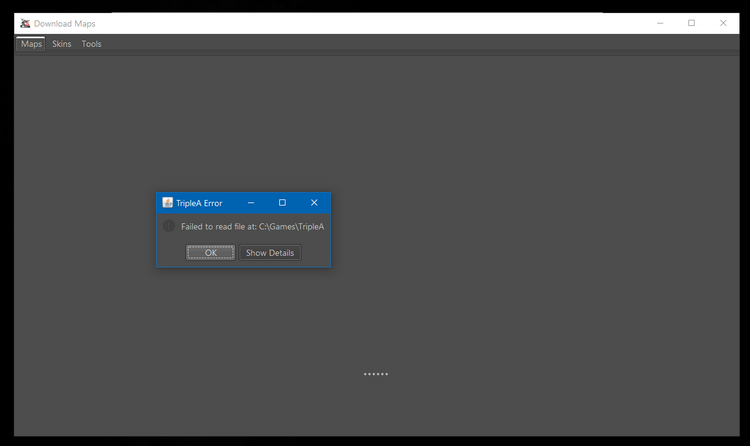
      I can’t startup and use the download maps feature anymore. When I in TripleA’s main menu choose and press the “Download Maps”, this screen pops up and the selection tabs have no content. I can’t download anything. Here is what I see.
      Unavngivet.png

      This is the error one can read from the “Show details” button:

      jan. 25, 2019 11:37:09 PM games.strategy.engine.framework.map.download.DownloadRunnable readLocalFile
      SEVERE: Failed to read file at: C:\Games\TripleA
      java.nio.file.AccessDeniedException: 
      	at sun.nio.fs.WindowsException.translateToIOException(Unknown Source)
      	at sun.nio.fs.WindowsException.rethrowAsIOException(Unknown Source)
      	at sun.nio.fs.WindowsException.rethrowAsIOException(Unknown Source)
      	at sun.nio.fs.WindowsFileSystemProvider.newByteChannel(Unknown Source)
      	at java.nio.file.Files.newByteChannel(Unknown Source)
      	at java.nio.file.Files.newByteChannel(Unknown Source)
      	at java.nio.file.Files.readAllBytes(Unknown Source)
      	at games.strategy.engine.framework.map.download.DownloadRunnable.readLocalFile(DownloadRunnable.java:56)
      	at games.strategy.engine.framework.map.download.DownloadRunnable.getDownloads(DownloadRunnable.java:33)
      	at games.strategy.engine.ClientContext.getMapDownloadList(ClientContext.java:67)
      	at games.strategy.engine.framework.ui.background.BackgroundTaskRunner$1.doInBackground(BackgroundTaskRunner.java:129)
      	at javax.swing.SwingWorker$1.call(Unknown Source)
      	at java.util.concurrent.FutureTask.run(Unknown Source)
      	at javax.swing.SwingWorker.run(Unknown Source)
      	at java.util.concurrent.ThreadPoolExecutor.runWorker(Unknown Source)
      	at java.util.concurrent.ThreadPoolExecutor$Worker.run(Unknown Source)
      	at java.lang.Thread.run(Unknown Source)
      

      Does anyone see what it wrong?

      Map maker of: Star Wars: Galactic War + Star Wars: Tatooine War + Caribbean Trade War + Dragon War + Age of Tribes + Star Trek: Dilithium War + Iron War + Iron War: Europe + Warcraft: War Heroes

      1 Reply Last reply Reply Quote 0
      • FrostionF Offline
        Frostion Admin
        last edited by

        PS: C:\Games\TripleA is of course my TripleA install folder.

        Map maker of: Star Wars: Galactic War + Star Wars: Tatooine War + Caribbean Trade War + Dragon War + Age of Tribes + Star Trek: Dilithium War + Iron War + Iron War: Europe + Warcraft: War Heroes

        1 Reply Last reply Reply Quote 0
        • RoiEXR Offline
          RoiEX Admin
          last edited by

          Are you using 1.9?

          1 Reply Last reply Reply Quote 0
          • RoiEXR Offline
            RoiEX Admin
            last edited by

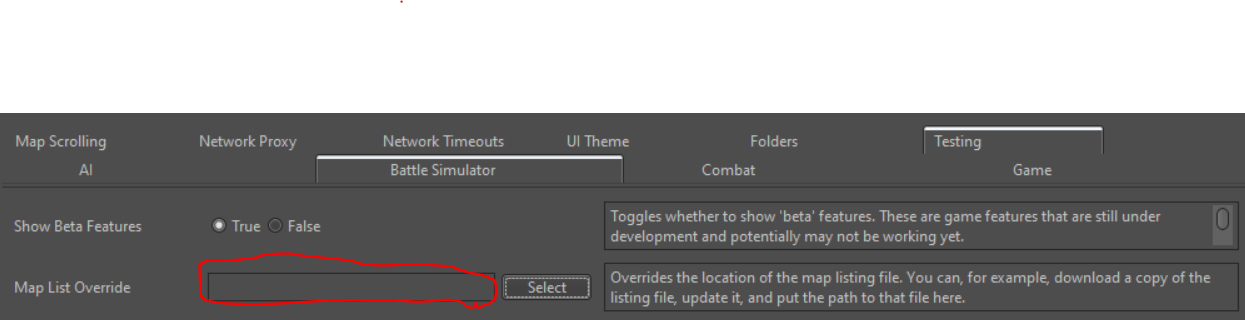
            You should clear this setting and it should work again:
            2e02c007-ad84-4be9-85e5-d19b8f99d72f-grafik.png

            1 Reply Last reply Reply Quote 1
            • FrostionF Offline
              Frostion Admin
              last edited by

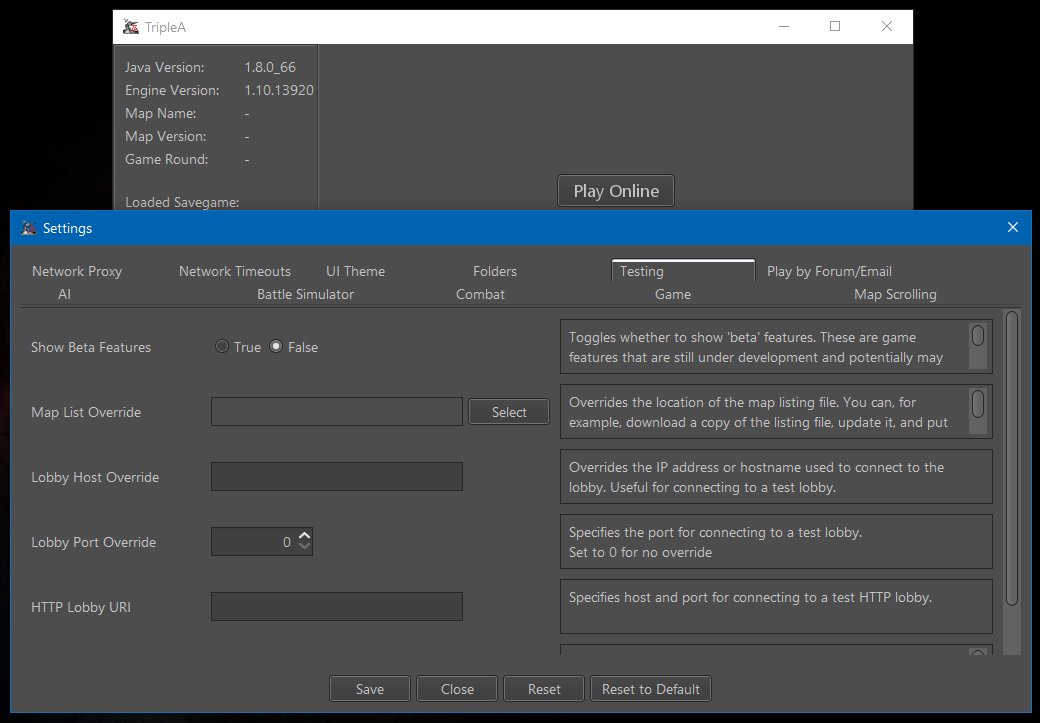
              Thanks @RoiEX for the response. I can now download again.

              I used engine v1.10, so the setting was not where you showed it to be. But I found it in another fan.
              Unavngivet.png

              Map maker of: Star Wars: Galactic War + Star Wars: Tatooine War + Caribbean Trade War + Dragon War + Age of Tribes + Star Trek: Dilithium War + Iron War + Iron War: Europe + Warcraft: War Heroes

              1 Reply Last reply Reply Quote 0
              • RoiEXR Offline
                RoiEX Admin
                last edited by

                @Frostion The location didn't change.
                It's only my mouse that hovered over the second tab,so that's why both tabs are highlighted.

                1 Reply Last reply Reply Quote 1
                • FrostionF Offline
                  Frostion Admin
                  last edited by

                  Ahhhaa ... Now it all makes more sense 😊

                  Map maker of: Star Wars: Galactic War + Star Wars: Tatooine War + Caribbean Trade War + Dragon War + Age of Tribes + Star Trek: Dilithium War + Iron War + Iron War: Europe + Warcraft: War Heroes

                  1 Reply Last reply Reply Quote 0

                  Hello! It looks like you're interested in this conversation, but you don't have an account yet.

                  Getting fed up of having to scroll through the same posts each visit? When you register for an account, you'll always come back to exactly where you were before, and choose to be notified of new replies (either via email, or push notification). You'll also be able to save bookmarks and upvote posts to show your appreciation to other community members.

                  With your input, this post could be even better 💗

                  Register Login
                  • 1 / 1
                  • First post
                    Last post
                  Copyright © 2016-2018 TripleA-Devs | Powered by NodeBB Forums
