Help Needed Hosting Bot(s) On Ubuntu Server
-
Re: Hosting a bot from Ubuntu server?
Hi all, I initially wanted to reply to this specific thread, but the forum bot suggested I make a new post referencing the thread instead.
I have a headless Ubuntu Server that hosts a site for a URL that points to it. What I would like to do is move the TripleA hosting over to this same server so that we can use our URL for logging into a self-contained bot, instead of giving out my IP address every game.
I can see from the referenced post that its possible to host bots on an Ubuntu Server, which I would love any and all help with (specifically, the bot script file that @prastle mentioned he had).
Is it even possible to use an https:// URL entered into the IP address field for TripleA?
Just for clarification, the flow would be:
https://ourwebsite.co ----> ubuntu server running triplea bot(s)
-
UPDATE
I decided to create an additional Virtual Machine on our server so that TripleA could run separate from our L.A.M.P Webserver VM. This allowed me to use Ubuntu Desktop so I could have a GUI and make the process a bit simpler.
First, I attempted to run just the headless triplea game and follow these steps to set up a Lobby Bot (TripleA- How To Host a Lobby Bot) However, I am unable to get the script to launch, as I keep getting a "Unable to access jarfile" error in the terminal. Nothing I have tried has fixed this problem. I've checked permissions for all files and folders involved, made sure to have Java 11 running and selected as the system default Java version, and tried even changing the directory destination in the .sh. Nothing.
So then I switched gears to see if I could (at least) host a TripleA game on the server using the in-game "host networked game". Downloaded, installed, and it works! I can have friends use our URL as the IP address and connect right to the server, its awesome! Only problem is, my friends need me to be present at the server to setup the game and launch it.
Which brings me to that slightly smaller problem I'm looking for help with: Getting the headless version to run and get bots online. If anyone has a sample of their .sh file and/or how their file directory for the assets is setup, I'd be grateful for the help.
Thanks!
-
The .sh script should work OOB. Is the path from the '.sh' script to the jar file correct? Try adding
set -xto the top of the '.sh' script to get more debug output, then see if the relative path from the script to the jar file is correct. -
It could be the '.sh' launch script is broken, I wouldn't be surprised if there were a pathing issue, or if the jar file has a version number on it that the .sh script is not expecting (any problem like that would not be that big of a surprise)
-
Hey @LaFayette thanks for the reply!
I've started fresh with a new download of the headless server, so that I can walk you through my steps to see if I'm missing something. Also, on step 3 you'll see I wasn't sure where to add the debug code.
1) Download "triplea-game-headless" from TripleA GitHub
2) Extract to "home" directory (same directory that base game is located)
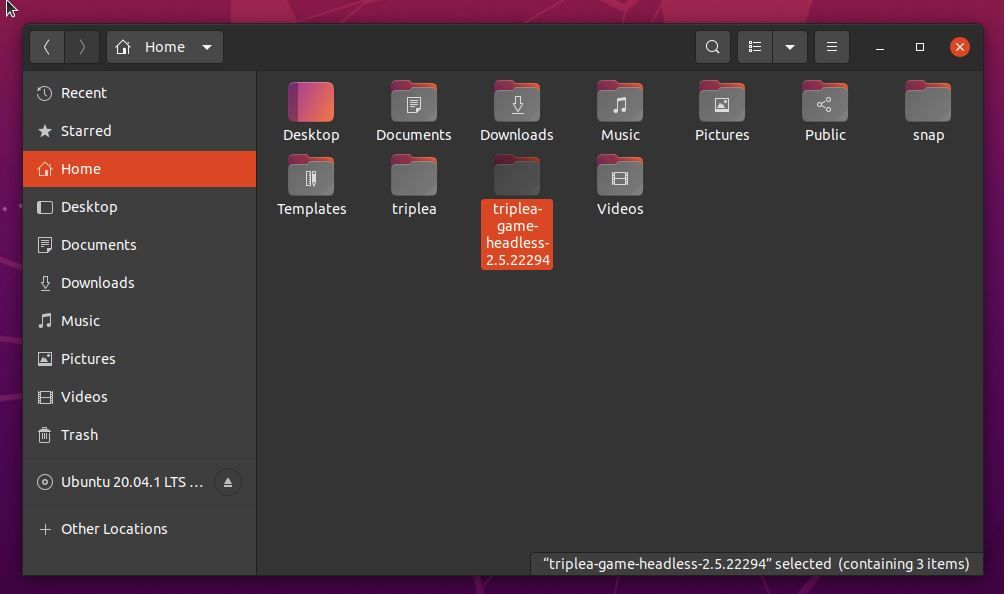
3) Alter run_bot.sh file, check "allow executing file as program" Change variables where needed. Not sure where I should add the additional debug code line, at the top of the doc or at the top of the java \ section?
#!/bin/bash
#
# This is a sample script for running a TripleA bot on a Unix-like system.
#
# THIS SCRIPT MAY NOT RUN CORRECTLY UNLESS YOU CUSTOMIZE SOME OF THE VARIABLES
# BELOW!  Please read each variable description carefully and modify them, if
# appropriate.
#
# To run this script, change to the directory in which you unpacked the
# headless game server archive, and type "./run_bot".
#

###############################################################################
# VARIABLES THAT YOU MAY CUSTOMIZE BEGIN HERE
###############################################################################

#
# The folder from which the bot will load game maps.
#
# The default value is the folder in which the TripleA game client stores
# maps that it downloads.  Under normal circumstances, you will not have to
# change this variable.  However, if you customized the settings in your
# TripleA client to use a different maps folder, you should change this
# variable to refer to the same location.
#
readonly MAPS_FOLDER="$HOME/triplea/downloadedMaps"

#
# The port on which the bot will listen for connections.  This port must be
# reachable from the Internet, so you may have to configure your firewall
# appropriately.
#
# Under normal circumstances, you will not have to change this variable.
# However, if you choose to run multiple bots on your system, you need to
# select a different available port for each bot.
#
readonly BOT_PORT=3300

#
# The name of the bot as displayed in the lobby.  Each bot must have a unique
# name.
#
# The default value uses a combination of your username and the local port
# you selected above on which the bot will run.  Under normal circumstances,
# you will not have to change this variable.
#
readonly BOT_NAME="Bot_${USER}_${BOT_PORT}"

#
# The password used to secure access to games running on your bot.  Users
# attempting to start a new game or connect to an existing game on your bot
# will be prompted for this password.  If the password is an empty string,
# the user will not be prompted, and any lobby user will be able to use your
# bot.
#
# The default value is an empty password. You should change this to a
# non-empty string if you do not want arbitrary users to use your bot.  For
# example, you may wish to run a private game for you and some friends.  In
# that case, set the password to a non-empty string and communicate it to
# your friends in some manner (e.g. via email).
#
readonly BOT_PASSWORD=

#
# The hostname of the lobby to which the bot will connect.
#
# The default value is the hostname for the TripleA community's public lobby.
# Under normal circumstances, you will not have to change this variable.
#
readonly LOBBY_URI="https://lobby.triplea-game.org"

###############################################################################
# VARIABLES THAT YOU MAY CUSTOMIZE END HERE
#
# DO NOT MODIFY ANYTHING BELOW THIS LINE!
###############################################################################

java \
    -server \
    -Xmx256M \
    -Djava.awt.headless=true \
    -jar bin/triplea-game-headless-*-all.jar \
    -Ptriplea.lobby.uri="$LOBBY_URI" \
    -Ptriplea.map.folder="$MAPS_FOLDER" \
    -Ptriplea.name="$BOT_NAME" \
    -Ptriplea.port="$BOT_PORT" \
    -Ptriplea.server.password="$BOT_PASSWORD"
4) Attempt launch with both ./run_bot command as well as dragging the .sh file into the terminal and executing. Both ways produce the same error:
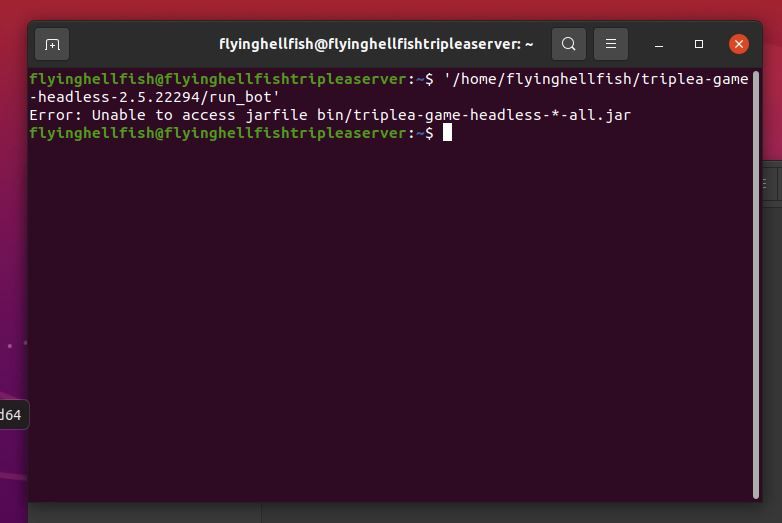
-
set -xcan go anywhere. It causes a shell script to print any lines before they are executed.The
bin/triplea-game...path is relative. If youcdinto the installation directory and run the script as./run_bot, it should likely work then. -
@LaFayette Used cd into the installation directory and ran the script ./run_bot.
Output below:
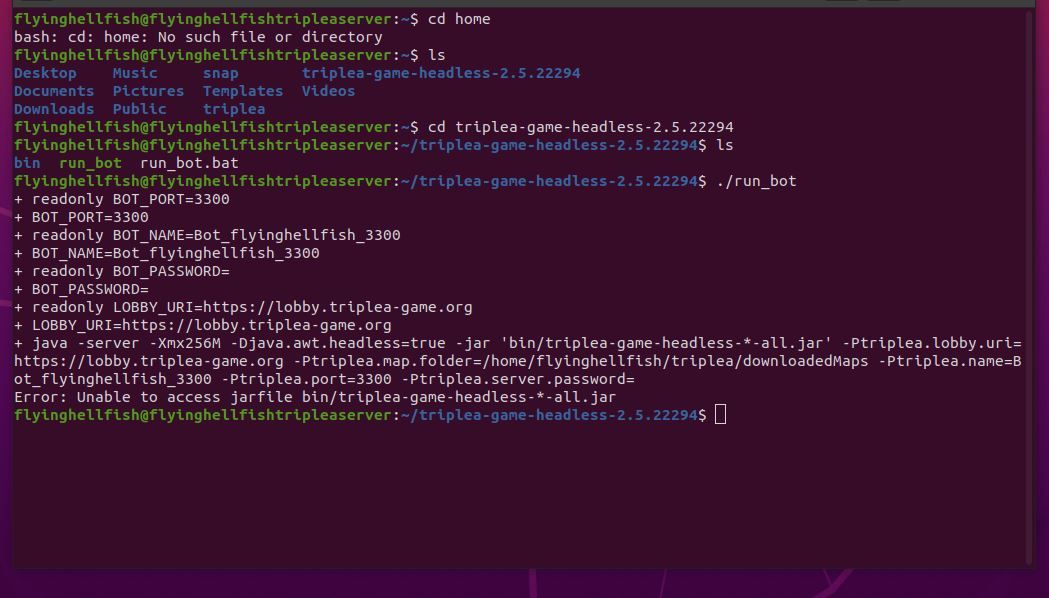
Don't mean to just keep dumping screen grabs up here, still haven't figured out how to enable cut and paste on ProxMox VMs. Thanks for the patience.
-
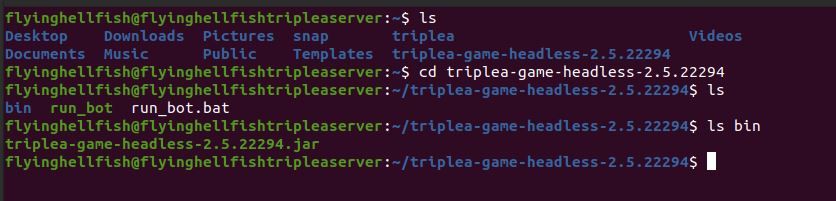
do an
ls binfrom that location. -
@LaFayette output below:
-
update the run script,remove the '-all' from the jar name
-
@LaFayette - I removed the '-all' from the jar name and it ran the script successfully.
However, it looks like its getting errors connecting to the lobby and I don't see it when I log into the Online Lobby listed as a bot. Does the bot need to be operating using a registered username in order to connect to the lobby?
flyinghellfish@flyinghellfishtripleaserver:~$ cd triplea-game-headless-2.5.22294 flyinghellfish@flyinghellfishtripleaserver:~/triplea-game-headless-2.5.22294$ ls bin run_bot run_bot.bat flyinghellfish@flyinghellfishtripleaserver:~/triplea-game-headless-2.5.22294$ ./run_bot + readonly BOT_PORT=3300 + BOT_PORT=3300 + readonly BOT_NAME=Bot_flyinghellfish_3300 + BOT_NAME=Bot_flyinghellfish_3300 + readonly BOT_PASSWORD= + BOT_PASSWORD= + readonly LOBBY_URI=https://lobby.triplea-game.org + LOBBY_URI=https://lobby.triplea-game.org + java -server -Xmx256M -Djava.awt.headless=true -jar bin/triplea-game-headless-2.5.22294.jar -Ptriplea.lobby.uri=https://lobby.triplea-game.org -Ptriplea.map.folder=/home/flyinghellfish/triplea/downloadedMaps -Ptriplea.name=Bot_flyinghellfish_3300 -Ptriplea.port=3300 -Ptriplea.server.password= Jan 24, 2021 7:26:27 PM games.strategy.engine.framework.map.file.system.loader.AvailableGamesFileSystemReader lambda$parseMapFiles$0 INFO: Found game: Pact of Steel @ jar:file:/home/flyinghellfish/triplea/downloadedMaps/the_pact_of_steel-master.zip!/the_pact_of_steel-master/map/games/pact_of_steel.xml Jan 24, 2021 7:26:27 PM games.strategy.engine.framework.map.file.system.loader.AvailableGamesFileSystemReader lambda$parseMapFiles$0 INFO: Found game: Pact of Steel 2 @ jar:file:/home/flyinghellfish/triplea/downloadedMaps/the_pact_of_steel-master.zip!/the_pact_of_steel-master/map/games/pact_of_steel_2.xml Jan 24, 2021 7:26:27 PM org.triplea.game.server.HeadlessGameServer <init> INFO: Game Server initialized Jan 24, 2021 7:26:27 PM org.triplea.game.server.HeadlessGameServer lambda$new$1 INFO: Headless Start Exception in thread "Initialize Headless Server Setup Model" feign.RetryableException: No subject alternative DNS name matching lobby.triplea-game.org found. executing POST https://lobby.triplea-game.org/lobby/game-hosting-request at feign.FeignException.errorExecuting(FeignException.java:214) at feign.SynchronousMethodHandler.executeAndDecode(SynchronousMethodHandler.java:115) at feign.SynchronousMethodHandler.invoke(SynchronousMethodHandler.java:80) at feign.ReflectiveFeign$FeignInvocationHandler.invoke(ReflectiveFeign.java:103) at com.sun.proxy.$Proxy4.sendGameHostingRequest(Unknown Source) at org.triplea.http.client.lobby.game.hosting.request.GameHostingClient.sendGameHostingRequest(GameHostingClient.java:25) at games.strategy.engine.framework.startup.mc.ServerModel.createServerMessenger(ServerModel.java:425) at games.strategy.engine.framework.startup.mc.ServerModel.lambda$new$1(ServerModel.java:289) at java.base/java.util.Optional.ifPresent(Optional.java:183) at games.strategy.engine.framework.startup.mc.ServerModel.<init>(ServerModel.java:289) at org.triplea.game.server.HeadlessServerSetupPanelModel.showSelectType(HeadlessServerSetupPanelModel.java:28) at org.triplea.game.server.HeadlessGameServer.lambda$new$1(HeadlessGameServer.java:69) at java.base/java.lang.Thread.run(Thread.java:834) Caused by: javax.net.ssl.SSLHandshakeException: No subject alternative DNS name matching lobby.triplea-game.org found. at java.base/sun.security.ssl.Alert.createSSLException(Alert.java:131) at java.base/sun.security.ssl.TransportContext.fatal(TransportContext.java:350) at java.base/sun.security.ssl.TransportContext.fatal(TransportContext.java:293) at java.base/sun.security.ssl.TransportContext.fatal(TransportContext.java:288) at java.base/sun.security.ssl.CertificateMessage$T12CertificateConsumer.checkServerCerts(CertificateMessage.java:654) at java.base/sun.security.ssl.CertificateStatus$CertificateStatusConsumer.consume(CertificateStatus.java:295) at java.base/sun.security.ssl.SSLHandshake.consume(SSLHandshake.java:392) at java.base/sun.security.ssl.HandshakeContext.dispatch(HandshakeContext.java:444) at java.base/sun.security.ssl.HandshakeContext.dispatch(HandshakeContext.java:422) at java.base/sun.security.ssl.TransportContext.dispatch(TransportContext.java:183) at java.base/sun.security.ssl.SSLTransport.decode(SSLTransport.java:171) at java.base/sun.security.ssl.SSLSocketImpl.decode(SSLSocketImpl.java:1408) at java.base/sun.security.ssl.SSLSocketImpl.readHandshakeRecord(SSLSocketImpl.java:1314) at java.base/sun.security.ssl.SSLSocketImpl.startHandshake(SSLSocketImpl.java:440) at java.base/sun.security.ssl.SSLSocketImpl.startHandshake(SSLSocketImpl.java:411) at java.base/sun.net.www.protocol.https.HttpsClient.afterConnect(HttpsClient.java:567) at java.base/sun.net.www.protocol.https.AbstractDelegateHttpsURLConnection.connect(AbstractDelegateHttpsURLConnection.java:185) at java.base/sun.net.www.protocol.http.HttpURLConnection.getInputStream0(HttpURLConnection.java:1592) at java.base/sun.net.www.protocol.http.HttpURLConnection.getInputStream(HttpURLConnection.java:1520) at java.base/java.net.HttpURLConnection.getResponseCode(HttpURLConnection.java:527) at java.base/sun.net.www.protocol.https.HttpsURLConnectionImpl.getResponseCode(HttpsURLConnectionImpl.java:334) at feign.Client$Default.convertResponse(Client.java:79) at feign.Client$Default.execute(Client.java:75) at feign.SynchronousMethodHandler.executeAndDecode(SynchronousMethodHandler.java:110) ... 11 more Caused by: java.security.cert.CertificateException: No subject alternative DNS name matching lobby.triplea-game.org found. at java.base/sun.security.util.HostnameChecker.matchDNS(HostnameChecker.java:212) at java.base/sun.security.util.HostnameChecker.match(HostnameChecker.java:103) at java.base/sun.security.ssl.X509TrustManagerImpl.checkIdentity(X509TrustManagerImpl.java:455) at java.base/sun.security.ssl.X509TrustManagerImpl.checkIdentity(X509TrustManagerImpl.java:415) at java.base/sun.security.ssl.X509TrustManagerImpl.checkTrusted(X509TrustManagerImpl.java:229) at java.base/sun.security.ssl.X509TrustManagerImpl.checkServerTrusted(X509TrustManagerImpl.java:129) at java.base/sun.security.ssl.CertificateMessage$T12CertificateConsumer.checkServerCerts(CertificateMessage.java:638) ... 30 more -
@HSThompsn in the run_bot script, change
lobby.triplea-game.orgtoprod2-lobby.triplea-game.org -
Likely that is going to be the last thing needed, most other validation generally happens before connecting to lobby.
I recommend to stay with 2.5 for bots until there is a version update in lobby, but FWIW future versions will have this corrected: https://github.com/triplea-game/triplea/pull/8699
-
@LaFayette just a preface to thank you again for the help and all day patience on this. I'll make sure to stick with this version until version update.
I've changed the lobby address and now seem to get a new error. Output below:
flyinghellfish@flyinghellfishtripleaserver:~/triplea-game-headless-2.5.22294$ ./run_bot + readonly BOT_PORT=3300 + BOT_PORT=3300 + readonly BOT_NAME=Bot_flyinghellfish_3300_TEST + BOT_NAME=Bot_flyinghellfish_3300_TEST + readonly BOT_PASSWORD=test + BOT_PASSWORD=test + readonly LOBBY_URI=prod2-lobby.triplea-game.org + LOBBY_URI=prod2-lobby.triplea-game.org + java -server -Xmx256M -Djava.awt.headless=true -jar bin/triplea-game-headless-2.5.22294.jar -Ptriplea.lobby.uri=prod2-lobby.triplea-game.org -Ptriplea.map.folder=/home/flyinghellfish/triplea/downloadedMaps -Ptriplea.name=Bot_flyinghellfish_3300_TEST -Ptriplea.port=3300 -Ptriplea.server.password=test Jan 24, 2021 7:54:13 PM games.strategy.engine.framework.map.file.system.loader.AvailableGamesFileSystemReader lambda$parseMapFiles$0 INFO: Found game: Pact of Steel @ jar:file:/home/flyinghellfish/triplea/downloadedMaps/the_pact_of_steel-master.zip!/the_pact_of_steel-master/map/games/pact_of_steel.xml Jan 24, 2021 7:54:13 PM games.strategy.engine.framework.map.file.system.loader.AvailableGamesFileSystemReader lambda$parseMapFiles$0 INFO: Found game: Pact of Steel 2 @ jar:file:/home/flyinghellfish/triplea/downloadedMaps/the_pact_of_steel-master.zip!/the_pact_of_steel-master/map/games/pact_of_steel_2.xml Jan 24, 2021 7:54:13 PM org.triplea.game.server.HeadlessGameServer <init> INFO: Game Server initialized Jan 24, 2021 7:54:13 PM org.triplea.game.server.HeadlessGameServer lambda$new$1 INFO: Headless Start Exception in thread "Initialize Headless Server Setup Model" java.lang.IllegalArgumentException: target values must be absolute. at feign.RequestTemplate.target(RequestTemplate.java:458) at feign.Target$HardCodedTarget.apply(Target.java:101) at feign.SynchronousMethodHandler.targetRequest(SynchronousMethodHandler.java:173) at feign.SynchronousMethodHandler.executeAndDecode(SynchronousMethodHandler.java:101) at feign.SynchronousMethodHandler.invoke(SynchronousMethodHandler.java:80) at feign.ReflectiveFeign$FeignInvocationHandler.invoke(ReflectiveFeign.java:103) at com.sun.proxy.$Proxy4.sendGameHostingRequest(Unknown Source) at org.triplea.http.client.lobby.game.hosting.request.GameHostingClient.sendGameHostingRequest(GameHostingClient.java:25) at games.strategy.engine.framework.startup.mc.ServerModel.createServerMessenger(ServerModel.java:425) at games.strategy.engine.framework.startup.mc.ServerModel.lambda$new$1(ServerModel.java:289) at java.base/java.util.Optional.ifPresent(Optional.java:183) at games.strategy.engine.framework.startup.mc.ServerModel.<init>(ServerModel.java:289) at org.triplea.game.server.HeadlessServerSetupPanelModel.showSelectType(HeadlessServerSetupPanelModel.java:28) at org.triplea.game.server.HeadlessGameServer.lambda$new$1(HeadlessGameServer.java:69) at java.base/java.lang.Thread.run(Thread.java:834) -
The lobby URI needs to be fully qualified. Change:
prod2-lobby.triplea-game.orgtohttps://prod2-lobby.triplea-game.org -
@LaFayette SUCCESS! The script boots, connects, lists as a bot in lobby, and can accept direct URL connections as well. Thanks again for all the help today, I'll get some bots up in the lobby ASAP for public use.

-
@LaFayette One last question. Is it possible to have the bot not need to connect to the public lobby, if its going to be a private password protected bot?
My plan is to run (1) private bot in terminal (A) and (2) public bots in terminals (B,C) all on separate ports.
With the help you provided above, I'll have no issue getting those (2) public bots up and running in the lobby. As for the private bot, I was attempting to implement a suggestion from this post: ssollof private bot tip. By removing the url completely, it locks on the script executing- which was our experience we just hacked through above.
Is it possible not to have it have to connect to a lobby? That way it would only be accessible through "Connect to network game" using the URL.
-
I think you'd have to launch a lobby instance to have a truly private bot instance. It's not currently possible to run without a lobby connection.
FWIW, here is a script to download maps:
- change the
cd /home/bot/mapsto be your maps folder - change the 'sudo -u bot' to be your bot system user or remove entirely if you run the bot instance as yourself (likely just remove the 'sudo -u bot' prefixes on the various commands)
#!/bin/bash ## note: ## - it appears that it takes some time for a repo to show up in an orgs repo list ## - the curl call below is rate limited, not intended for repeated invocations # Usage: # - Simply execute this script without any arguments update_maps="${1:-false}" sudo -u "bot" mkdir -p "/home/bot/maps" cd "/home/bot/maps" for j in 1 2; do while read mapRepo; do downloadFile="$(echo $mapRepo | sed 's|.*/||')-master.zip" if [ "$update_maps" == "true" ] || [ ! -e "$downloadFile" ]; then sudo -u "bot" wget -O "$downloadFile" "https://github.com/$mapRepo/archive/master.zip" fi done < <(curl --silent "https://api.github.com/orgs/triplea-maps/repos?page=$j&per_page=1000" \ | grep full_name | sed 's/.*: "//' | sed 's/",$//') done - change the
-
@LaFayette Thanks for the auto-download script. All three bots are up an running in the lobby.
I saw the lobby server on GitHub and gave it a look. Didn't see a prebaked .sh file in there to launch, so figured its gotta be a pretty complex setup. If there's any documentation on the lobby server, I'd love to take a look.


Hello! It looks like you're interested in this conversation, but you don't have an account yet.
Getting fed up of having to scroll through the same posts each visit? When you register for an account, you'll always come back to exactly where you were before, and choose to be notified of new replies (either via email, or push notification). You'll also be able to save bookmarks and upvote posts to show your appreciation to other community members.
With your input, this post could be even better 💗
Register Login