Java, faster TripleA on Windows 10
-
I have recently put -Xmx3072m as a Java runtime parameter.
Now my PC appears to run TripleA faster by using more CPU, like 90%+ when it needs to and using more memory when it needs to.
Prior to this change CPU usage would hardly go above 60% and I would have loads of RAM spare
Does anyone one else see an improvement, if they do the following?
Suggest you have 8GB+ RAM
To make the change;
Click Start
Scroll to the Java Folder, Click Java Folder
Click Configure Java
Click Java Tab
Click View button
Double click Runtime Parameters field (just below the words Runtime Parameters)
in the field enter -Xmx3072m
Click OK
Click Apply
Click OK
Enjoy!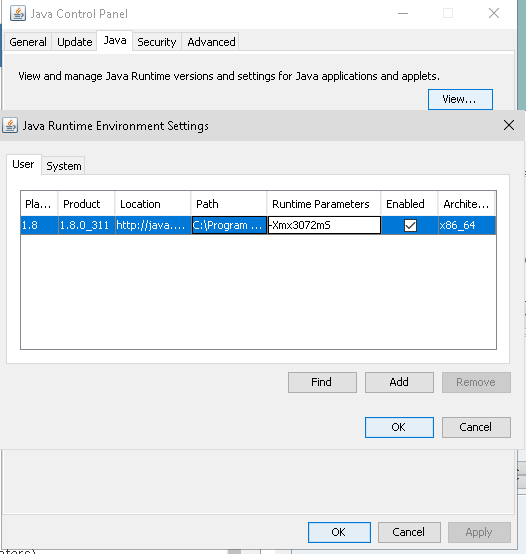
-
@thedog Interesting, as I also had such feelings. By the way, are you aware there is the "TripleA.vmoptions" file for this?
-
No, interesting, thanks!
The TripleA.vmoption is just for TripleA, so thats better, my change affects all Java apps, so not as good.
I have been working on our new "The Shogun" map with @Ebbe. It is a big map 11008 x 6140px and its been running noticeably slower than other maps.
But with no testing or bench marking the above change appears faster.
@cernel
What changes have you made to make TripleA run faster? -
@thedog Not really anything else of note. I've both RAM settings at 4G.
This issue may be of interest to you:
https://github.com/triplea-game/triplea/issues/9654
For your information, your previous issues were likely due to that file I pointed out to you, which was forcibly keeping the RAM under 2G (despite the map clearly needing more). You may want to try both removing the file and erasing the runtime parameters setting you defined, thereby letting the system allocate RAM freely to the process, see how it compares to what you experienced so far.
-
@cernel
Thank you, very helpful !I shall change my TripleA.vmoptions to your suggestion of;
-Xmx3072M
-Xms3072MFor the new The Shogun map we dont even have the relief tiles yet and we having speed problems so might go to your current 4096M settings.
Thanks again, as testing has got faster

-
@Cernel
I can confirm your fix is working well, with our new The Shogun map, my cpu reaches 100% and its using up to 3GB when it needs to. In short it is running well.
Thanks again.

Hello! It looks like you're interested in this conversation, but you don't have an account yet.
Getting fed up of having to scroll through the same posts each visit? When you register for an account, you'll always come back to exactly where you were before, and choose to be notified of new replies (either via email, or push notification). You'll also be able to save bookmarks and upvote posts to show your appreciation to other community members.
With your input, this post could be even better 💗
Register Login