Proposed Map: Domination 1941
-
Oh good eye! I'll fix that up this week and anything else I missed.
I think I need to shift the N. America split too, keep meaning to do it but then got busy with other stuff. Basically so we don't have a hanging Gulf of Mexico Hudson bay sz hanging on the wrong side of the board haha.
That should be easy enough though. It's be better anyway, I can clean the relief a bit while I'm at it, in case there were any artifacts or weirdness I didn't catch there.
Let me know if anything else comes to mind!
Catch ya next roundps. More like this right? I'll correct it on the big base when I get some time free this week.
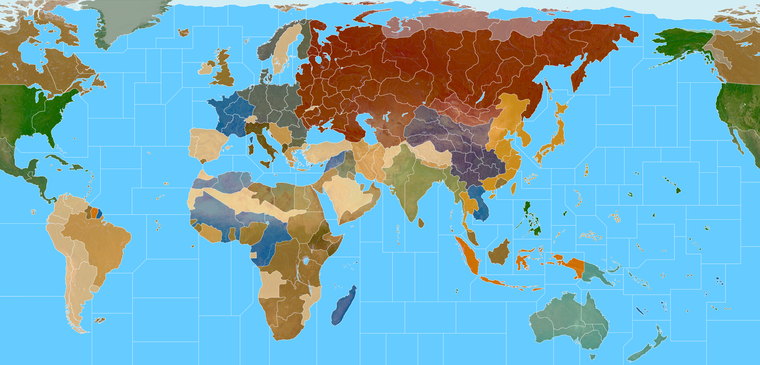
Terrain
https://www.dropbox.com/s/nsuiz1tnk8d7ya1/terrain world warp.png?dl=0
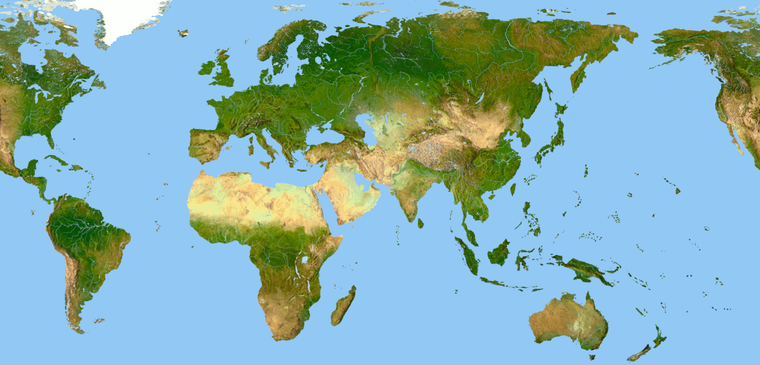
Base at 6px white line with the TTs transparent
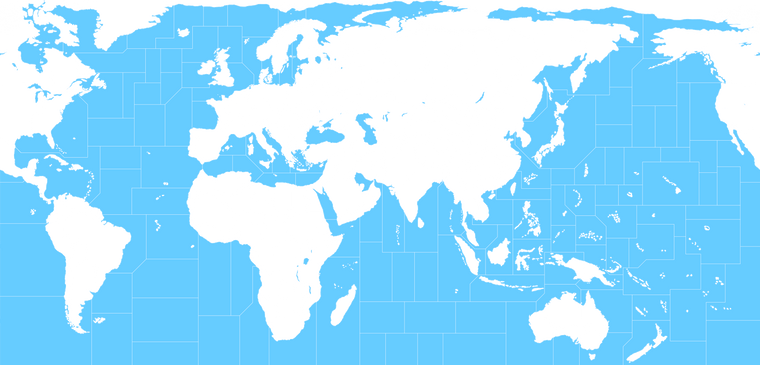
World War II Global draft (Atlantic fixed)
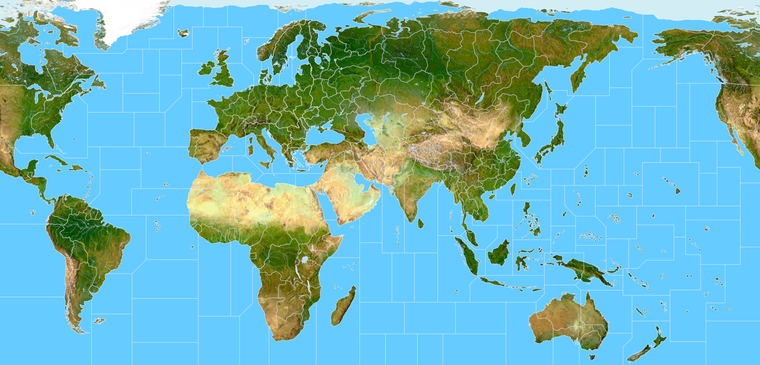
ps. here is the baseline with the corrected split at 1 px for the utilities. I think it's good to go
World War II Global 1940 Base
https://www.dropbox.com/s/4740bj0l87sbb57/World_War_II_Global_1940_baseline.png?dl=0 -
@black_elk
Your map has 4SZ New York to Iceland. There appear to be some annolomies in the mid atlantic.I might be using the wrong G40 map, but the one Im looking at, has 3SZ from New York to Iceland.
Im looking at this one.
https://www.axisandallies.org/p/axis_allies_europe_1940_preview_4_the_global_rules/ -
Good eye! Thanks
I must have missed a line when expanding the Atlantic sz107 and sz117
ps. OK I think I got it fixed. Somehow there was an extra zone. I believe this should be correct, though my eyes are starting to glaze over a bit. I'll check it again tomorrow when after some sleep hehe. Guess I should probably do one with labels just to make sure lol. I'll update the db links
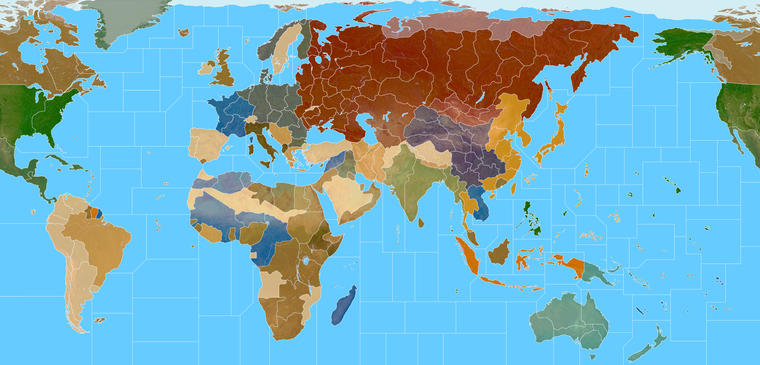
Baseline 1px
https://www.dropbox.com/s/4740bj0l87sbb57/World_War_II_Global_1940_baseline.png?dl=0Terrain with with Border 5px
https://www.dropbox.com/s/1e7aj1e8ipqzmmo/G40_alternate.png?dl=0Terrain Relief LT Indexed color at 16.5 mb.
https://www.dropbox.com/s/gvotomlf59xg9ko/terrain world indexed.png?dl=0Quick Paint
https://www.dropbox.com/s/1qlojy8bbgkujvz/World_War_II_Global_1940_painted.png?dl=0 -
@black_elk Suggestions follow;
Can most of the Pacific SZ hold 8+ units? In particular SZ18, 10, 13, 27
SZ50 Fuji is a weird shape and will confuse players, any chance it could be made a more regular in shape.
SZ31 Wake Island, can it hold 8 ships in a C shape and say 4 Land units with an overflow to the right?
SZ23 could be more rectangular to hold 8 Sea units and give more space to SZ31ps. Remember to increase the unit icons to x1.25 in size, so they will be 68px high for testing above.
-
Here's an example of Wake when the map is at 16816 with units at 125%
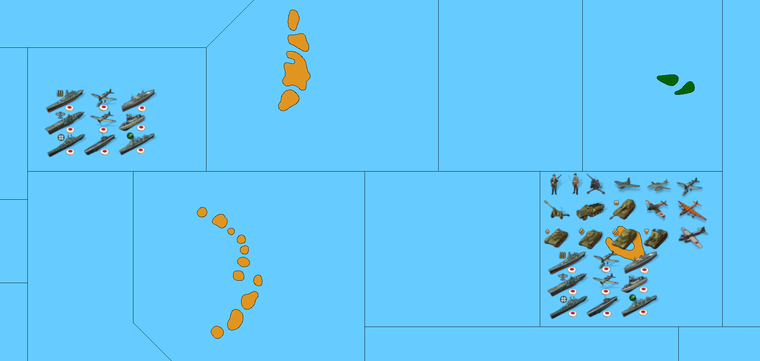
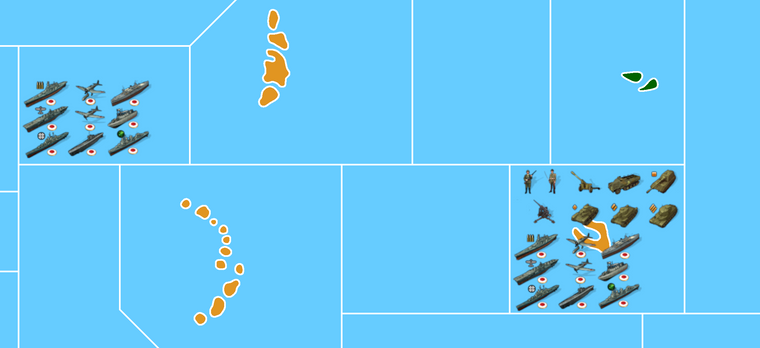
Yeah Fiji was annoying me all week. We can just move Samoa or whatever. The map is highly abstract in other places so I don't know if there's any huge advantage to keeping the islands all snug. In general OOB used horizontal compression for a lot of stuff in the global south, this map shows more vertical compression. Compared to OOB, if you placed your ships vertically you could fit more sculpts that way I'd think. OOB pushes many islands very very far apart to create more sz space, but I just don't if it's needed here. I mean they're all like twice the size of the current World War II global right? lol
Here it is with units at 150%
-
@black_elk
Excellent, so only SZ50 Fuji to reshape, then call in Cernel when that's done for his critical eye. -
@thedog Sounds good! Honestly when I got to that part of the pacific I think I was pretty zonked lol.
What kept tripping me up was that I was using tripleA with bung's map open, but then I think the wrap gotta a little weird when I got close to South America haha. I'll redo that lower right hand corner of the map tomorrow and hopefully she's fit to sail

-
@black_elk
lol, getting closer .... to the end. -
I think one could maybe upscale the units to like 200% with no halo, before the fuzz starts to get annoying? I mean if you're planning to play all panned out anyway, it probably wouldn't even be that noticeable. Only difference is that you'd have few centers before it spills over, but even there still more space than the current I think for just about everywhere.
It would be nice to have some super clean units at like 100px or taller, but that would be hard to produce from the existing unit graphics.
The only thing I can really think of is just to find someone who has some really nice painted sculpts and then to create units graphics from photographs of those.
Basically we just need a consistent light source and something that looks nice while being original enough to be distinct. Something hand painted basically. Photographed with some dramatic lighting and punched up that way, before being shrunk down to super tiny scale. Doing it from illustrations or photographs of the actual equipment is harder obviously, cause you have to make it your own and fiddle with the pixels to get it even read anyway lol. Still I'm pretty happy with the Frostion units as a basis. They look cool to me. I think it would probably work fine with the standard default units display as well. They're more abstract so they upscale somewhat better, with just less visual information to enlarge, and for people who prefer that more familiar. I'll do some unit work to keep myself engaged, before giving the map a last pass hehe.
For TTs that are shown on the map here, but which don't exist in Global we basically got a couple options. Either erase it, or attach to a nearby tile for the purpose of ownership/color, but treat the tile as impassible for the purposes of connection. An example would be Sakhalin, the North of the Island would be attached to say Amur, while the South of the Island is attached to Japan, with no connection between the tiles. So the map will present with the right colors and players will just now that the visual information is extra. You could do the same in many places, instead of incorrectly assigning control of British possessions to Saudi Arabia they could just be attached to TransJordan. The first time the TT changes hands the change in color indicates what's going on. Works better if there isn't too much distance or confusion. Basically exactly how Sicily and Sardinia were attached to Italy in earlier games. Though one could probably go further afield if they wanted. Like maybe Falklands is just attached to British Surinam, or Jamaica and Bermuda to Newfoundland etc. Given my choice I'd prefer to keep more stuff as opposed to erasing it. But maybe that's just my dream of A&A Svalbard, like they did for Risk in Risk2. You know, where we get an unlock for some zones like that in some alt variant of the same. Something rather simpler than the domination map, that'd be a bit more serviceable at that playscale, but still fun. The baseline for the crazy complex Domination map will prob take me longer to get together, so it's to get my head around the global revamp before attacking that again hehe
-
@black_elk
If you want to be creative missing icons are;
Industry-Med
Industry-Lgt
Im using Frostions Factory for Industry-Hvy (Yes there are 3 Factories in game)missing Command icons are;
HQ-Air
HQ-Army
HQ-Fleet
HQ-Submarine
Im currently usingFor Air

For Army

But Im sure you can do better

-
Ok I'll see what I can come up with. For factories there's all kinds of free clip art looking things I've seen around, but they're all kinda generic modern. For a good WW2 era vibe maybe something simple like just a single smoke stack to indicate the Industry-Ltg?

So something like that, but we paint it up with more rust color to look like Frostion's vibe hehe.
I took that from a WW2 era photograph of a factory in Iowa.
Here's Frostion's for scale...

So maybe if the single stack is the base, a medium or heavy might just have more stacks and a slight upscale to indicate which is which?
-
@black_elk
Re: For the TTs, might this work in Inkscape, have a TT layer for Global and another layer with the additional lines/borders to make the 1941 Domination map.One one layer = Global (plus other layers)
Two layers = 1941 Domination (plus other layers)This way it is WYSIWG for both maps and it has no deletions.
Re: Factory Icons, yes stacks is the way to go, as that is quick and easy on the eye, 3 stacks = Heavy Industry. So it might be better as you allude to, to start with a new Industry-Lgt and so add building and stacks to that.
-
Sounds good not sure if for inkscape you want just the line work by itself to start (only BW) or the sea zones colored in as well for the base layer?
These bitmaps should be identical, meaning if you overlay the latter on the former you'd basically have your two layers as described, at 16816px in BW.
https://www.dropbox.com/s/4740bj0l87sbb57/World_War_II_Global_1940_baseline.png?dl=0
https://www.dropbox.com/s/khxkql58g73q1n3/Domination_1940_baseline.png?dl=0
It has Fiji sz adjusted and Samoa shifted. I updated the terrain files for the same. It looks like this now with the quickie paintjob...
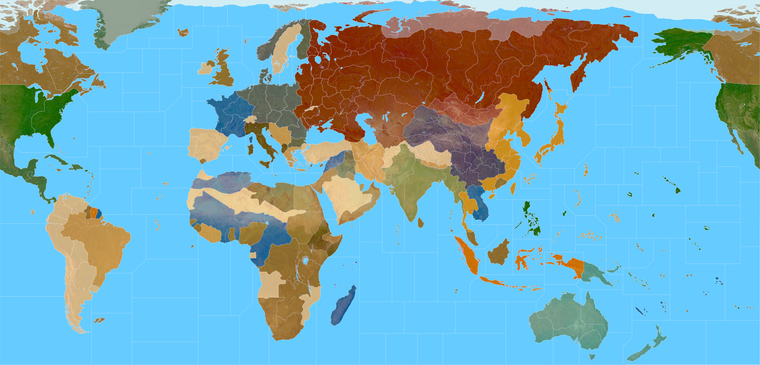
I'll try to bang out those units this week, and finish clipping the roundels for the nations I didn't get around to yet lol
Catch ya next round
ps. lol I'm looking at it now and realizing I still need to get that weird ass OOB 4 point in there off the coast of Mexico. Agh heheh
Figures I'd be all on top of it half the night and still miss that. Must have happened when I changed the split in N. America to keep the Gulf and Hudson bay all on the left side of the board. Basically that last transit SZ south of Mexico, it has to hit the TT of Eastern Mexico at a 4 point, or that sz will appear to connect to stuff that it shouldn't. 4 points at the edge of the map are annoying. I'd try to avoid them if doing an original design, but that one is in there OOB, so gotta raise that line. I'll deal with it tomorrow I guess.
ps. Aha! I finally figured out what was making it so weird. Somehow I'd inserted an extra tile while trying to enlarge Hawaii and I had the W. US sz splitting at Mexico instead of including everything there. Whatever I'll have to rework that whole zone now, to get the connections to land right lol. A butterfly flapped it's wings in Fiji I swear and now there's a whole hurricane hehehe. The Domination map will have to just get blanked there until I can it worked out properly
-
@black_elk said in Proposed Map: Domination 1941:
A butterfly flapped it's wings in Fiji I swear and now there's a whole hurricane hehehe.
:face_with_tears_of_joy:
-
Does anybody know is it really accurate to portray Sinkiang as Chinese territory in WWII? AFAIK Sinkiang was ruled by a Soviet backed warlord until late 1942. Sinkiang wasn't part of Chinese United Front. for a very long time.
-
OK so I think I got it figured now. Basically SZ 10 just needed to beef up, to encompass all of Mexico on that side of the board, which isn't a bad problem to have I guess. You stay classy San Diego lol
I was able to do Hawaii as a perfect 1000 px square, which seemed to make the other pieces fall into place like some kind of Vitruvian mystery hehe. Was able to get Wake and Midway a little larger in the process.
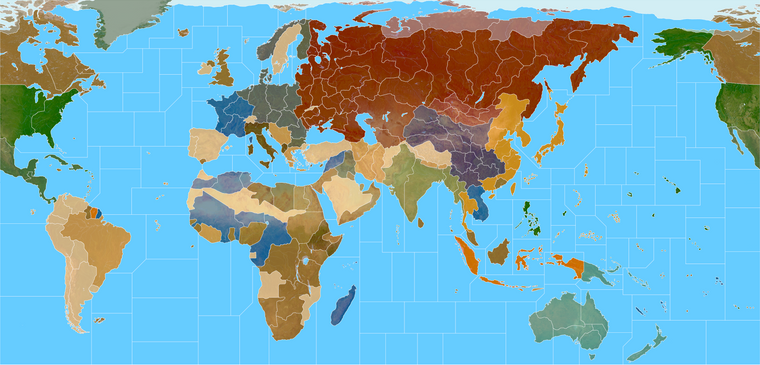
Hopefully I didn't miss to much else. I'll update all the DB links and the Previews when I get a chance. Haven't touched the domination draft yet.
If the Sea Zones are good, I'd like to return to the border contours like for Germany and such, to incorporate those ideas mentioned a few pages back. I'll make that the plan for the week, just keep chippin' away at it.
Good Q about the Warlord. Not sure, prob Cernel would know. It's funny every time I look at the OOB map with no free Tibet and China looking all extra massive I wonder if it was like maybe the printers in China going crazy or something lol.
-
@schulz said in Proposed Map: Domination 1941:
Does anybody know is it really accurate to portray Sinkiang as Chinese territory in WWII? AFAIK Sinkiang was ruled by a Soviet backed warlord until late 1942. Sinkiang wasn't part of Chinese United Front. for a very long time.
If you do that, you should also allow Chinese and Sovietics to fight each other because the Chinese had fully retaken Sinkiang (and removed Sheng completely) by 1944 and thereafter the Sovietics launched a (proxied) invasion of Sinkiang at the end of 1944, temporarily conquering about half of it and eventualy freezing the conflict into a ceasefire in 1946, with the Sovietic-backed East Turkestan Republic holding the three northwesternmost districts of Sinkiang, the rest of Sinkiang being chinese. This means you have to make the game into at least a 3-sided game.
In a 2-sided game, I tend to think that the best compromise is having all Sinkiang simply either Chinese or a Neutral territory originally owned by Chinese (Tibet and western Sikang should be a Neutral territory originally owned by Chinese, by the way.). This would mean ahistorically rendering impossible to make the 1944 Sovietic invasion under the proxy of the East Turkestan Republic, but that was a very late and very unimportant thing.
As a matter of original ownership, all Sinkiang was Chinese, but I'm pretty sure the Sovietics would not respect such formalities.
Anyway, although the Sovietics were extracting some oil in Dushanzi before being expelled in 1942 or 1943 and likely were extracting some more after reconquering the region from 1944, I'm positive the entire Sinkiang can be valued having production 0 unless maybe you have a map with total production of several thousands, so it should be a moot point who actually owns it. I'm ignoring the matter of uranium-digging for the atomic bomb.
The Chinese and the Sovietics also had rather extensive border disputes abouth their actual formal borders, not resolved until very recently, by the way, so even parts of the Soviet Union by its pre-1939 borders were claimed by the Chinese, and I'm not sure what was recognized by others. Example:
https://en.wikipedia.org/wiki/China–Tajikistan_borderIn 2011, Tajikistan ratified a 1999 deal (and a 2002 supplementary agreement) to cede 200 km2 (77 sq mi) and 1,122 km2 (433 sq mi) respectively[8] of land in the Pamir Mountains to the People's Republic of China, ending a 130-year dispute. In the treaty, China also relinquished claims to over 28,000 km2 (11,000 sq mi) of Tajikistani territory.[9][10][8] The Republic of China had historically made similar claims in the area.[11][12][better source needed] Tajik attitudes toward the boundary treaty varied significantly among different interest groups, ranging from overt opposition to overt support
-
@cernel By the way, that was a good move by Tajikistan, if you ask me. I can see now (with Russia distracted) the Chinese going for retaking those 28,000 square km otherwise...
-
@black_elk
The bit maps are looking good, but for the final version I will need them with no white background/paper and a light blue sea for the SZ.Glad you found that butterfly and solved the Vitruvian mystery.
-
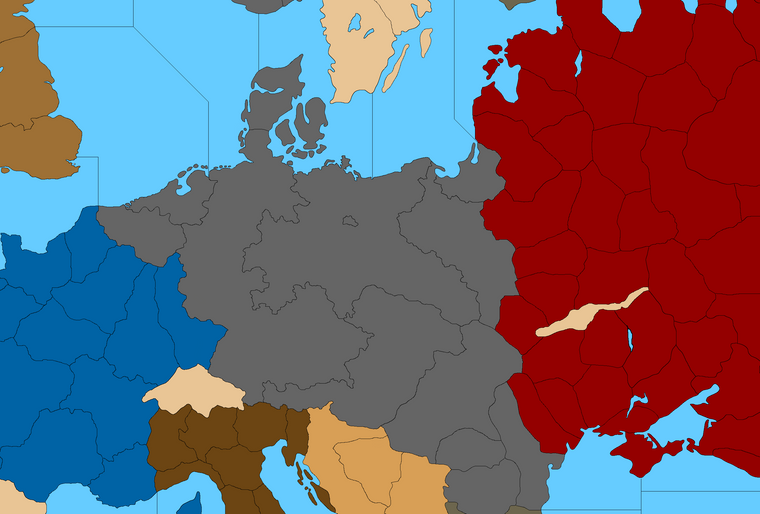
Trying to find a shape I like. Any thoughts on how to split G for G40 so it looks cooler?
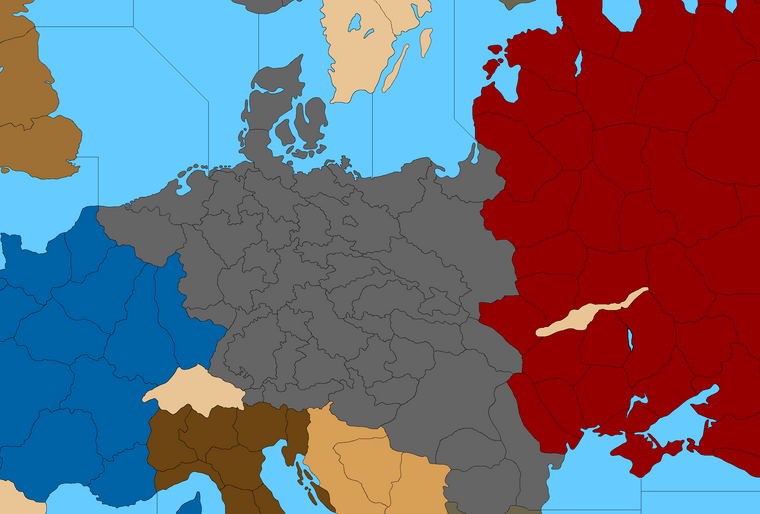
I kinda figured this would be about as far West as the E. Germany TT might reach while still allowing the proper connections for W. Germany.
Probably could just give Hamburg to W. Germany tile so it doesn't get too narrow at the top and so the labelling still feels right. But anyway I was trying to see how far I could push it.Do you think it's better to assign all of all of the annexations/anschluss stuff to the Greater Southern Germany TT, or just Bohemia/Moravia/Austria and give the rest to E. Germany directly?
Not sure what feels best or looks best. I'd like to settle on something decent and then call it so I don't have to keep changing so much stuff around lol
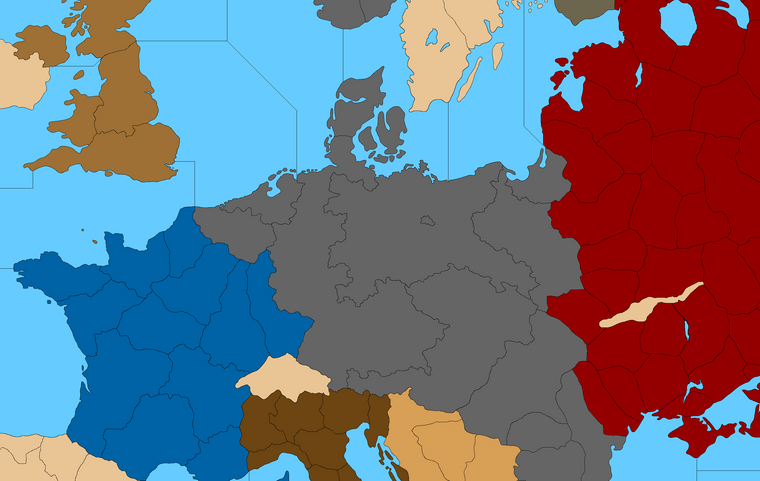
Then a little stretch maybe...
So it hits the OOB marks?



Hello! It looks like you're interested in this conversation, but you don't have an account yet.
Getting fed up of having to scroll through the same posts each visit? When you register for an account, you'll always come back to exactly where you were before, and choose to be notified of new replies (either via email, or push notification). You'll also be able to save bookmarks and upvote posts to show your appreciation to other community members.
With your input, this post could be even better 💗
Register Login