How to modify borders on an existing map
-
Hey everyone, this is my first post here.
I know basically nothing about map making for tripleA, however i don't want to make a completely new map from scratch, i am simply interested in changing the look of an existing map, changing the borders. But i'm clueless where to start and how.
I really like 'Iron War' map but i want to make a new version and change borders and countries for year 1939. I looked at the map making documentation but im not sure that's what im looking for, and to be honest i don't really understand it.
I just want to tweak the map a little bit without changing anything else, i wonder how i can do that.
-
@davor-pavlić
Welcome!Not sure what you are after but;
- Do want to move a territory(TT is a shortened version) line/border?
- or change the ownership of an existing TT to another owner?
- Both of the above?
-
My main goal would be to move TT borders yes, however i don't think i would change any ownerships (atleast not for now), just readjust the existing TT lines.
If you could provide some guide if it exists on how do that or where i can learn that i would really appreciate it, after all i wouldn't only do it for myself but for the community too of course.
Thanks for replying!
-
I like that one too! Welcome aboard!
The Iron War game was set in 1939 at one point if I remember right, but Frostion pushed it to 1940 around the time when he fuel was changed from a maintenance thing to a movement thing. Not sure if those earlier versions exist anywhere, I overwrote all my files whenever it was updated.
I'm also not sure there is a basemap in the package. I remember looking for it, but never found. Like it's already broken into the territory tiles there I'm pretty sure. So you might have to reassemble the TTs from that somehow, and then draw a new line on a bitmap? Not sure how that's done. I never actually end up doing that part, like I'd usually do the bitmap as a single big image and then hand it off for that last step where it's busted apart into tiles lol. I'm sure there must be a way to do it but I think it involves getting the base tiles back together. Like to split Poland or something I'd guess for a 1939 vibe? It's a fun map. For some kind of late 30s mod you might look at the Europe version, as it might have some stuff in the folders. I feel like I might have seen stuff for Poland and the Dutch and Norway but maybe I'm just imaging it lol. I haven't heard from Frostion in a while, but I definitely dig his unit work. The sound is cool too, though sometimes I get weird audio glitching. I think it would be a fun map with different carrier rules. The current game uses the older revised rules for that, and for some of the AA gun type behaviors, but something more v3 style would be cool. I don't really mind the return to older style transports and subs, but carriers feel weird and the placement is a bit buggy hehe. Otherwise I think it's a great game, with a lot of fun concepts. Good to see other people enjoying it too!
Catch ya next round dude
-
@davor-pavlić
Can you use paint.net or GIMP or similar?
https://www.getpaint.net/download.html
https://www.gimp.org/downloads/
You will need to edit the baseTiles and the reliefTiles.Then you will need to do some coding, so will need notepad++
https://notepad-plus-plus.org/downloads/I hope your are really good with paint.net or GIMP as your work on the reliefTiles will have to match Frostions graphic skills, otherwise it will not look the same.
Have you read this, as some of what you need is in here;
https://github.com/triplea-game/triplea/blob/master/docs/map-making/tutorial/map-and-map-skin-making.mdTo edit the baseTiles, need to build the base tiles into one png file
Load TripleA, then press these buttons
Map Creator Tools
Other: Optional Things
Run the Tile Image Reconstructor -
Yeah, to me personally it's one of the most visually pleasing maps with huge variety of units and nations, im more of a historical player so i really dig that.
That's why i'd like to modify it to fit the very start of the war with whole Poland still existing.
-
Thank you for guidance, i will look into it.
God i really wish there was video tutorials for this kind of thing to encourage more people into map making, but i understand why there isn't.
Is there a specific channel where i can ask for any further help if i may need it?
-
@davor-pavlić
This is the correct category, Map Making, and this is your thread, so all good, just keep asking here.
Just keep asking questions, its a steep learning curve.
-
@davor-pavlić said in How to modify borders on an existing map:
My main goal would be to move TT borders yes, however i don't think i would change any ownerships (atleast not for now), just readjust the existing TT lines.
If you could provide some guide if it exists on how do that or where i can learn that i would really appreciate it, after all i wouldn't only do it for myself but for the community too of course.
Thanks for replying!
If you are just redrawing borders (neither adding nor removing any zones) and are fine with trashing the relief tiles and possibly other graphic content, what you want to do is actually very simple: all you need to do should normally be (in this sequence)
- getting the base map image by running the Tile Image Reconstructor,
- redrawing the base map image with an image editor (like GIMP),
- running the Center Picker with the new base map image unless all centres are still good enough for you (This is actually never strictly necessary, but having the centre at least within the zone is good for the visual and helpful when running the Polygon Grabber.),
- running the Polygon Grabber with the new base map image,
- running the Automatic Placement Finder with the new base map image,
- deleting all images in the "baseTiles" folder and
- running the Tile Image Breaker on the new base map image saving the created file into the "baseTiles" folder.
If you want to do more, things will likely get much more complex.
-
If the map has a "reliefTiles" folder, delete it unless it is fine after you've redrawn the borders (which is unlikely). Firstly simply start the map which you have modified as I've described and see for yourself if the map is better for you with or without "Show Map Details". If it is better without, delete the folder, otherwise do not.
-
-
Regarding the Tile Image Reconstructor, i open it up and it tells me to choose a folder where the tile images are located, should i navigate to some specific folder, or is a default destination good (c:\Program Files\TripleA)? I guess i need to choose the tiles for the specific map, but im sure where to navigate.
-
Next step is saving an image png and then entering an image's width and height in pixels, how do i find out the exact dimensions of the map i want to modify?
Thanks for the help, im not sure how many questions i'll have, im a complete noob to map making

-
-
@davor-pavlić
copy this into your file manager, the %username% is a DOS command to substitute your userid into the path, assuming you did a default install.C:\Users\%username%\triplea\downloadedMaps
the file manger path to iron wars baseTiles is
C:\Users\%username%\triplea\downloadedMaps\iron_war\map\baseTilesthe file manger path to iron wars reliefTiles is
C:\Users\%username%\triplea\downloadedMaps\iron_war\map\reliefTilesThe map dimensions are held in the map.properties file held here
C:\Users\%username%\triplea\downloadedMaps\iron_war\map
They are
map.width=12001
map.height=5239You will have hundreds of questions
 just keep going.
ps. TripleA cannot understand %username%, this must be replaced the real users name.
-
I've found where the baseTiles are, however it doesn't show anything in downloaded maps when i use Tile Reconstructor. I have loads of stuff downloaded in downloadedmaps but the TripleA Tile Reconstructor shows the folder as blank and i can't choose anything.
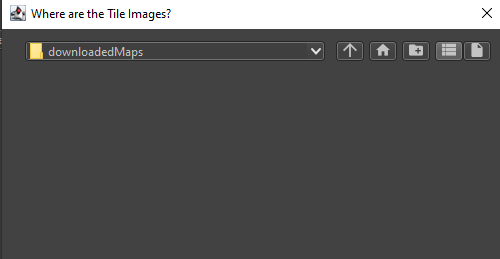
-
@davor-pavlić
Make a copy of the original iron_war as we will be over-writing the it.where it says
C:\Program Files\TripleAoverwrite that text with
C:\Users\%username%\triplea\downloadedMaps\iron_war\map\baseTiles
EDIT: where %username% is replaced by the real user namethen press Enter
then save the file to your desktop, so you know where is, then cut/paste to here, so outside of the map folder
C:\Users\%username%\triplea\downloadedMaps\iron_war\ -
Okay i think i got it, assuming that the png is supposed to be all just empty black.
What is the next step? Editing the png in GIMP/Photoshop?
-
@davor-pavlić said in How to modify borders on an existing map:
What is the next step? Editing the png in GIMP/Photoshop?
Yes, put it on white background and it should show the TT outlines and have a blue sea TT colour.
-
Hmm, i don't have anything on the map, i probably messed up when i copied original iron_war, maybe it's because its zipped? Should i unzip everything?
So to recap everything i did :
-Made a copy of iron_war in DownloadedMaps, still zipped
-Opened the tile Reconstructor and navigated to the files of the copied iron_war
-Saved a png to desktop, and copy pasted it to the copied iron_war folder
-Opened a png and it was empty, nothing on it. -
@Davor-Pavlić
Are you using 2.6 ?
As I have just tried using 2.6 and it fails.
However using 2.5 and it works as intended.
-
@thedog i am using 2.5.2
-
@davor-pavlić
Yes unzip everything and remove the zip from the downloads folder.Keep trying the reconstruction, but if you get bored, here is the file you are after.
https://drive.google.com/file/d/1lD24jpT1jdBuCAJRafjvnm4W4BJ_riWi/view?usp=sharing



Hello! It looks like you're interested in this conversation, but you don't have an account yet.
Getting fed up of having to scroll through the same posts each visit? When you register for an account, you'll always come back to exactly where you were before, and choose to be notified of new replies (either via email, or push notification). You'll also be able to save bookmarks and upvote posts to show your appreciation to other community members.
With your input, this post could be even better 💗
Register Login