Battle for Craglorn - Alpha/Early Testing Thread
-
@rogercooper said in Battle for Craglorn - Alpha/Early Testing Thread:
@tannenbernie The Reiksguard seems to be on the short side. You might want to change his pose and make him the same height as the spearman.
Ya that seems to be a general problem. If you look at these three, then i would say the Reiksguard and the Lancer are of equal size while the spearman is much bigger. Reason is that all three have only 72px of room. The Lancer shares the room with his horse, the Reiksguard raises his sword which steals much of the room. Only the Spearman fits well into the 72px square so he is biggest.
Actually i have no idea yet how to solve that. A Rider on horse is of course bigger than a foot soldier, but both can only have the same 72px square. So the Rider himself will always be smaller. Also depending on pose and weapons the foot soldiers will look different size when all brought to same 72px.
Is there a common solution to that problem, any hints?
Thx and cheers
-
@tannenbernie
Yes dont bother with trying to have correct size images.
A Giant and a Goblin will appear about the same size, but the iconography should be good enough to distinguish the two, although the the Giant should obviously be bigger.If you dont like the above, then truncate the lower half of the horse and the Giants lower torso to give a bit more realism in the image sizes.
-
@tannenbernie The common solution here in TripleA is not giving a damn about it, which is probably what you'll have to do if you'll have wildly differently sized creatures (How many pixels for a Goblin if an Ogre is 72?), yet I wouldn't discourage you from keeping all non-giant on-foot humanoids realistically scaled. It's not a crime to leave a lot of pixels non-used... In the particular case raised by @RogerCooper, you could keep dimensional consistency between Spearman and Reiksguard by making the Spearman smaller, leaving a lot of transparent pixels (contrary to the suggestion of @RogerCooper of making the Reiksguard bigger instead).
Besides, I don't know if you have pikemen or anyway warriors having very long weapons which would be very challenging to fit too.
By the way, you are leaving the images background transparent right? I assumed that the grey background was just for showing here.
My main suggestion is not getting bogged down too much by perfectionism: try to finish all images and have it done, then you can go back anytime tweaking whatever.
-
@tannenbernie I thought the pose of Reiksguard looks a bit odd and his sword is the length of his entire body. But don't worry about art details too much.
-
Good arguments!
Ok i will follow your advice and forget about that atm.
@Cernel: No, no transparency yet. I dont know anything about graphic stuff, so i will have to get into it slowly step by step.
-
Try this, an Icon Editor called Greenfish icon editor pro its free, I use it
http://greenfishsoftware.org/gfie.php#apage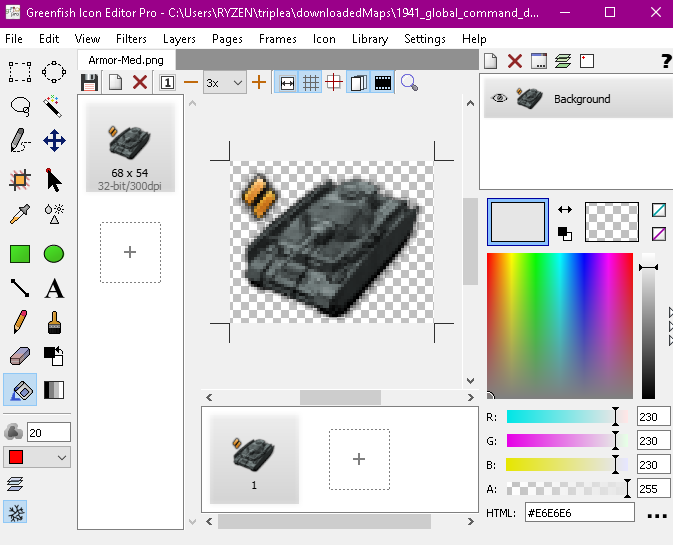
-
@tannenbernie It does not have to be transparent, though a non transparent square is unlikely to look good unless it is something abstract.
For non abstract units, I think that the best alternative to a transparent background is a circular background, which anyway requires transparency given that image files are rectangular (or square).
For example, you could have an 80 pixels per axis background like this one,

over which you could draw the units you want (like these ones).


If you don't want to learn how to handle transparency just yet, you can use this image, being careful to keep your drawing within the monotone gray zone,

as it will be very easy to then turn the black outside the circle to transparency.
However, having a transparent background is preferable because it is neutral and is much easier to add a background than to remove it so giving you the option to decide about the background thereafter with ease, comprising opting for keeping it purely transparent.
-
Good advice from both of you. I agree, it will be much better with transparency, so i am willing to go for that for my final version.
As for my version 0.2, half of the models with background are finished so i will just finish the rest too. Even without transparency the map will be much more fun to play that way.I will probably look into greenfish already while workig on 0.2, to see if i get a hook on it.
@edit:
Oh one more thing:
I found that i can make the background the same color as the map territories, belonging to the respective race. So the Empire background is the same grey as the empire territory, so it looks like tranparency as long as you do not go on allied territory.Cheers
-
@tannenbernie
How goes the project?.
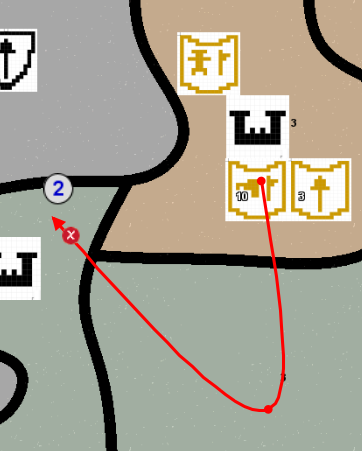
A Connection issue FOT9 to FOT10
-
@thedog Hi there
Thx for the connection bug, i also found a few. I have finished replacing the symbol-armies with better-looking figurine-armies. Also the game is now 2vs2 which seems much better for the balancing.
My plan is to fix the last few connection bugs and then bring on a new version of the map. With the better graphics it should be better playable.
Now the question: How do i do that? All that github stuff is so confusing. New version, new release, new whatever. At the moment i am still confused and do not really know how to bring on a new version. Maybe a tip for me?
Thx and cheers,
Bernd -
My preferred method of delivering updates is Google Drive, its quick and very easy to share a zip.
See here
https://forums.triplea-game.org/topic/3326/1941-global-command-decision-official-thread?page=1I always point the downloader back to the first post. So the downloader knows where to go.
Serialize your versions ie. v005 v010 v015 etc
For GitHub, hopefully you have a separate folder for GitHub uploading/syncing (dont user your development/downloads folder)
Also I hope you are using GitHub Desktop
https://desktop.github.com/ -
@thedog Ok i will take your advice and look into Google, GitHub is just too strange to me.
Short question on the connections-file. I had been under the impression that changing the file and then reloading the map would do the trick. But the bug is still there. Do i have to reload the connections somewhere to activate the change?
-
Yes just adding in
<connection t1="FOT9" t2="NO10"/>
should workHowever, on your GitHub download the xml was called battle_for_craglorn.xml.xml
note the duplicated xml, remove one of those, try that.When testing your Google Drive share use 'anyone with this link' and use say Firefox (a browser with no direct access to your Google Account) to test the download.
-
Ok i am basically ready for my version v0.2.
I have added everything but the connection problem.
If i can fix the problem in next 1-2 days then i will bring it into v0.2.
If not then the bug will stay and i will try to fix it for next version.What i found is that the "connection.txt" does nothing. I did even completely delete it and the game would still start. I has all the connections including the buggy one.
No matter what i change in the connections.txt, it does nothing to the game. I did just delete some connections but when starting the game they were all there.
So it seems that the information from the connections.txt has already beed read in and is used somewhere in the other files. I have just no idea how to re-read it in again to make changes work. -
What i found is that the "connection.txt" does nothing
Yes it does nothing and is just a temporary unread file.Im guessing you are using the TripleA tools to do your changes, at this stage, stop using them and do your changes manually in the xml file.
All the connections are in your xml file. Did you rename it?
Search for <connection to find the start of them.
Manually add the ones that are missing in the xml file.Are you using Notepad++, its a text editor and then some, if not try it out its free
https://notepad-plus-plus.org/downloads/ -
@tannenbernie said in Battle for Craglorn - Alpha/Early Testing Thread:
Ok i am basically ready for my version v0.2.
I have added everything but the connection problem.
If i can fix the problem in next 1-2 days then i will bring it into v0.2.
If not then the bug will stay and i will try to fix it for next version.What i found is that the "connection.txt" does nothing. I did even completely delete it and the game would still start. I has all the connections including the buggy one.
No matter what i change in the connections.txt, it does nothing to the game. I did just delete some connections but when starting the game they were all there.
So it seems that the information from the connections.txt has already beed read in and is used somewhere in the other files. I have just no idea how to re-read it in again to make changes work.TripleA Map Creator Tools/Step 3: Game XML/Run the Connection Finder:
This is the ConnectionFinder.
It will create a file containing the connections between territories, and optionally the territory definitions as well.
Copy and paste everything from this file into your game xml file (the 'map' section).
The connections file can and Should Be Deleted when finished, because it is Not Needed and not read by the engine.
I suggest running the Connection Finder at 2 pixels more than your borders' wideness, then check all the connections for the points where four or more zones met (which are usually quadripoints) and delete the ones which are not supposed to be there. Easier to delete than to add and, if you have no points where more than three zones met, you should have the perfect file, actually.
-
Also, I don't know what you are doing, but, if you are drawing considerably thick borders, you should make sure that your drawing tool is circular. If it is a square, then oblique borders are going to end up being thicker than borders which run more parallel to either axis.
As said, I don't know if this is the case for you.
-
@cernel Hey, thanks to you i found it.
So simple, i completely had forgotten that the connections file gets copied into the game xml. So i had to do the change to the missing connection in the game xml of course. Added a simple line and now it all works. Great, thank you for that.
I will now see that i do some last corrections and then bring on v0.2!
-
@tannenbernie Ok i have updated with Version v0.2, real units now. Links are in first post page 1, happy for feedback

-
@tannenbernie
In 1984 terms Double-plus-good! (On v0.2)I really like your unit icon style, simple but very effective.
How do you do them? (As an overview not in detail.)I use latest 2.6 and it errors, you need to rename game folder to games
Personally I would resize your small flags to 20x20 or 16x16, less white space to scroll through when debugging the rounds/history in the left hand pane.
You can find and replace this text in the xml
games.strategy.triplea.attachments. (note the .)
and replace it with nothing.
So save your current xml to another name and try it.
It will reduce your file size and make the xml more readable..
At about line 795, add the following
<!-- ======================================= TECHNOLOGY ======================================= -->
<!-- below removes the Tech grid on the Players tab with no tech properties defined -->
<technology>
</technology>


Hello! It looks like you're interested in this conversation, but you don't have an account yet.
Getting fed up of having to scroll through the same posts each visit? When you register for an account, you'll always come back to exactly where you were before, and choose to be notified of new replies (either via email, or push notification). You'll also be able to save bookmarks and upvote posts to show your appreciation to other community members.
With your input, this post could be even better 💗
Register Login